
1. Уводзіны
This manual provides essential information for the safe and efficient use of your HP Envy x360 13.3-inch 2-in-1 laptop. Please read this manual thoroughly before operating your device to ensure optimal performance and longevity. This device combines the functionality of a traditional laptop with the versatility of a tablet, featuring a responsive touchscreen and a 360-degree hinge.
2. Асаблівасці прадукту
- 13.3-inch Full HD IPS Touch-Screen Display: Experience vibrant visuals and intuitive interaction with the responsive touch display.
- 11th Generation Intel Core i5-1135G7 Processor: Delivers efficient performance for multitasking, productivity, and entertainment.
- 8 ГБ аператыўнай памяці DDR4: Provides substantial memory for smooth operation of multiple applications.
- 256GB PCIe NVMe SSD: Offers fast boot-up times and quick data access with solid-state storage.
- Клавіятура з падсветкай: Enables comfortable typing in various lighting conditions.
- Счытвальнік адбіткаў пальцаў: Enhances security and provides quick, convenient login.
- Аперацыйная сістэма Windows 10 Home: Pre-installed for a familiar and productive user experience.
- Завеса на 360 градусаў: Дазваляе прыладзе трансфармавацца паміж рэжымамі ноўтбука, палаткі, падстаўкі і планшэта.
- Графіка Intel Iris Xe: Integrated graphics for clear visuals and light creative tasks.
- Bang & Olufsen Audio with Three Speakers: Delivers rich and immersive sound.
- HP Wide Vision HD Camera with Camera Shutter: For video calls and privacy.
3. Фізічны канецview
Familiarize yourself with the various components and ports of your HP Envy x360 laptop.

Малюнак 3.1: Пад вуглом view of the HP Envy x360 laptop in traditional laptop mode, displaying the keyboard and screen.
Парты і раздымы:
- Парты USB 3.0 тыпу A (x2): For connecting external devices such as USB drives, mice, or keyboards.
- Порт HDMI (x1): Для падлучэння да знешніх дысплеяў або праектараў.
- Micro SD Card Reader (x1): For reading and writing data to Micro SD cards.
- Камбінаваны раз'ём для навушнікаў/мікрафона (x1): Для падключэння навушнікаў або знешняга мікрафона.
- Порт USB-C (x1): For data transfer, charging, and display output (Thunderbolt compatible).
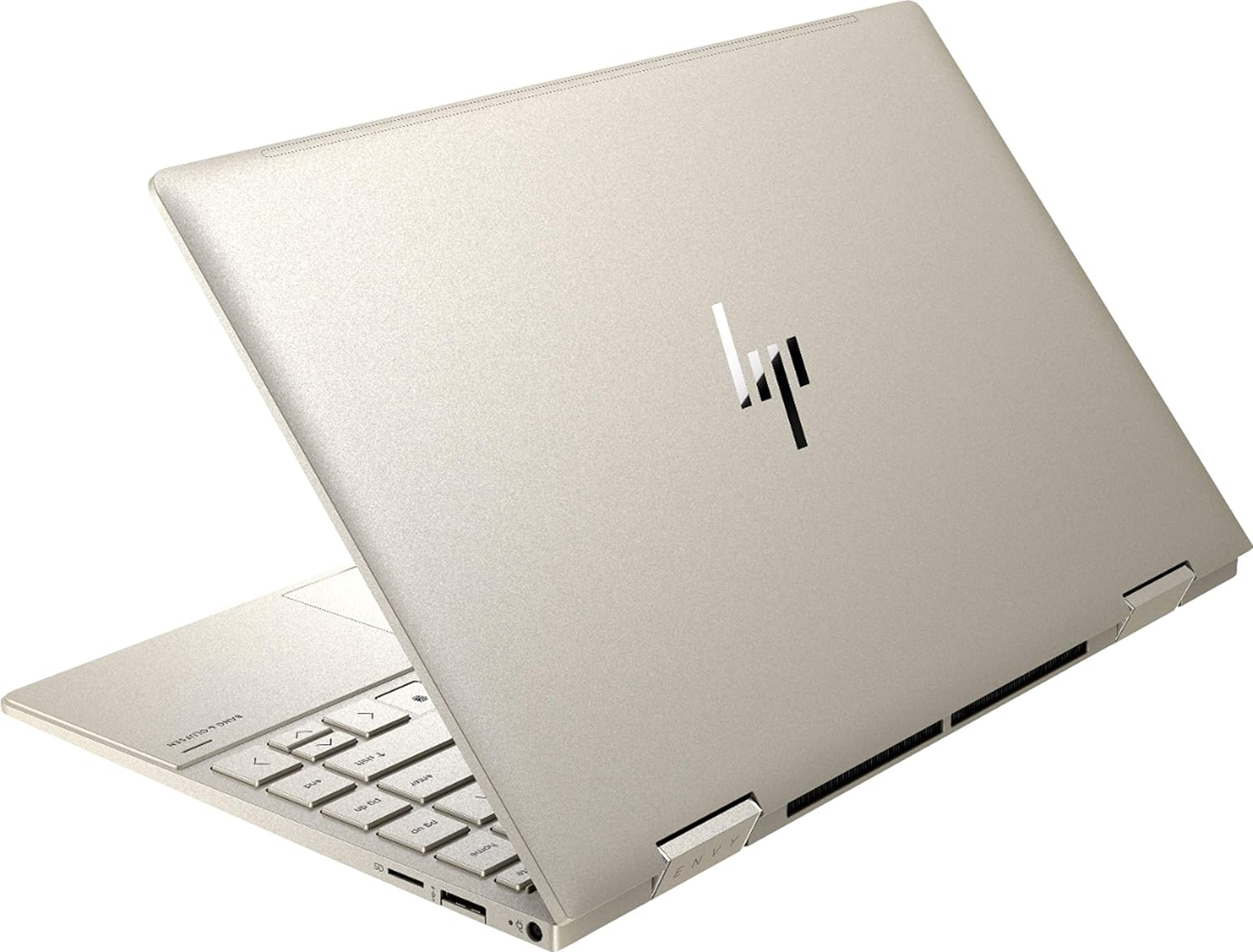
Малюнак 3.2: Задняя частка view of the HP Envy x360 laptop, highlighting the sleek design and port placement on the sides.
4. Настройка
4.1 Першапачатковае ўключэнне
- Unpack your HP Envy x360 laptop and included accessories.
- Падключыце адаптар харчавання да зараднага порта ноўтбука, а затым да разеткі.
- Press the power button, typically located on the side or keyboard deck, to turn on the laptop.
- Выконвайце інструкцыі на экране, каб завяршыць наладу Windows 10 Home, у тым ліку выбар мовы, падключэнне да сеткі і стварэнне ўліковага запісу карыстальніка.
4.2 Падключэнне перыферыйных прылад
Connect your mouse, external display, or other USB devices to the available ports as described in Section 3. For wireless devices, enable Bluetooth in Windows settings and pair your devices.
5. Інструкцыя па эксплуатацыі
5.1 Using the 2-in-1 Modes
Your HP Envy x360 features a versatile 360-degree hinge, allowing for multiple usage modes:
- Рэжым ноўтбука: Traditional laptop orientation for typing and productivity.
- Рэжым намёта: Fold the screen back to form an inverted 'V' shape, ideal for watching videos or presentations in confined spaces.
- Рэжым падстаўкі: Fold the screen back further, resting the keyboard face down, to use the display for media consumption or touch-based applications.
- Рэжым планшэта: Fold the screen completely back against the base, transforming the device into a tablet for touch interaction.

Figure 5.1: The HP Envy x360 laptop configured in tent mode, suitable for media viewінж.

Figure 5.2: The HP Envy x360 laptop fully folded into tablet mode, ready for touch input.
5.2 Touchscreen and Keyboard Usage
- Сэнсарны экран: Use gestures similar to a smartphone or tablet for navigation, zooming, and interaction with applications.
- Клавіятура з падсветкай: Press the function key (Fn) and the appropriate F-key (usually F5 or F4, check keyboard icons) to toggle the keyboard backlight on/off or adjust brightness.
- Счытвальнік адбіткаў пальцаў: Enroll your fingerprint through Windows Hello settings for secure and fast login.
6. Тэхнічнае абслугоўванне
Regular maintenance helps prolong the life of your laptop.
- Уборка: Для чысткі экрана і корпуса выкарыстоўвайце мяккую тканіну без ворса. Для выдалення ўстойлівых плям,ampпрацярыце тканіну вадой або сродкам для ачысткі экрана. Пазбягайце агрэсіўных хімічных рэчываў.
- Абнаўленні праграмнага забеспячэння: Regularly update Windows and HP drivers to ensure optimal performance and security.
- Сыход за батарэяй: Avoid fully discharging the battery frequently. For long-term storage, charge the battery to about 50-70%.
- Вентыляцыя: Ensure the laptop's vents are not obstructed to prevent overheating. Use on a hard, flat surface when possible.
7. Выпраўленне непаладак
У гэтым раздзеле разглядаюцца распаўсюджаныя праблемы, з якімі вы можаце сутыкнуцца.
7.1 Праблемы з харчаваннем
- Ноўтбук не ўключаецца: Ensure the power adapter is securely connected and the outlet is functional. Try a different outlet or power adapter if available.
- Акумулятар не зараджаецца: Verify the power adapter connection. Check for any damage to the cable or port.
7.2 Праблемы з адлюстраваннем
- Экран пусты: Падключыце знешні манітор, каб праверыць, ці праблема ў дысплеі ноўтбука. Паспрабуйце перазагрузіць ноўтбук.
- Сэнсарны экран не рэагуе: Restart the laptop. Ensure all drivers are up to date via Windows Update or HP Support Assistant.
7.3 Праблемы з прадукцыйнасцю
- Павольная прадукцыйнасць: Закрыйце непатрэбныя праграмы. Праверце дыспетчар задач на наяўнасць рэсурсаёмістых працэсаў. Пераканайцеся, што на SSD-назапашвальніку дастаткова вольнага месца.
- Перагрэў: Clean vents. Ensure proper airflow. Reduce workload if consistently hot.
8. Тэхнічныя характарыстыкі
| Асаблівасць | Дэталь |
|---|---|
| Марка | HP |
| Назва мадэлі | HP Envy x360 |
| Памер экрана | 13.3 цалі |
| Дазвол дысплея | 1920 x 1080 (Full HD) |
| Тып дысплея | LED IPS Touch Screen |
| Працэсар | 11th Generation Intel Core i5-1135G7 (2.4 GHz, up to 4.2 GHz with Turbo Boost) |
| Аператыўная памяць | 8 ГБ DDR4 |
| Захоўванне | 256 ГБ SSD |
| Аперацыйная сістэма | Windows 10 хатняя |
| Графіка | Графіка Intel Iris Xe (інтэграваная) |
| Асаблівасці | Падсветленая клавіятура, счытвальнік адбіткаў пальцаў |
| Аўдыё | Bang & Olufsen Audio with Three speakers |
| Сувязь | Wireless-AX, Bluetooth, USB, HDMI |
| Парты | 2x USB 3.0 Type-A, 1x HDMI, 1x Micro SD Card Reader, 1x Headphone/Microphone Combo, 1x USB-C |
| Памеры (Д х Ш х У) | 12.07" x 7.66" x 0.65" |
| Вага | 2.92 фунтаў |
| Колер | Бледнае золата |
9. Што ў скрынцы
The following items are included with your HP Envy x360 laptop:
- HP Envy x360 13.3-inch 2-in-1 Laptop
- Адаптар сілкавання
- Дыванок для мышы

Figure 9.1: The HP Envy x360 laptop shown alongside the included mouse pad.
10. Гарантыя і падтрымка
Your HP Envy x360 laptop comes with a standard manufacturer's warranty. For detailed warranty information, please refer to the warranty card included in your product packaging or visit the official HP support website. For technical assistance, driver downloads, or service requests, please contact HP Customer Support.
Служба падтрымкі HP Webсайт: support.hp.com