

1. Уводзіны
This manual provides essential information for the safe and effective use of your Accutime iTIME Kids Smart Watch, Model ITK2005AZ. Please read these instructions thoroughly before initial use and retain them for future reference.
The iTIME Kids Smart Watch is designed for children, offering various features such as a camera, learning games, and activity tracking, without requiring internet connectivity, Wi-Fi, or Bluetooth for core functions, ensuring a secure experience.
2. Інфармацыя па бяспецы
- Небяспека ўдушша: This device contains small parts. Keep out of reach of very young children.
- Бяспека акумулятара: The watch contains a built-in rechargeable lithium-ion battery. Do not attempt to replace the battery yourself. Do not expose the watch to extreme temperatures or dispose of it in fire.
- Воданепранікальнасць: This watch is not waterproof. Avoid submersion in water or exposure to heavy rain.
- Сыход за экранам: The touchscreen display is fragile. Avoid dropping the watch or subjecting it to strong impacts to prevent screen damage.
- Уборка: Выкарыстоўвайце для чысткі мяккую сухую тканіну. Не выкарыстоўвайце агрэсіўныя хімікаты або абразіўныя матэрыялы.
- Кантроль: Adult supervision is recommended during use, especially for younger children.
3. Змесціва ўпакоўкі
Праверце наяўнасць усіх прадметаў у камплекце:
- Accutime iTIME Kids Smart Watch (Model: ITK2005AZ)
- USB-кабель для зарадкі
- Кіраўніцтва па эксплуатацыі


Left: Packaging box for the iTIME Kids Smart Watch. Right: Included USB charging cable.
4. Настройка
4.1. Пачатковая зарадка
Before first use, fully charge the watch for at least two hours to ensure optimal battery performance. Subsequent charges should be at least one hour.
- Connect the small end of the USB charging cable to the charging port on the side of the watch.
- Падключыце большы канец USB-кабеля да стандартнага USB-адаптара харчавання (не ўваходзіць у камплект) або да USB-порта кампутара.
- The watch display will indicate that it is charging.
4.2. Уключэнне / выключэнне харчавання
- Каб уключыць: Націсніце і ўтрымлівайце кнопку харчавання (звычайна размешчаную збоку гадзінніка), пакуль не падсвеціцца экран.
- Каб выключыць: Press and hold the power button until a power-off option appears on the screen, then tap to confirm. Alternatively, hold the button longer until the screen turns off.
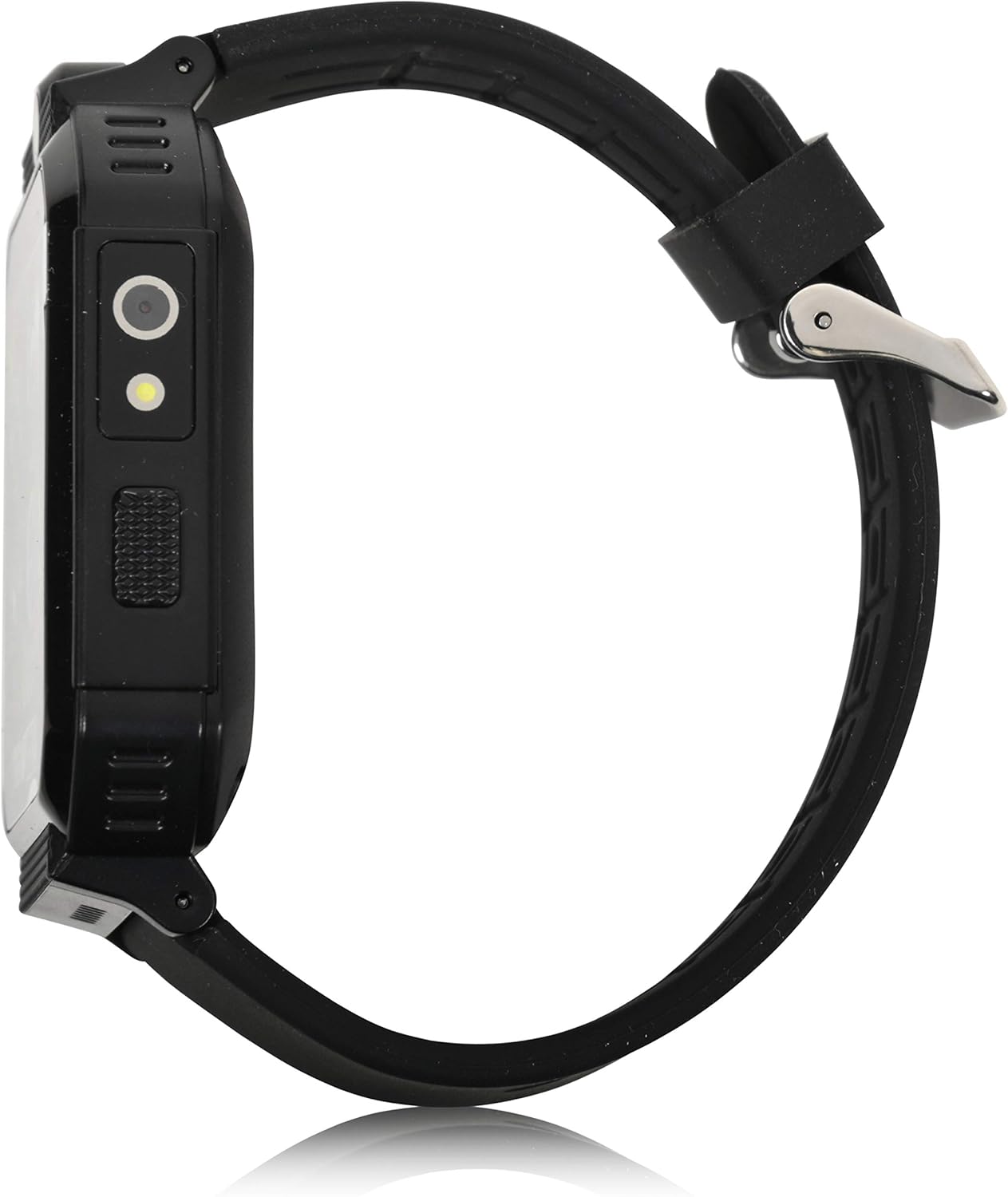
Збоку view of the smartwatch, highlighting the power button and charging port.
5. Інструкцыя па эксплуатацыі
The iTIME Kids Smart Watch features a touchscreen interface for navigation. Swipe left or right to browse through applications and tap an icon to select.
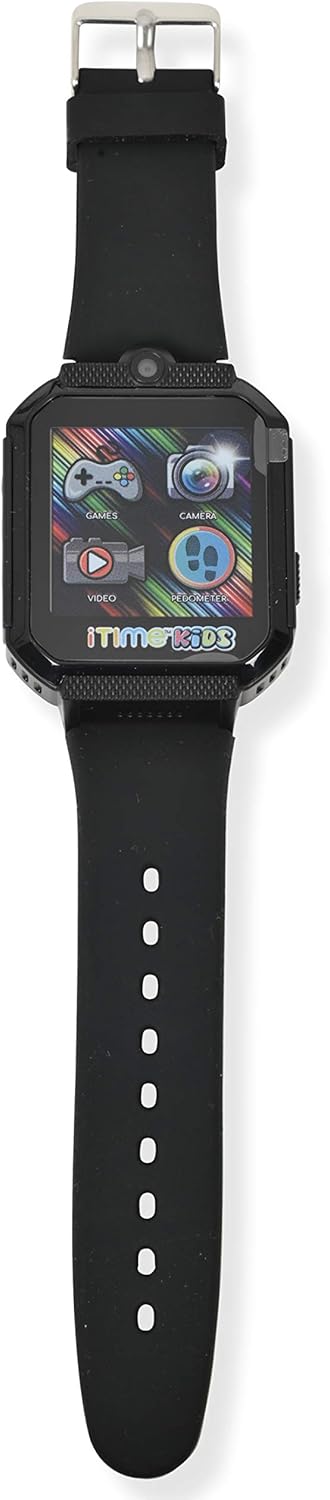
Фронт view of the smartwatch display, showing various application icons.
5.1. Time Display and Watch Faces
- The home screen displays the current time.
- To change watch faces, tap and hold on the home screen, then swipe to select a different design.
5.2. Camera and Photo Album
- Націсніце Камера icon to open the selfie camera.
- Tap the screen to take a photo.
- Націсніце Фотаальбом абразок да view зробленыя выявы.
5.3. Гульні
- Націсніце гульні icon to access the preloaded games.
- Select a game from the list and follow the on-screen instructions to play.
5.4. Pedometer and Activity Tracking
- Націсніце Шагомер абразок да view your step count.
- The watch automatically tracks steps, distance, and estimated calories burned.
5.5. Іншыя асаблівасці
- Відэаплэер: Націсніце Відэа icon to play recorded videos.
- Дыктафон: Націсніце Дыктафон icon to record and playback audio.
- калькулятар: Access basic arithmetic functions.
- Будзільнік: Усталюйце будзільнікі для напамінкаў.
- Ліхтарык: Activate the built-in flashlight.
- Секундамер: Use for timing activities.
- Датчык тэмпературы цела: Access the sensor to view real-time body temperature readings.
6. Асаблівасці большview
The Accutime iTIME Kids Smart Watch ITK2005AZ includes the following functionalities:
- Сэнсарны дысплей
- Selfie Camera for photos and videos
- Фотаальбом Viewer
- Відэаплэер
- Дыктафон
- Калькулятар
- Будзільнік
- Шагомер лічыльнік крокаў
- Лічыльнік калорый
- Лічыльнік адлегласці
- 26 Preloaded Playable Games
- Changeable Watch Faces
- Ліхтарык
- Секундамер
- Real-time Body Temperature Sensor
- Убудаваная акумулятарная батарэя
7. Тэхнічнае абслугоўванне
7.1. Уборка
Wipe the watch and strap with a soft, dry, lint-free cloth. Do not use liquid cleaners or sprays directly on the watch.
7.2. Захоўванне
When not in use for extended periods, store the watch in a cool, dry place away from direct sunlight and extreme temperatures. Ensure the battery has some charge before storing to prevent deep discharge.
8. Выпраўленне непаладак
- Watch does not power on: Пераканайцеся, што гадзіннік цалкам зараджаны. Падключыце яго да зараднай прылады як мінімум на 30 хвілін, перш чым спрабаваць зноў уключыць.
- Экран не рэагуе або завісае: Try restarting the watch by pressing and holding the power button until it powers off, then power it back on.
- Battery life is short: Ensure the watch is charged for the recommended duration (at least 1 hour for regular use, 2 hours for initial use). Reduce screen brightness or frequency of game use to conserve battery.
- Праблемы з гукам: Check the volume settings within the watch's menu. If games have separate volume controls, adjust them accordingly.
- Праблемы з зарадкай: Verify that the USB cable is securely connected to both the watch and the power source. Try a different USB port or power adapter.
9. Тэхнічныя характарыстыкі
| Марка | Актывізацыя |
| мадэль | ITK2005AZ |
| Тып дысплея | ВК |
| Памер экрана | 40 міліметраў |
| Увод чалавечага інтэрфейсу | Сэнсарны экран |
| Тып батарэі | Літый-іённы (акумулятар) |
| Час зарадкі | 1-2 гадзін |
| Асаблівасці | Alarm Clock, Audio Recording, Camera, Pedometer, Time Display, Body Temperature Sensor |
| Тэхналогія падлучэння | USB (для зарадкі) |
| Стандарт бесправадной сувязі | Bluetooth (Note: Product description states no Bluetooth for safety, but specifications list it. For core functions, it does not connect to internet/Wi-Fi/Bluetooth. Bluetooth may be for internal components or specific accessories not advertised for general use.) |

Назад view of the smartwatch, displaying model information.
10. Гарантыя і падтрымка
10.1. Інфармацыя аб гарантыі
This Accutime iTIME Kids Smart Watch comes with a адзін год гарантыі from Accutime Watch Corp. Please retain your proof of purchase for warranty claims.
10.2. Падтрымка кліентаў
For further assistance, technical support, or warranty inquiries, please contact Accutime Watch Corp. customer service. Refer to the packaging or Accutime's official webсайт для кантактных дадзеных.