
1. Уводзіны
This manual provides comprehensive instructions for the Taidacent RJ45 to RS485 Converter Terminal Adapter. This device is designed to facilitate communication between RJ45 network interfaces and RS485 serial communication systems, commonly used in industrial and network applications. Please read this manual thoroughly before installation and operation to ensure correct usage and optimal performance.
2. Інфармацыя па бяспецы
Заўсёды выконвайце наступныя меры бяспекі:
- Ensure all power is disconnected from devices before making any connections.
- Do not expose the adapter to moisture, extreme temperatures, or corrosive environments.
- Avoid physical impact or dropping the device.
- Only use the adapter for its intended purpose as an RJ45 to RS485 converter.
3. Змесціва ўпакоўкі
- 1 x Taidacent RJ45 to RS485 Converter Terminal Adapter
4. Прадукт скончыўсяview
The Taidacent RJ45 to RS485 Converter Terminal Adapter provides a simple and robust solution for converting an RJ45 interface to a 2-wire RS485 terminal block. It features a standard RJ45 connector on one end and a screw-type terminal block with 'A' and 'B' markings for RS485 differential signals on the other.
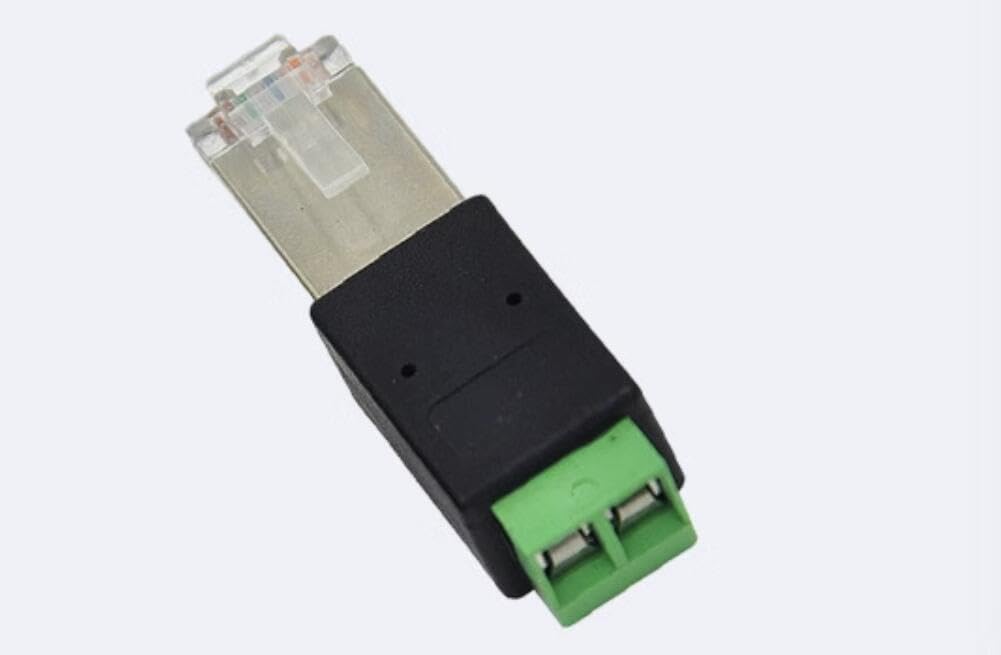
Image 1: Taidacent RJ45 to RS485 Converter Terminal Adapter. This image shows the adapter with its RJ45 plug on the right and the green screw terminal block on the left, labeled 'A' and 'B'.
5. Тэхнічныя характарыстыкі
| Асаблівасць | Апісанне |
|---|---|
| Мадэль прадукту | RJ45-485 Terminal (ZC-RJ45485adapter-210617) |
| Прызначэнне | Converts RJ45 to RS485 physical interface |
| Supported RJ45 Pins | Pin 4 & Pin 5 or Pin 6 & Pin 7 (customization for other pins may be required) |
| Працоўная тэмпература | -40°C да 85°C |
| Тып раздыма | RJ45 |
| Сумяшчальныя прылады | Industrial and network devices, PCs |
| Тып аздаблення | Крышталь |
| Колькасць партоў | 1 |
| Тып сілкавання | No plug (passive device) |
| Вага прадмета | 0.08 фунта (прыблізна 36 грамаў) |
| UPC / GTIN | 739319150839 |
6. Налада і падключэнне
This adapter facilitates the connection of an RS485 device to an RJ45 interface. The key is to correctly map the RS485 A and B signals to the appropriate pins on the RJ45 connector.
6.1. RJ45 Pin Mapping for RS485
The adapter supports common RJ45 pin assignments for RS485. The terminal block has two screw terminals labeled 'A' and 'B'.
- Option 1: Using RJ45 Pin 6 and Pin 7
- Connect the RS485 'A' signal to the terminal labeled 'A'. This typically corresponds to RJ45 Pin 6 (485A).
- Connect the RS485 'B' signal to the terminal labeled 'B'. This typically corresponds to RJ45 Pin 7 (485B).
- Заўвага: Depending on your RS485 device's polarity, you may need to reverse the connections (e.g., terminal A to 485B, terminal B to 485A). The adapter allows for this flexibility as long as the correct two pins are used.
- Option 2: Using RJ45 Pin 4 and Pin 5
- Connect the RS485 'A' signal to the terminal labeled 'A'. This typically corresponds to RJ45 Pin 4 (485A).
- Connect the RS485 'B' signal to the terminal labeled 'B'. This typically corresponds to RJ45 Pin 5 (485B).
- Заўвага: Similar to Option 1, polarity reversal (terminal A to 485B, terminal B to 485A) is possible if required by your RS485 device.
- Custom Pin Assignments: If your application uses other RJ45 pins for RS485 communication, customization of the wiring may be necessary. Consult your device's documentation for specific pinouts.
6.2. Парадак падлучэння
- Identify the RS485 A and B signals from your RS485 device or network.
- Loosen the screws on the green terminal block of the adapter.
- Insert the RS485 'A' wire into the terminal labeled 'A' and tighten the screw securely.
- Insert the RS485 'B' wire into the terminal labeled 'B' and tighten the screw securely.
- Plug the RJ45 end of the adapter into the corresponding RJ45 port on your network device or PC, ensuring the RJ45 pins are correctly mapped as per Section 6.1.
- Verify all connections are firm and correct before powering on any connected equipment.
7. Інструкцыя па эксплуатацыі
The Taidacent RJ45 to RS485 Converter Terminal Adapter is a passive device and does not require external power. Once correctly connected, it acts as a physical interface converter, allowing data to flow between the RJ45 and RS485 interfaces. Ensure that the communication parameters (baud rate, data bits, stop bits, parity) are correctly configured on both the RJ45-connected device and the RS485 device for successful data transmission.
8. Тэхнічнае абслугоўванне
This adapter requires minimal maintenance:
- Трымайце прыладу чыстай і без пылу. Выкарыстоўвайце для чысткі мяккую сухую тканіну.
- Захоўвайце ў прахалодным, сухім месцы, удалечыні ад прамых сонечных прамянёў і экстрэмальных тэмператур.
- Regularly check connections for tightness, especially in environments with vibration.
9. Выпраўленне непаладак
If you experience issues with the converter, consider the following:
- Няма сувязі:
- Verify that the RS485 A and B signals are correctly connected to the 'A' and 'B' terminals, respectively, or with reversed polarity if required.
- Confirm that the RJ45 pins used for RS485 on your network device match the pins connected to the adapter (Pin 4/5 or Pin 6/7).
- Ensure that the communication parameters (baud rate, data format) are identical on both connected devices.
- Check for loose connections at both the terminal block and the RJ45 port.
- Перыядычная сувязь:
- Inspect cables for damage or poor shielding.
- Ensure terminal screws are tightened securely.
- Check for electromagnetic interference (EMI) in the environment.
10. Інфармацыя аб гарантыі
Taidacent products are manufactured to high-quality standards. This product is covered by a limited warranty against defects in materials and workmanship for a period specified by the retailer at the time of purchase. This warranty does not cover damage caused by misuse, accident, unauthorized modification, or improper installation. Please retain your proof of purchase for warranty claims.
11. Падтрымка кліентаў
For technical assistance or support, please contact your retailer or visit the Taidacent official website for contact information. When contacting support, please have your product model number (ZC-RJ45485adapter-210617) and a detailed description of the issue ready.