
Уводзіны
This manual provides detailed instructions for the installation, operation, and maintenance of the Taidacent RJ45 to RS485 Converter. This industrial-grade adapter facilitates the conversion of an RJ45 physical interface to an RS485 terminal, enabling communication between various industrial equipment, PLCs, sensors, and networking devices.
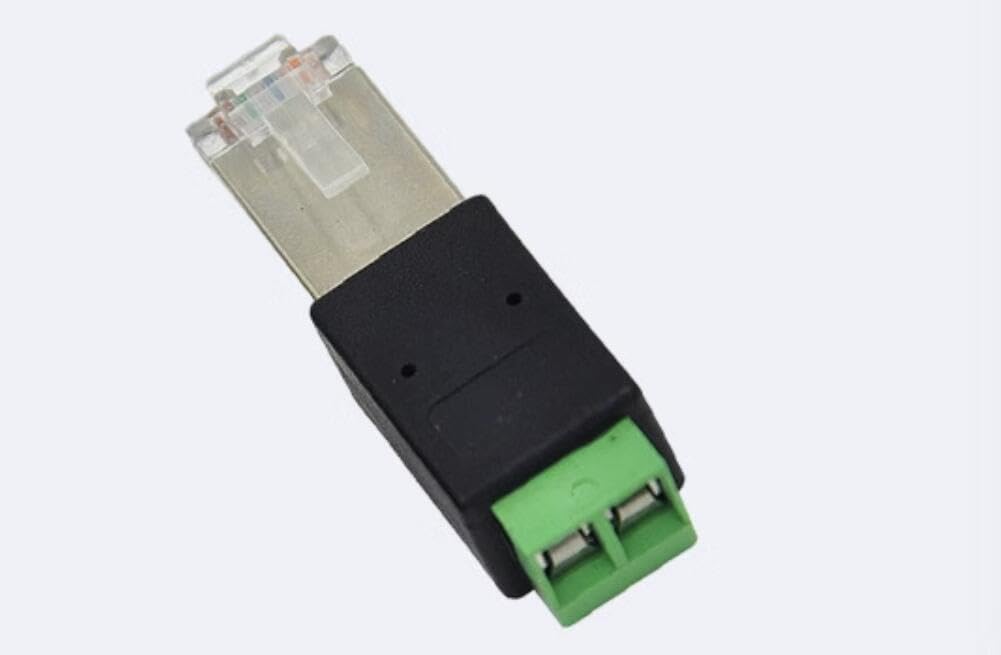
Image: The Taidacent RJ45 to RS485 Converter, showing the RJ45 plug on one end and the green screw terminal block on the other, labeled A and B.
Асаблівасці прадукту
- мадэль: RJ45 to 485 terminal
- Мэта: Converts RJ45 physical interface to RS485
- Pin Configuration Options: Supports connections to RJ45 pins 4 and 5, or pins 6 and 7.
- якасць: Industrial grade for reliable performance
- Працоўная тэмпература: -40℃ да 85℃
Тэхнічныя характарыстыкі
| Марка | Тайдацэнт |
| Нумар мадэлі | ZC-RJ45485adapter-210617 |
| Тып раздыма | RJ45 |
| Інтэрфейс | RS485 Terminal Block |
| Колькасць партоў | 1 (RJ45 to 1 RS485) |
| Сумяшчальныя прылады | Industrial Equipment, PLC, Sensors, Networking Devices |
| Працоўная тэмпература | -40℃ да 85℃ |
| Якасць | Прамысловы клас |
| UPC | 739319150761 |
Настройка
The Taidacent RJ45 to RS485 Converter is designed for straightforward integration. Follow these steps for proper connection:
- Identify RJ45 Pins: Determine which pins on your RJ45 connection are designated for RS485 A and B signals. Common configurations supported by this adapter include:
- RJ45 Pin 5 (485A) and Pin 6 (485B)
- RJ45 Pin 4 (485A) and Pin 5 (485B)
Note: The specific pinout for your device's RJ45 port should be confirmed with its documentation.
- Connect RS485 Wires:
- Connect the wire for the 485А signal to the terminal labeled A on the converter.
- Connect the wire for the 485Б signal to the terminal labeled B on the converter.
The converter is designed to function even with a reverse connection of A and B terminals (e.g., if 485A is connected to terminal B and 485B to terminal A), provided the correct RJ45 pins are used. However, for best practice, match A to A and B to B.
- Insert RJ45 Plug: Plug the RJ45 end of the converter into the corresponding RJ45 port on your industrial equipment, PLC, or networking device.
- Бяспечныя злучэнні: Ensure all terminal screw connections are tightened securely to prevent intermittent connectivity.
Выява: Падрабязны view of the converter's green terminal block, clearly showing the 'A' and 'B' labels for RS485 signal connections.
Інструкцыя па эксплуатацыі
Once the converter is physically connected, its operation is passive. It acts as a physical interface adapter, converting the RJ45 pinout to a standard RS485 terminal block. The functionality of the RS485 communication will depend on the connected devices and their respective software/firmware configurations.
- Ensure the connected devices are powered on and configured for RS485 communication.
- Verify that the baud rate, data bits, parity, and stop bits settings match across all devices in the RS485 network.
- For multi-drop RS485 networks, ensure proper termination resistors are used at the ends of the bus, if required by your system design.
Тэхнічнае абслугоўванне
The Taidacent RJ45 to RS485 Converter is designed for industrial environments and requires minimal maintenance.
- Уборка: Periodically inspect the converter for dust or debris. Clean with a soft, dry cloth if necessary. Avoid using liquid cleaners directly on the device.
- Цэласнасць злучэння: Occasionally check the screw terminal connections to ensure they remain tight and secure. Loose connections can lead to intermittent communication issues.
- Умовы навакольнага асяроддзя: Ensure the operating environment remains within the specified temperature range of -40℃ to 85℃. Avoid exposure to excessive moisture or corrosive substances.
Ліквідацыю непаладак
If you encounter issues with the Taidacent RJ45 to RS485 Converter, consider the following troubleshooting steps:
- Няма сувязі:
- Verify all physical connections are secure at both the RJ45 and terminal block ends.
- Double-check the RJ45 pinout configuration. Ensure that the correct RJ45 pins (e.g., 4&5 or 6&7) are being used for RS485 A and B signals, and that they are connected to the corresponding A and B terminals on the converter.
- Confirm that the RS485 communication parameters (baud rate, data bits, parity, stop bits) are correctly set on all connected devices.
- Check for proper RS485 bus termination, if applicable to your network setup.
- Перыядычная сувязь:
- Inspect terminal screw connections for looseness. Tighten if necessary.
- Check for electromagnetic interference (EMI) in the environment. Ensure RS485 cables are shielded and properly grounded if needed.
- Прылада не распазнана:
- Ensure the host device (PC, PLC) has the necessary drivers or software installed to communicate via RS485.
- Verify the power supply to all connected devices.
Гарантыя і падтрымка
This Taidacent product comes with a Абмежаваная гарантыя. For specific terms and conditions, please refer to the warranty information provided at the time of purchase or contact Taidacent customer support.
For technical support, additional product information, or to explore other Taidacent products, please visit the official Taidacent store: