
1. Уводзіны
Thank you for choosing the AUKEY Sprint Wireless Power Bank PB-Y32. This device is designed to provide portable power for your mobile devices, featuring both wired and wireless fast charging capabilities. Please read this manual carefully before use to ensure optimal performance and safety.
2. Асаблівасці прадукту
- Ёмістасць 10000 мАг: High-capacity battery to charge your devices multiple times.
- Падтрымка хуткай зарадкі: Supports Quick Charge 3.0 and Power Delivery for rapid charging of compatible devices.
- Бесправадная зарадка: Conveniently charge Qi-compatible devices at up to 10W.
- Некалькі выхадных партоў: Equipped with USB-C and USB-A ports for versatile charging.
- Кампактны і партатыўны дызайн: Easy to carry for on-the-go power.
- Функцыі бяспекі: Built-in protections against overcharge, over-discharge, overcurrent, and short circuits.
3. Змесціва ўпакоўкі
- AUKEY Sprint Wireless Power Bank PB-Y32
- Кабель USB-A да C
- Кіраўніцтва карыстальніка
4. Усталёўка і першае выкарыстанне
4.1 Зарадка знешніх акумулятараў
Before first use, fully charge the power bank. It takes approximately 7 hours to fully charge the power bank using a compatible USB-C power adapter.
- Connect the included USB-A to C cable to the power bank's USB-C input port.
- Connect the other end of the cable to a USB wall charger (not included).
- The LED indicators will light up to show the charging status. All four LEDs will be solid when fully charged.
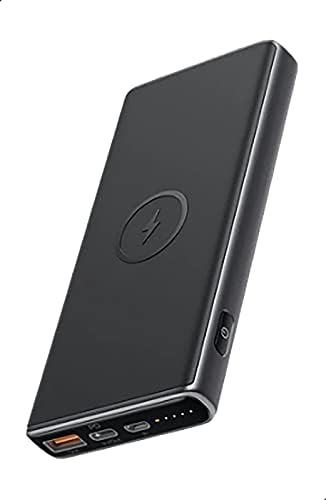
Image: The AUKEY Sprint Wireless Power Bank PB-Y32, showcasing its sleek black design and port layout.
5. Інструкцыя па эксплуатацыі
5.1 Правадная зарадка
To charge your device using a cable:
- Падключыце зарадны кабель прылады да выхаднога порта USB-A або выхаднога порта USB-C на знешнім акумулятары.
- Падключыце іншы канец кабеля да прылады.
- Паўэрбанк аўтаматычна пачне зараджаць вашу прыладу.
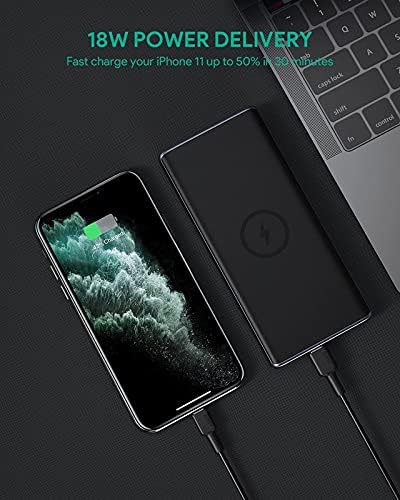
Image: The power bank connected via cable to a smartphone, demonstrating 18W Power Delivery fast charging.

Image: A smartphone connected to the power bank, illustrating Qualcomm Quick Charge 3.0 capabilities for rapid charging.
5.2 Бесправадная зарадка
To charge your Qi-compatible device wirelessly:
- Place your Qi-compatible device directly onto the wireless charging pad located on the top surface of the power bank. Ensure the device is centered on the charging symbol.
- The power bank will automatically detect your device and begin wireless charging.

Image: A smartphone placed on the power bank's surface, demonstrating the wireless charging feature.

Выява: буйны план view of the power bank showing the silicone ring designed to keep the phone stable during wireless charging.
5.3 Рэжым зарадкі нізкім токам
This mode is ideal for charging low-power devices like wireless earbuds or smartwatches.
- Press and hold the power button for 2 seconds to enter low-current charging mode. The first LED indicator will blink green.
- Connect your low-power device or place it on the wireless charging pad.
- To exit low-current charging mode, press the power button once, or it will automatically exit after 2 hours.
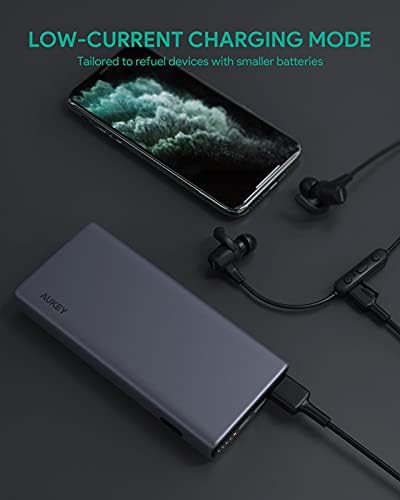
Image: The power bank connected to a smartphone and wireless earbuds, demonstrating its low-current charging mode for smaller devices.

Image: An illustration showing the power bank's broad compatibility with various devices, including smartphones, tablets, and gaming consoles.
6. Тэхнічнае абслугоўванне
- Keep the power bank away from liquids, extreme heat, and strong magnetic fields.
- Не кідайце і не падвяргайце знешні акумулятар моцным ударам.
- Clean the power bank with a dry, soft cloth. Do not use corrosive cleaners.
- Захоўвайце павербанк у прахалодным сухім месцы, калі ён не выкарыстоўваецца.
- Recharge the power bank at least once every 3 months to maintain battery health.
7. Выпраўленне непаладак
7.1 Паўэрбанк не зараджаецца
- Пераканайцеся, што зарадны кабель надзейна падключаны як да паўэрбанка, так і да зараднай прылады.
- Паспрабуйце іншы кабель USB-C або зарадную прыладу.
- Verify the wall charger's output meets the power bank's input requirements (DC 5V-3A / 9V-2A).
7.2 Прылада не зараджаецца ад знешніх акумулятараў
- Пераканайцеся, што знешні акумулятар мае дастатковы зарад.
- Паспрабуйце іншы кабель для зарадкі вашай прылады.
- For wireless charging, ensure your device is Qi-compatible and properly aligned on the charging pad. Remove any thick cases that might interfere.
- If charging a low-power device, ensure low-current charging mode is activated.
7.3 Перагрэў знешніх акумулятараў
- Падчас зарадкі або разрадкі знешні акумулятар можа трохі награвацца.
- Калі прылада занадта нагрэецца, неадкладна адключыце ўсе прылады і зарадны кабель. Дайце ёй астыць, перш чым зноў карыстацца ёю.
- Забяспечце належную вентыляцыю і не накрывайце знешні акумулятар падчас выкарыстання.
8. Тэхнічныя характарыстыкі
| Асаблівасць | Дэталь |
|---|---|
| Назва мадэлі | Спрынт |
| Нумар мадэлі | PB-Y32 |
| Ёмістасць батарэі | 10000 мАг |
| Уваход USB Type-C | DC 5V-3A / 9V-2A |
| Выхад USB Type-C | Пастаянны ток 5V-3A / 9V-2A / 12V-1.5A |
| Выхад USB Type-A | 18 Вт |
| Максімальная выхадная магутнасць | 18 Вт |
| Выхад для бесправадной зарадкі | 5 Вт, 7.5 Вт, 10 Вт |
| Памеры | 144 х 67 х 17 мм |
| Вага | 210 грамаў |
| Склад батарэі | Літый-палімерны |
| Асаблівасці | Short Circuit Protection, Wireless Charging |
| Колер | Чорны |
| Час зарадкі акумулятара | 7 гадзіны |
9. Гарантыя і падтрымка
According to the product specifications, this product comes with Няма гарантыі. For any product-related inquiries or support, please refer to the retailer or manufacturer's official webсайт для кантактнай інфармацыі.