
Goshyda KX-T6001CID
Goshyda KX-T6001CID Big Button Corded Telephone User Manual
Model: KX-T6001CID | Brand: Goshyda
Уводзіны
Thank you for choosing the Goshyda KX-T6001CID Big Button Corded Telephone. This manual provides detailed instructions to help you set up, operate, and maintain your new telephone. Please read this manual thoroughly before use to ensure proper functionality and to take full advantagе з яго асаблівасцей.
Інфармацыя па бяспецы
- Do not expose the telephone to water or moisture.
- Avoid placing the telephone in direct sunlight or near heat sources.
- Use only the provided telephone line cord.
- Do not attempt to open or repair the telephone yourself. Refer all servicing to qualified personnel.
- Захоўваць у месцах, недаступных дзецям.
Змест пакета
Праверце наяўнасць усіх прадметаў у камплекце:
- 1 х трубка
- 1 x Telephone Base Unit
- 1 x Handset Cord
- 1 х тэлефонны шнур
- 1 х Кіраўніцтва карыстальніка

Image: The Goshyda KX-T6001CID telephone, showing the base unit, handset, and coiled cord.
Прадукт скончаныview
Familiarize yourself with the main components and controls of your telephone.

Выява: спераду view of the telephone, highlighting the LCD display, large numeric keypad, and function buttons.
Keypad and Display:
- Лічбавая клавіятура (0-9, *, #): For dialing phone numbers.
- ВК-дысплей: Паказвае ідэнтыфікатар абанента, час, дату і параметры меню.
- Кнопкі M1/M2: One-touch memory dialing keys.
- SET/STORE Button: Used for entering settings menu and saving entries.
- Кнопкі УВЕРХ/УНІЗ: Navigate through menu options or adjust volume.
- RING Button: Adjust ringer volume.
- Кнопка рэгулявання гучнасці: Adjust earpiece/speaker volume.
- FL/BRT (Flash/Brightness) Button: Flash function for call waiting, also adjusts LCD brightness.
- REDIAL Button: Redials the last dialed number.
- H.F (Hands-Free) Button: Activates speakerphone mode.

Выява: буйны план view of the large, easy-to-read buttons on the telephone's keypad.
Настройка
1. Connecting the Telephone:
- Connect one end of the coiled handset cord to the handset and the other end to the handset jack on the left side of the telephone base unit.
- Connect one end of the telephone line cord to the LINE jack on the back of the telephone base unit.
- Падключыце другі канец тэлефоннага шнура да тэлефоннай разеткі ў сцяне.
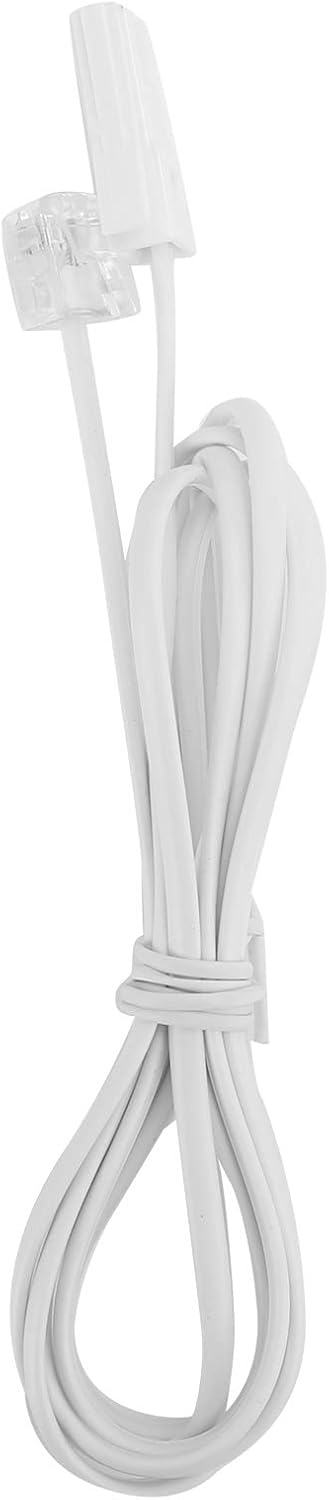
Image: The telephone line cord, used to connect the phone to the wall jack.
2. Initial Settings:
Upon initial connection, the LCD display may prompt you to set the date and time. Follow the on-screen instructions using the UP і УНІЗ buttons to adjust values and the УСТАНОВІЦЬ/ЗАХАВАЦЬ кнопку для пацверджання.
Інструкцыя па эксплуатацыі
Здзяйсненне званка:
- Падніміце слухаўку або націсніце ВЧ button for speakerphone.
- Набярыце патрэбны нумар тэлефона з дапамогай лічбавай клавіятуры.
- Дачакайцеся званка для злучэння.
- Каб завяршыць званок, пакладзеце слухаўку або націсніце ВЧ кнопку зноў.
Адказ на званок:
Калі тэлефон зазваніць, падніміце слухаўку або націсніце ВЧ кнопку, каб адказаць.
Паўторны набор:
Падніміце трубку альбо націсніце ВЧ, затым націсніце ПЕРАСУД кнопку, каб патэлефанаваць па апошнім набраным нумары.
Using Memory Keys (M1/M2):
Захаванне нумара:
- Падніміце трубку альбо націсніце ВЧ.
- Прэса УСТАНОВІЦЬ/ЗАХАВАЦЬ.
- Набярыце нумар тэлефона, які вы хочаце захаваць.
- Прэса УСТАНОВІЦЬ/ЗАХАВАЦЬ зноў.
- Націсніце альбо M1 or M2 to save the number to that memory key.
Набор з памяці:
Падніміце трубку альбо націсніце ВЧ, then press either M1 or M2 to dial the stored number.
Асаблівасці
- DTMF/FSK Dual System Caller ID: Supports both DTMF and FSK caller ID systems for displaying incoming call information.

Image: The telephone's display, showing its capability for DTMF/FSK dual system caller ID function.
- FLASH Time Adjustment: Adjustable FLASH time (90/95/100/120/180/300/600/1000ms) for compatibility with various PBX systems or call waiting services.
- 16 Ringtone Options: Choose from 16 different ringtones.

Image: The telephone with graphic elements suggesting a choice of 16 ringtones.
- Adjustable LCD Brightness: Five levels of LCD screen brightness adjustment for optimal viewінж.
- 3 Alarm Clock Functions: Set up to 3 different alarm clocks, each with unique alarm sounds.
- 10 Groups of Dual Key Memory: Store up to 10 frequently called numbers using dual-key memory functions.
- 1-99 Hours Do Not Disturb Function: Set a "Do Not Disturb" period from 1 to 99 hours.
Тэхнічнае абслугоўванне
- Clean the telephone with a soft, damp тканіна. Не выкарыстоўвайце абразіўныя ачышчальнікі або растваральнікі.
- Keep the telephone away from dust and extreme temperatures.
- Ensure cords are not tangled or pinched to prevent damage.
Ліквідацыю непаладак
| праблема | Магчымая прычына | Рашэнне |
|---|---|---|
| Няма сігналу набору | Тэлефонны шнур адключаны або няспраўны. | Check all cable connections. Try a different telephone line cord. Test the wall jack with another phone. |
| Немагчыма рабіць або прымаць званкі | Line issue, or phone is in "Do Not Disturb" mode. | Verify phone line service. Check if "Do Not Disturb" is active and disable it. |
| Ідэнтыфікатар абанента не адлюстроўваецца | Caller ID service not subscribed or incompatible system. | Contact your telephone service provider to ensure Caller ID service is active. |
| Дысплей цьмяны або пусты | LCD brightness setting is too low. | Adjust the LCD brightness using the FL/BRT button or menu settings. |
Тэхнічныя характарыстыкі
| Асаблівасць | Дэталь |
|---|---|
| мадэль | KX-T6001CID |
| Марка | Гошыда |
| Матэрыял | Акрыланітрылбутадыенстырол (АБС) |
| Колер | Белы |
| Тып | Правадной тэлефон |
| Тып дазвону | Адзіная клавіятура |
| Ідэнтыфікатар абанента | Yes (DTMF/FSK Dual System) |
| Час успышкі | 90/95/100/120/180/300/600/1000ms |
| Рынгтоны | 16 варыянты |
| Яркасць ВК | 5 ўзроўню рэгуляваных |
| Функцыі сігналізацыі | 3 груп |
| Функцыя памяці | 10 groups of dual key memory |
| Не турбаваць | 1-99 гадзін |
| Вага прадмета | 481 грам |
| Памеры (Д х Ш х У) | 10 x 10 x 10 millimeters (approximate) |
| Крыніца харчавання | Battery Powered (likely referring to LCD/memory backup, as corded phones are line-powered for basic functions) |
Гарантыя і падтрымка
This Goshyda product is covered by a standard manufacturer's warranty. For specific warranty details, please refer to the documentation included with your purchase or contact Goshyda customer support.
For technical assistance or further inquiries, please contact Goshyda customer service through their official webсайт або кантактную інфармацыю, прадстаўленую разам з вашым прадуктам.
Ask a question about this manual
Ask about setup, troubleshooting, compatibility, parts, safety, or missing instructions. Manuals+ will review the question and use this page’s manual context to help answer it.