
Уводзіны
Thank you for choosing the Zelotes F-35 2.4GHz Vertical Wireless Rechargeable Gaming Mouse. This ergonomic mouse is designed to provide a comfortable and efficient user experience, reducing wrist strain during extended use. Featuring multiple connectivity options and customizable buttons, it is ideal for both productivity and gaming on various devices.
Асаблівасці прадукту
- Эрганамічны вертыкальны дызайн: Positions the hand in a natural handshake posture to minimize wrist and forearm strain.
- Шматрэжавае падключэнне: Supports 2.4GHz wireless via USB dongle, Bluetooth 1, and Bluetooth 2 for versatile device pairing.
- Акумулятарная батарэя: Built-in rechargeable battery for convenience.
- Рэгуляваны DPI: Up to 2400 DPI for precise cursor control, suitable for various tasks and gaming.
- 6 праграмуемых кнопак: Includes left/right click, scroll wheel, DPI button, and forward/backward buttons for enhanced functionality.
- Аптычны датчык: Reliable and accurate tracking on most surfaces.
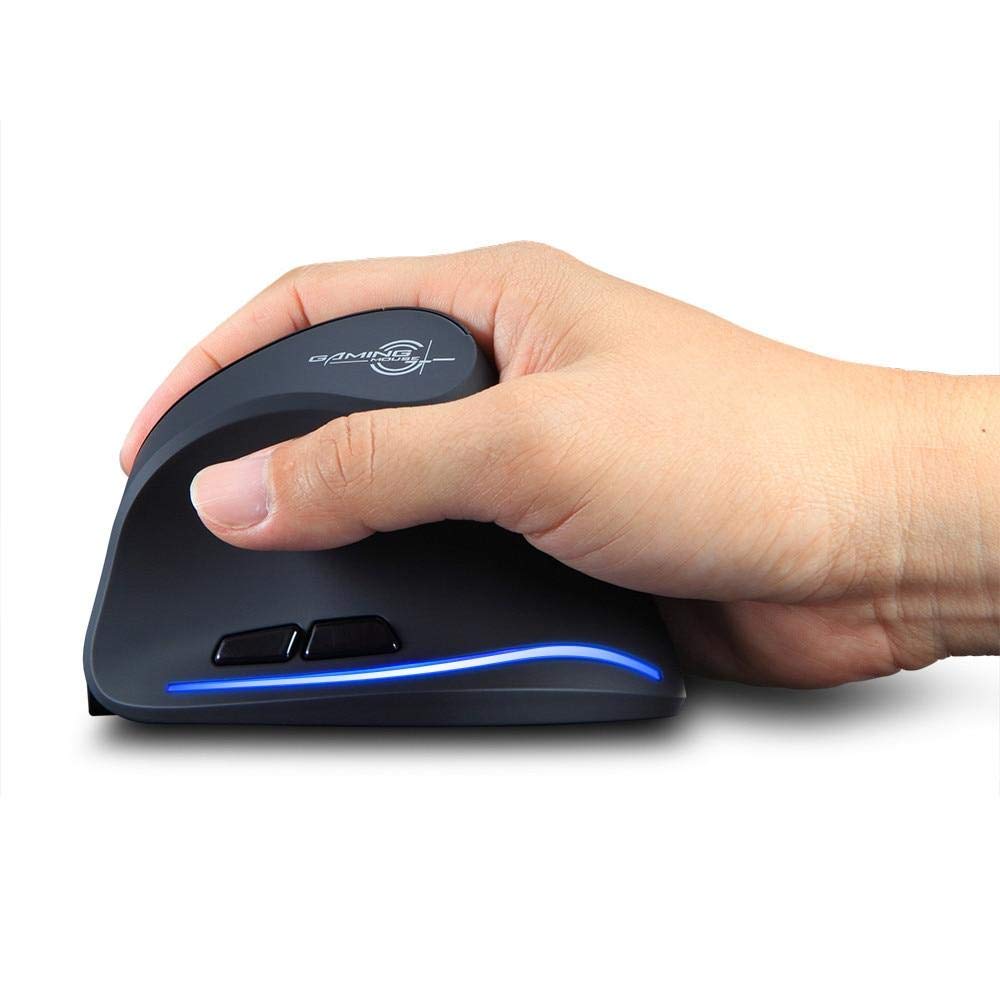
Image: The Zelotes F-35 Vertical Wireless Gaming Mouse, showcasing its unique ergonomic shape and illuminated accents.

Image: A visual comparison illustrating the natural hand position with a vertical mouse versus the twisted wrist position with a traditional horizontal mouse, highlighting the ergonomic benefits.
Інструкцыя па наладзе
- Уключэнне: Locate the ON/OFF switch on the bottom of the mouse and slide it to the 'ON' position.
- Выберыце рэжым падключэння: The mouse supports three connection modes: 2.4GHz wireless (via USB dongle), Bluetooth 1, and Bluetooth 2. Use the 'Mode Switch' button on the bottom of the mouse to cycle through these options. The corresponding indicator light will illuminate.
- Бесправадное злучэнне 2.4 ГГц:
- Remove the USB receiver dongle from its storage slot on the bottom of the mouse.
- Падключыце USB-прыёмнік да вольнага порта USB на вашым кампутары або ноўтбуку.
- Мышка павінна падключыцца аўтаматычна.
- Падключэнне Bluetooth (BT1/BT2):
- Switch the mouse to either Bluetooth 1 or Bluetooth 2 mode using the 'Mode Switch'.
- On your computer or laptop, go to Bluetooth settings and search for new devices.
- Select 'Zelotes F-35' from the list of available devices to pair.

Image: The underside of the Zelotes F-35 mouse, highlighting the ON/OFF switch, mode switch, and the integrated storage slot for the 2.4GHz USB receiver dongle.
Інструкцыя па эксплуатацыі
The Zelotes F-35 mouse features 6 buttons designed for intuitive control and enhanced productivity:
- Левая кнопка мышы: Стандартная функцыя асноўнага кліку.
- Правая кнопка мышы: Стандартная функцыя другаснага кліку.
- Кола пракруткі: Scroll up or down for navigation. Can also be pressed for a middle-click function.
- Кнопка рэгулявання DPI: Located near the scroll wheel, press to cycle through different DPI settings (e.g., 800/1200/1600/2400) to adjust cursor sensitivity.
- Кнопка "Наперад": Located on the thumb rest, typically navigates forward in web браўзэры або file даследчыкі.
- Кнопка "Назад": Located on the thumb rest, typically navigates backward in web браўзэры або file даследчыкі.
Зарадка і акумулятар
The Zelotes F-35 mouse is equipped with a rechargeable battery for continuous use.
- Порт для зарадкі: The mouse features a USB-C charging port, typically located at the front base of the mouse.
- Зарадка: Connect the provided USB-C cable to the mouse and the other end to a USB power source (e.g., computer USB port, wall adapter).
- Індыкатар батарэі: The mouse may have an indicator light to show charging status or low battery. Refer to the product packaging for specific indicator behavior.
- Тэрмін службы батарэі: The average battery life is approximately 12 months, depending on usage.
Тэхнічнае абслугоўванне
- Уборка: Use a soft, dry cloth to clean the mouse surface. For stubborn dirt, a slightly damp можна выкарыстоўваць тканіну, каб не дапусціць траплення вільгаці ўнутраныя кампаненты.
- Сыход за датчыкам: Для забеспячэння дакладнага адсочвання падтрымлівайце аптычны датчык у ніжняй частцы мышы ў чысціні і без пылу і смецця.
- захоўванне: Калі мыш доўга не выкарыстоўваецца, выключайце яе, каб падоўжыць тэрмін службы батарэі. Захоўвайце USB-прыёмнік у прызначаным для яго слоце, каб пазбегнуць яго страты.
Ліквідацыю непаладак
- Мышка не рэагуе:
- Пераканайцеся, што мыш уключана.
- Праверце ўзровень зарада батарэі і пры неабходнасці зарадзіце яе.
- Для падключэння 2.4 ГГц пераканайцеся, што USB-прыёмнік надзейна падключаны да кампутара.
- For Bluetooth connection, ensure Bluetooth is enabled on your device and the mouse is correctly paired. Try re-pairing if issues persist.
- Няправільнае адсочванне:
- Ачысціце аптычны датчык у ніжняй частцы мышы.
- Ensure you are using the mouse on a suitable surface (non-reflective, non-glass).
- Усталюйце камфортны ўзровень DPI.
- Збоі ў падключэнні:
- Ensure the mouse is within the effective range of your device (typically up to 10 meters for wireless).
- Мінімізуйце перашкоды ад іншых бесправадных прылад.
Тэхнічныя характарыстыкі
| Асаблівасць | Дэталь |
|---|---|
| Марка | Zelotes |
| мадэль | Ф-35 |
| Тып | Бесправадная сетка 2.4 ГГц, Bluetooth |
| Рэжым працы | Оптыка-электронныя |
| Колькасць кнопак | 6 |
| Колькасць ролікаў | 1 |
| Рука арыентацыі | правільна |
| Тып інтэрфейсу | USB |
| DPI | 2400 |
| Асаблівасць | Акумулятарная, бесправадная |
| Выяўленне руху | Аптычны |
| Сумяшчальныя прылады | Ноўтбук, персанальны кампутар |
| Аперацыйная сістэма | Linux, Windows 7 (і навейшыя версіі) |
| Сярэдні тэрмін службы батарэі | 12 месяцаў |
| Крыніца харчавання | Харчаванне ад батарэі |
| Колер | Чорны |
| Краіна паходжання | Кітай |
Гарантыя і падтрымка
For warranty information and technical support, please refer to the documentation included with your product or visit the official Zelotes webсайт. Вы таксама можаце звярнуцца па дапамогу да прадаўца, у якога вы набылі прадукт.