
Уводзіны
This manual provides instructions for the setup, operation, and maintenance of your Zelotes T20 Ergonomic Vertical Mouse. Please read this manual thoroughly before using the product to ensure proper function and longevity.
Прадукт скончаныview
The Zelotes T20 is an ergonomic vertical mouse designed to promote a natural hand and wrist posture, reducing strain during extended use. It features adjustable DPI settings and multiple programmable buttons for enhanced control.

Figure 1: Zelotes T20 Ergonomic Vertical Mouse. This image displays the overall design of the mouse, highlighting its vertical orientation and LED lighting.
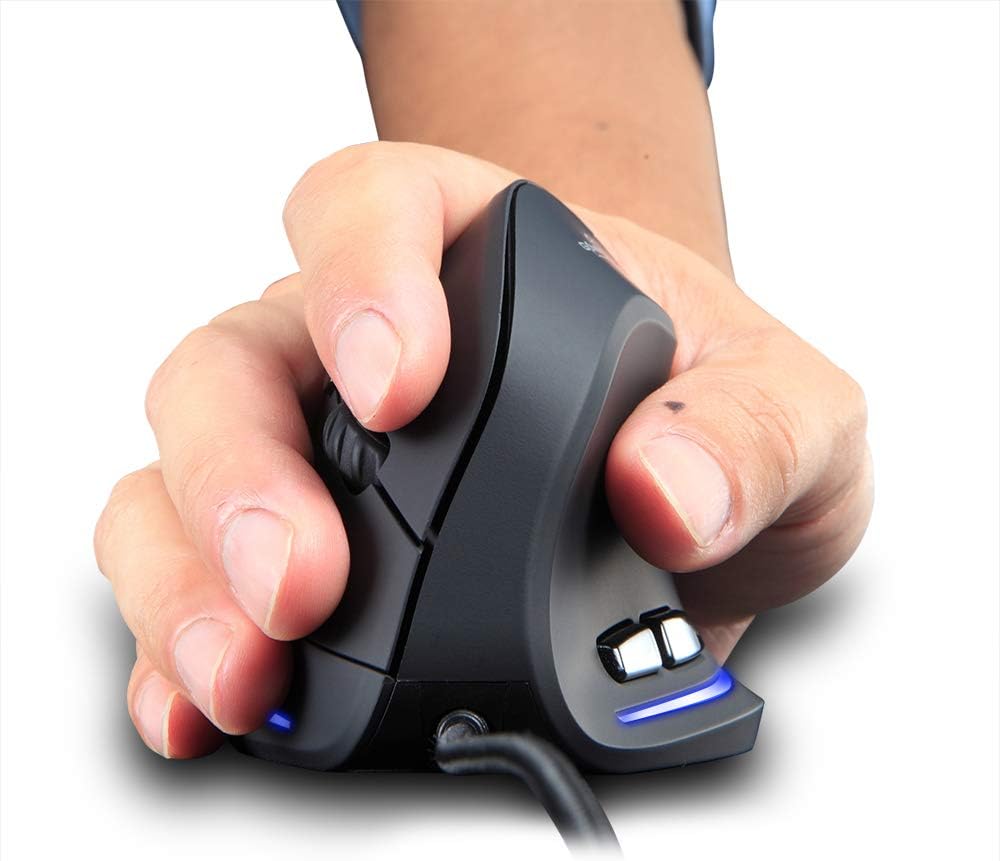
Figure 2: Proper hand placement on the Zelotes T20 mouse. This image illustrates how the vertical design allows for a natural handshake grip, intended to reduce wrist strain.

Figure 3: Ergonomic comparison. This diagram contrasts the natural wrist posture with a vertical mouse against the twisted posture often associated with traditional horizontal mice, emphasizing fatigue reduction.
Змест пакета
Праверце наяўнасць усіх прадметаў у камплекце:
- 1 x Zelotes Ergonomic Vertical Mouse
- 1 х Інструкцыя па эксплуатацыі (гэты дакумент)
Настройка
- Падключыце мыш: Plug the USB cable of the Zelotes T20 mouse into an available USB port on your computer.
- Ўстаноўка драйвера: The mouse is plug-and-play. Your operating system should automatically detect and install the necessary drivers. No additional software installation is typically required.
- Зняць ахоўную плёнку: Before use, locate and remove the protective film from the "Bigfoot pads" on the underside of the mouse for optimal gliding performance.

Figure 4: Underside of the mouse. This image shows the Teflon material pads and indicates the location of the protective film that should be removed before initial use.
Інструкцыя па эксплуатацыі
Функцыі кнопак
The Zelotes T20 mouse features 6 buttons for various functions:
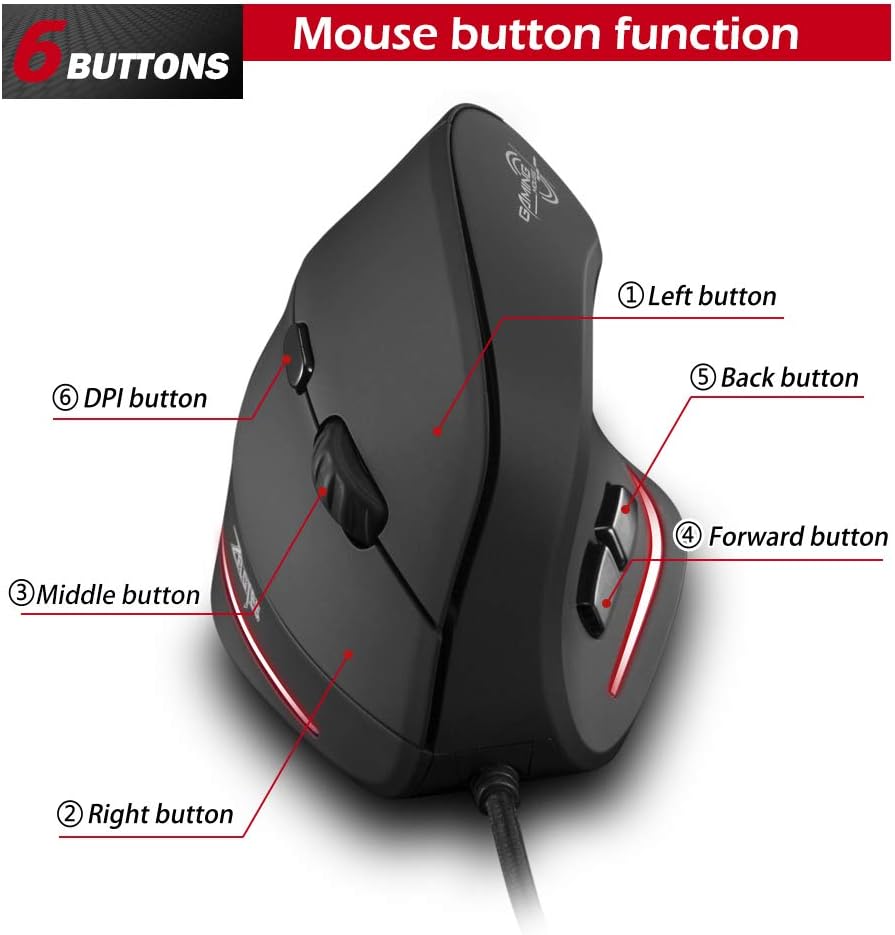
Figure 5: Mouse button layout. This diagram labels each of the six buttons: Left, Right, Middle (scroll wheel click), Forward, Back, and DPI adjustment button.
- Левая кнопка: Стандартная функцыя левага кліку.
- Правая кнопка: Стандартная функцыя правай кнопкі мышы.
- Middle Button (Scroll Wheel): Clickable scroll wheel for middle-click functions.
- Кнопка "Наперад": Перамяшчаецца наперад web браўзэры або file даследчыкі.
- Кнопка "Назад": Пераходзіць назад у web браўзэры або file даследчыкі.
- Кнопка DPI: Рэгулюе адчувальнасць мышы (DPI).
Рэгуляванне DPI (адчувальнасці)
The mouse offers four adjustable DPI settings to suit different tasks and preferences. Press the DPI button (Button 6 in Figure 5) to cycle through the settings. Each DPI level is indicated by a specific LED light color:
- 1200 DPI: Blue light hint
- 1600 DPI: Dark purple light hint
- 2400 DPI: Red light hint
- 3200 DPI: Light purple light hint
The light will stay on for approximately 3 seconds when switching DPI settings to indicate the current level.

Figure 6: DPI adjustment and LED indicators. This image illustrates the DPI button and the color coding for each of the four sensitivity settings.
Using Forward/Back Keys
The dedicated Forward and Back buttons (Buttons 4 and 5 in Figure 5) provide quick navigation. These buttons are designed to streamline browsing through web pages or folders, reducing the need for on-screen clicks.

Figure 7: Forward and Back navigation buttons. This image highlights the placement of the forward and back buttons, designed for convenient web і file навігацыя.
Тэхнічнае абслугоўванне
- Уборка: Выкарыстоўвайце мяккую сухую тканіну для чысткі паверхні мышы. Для выдалення ўстойлівага бруду злёгкуamp можна выкарыстоўваць тканіну, сачыце за тым, каб вадкасць не патрапіла ўнутр мышы.
- Абслугоўванне датчыка: Для забеспячэння дакладнага адсочвання падтрымлівайце аптычны датчык на ніжняй частцы мышы ў чысціні і без пылу і смецця.
- Сыход за кабелем: Пазбягайце рэзкіх выгібаў або празмернага нацягвання USB-кабеля, каб пазбегнуць пашкоджанняў.

Figure 8: Mouse surface texture. This image provides a close-up view of the mouse's surface, described as smooth for comfortable handling.
Ліквідацыю непаладак
- Мышка не рэагуе:
- Пераканайцеся, што кабель USB надзейна падключаны да спраўнага порта USB на вашым кампутары.
- Паспрабуйце падключыць мыш да іншага USB-порта.
- Перазагрузіце кампутар.
- Няправільнае адсочванне:
- Ачысціце аптычны датчык на ніжняй частцы мышы.
- Ensure you are using the mouse on a suitable surface (e.g., a mouse pad). Highly reflective or transparent surfaces may cause issues.
- Адрэгулюйце налады DPI з дапамогай кнопкі DPI.
- Кнопкі працуюць няправільна:
- Verify that the mouse is properly connected.
- Праверце мыш на іншым кампутары, каб вызначыць, ці праблема ў мышэй, ці ў наладах кампутара.
Тэхнічныя характарыстыкі
| Асаблівасць | Дэталь |
|---|---|
| мадэль | Т20 |
| Нумар кнопкі | 6 кнопкі |
| Сістэма сачэння | Аптычны |
| Даўжыня кабеля USB | 1.8м |
| Рабочы выпtagе/Ток | 5 В/100 мА |
| Кнопка жыцця | 5 мільёнаў разоў |
| Roller Life | 1.2 million turns |
| Памеры прадукту (Д х Ш х У) | 110 х 72 х 75 мм (4.33 х 2.83 х 2.95 цалі) |
| Вага прадукту | 160 ± 5g (5.6 ounces) |
| Дазвол (DPI) | 1200-1600-2400-3200 |
| Узровень прыбытковасці (узровень апытання) | 125 Гц |
| Сумяшчальнасць | Windows 2000/ME/XP (x64)/Vista/7/8/10, Mac OS X (over V10.4), Linux |

Figure 9: Product dimensions. This image provides detailed measurements of the mouse from various angles.
Гарантыя і падтрымка
Каб атрымаць інфармацыю аб гарантыі або тэхнічнай падтрымцы, звярніцеся да афіцыйнага прадстаўніка вытворцы webсайт або звярніцеся ў службу падтрымкі кліентаў. Захоўвайце чэк аб куплі як пацверджанне пакупкі.