
Уводзіны
This manual provides comprehensive instructions for the setup, operation, and maintenance of your Zelotes T90 Professional 9200 DPI High Precision USB Wired Gaming Mouse. Please read this manual thoroughly before using the product to ensure optimal performance and longevity.

Figure 1: Zelotes T90 Professional Gaming Mouse, showcasing its ergonomic design and LED lighting.
Змест пакета
- 1 x Zelotes T90 Gaming Mouse
- 1 х Інструкцыя па эксплуатацыі (гэты дакумент)
Настройка
Сістэмныя патрабаванні
- Operating System: Windows 98/ 2000/ ME/ NT / XP/ win 7/ win 8/ win 10/ Mac OS and other OS
- Інтэрфейс: порт USB
Ўстаноўка
- Распакуйце мыш: Carefully remove the Zelotes T90 Gaming Mouse from its packaging.
- Зняць ахоўную плёнку: Before use, please remove the foot pad protective film located on the underside of the mouse.
- Падключыцеся да кампутара: Plug the USB connector of the mouse into an available USB port on your computer. The mouse is plug-and-play and does not require additional driver installation for basic functionality.
Інструкцыя па эксплуатацыі
Функцыі кнопак
The Zelotes T90 mouse features 8 programmable buttons designed for enhanced gaming and productivity.
- Кнопка левай кнопкі
- Пстрыкніце правай кнопкай мышы
- Middle Button / Scroll Wheel
- Кнопка "Наперад": Quick forward function when browsing the web or navigating folders.
- Кнопка "Назад": Quick backward function when browsing the web or navigating folders.
- Кнопка DPI: Рэгулюе адчувальнасць мышы (DPI).
- Пажарны ключ: Configurable for rapid actions.
- Пераключальнік рэжыму святла: Кіруе святлодыёднымі эфектамі.
Рэгуляванне DPI (адчувальнасці)
The mouse supports 6-speed DPI adjustment, allowing you to customize sensitivity for different tasks or games. Press the Кнопка DPI to cycle through the following settings:
- 1000 DPI: Indicated by red light flashing 3 times.
- 1600 DPI: Indicated by orange light.
- 2400 DPI: Indicated by green light.
- 3200 DPI: Indicated by light blue light.
- 5500 DPI: Indicated by blue light.
- 9200 DPI: Indicated by purple light.

Figure 2: Location of DPI and Fire Key buttons on the Zelotes T90 mouse.
Fire Key Function
- Кароткі націск: Performs a double click.
- Доўгі націск (больш за 2 секунды): Switches to triple click mode. The light will flash 3 times to confirm the successful switch.
Пераключальнік рэжыму святла
The Zelotes T90 features various LED lighting modes:
- Кароткі націск: Cycles through 7-color breathing, 6 single-color breathing, and 6 single-color constant light modes (13 modes total).
- Доўгі націск (больш за 2 секунды): Выключае святлодыёдныя лямпы.

Figure 3: The Zelotes T90 mouse showcasing its 7-color cycle breathing and single-color lighting options.
Сістэма налады вагі
The mouse includes 8 removable 2.5-gram weights, allowing you to customize the mouse's weight and balance for improved stability and control, especially during fast movements.
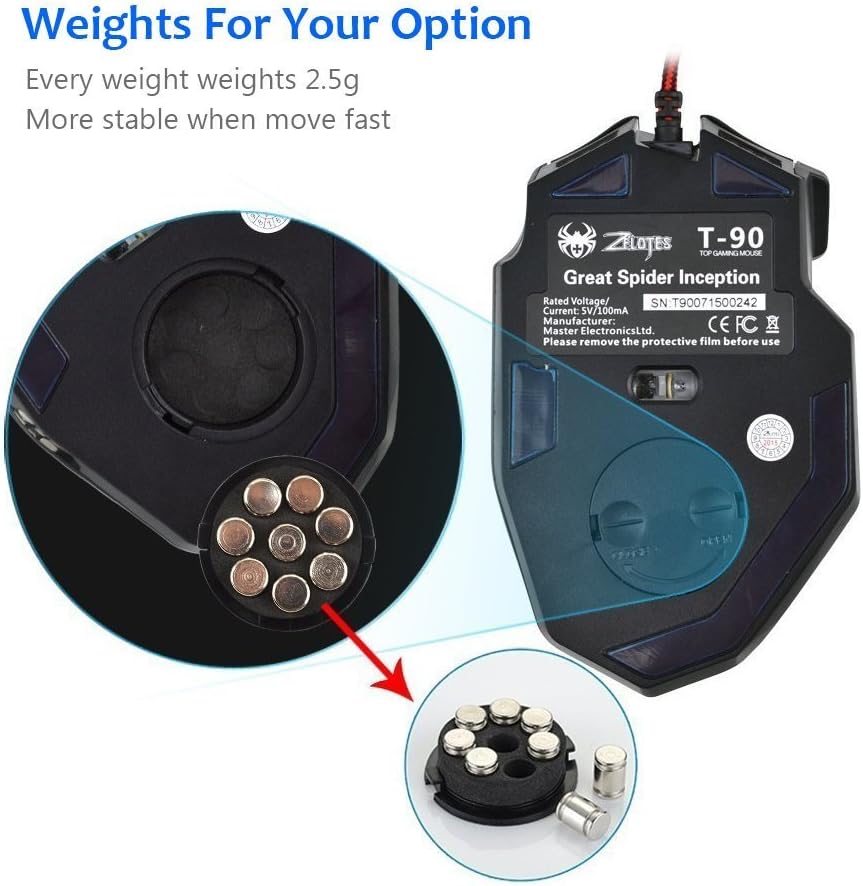
Figure 4: Location of the weight tuning system on the underside of the Zelotes T90 mouse.
Тэхнічнае абслугоўванне
Уборка
- Для ачысткі паверхні мышы выкарыстоўвайце мяккую сухую тканіну.
- Для ўстойлівага бруду злёгку ачысціцеampпрацярыце тканіну вадой або мяккім ачышчальным растворам. Пазбягайце агрэсіўных хімічных рэчываў.
- Не апускайце мыш у ваду або любую іншую вадкасць.
Захоўванне
Захоўвайце мыш у прахалодным, сухім месцы, удалечыні ад прамых сонечных прамянёў і экстрэмальных тэмператур, калі яна не выкарыстоўваецца працяглы час.
Ліквідацыю непаладак
| праблема | Магчымая прычына | Рашэнне |
|---|---|---|
| Мышка не рэагуе | Слабае падключэнне USB, няспраўны порт USB, сістэмная памылка. | Ensure the USB cable is securely plugged into the computer. Try a different USB port. Restart your computer. |
| Святлодыёдныя ліхтары не працуюць | Lights turned off, software issue. | Short press the Light Mode Switch button to cycle through modes. Long press the Light Mode Switch button for more than 2 seconds to turn lights on if they were off. |
| DPI setting not changing | DPI button not pressed correctly. | Ensure you are pressing the dedicated DPI button. Observe the light flashes to confirm DPI changes. |
| Курсор мышы няўстойлівы або скача | Брудны аптычны датчык, непрыдатная паверхня кілімка для мышы. | Clean the optical sensor on the underside of the mouse. Use a clean, uniform mouse pad surface. |
| Mouse settings reset | Accidental factory reset. | Press the left and right buttons simultaneously for more than 2 seconds to restore factory settings. If settings are reset, reconfigure them as desired. |
Тэхнічныя характарыстыкі
| мадэль | Т90 |
| Памеры (ДхШхВ) | 130 мм х 81 мм х 40 мм (5.12 х 3.19 х 1.57 цалі) |
| Вага | 145g ± 5g (excluding cable) |
| Супрацьвага | 8 x 2.5 Gram tuning weights |
| Налады DPI | 1000/1600/2400/3200/5500/9200 DPI |
| FPS | 6666 |
| Паскарэнне | 23G |
| Стаўка апытання | 500 Гц |
| Пераключыць жыццё | 800 мільёнаў разоў |
| Гузікі | 8 |
| Даўжыня кабеля USB | 1.8M braided-fiber cable |
| Інтэрфейс | USB |
| Optical Type | Red wave |
| Сумяшчальнасць | Windows 98/ 2000/ ME/ NT / XP/ win 7/ win 8/ win 10/ Mac OS and other OS |
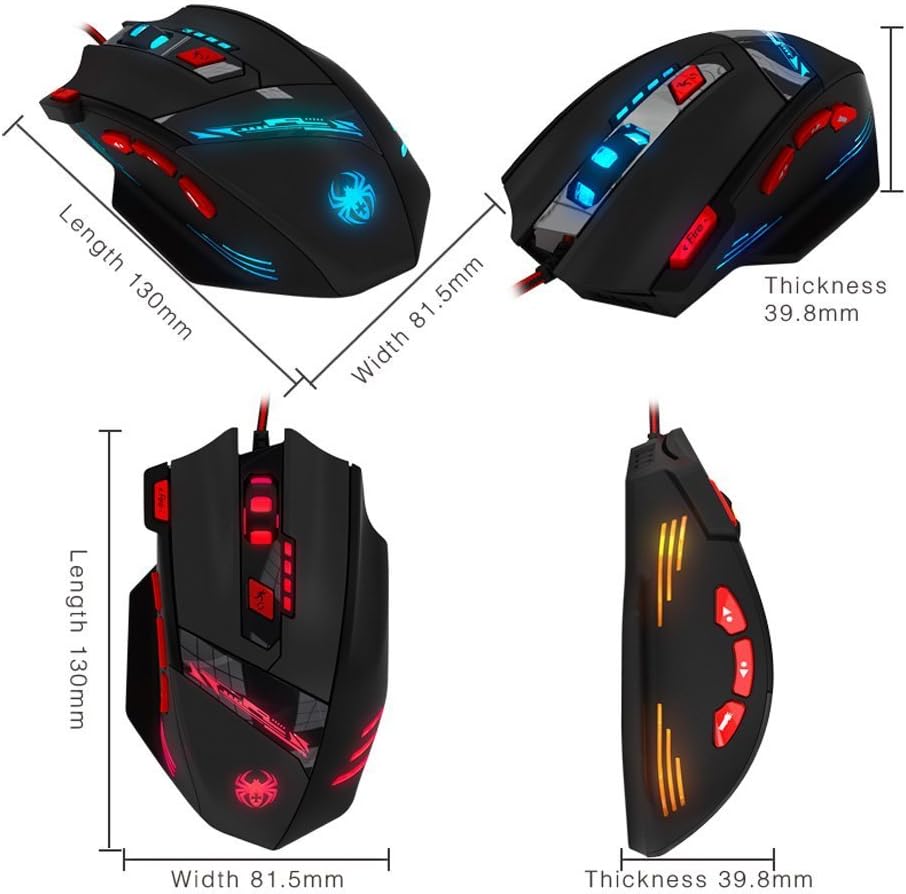
Figure 5: Detailed dimensions of the Zelotes T90 Professional Gaming Mouse.
Эрганамічны дызайн
The Zelotes T90 mouse is designed with ergonomics in mind, providing a comfortable fit for both fingertip and claw-style grips. This design aims to reduce fatigue during long periods of use.

Figure 6: Ergonomic design of the Zelotes T90 mouse, showing a comfortable hand grip.
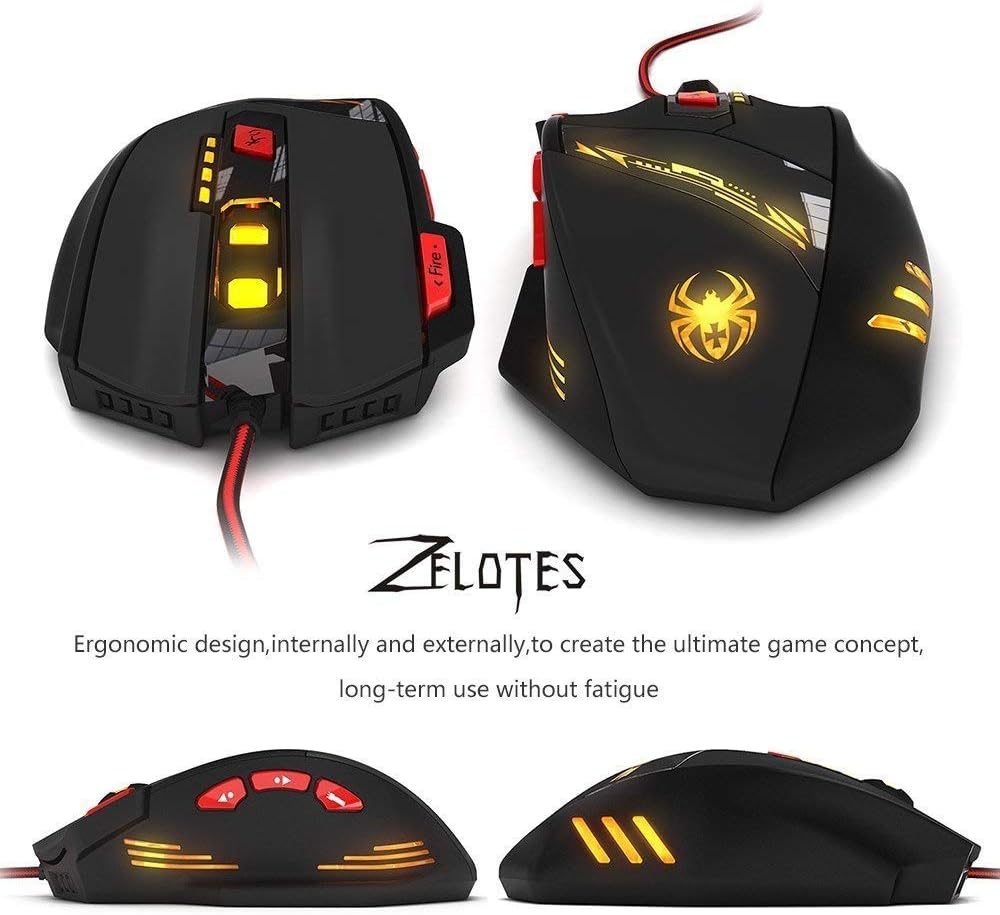
Малюнак 7: Рознае views highlighting the ergonomic contours of the Zelotes T90 mouse.
Важныя заўвагі
- Always remove the foot pad protective film before using the mouse.
- To restore the mouse to factory settings, press and hold the left and right mouse buttons simultaneously for more than 2 seconds.