
Giriş
This user manual provides essential information for the setup, operation, and maintenance of your Piko 55056 Expert SmartMeasure Wagon. This precision model railway accessory is designed to measure speed and distance on your layout, enhancing your model railway experience with accurate data.
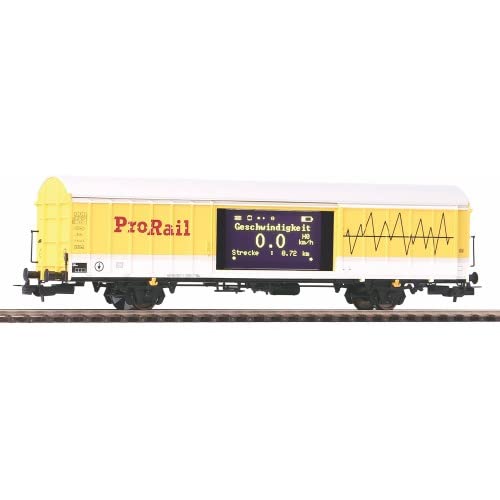
Şəkil 1: The Piko 55056 Expert SmartMeasure Wagon, featuring a digital display for speed and distance measurements.
Təhlükəsizlik Təlimatları
- Kiçik hissələri olduğuna görə uşaqların əli çatmayan yerdə saxlayın.
- Operate only on compatible model railway tracks.
- Həddindən artıq temperatura və ya nəmə məruz qalmayın.
- Handle with care to avoid damage to delicate components.
Quraşdırma
Qablaşdırma
- Carefully remove the Piko 55056 wagon from its packaging.
- Inspect the wagon for any visible damage. If damaged, contact your retailer.
- Gələcək saxlama və ya daşınma üçün orijinal qablaşdırmanı saxlayın.
Placing on Tracks
Gently place the wagon onto your model railway tracks, ensuring all wheels are properly seated on the rails. The wagon is designed for standard H0 gauge tracks.
Əməliyyat Təlimatları
Yandırılır
The Piko 55056 wagon is powered directly by the track current. Once placed on an energized track, its internal electronics will activate, and the display will illuminate.
Ekran Funksiyaları
The integrated display shows two primary measurements:
- Geschwindigkeit (Speed): Displays the current speed of the wagon in kilometers per hour (km/h).
- Strecke (Distance): Shows the total distance traveled by the wagon in kilometers (km) since the last reset.
Resetting Measurements
To reset the "Strecke" (distance) measurement, refer to the specific instructions provided with the wagon's packaging or consult the Piko website for detailed operational procedures. Typically, a small button or a specific sequence of track power cycles is used for this function.
Operation with Locomotives
Attach the SmartMeasure Wagon to any compatible locomotive using standard model railway couplings. Ensure secure connection before operation. The wagon will automatically begin measuring as it moves along the track.
Baxım
Təmizləmə
- Use a soft, dry cloth to gently wipe the exterior of the wagon and the display screen.
- Do not use abrasive cleaners or solvents, as these can damage the finish or electronics.
- Periodically clean the wheels and electrical contacts to ensure optimal performance and power pickup.
Saxlama
When not in use, store the wagon in its original packaging or a protective case to prevent dust accumulation and accidental damage. Store in a cool, dry place away from direct sunlight.
Problemlərin aradan qaldırılması
| Problem | Mümkün Səbəb | Həll |
|---|---|---|
| Display not illuminating | No power to tracks; poor contact with rails; internal fault. | Ensure track power is on. Clean wagon wheels and track rails. If problem persists, contact support. |
| Inaccurate speed/distance readings | Dirty wheels/track; mechanical obstruction; sensor issue. | Clean wheels and track. Check for any debris obstructing movement. |
| Wagon derails frequently | Improper track gauge; damaged wheels; uneven track. | Verify track gauge. Inspect wheels for damage. Ensure track is level and properly joined. |
Spesifikasiyalar
- Model: Piko 55056 Expert SmartMeasure Wagon
- Brend: Piko
- Ölçü: H0 (1:87 scale)
- Güc mənbəyi: Track current (DC/AC compatible, depending on model variant)
- Ölçmələr: Speed (km/h), Distance (km)
- Ekran növü: Digital LCD/LED
- İstehsalçıya istinad: 55056
- ASIN: B07FN31FQ3
Zəmanət Məlumatı
Piko products are manufactured to high quality standards. For specific warranty terms and conditions, please refer to the warranty card included with your product or visit the official Piko websayt. Hər hansı bir zəmanət iddiası üçün satınalma sübutunuzu saxlayın.
Müştəri dəstəyi
For further assistance, technical support, or spare parts, please contact Piko customer service through their official website or authorized service centers. You can find contact details on the Piko official websayt: www.piko.de.