
AULA HERO 68HE
AULA HERO 68 HE Gaming Keyboard Instruction Manual
Model: HERO 68HE
1. Introduction
The AULA HERO 68 HE is a high-performance 60% gaming keyboard designed for precision and speed. Featuring Hall Effect Magnetic Switches, adjustable actuation, and rapid trigger mode, it offers an ultra-fast 8K Hz polling rate and ultra-low latency for competitive gaming. The keyboard also boasts vibrant RGB backlighting and a customizable web driver for personalized settings.

Figure 1: AULA HERO 68 HE Gaming Keyboard (White Model)
2. What's in the Box
Upon unboxing your AULA HERO 68 HE keyboard, please ensure all the following items are present:
- Keyboard x1
- USB Cable x1
- Keycap Puller x1
- Extra Magnetic Switch x2
- Portable Ribbon x1
3. Setup
3.1 Connecting the Keyboard
The AULA HERO 68 HE keyboard connects via a USB-C wired connection. Simply plug the USB-C end of the provided cable into the keyboard's port and the USB-A end into an available USB port on your computer.

Figure 2: The compact 60% layout of the AULA HERO 68 HE keyboard, ideal for saving desk space.
3.2 Driver Installation and Initial Setup
The HERO 68 HE keyboard utilizes a web-based driver, eliminating the need for traditional software installation. This driver is compatible with Windows operating systems only. To access the driver and begin customization:
- Connect your keyboard to a Windows PC.
- Open your web browser and navigate to the AULA web driver portal (refer to the user manual for the exact URL).
- The driver should automatically detect your keyboard. You can then proceed with initial setup and calibration.
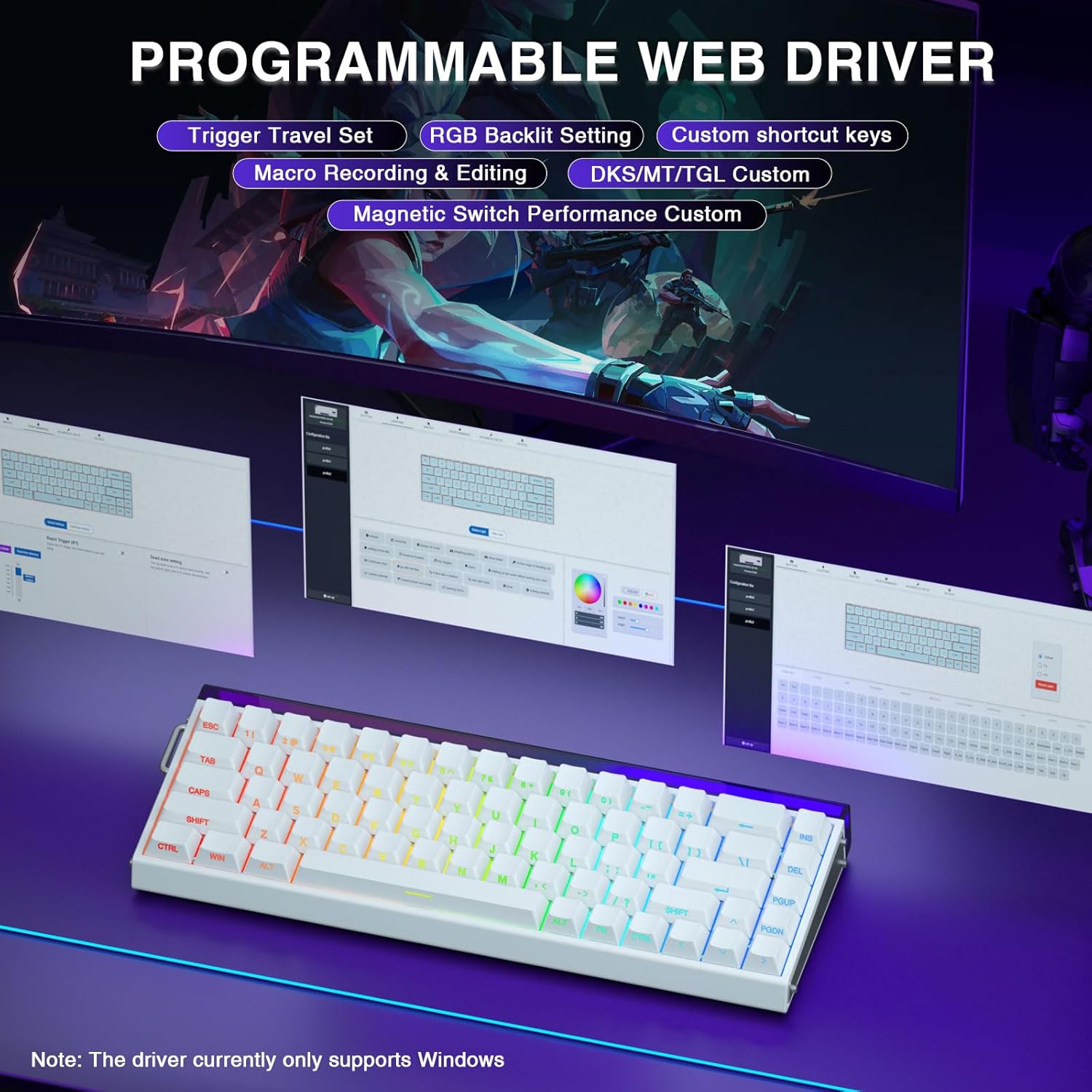
Figure 3: The programmable web driver interface for the AULA HERO 68 HE keyboard.
4. Operating the Keyboard
4.1 Key Functions and Combinations
The AULA HERO 68 HE keyboard features a 60% layout, which means some functions are accessed via FN key combinations. Refer to the provided user manual for a complete list of FN key shortcuts for media control, lighting adjustments, and other functions.

Figure 4: FN key combinations for controlling RGB backlighting and lightbox effects.
4.2 Adjustable Actuation and Rapid Trigger Mode
The Hall Effect Magnetic Switches allow for precise customization of actuation points and enable Rapid Trigger mode. These settings are configured through the web driver:
- Adjustable Actuation: Set the trigger travel distance for each key from 0.1mm to 3.4mm with 0.01mm accuracy.
- Rapid Trigger Mode: Configure keys to activate and deactivate based on movement rather than a fixed point, allowing for faster repeated inputs.

Figure 5: Comparison of regular switch behavior versus Rapid Trigger mode, highlighting faster reset and activation.
4.3 Macro Programming
The web driver allows for comprehensive macro programming. You can remap key functions, set complex macros, and create hotkeys to streamline your workflow or gaming commands.
4.4 RGB Lighting Customization
The keyboard features 16.8 million colors of RGB backlighting with south-facing LEDs for enhanced visual effects. You can customize lighting modes, colors, and brightness via the web driver or using FN key combinations.
5. Maintenance
5.1 Cleaning the Keyboard
To maintain optimal performance and appearance, regularly clean your keyboard. Use a soft, dry cloth to wipe down the keycaps and chassis. For deeper cleaning, you may use a can of compressed air to remove dust and debris from between the keycaps.
5.2 Keycap and Switch Replacement
The AULA HERO 68 HE features side-printed PBT keycaps that are durable and resistant to fading. The magnetic switches are hot-swappable, allowing for easy replacement or customization.
- Keycap Removal: Use the provided keycap puller to gently remove keycaps. Hook the puller onto opposite sides of the keycap and pull straight up.
- Switch Removal: Use a switch puller (not included, but compatible with magnetic switches) to carefully remove the magnetic switches.
- Replacement: Align new keycaps or switches with the appropriate stems and press down firmly until they click into place.

Figure 6: Hot-swappable magnetic switches and durable side-engraved PBT keycaps.
6. Troubleshooting
If you encounter any issues with your AULA HERO 68 HE keyboard, please refer to the following common solutions:
- Keyboard Not Responding: Ensure the USB-C cable is securely connected to both the keyboard and your computer. Try a different USB port or cable.
- Driver Issues: The web driver is only compatible with Windows systems. Ensure your operating system is supported. Clear your browser cache or try a different browser if experiencing loading issues.
- Lighting Problems: Use FN key combinations (refer to manual) to cycle through lighting modes or adjust brightness. If issues persist, check lighting settings in the web driver.
- Double Inputs/Missed Inputs: This can often be resolved by recalibrating the switches through the web driver's performance settings. Adjust actuation points and dead zones as needed.
For more detailed troubleshooting or persistent problems, please visit the official AULA support website or contact customer service.
7. Specifications
| Feature | Detail |
|---|---|
| Brand | AULA |
| Model Number | HERO 68HE |
| Connectivity Technology | USB-C Wired |
| Switch Type | Hall Effect Magnetic Switch |
| Polling Rate | 8K Hz |
| Latency | 0.125ms |
| Actuation Point Accuracy | 0.01mm |
| Keycaps | Side-Printed PBT |
| Backlighting | RGB (16.8 million colors) |
| Product Dimensions | 12.69 x 4.72 x 1.59 inches |
| Item Weight | 1.76 pounds |
| Compatible Devices | Laptop, PC, Gaming Console |
8. Warranty and Support
AULA provides support for its products. For warranty information, technical assistance, or customer service inquiries, please visit the official AULA website or refer to the contact details provided in your product packaging. Keep your purchase receipt for warranty claims.
Related Documents - HERO 68HE
 |
AULA WIN60 Wired Magnetic Switch Keyboard Product Manual This manual provides a comprehensive guide to the AULA WIN60 Wired Magnetic Switch Keyboard, covering its features, functions, and operating modes for both PRO/Max and Standard editions. Learn about backlight adjustments, system switching, shortcut key descriptions, and magnetic switch adjustment methods. |
 |
AULA HERO 68HE Gaming Keyboard Product Manual Comprehensive product manual for the AULA HERO 68HE Gaming Keyboard, detailing features like magnetic switches, 8K return rate, hot-swappable keys, RGB lighting, and a compact 68-key layout. Includes essential safety warnings and disposal guidelines. |
 |
AULA MINI 60 HE Tri-Mode Magnetic Switch Keyboard - Product Manual Comprehensive product manual for the AULA MINI 60 HE Tri-Mode Magnetic Switch Keyboard. This guide covers features like hot-swappable magnetic switches, adjustable actuation, RGB lighting, multiple connection modes (Bluetooth, 2.4G, Wired), shortcut functions, and detailed product specifications. |
 |
AULA HERO 68HE Magnetic Switch Keyboard User Manual User manual for the AULA HERO 68HE magnetic switch keyboard, detailing its features, functions, and specifications. Includes information on RGB lighting, shortcut keys, system mode switching, and magnetic switch adjustment. |
 |
AJAZZ AK820 MAX HE Hall Effect Magnetic Gaming Keyboard User Manual User manual for the AJAZZ AK820 MAX HE Hall Effect Magnetic Gaming Keyboard. Features adjustable actuation, 3-mode wireless connectivity, integrated screen and knob, gasket mount, RGB backlighting, and NKRO for Windows/Mac. |
 |
AULA HERO 68HE Magnetic Switch Gaming Keyboard User Manual Detailed user manual for the AULA HERO 68HE Magnetic Switch Gaming Keyboard, covering features, setup, customization, lighting effects, magnetic switch adjustments, and warranty information. |
Ask a question about this manual
Ask about setup, troubleshooting, compatibility, parts, safety, or missing instructions. Manuals+ will review the question and use this page’s manual context to help answer it.