
1. Product Overview
The Lipix JBD BD24SA09 Smart Battery Management System (BMS) is a robust protection board designed for high-performance battery pack applications. It supports a wide range of configurations from 10S to 24S and is compatible with 36V, 48V, 60V, and 72V Li-ion NMC and LiFePO4 battery packs. This BMS is engineered for demanding use cases, providing comprehensive protection and smart monitoring capabilities.
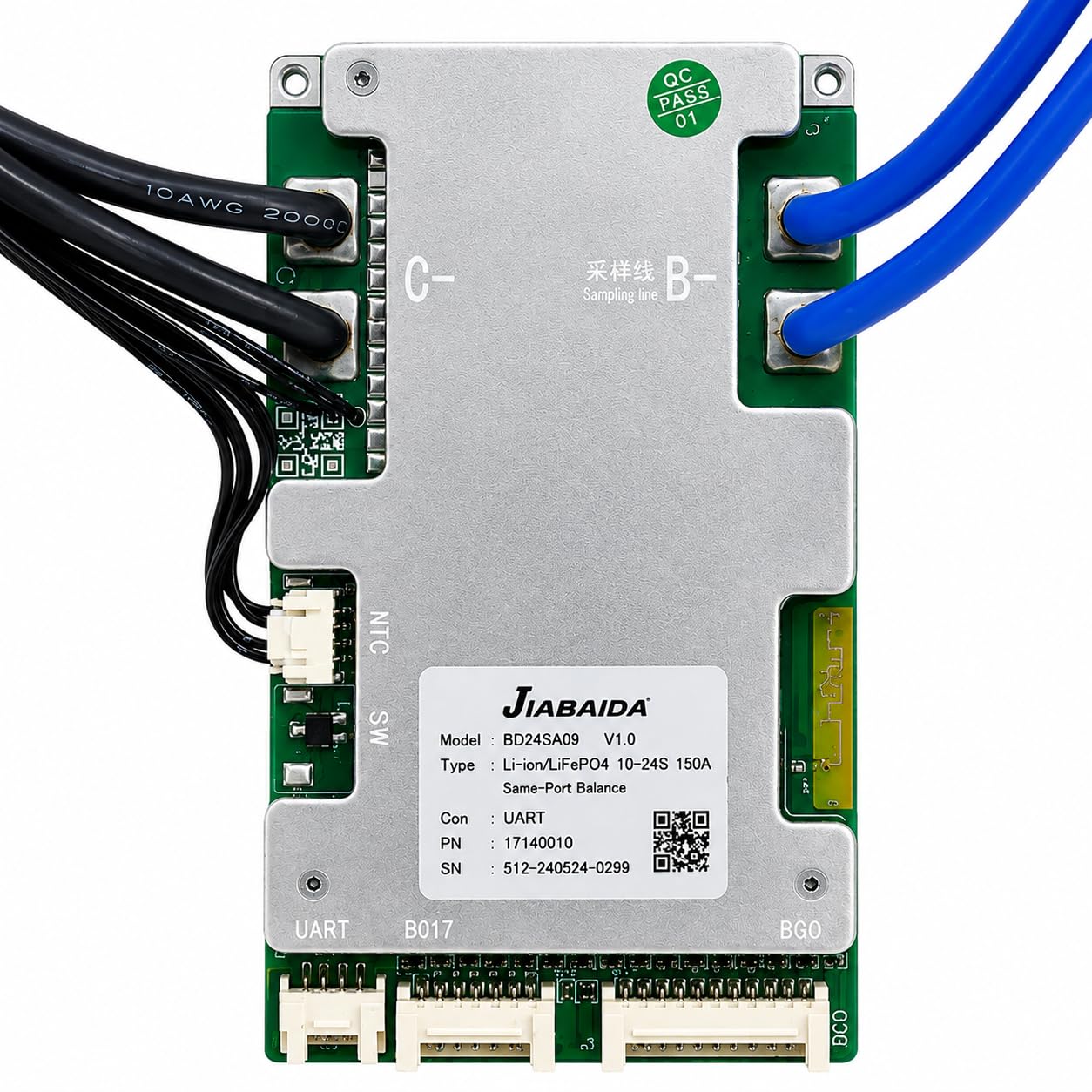
Figure 1: Lipix JBD BD24SA09 Smart BMS. This image shows the main unit with its various connection points, including the balance cable port and heavy-duty power terminals.
Key Features:
- Wide Compatibility: Supports 10S to 24S configurations for 36V, 48V, 60V, and 72V Li-ion NMC and LiFePO4 battery packs.
- High Current Rating: Rated at 150A continuous discharge for demanding power applications.
- Smart Connectivity: Built-in Bluetooth module and UART interface for real-time monitoring and configuration via a dedicated smartphone app.
- Comprehensive Protection: Safeguards against overcharge, over-discharge, overcurrent, short circuit, and temperature issues.
- Active Balancing: Includes a balance cable to maintain cell voltage equilibrium, extending battery pack life.
2. Setup and Installation
Proper installation is crucial for the safe and efficient operation of your BMS. Always ensure the battery pack is disconnected from any power source before beginning installation.
Safety Precautions:
- Wear appropriate personal protective equipment (PPE), including safety glasses and insulated gloves.
- Ensure all connections are secure and properly insulated to prevent short circuits.
- Verify correct polarity before making any connections. Incorrect polarity can damage the BMS and battery pack.
- Work in a well-ventilated area.
Connection Steps:
- Prepare Battery Pack: Ensure your battery pack is assembled and all individual cells are balanced to a similar voltage before connecting the BMS.
- Connect Balance Cable: Carefully connect the provided balance cable to the BMS. Ensure the first wire (B0) is connected to the negative terminal of the first cell, and subsequent wires are connected to the positive terminals of each cell in series (B1, B2, ..., B24). Double-check the wiring order according to your battery pack's cell count (10S-24S).
- Connect Main Negative (B-): Connect the main negative terminal of your battery pack to the B- terminal on the BMS.
- Connect Main Load/Charge Negative (P-): Connect the negative terminal of your load and charger to the P- terminal on the BMS.
- Connect Main Positive (B+): Connect the main positive terminal of your battery pack directly to the positive terminal of your load and charger. The BMS typically manages the negative path.
- Verify Connections: Before applying power, visually inspect all connections for correctness and security.
3. Operating Instructions
The JBD BD24SA09 Smart BMS offers advanced monitoring and configuration through its Bluetooth and UART interfaces.
Bluetooth App Connectivity:
- Download App: Search for the official JBD BMS app on your smartphone's app store (compatible with Android and iOS).
- Enable Bluetooth: Ensure Bluetooth is enabled on your smartphone.
- Connect to BMS: Open the app and search for available Bluetooth devices. Select your JBD BD24SA09 BMS from the list. The default password is often "123456" or "888888" if prompted.
- Monitor & Configure: Once connected, you can view real-time battery parameters such as total voltage, individual cell voltages, current, temperature, and state of charge. The app also allows for configuration of protection parameters (e.g., over-discharge voltage, overcurrent limits) within safe operating ranges.
UART Interface:
The UART interface provides a wired communication option for advanced users or integration with external controllers and display systems. Refer to the specific UART communication protocol documentation (usually available from the manufacturer) for detailed integration instructions.
4. Maintenance
The JBD BD24SA09 BMS is designed for reliability with minimal maintenance. However, periodic checks can ensure optimal performance and longevity.
- Visual Inspection: Periodically inspect the BMS and its connections for any signs of damage, corrosion, or loose wiring.
- Cell Balancing: The active balancing feature of this BMS helps maintain cell voltage equilibrium. Monitor cell voltages via the Bluetooth app to ensure they remain within acceptable tolerances, especially after prolonged use or storage.
- Firmware Updates: Check the manufacturer's website or app for any available firmware updates for the BMS. Follow instructions carefully if performing an update.
- Cleanliness: Keep the BMS free from dust and moisture. Use a dry, soft cloth for cleaning.
5. Troubleshooting
If you encounter issues with your JBD BD24SA09 BMS, refer to the following common troubleshooting steps:
| Problem | Possible Cause | Solution |
|---|---|---|
| No power output from P- terminal | BMS in protection mode (over-discharge, overcurrent, short circuit) | Check battery voltage. Recharge battery if over-discharged. Disconnect load and check for short circuits. BMS may reset automatically or require a charge input to reset. |
| BMS not detected by Bluetooth app | Bluetooth off, app issue, or BMS not powered | Ensure Bluetooth is enabled on your phone. Restart the app. Verify the BMS is correctly connected to the battery pack and powered on. Try restarting your phone. |
| Individual cell voltages unbalanced | Initial cell imbalance, or prolonged use without full charge cycles | Allow the BMS to perform active balancing by keeping the battery pack at a higher state of charge for an extended period. If severe, manually balance cells before connecting to BMS. |
| BMS overheating | Excessive current draw, poor ventilation, or internal fault | Reduce load. Ensure adequate airflow around the BMS. If overheating persists at low loads, discontinue use and contact support. |
For issues not covered here, or if troubleshooting steps do not resolve the problem, please contact Lipix customer support.
6. Specifications
| Feature | Detail |
|---|---|
| Model Name | Bd24sa09 Smart Bms |
| Brand | Lipix |
| Cell Configuration | 10S to 24S |
| Supported Battery Types | Li-ion NMC, LiFePO4 |
| Voltage Compatibility | 36V, 48V, 60V, 72V (nominal) |
| Continuous Discharge Current | 150 Amps |
| Connectivity | Bluetooth, UART |
| Protection Features | Overcharge, Over-discharge, Overcurrent, Short Circuit, Temperature |
| Balancing | Active Balancing (via balance cable) |
| Dimensions (L x W x H) | 20 x 8 x 3.5 Centimeters |
| Item Weight | 150 Grams |
| Compatible Phone Models | Android Smartphones, Bluetooth-enabled Smartphones, iOS Smartphones |
| Country of Origin | India |
7. Warranty Information
This Lipix JBD BD24SA09 Smart BMS comes with a 3-month warranty from the date of purchase. The warranty covers manufacturing defects and malfunctions under normal use. It does not cover damage caused by improper installation, misuse, unauthorized modifications, or external factors.
Please retain your proof of purchase for warranty claims.
8. Support
For technical assistance, troubleshooting beyond this manual, or warranty inquiries, please contact Lipix customer support.
Manufacturer/Packer: Lipix™
Location: Tamil Nadu, India
Refer to your purchase documentation or the Lipix official website for the most current contact information.