
Important Safety Information
Important! Please retain these instructions for future reference. Read carefully before assembly and use.
WARNING: TIPPING HAZARD!
Unanchored furniture can tip over. To prevent this furniture from tipping, it must be permanently attached to the wall. Use suitable fixing accessories for your home's walls. If you have any questions, please consult your local specialized retailer. Follow each step of the instructions carefully.
Product Overview
The Vicco Alvia Dressing Table is designed to provide a functional and elegant space for your daily routine. It features a spacious tabletop, multiple drawers for storage, and an integrated LED mirror.
Included Components:
- Dressing Table Unit
- LED Mirror
- Assembly Instructions
- Mounting Hardware (for assembly and wall anchoring)
Note: Decorations and additional accessories shown in product images are not included.

Image: Overview of the Vicco Alvia Dressing Table and LED Mirror, showing key dimensions and the assembly icon.

Image: Detail showing the LED mirror's integrated lighting, capable of different light temperatures.
Specifications
| Feature | Detail |
|---|---|
| Model Number | 65349 |
| Color | White |
| Material | 15 mm Particle Board with Melamine Resin Coating |
| Dressing Table Dimensions (L x H x D) | 100 x 75 x 40 cm |
| LED Mirror Dimensions (L x H x D) | 110 x 70 x 2.8 cm |
| Total Weight (Gross) | 46.5 kg |
| Number of Drawers | 6 |
| Assembly Required | Yes |
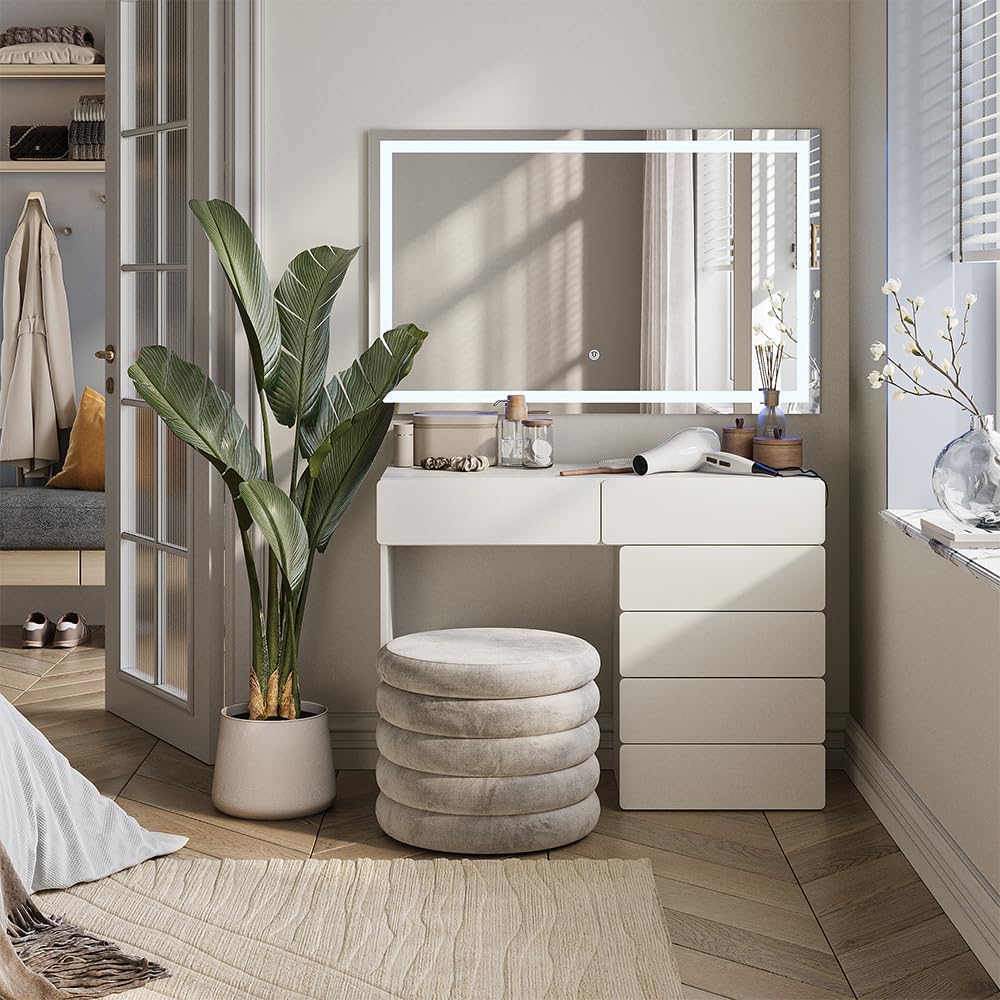
Image: Energy efficiency label for the integrated LED mirror. For more details, visit EPREL Database.
Setup and Assembly Instructions
The Vicco Alvia Dressing Table requires assembly. Please follow the detailed assembly instructions provided in the packaging carefully. Ensure all components are present before beginning assembly.
- Unpack Components: Carefully remove all parts from the packaging and verify against the parts list in the assembly manual.
- Assemble the Dressing Table: Follow the step-by-step diagrams and instructions to assemble the main table unit and drawer sections.
- Install Drawers: Insert the assembled drawers into their respective compartments.
- Mount the LED Mirror: Securely attach the LED mirror to the wall above the dressing table. Ensure the wall is suitable for mounting and use appropriate hardware.
- Wall Anchoring: Crucially, anchor the dressing table to the wall using the provided anti-tip hardware. This prevents accidental tipping and ensures safety. Refer to the safety information section for more details.
- Connect Power: Once assembled and anchored, connect the LED mirror's power cable to a suitable power outlet.
Always ensure the furniture is stable and securely anchored before use.
Operating Instructions (LED Mirror)
The integrated LED mirror features touch controls for easy operation.
- Power On/Off: Gently touch the power icon on the mirror surface to turn the LED lights on or off.
- Adjust Brightness/Color Temperature: Depending on the model, repeated touches or a long press on the power icon or a dedicated button may cycle through different brightness levels or color temperatures (e.g., warm white, cool white). Refer to the specific instructions provided with the mirror for detailed functionality.

Image: The Vicco Alvia Dressing Table with its LED mirror illuminated, showcasing its functionality.
Maintenance
To ensure the longevity and appearance of your Vicco Alvia Dressing Table, follow these maintenance guidelines:
- Cleaning the Surface: The melamine-coated particle board surface is easy to clean. Use a soft, damp cloth with mild soap and water. Avoid abrasive cleaners or harsh chemicals that could damage the finish.
- Cleaning the Mirror: Use a glass cleaner and a soft, lint-free cloth for the LED mirror. Do not spray cleaner directly onto the mirror; instead, apply it to the cloth first.
- Dusting: Regularly dust all surfaces with a dry, soft cloth.
- Liquid Spills: Wipe up any liquid spills immediately to prevent damage to the material.
- Avoid Direct Sunlight: Prolonged exposure to direct sunlight can cause fading or discoloration.
Troubleshooting
LED Mirror Not Turning On:
- Check if the power cable is securely plugged into both the mirror and the wall outlet.
- Ensure the wall outlet is functional by testing it with another device.
- Verify that the touch control area on the mirror is clean and unobstructed.
Table Instability:
- Ensure all assembly screws and fasteners are tightened correctly.
- Confirm that the dressing table is properly anchored to the wall as per the safety instructions.
- Check if the floor surface is even. Use furniture pads if necessary to level the table.
Drawers Not Sliding Smoothly:
- Check for any obstructions in the drawer runners.
- Ensure the drawers are assembled correctly and aligned with the runners.
- Verify that the table unit itself is level and not warped.
Warranty and Support
Warranty information for the Vicco Alvia Dressing Table is typically provided with your purchase documentation or by the retailer. Please refer to these documents for details regarding warranty coverage and terms.
For technical support, missing parts, or further assistance, please contact the retailer where you purchased the product or visit the official Vicco brand store for contact information: