
Introduction
This manual provides detailed instructions for the installation, operation, and maintenance of your YUNTX Android 16 Car Radio. This unit is specifically designed for Chrysler 300 and 300C models manufactured between 2004 and 2011. Please read this manual thoroughly before installation and use to ensure proper functionality and safety.
Compatibility and Pre-Installation Check
Before proceeding with installation, verify the compatibility of this unit with your vehicle. This car radio is suitable for Chrysler 300 and 300C models from 2004 to 2011. It is crucial to check the year, size, and shape of your vehicle's central console to ensure a proper fit.
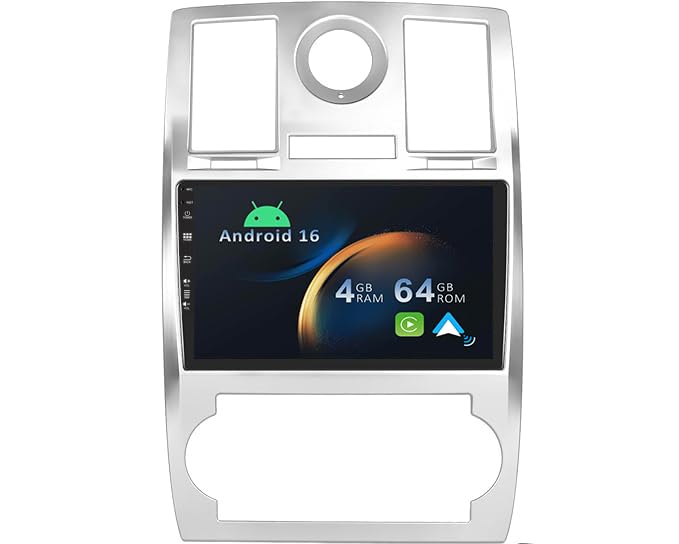
Image: The YUNTX Android Car Radio displaying a navigation map, with visual indicators for compatibility with Chrysler 300C and 300 models from 2005-2009, and a comparison of compatible and incompatible dashboard configurations.
Setup and Installation
Professional installation is recommended for this car radio. Ensure the vehicle's battery is disconnected before beginning any electrical work. Refer to your vehicle's service manual for specific dashboard removal instructions.
Package Contents:
- 1 x YUNTX Android Car Radio Unit
- 1 x Power Cable
- 1 x RCA A Output Cable
- 1 x RCA B Output Cable
- 1 x RCA C Output Cable
- 1 x GPS Antenna
- 1 x USB Cable
- 1 x Rear Camera (Gift)
- 1 x User Manual (This document)
Wiring Connections:
- Connect the main power cable harness to the vehicle's wiring. Ensure all connections are secure and correctly matched.
- Attach the GPS antenna to the designated port on the rear of the unit. Position the antenna in a location with a clear view of the sky for optimal signal reception.
- Connect the USB cable(s) for external devices or data transfer.
- If installing the rear camera, connect its video and power cables to the corresponding inputs on the car radio and the vehicle's reverse light circuit.
- Connect any additional RCA cables for external amplifiers or video outputs as required.
After all connections are made, carefully reassemble the dashboard and reconnect the vehicle's battery. Power on the unit to perform initial setup.

Image: Front view of the YUNTX Android Car Radio unit, showing its display and physical buttons.
Operating Instructions
1. Initial Power On and System Configuration
Upon first power-on, the system may guide you through initial setup steps, including language selection and time zone settings. The unit features a fast-boot function, allowing access to the system in less than 2 seconds after the initial boot.
2. CarPlay and Android Auto
The unit supports built-in CarPlay and Android Auto for seamless smartphone integration. Connect your smartphone via USB or Bluetooth to access navigation, music, calls, and messages directly from the car radio display. This allows for a safer and more focused driving experience.

Image: Demonstrates connecting a smartphone via USB or Bluetooth for CarPlay and Android Auto functionality, displaying the interface with various app icons.
3. GPS Navigation
The car radio includes integrated GPS navigation. It supports both online navigation applications (e.g., Google Maps) and offline maps. You can download offline maps to use navigation without an internet connection. The system provides 3D maps and voice guidance. Audio playback (radio, Bluetooth, USB, SD) continues during navigation.
4. Bluetooth 5.0 Connectivity
Utilize Bluetooth 5.0 for hands-free calling and audio streaming. Pair your smartphone to make and receive calls, sync your phonebook, and play music wirelessly. Bluetooth 5.0 ensures faster and more stable data transmission.
5. Radio (AM/FM/RDS/DAB+)
The unit features an integrated AM/FM tuner with RDS (Radio Data System) for enhanced radio information. For superior audio quality, the system supports DAB+ digital radio (requires an optional DAB adapter, model B07NRD4T9D). DAB+ provides CD-like sound quality and noise-free transmission.
6. Internet Connectivity (Wi-Fi/4G)
The car radio has built-in Wi-Fi (2.4GHz and 5GHz dual-band) for internet access. You can connect to a Wi-Fi hotspot or use an external 4G modem (optional, dongle B089KGJT61) for mobile internet connectivity. This enables access to online services and applications like Amazon Instant Video, Netflix, Pandora, Skype, and YouTube.
7. Split Screen Mode
The split-screen function allows you to run two applications simultaneously on the 9-inch IPS display. For example, you can view navigation maps on one side while controlling music playback on the other.

Image: The split-screen mode in action, displaying a navigation map on one half and a music player on the other.
8. Mirror-Link Mode
Mirror-Link allows you to mirror your smartphone's screen onto the car radio display. This feature supports most iPhone and Android phones, connecting via Bluetooth or USB.
9. Steering Wheel Control
The unit supports your vehicle's original steering wheel controls. This allows you to easily adjust volume, change tracks, and manage calls without taking your hands off the steering wheel, enhancing safety and convenience.
10. Reversing Video Support
The car radio automatically displays the rear camera feed when the vehicle is put into reverse. This feature significantly improves parking safety and visibility. A rear camera is included in the package.
11. Display and Illumination
The unit features a 9-inch IPS 2.5D screen with a resolution of 1024x640, offering wide viewing angles and clear visuals. You can customize the button illumination with various colors to match your vehicle's interior or personal preference.

Image: Comparison demonstrating the superior viewing angles and color reproduction of the IPS screen compared to other screen types.
12. Optional Features
- OBD (On-Board Diagnostics): Supports most Bluetooth and Wi-Fi OBD2 scanners (optional adapter required). Allows monitoring of vehicle data.
- DVR System: Compatible with external DVR cameras for recording driving footage.
Maintenance
To ensure the longevity and optimal performance of your YUNTX Android Car Radio, follow these maintenance guidelines:
- Cleaning the Screen: Use a soft, lint-free cloth to gently wipe the screen. For stubborn smudges, slightly dampen the cloth with water or a screen-specific cleaning solution. Avoid harsh chemicals or abrasive materials.
- Software Updates: Periodically check for available software updates from the manufacturer to ensure the system runs efficiently and has the latest features and security patches.
- Environmental Conditions: Avoid exposing the unit to extreme temperatures, direct sunlight for prolonged periods, or excessive moisture.
- Cable Connections: Ensure all cables are securely connected. Loose connections can lead to intermittent issues.
Troubleshooting
If you encounter issues with your car radio, refer to the following common problems and solutions:
| Problem | Possible Cause | Solution |
|---|---|---|
| Unit does not power on. | Loose power connection, blown fuse, vehicle battery issue. | Check power cable connections. Inspect vehicle fuses. Ensure vehicle battery is charged. |
| No sound. | Volume too low, mute activated, speaker wiring issue, incorrect audio source. | Increase volume. Check if mute is active. Verify speaker connections. Select correct audio source. |
| GPS signal lost or inaccurate. | GPS antenna obstructed or improperly placed, antenna connection loose. | Ensure GPS antenna has a clear view of the sky. Check antenna connection. |
| Bluetooth device cannot connect. | Bluetooth not enabled on unit or device, device not in pairing mode, interference. | Ensure Bluetooth is enabled on both devices. Put device in pairing mode. Try pairing again. |
| Touch screen unresponsive. | System freeze, temporary software glitch. | Restart the unit (power cycle). If issue persists, perform a factory reset (refer to system settings). |
If the problem persists after attempting these solutions, please contact YUNTX customer support for further assistance.
Specifications
| Feature | Detail |
|---|---|
| Operating System | Android 16 |
| Processor | Quad-core CPU |
| RAM | 4GB |
| Internal Storage (ROM) | 64GB |
| Display | 9-inch IPS 2.5D Touch Screen |
| Display Resolution | 1024x640 |
| Audio Output Power | 4 x 50 W |
| Bluetooth Version | 5.0 |
| Wi-Fi | Built-in (2.4GHz/5GHz Dual Band) |
| External 4G Support | Yes (requires optional 4G modem) |
| GPS | Built-in, supports online/offline maps |
| Radio Tuner | AM/FM with RDS (NXP TEF7708 IC) |
| DAB+ Support | Yes (requires optional DAB adapter B07NRD4T9D) |
| USB/SD Card Support | Up to 500GB |
| Connectivity Ports | RCA, USB 2.0 |
| Product Weight | 2 Kilograms |
| Manufacturer | YUNTX |
| Country of Origin | China |
Warranty and Support
This product comes with a 1-year product warranty. For warranty claims or technical support, please contact your retailer or the manufacturer directly. Ensure you have your purchase receipt and product model information available when seeking support.
For further assistance, you may visit the YUNTX Brand Store.