
HIVAGI KWS-306WF
HIVAGI Taxnele KWS-306WF 3-Phase WiFi Smart Energy Meter & Circuit Breaker User Manual
Model: KWS-306WF
1. Introduction
The HIVAGI Taxnele KWS-306WF is an advanced 3-phase WiFi Smart Energy Meter and Circuit Breaker designed for comprehensive electrical system monitoring and protection. This device integrates real-time power measurement with smart circuit protection and remote control capabilities via a mobile application. It is suitable for diverse residential, commercial, and industrial environments, offering features such as over/under voltage, current, and power protection, along with auto-reconnect functionality.

Figure 1: HIVAGI Taxnele KWS-306WF Smart Energy Meter with key features highlighted.
2. Product Features
- All-in-One Three-Phase Power Monitoring: Real-time display of Voltage, Current, Power (Watts), Timing, Electric Energy (kWh), Temperature, Frequency, and Power Factor on a vibrant multi-color digital LED display.
- WiFi App Remote Control & Timer: Seamless connectivity with Smart Life and Tuya Apps for remote control, scheduling, and monitoring from anywhere.
- Advanced Auto-Reconnect Protection: Customizable Over-Voltage, Under-Voltage, Over-Current, and Surge Protection with automatic power restoration after fault resolution.
- High-Reliability Magnetic Holding Relay: Static zero-power magnetic holding relay for reduced power consumption and enhanced switch durability and safety. Includes instant power-off protection.
- Power-Failure Memory & Wide Voltage Range: Built-in memory saves cumulative power consumption data during outages. Designed for 80-Amp three-phase load capacity.
- Easy DIN-Rail Snap-On Installation: Standard 35mm guide rail mounting with a tool-free buckle mechanism. Compact dimensions (8.7D x 5W x 7.4H cm).
- Versatile Multi-Scenario Application: Ideal for rental housing, family homes, commercial offices, hotels, factories, warehouses, and server rooms.

Figure 2: Illustration of the magnetic holding relay and WiFi remote control capability.

Figure 3: Multi-scenario application examples for the KWS-306WF.
3. Safety Information
WARNING: Risk of Electric Shock!
- Installation and maintenance should only be performed by qualified electricians.
- Ensure the main power supply is disconnected before installation or any wiring work.
- Always follow local electrical codes and regulations.
- Do not operate the device if it appears damaged.
- Keep the device away from water and excessive humidity.
- Verify correct wiring connections to prevent damage to the device and connected equipment.
4. Product Overview
4.1. Device Layout

Figure 4: KWS-306WF Layout Introduction.
- A, B, C: Three-phase voltage display.
- A, B, C: Three-phase current display.
- A, B, C: Three-phase active power display.
- A, B, C: Three-phase power factor display.
- Through the '-' button: View separately (A, B, C, phase energy).
- Through the '+' button: View separately (timing, total active power, total active energy).
- Frequency display.
- Sensor temperature display.
- Operation key (M, +, - buttons).
- WiFi mark (for WiFi version development).
4.2. HD Color Screen Interface
The device features a large LCD color VA display, providing a clear and intuitive visual experience for monitoring all electrical parameters.
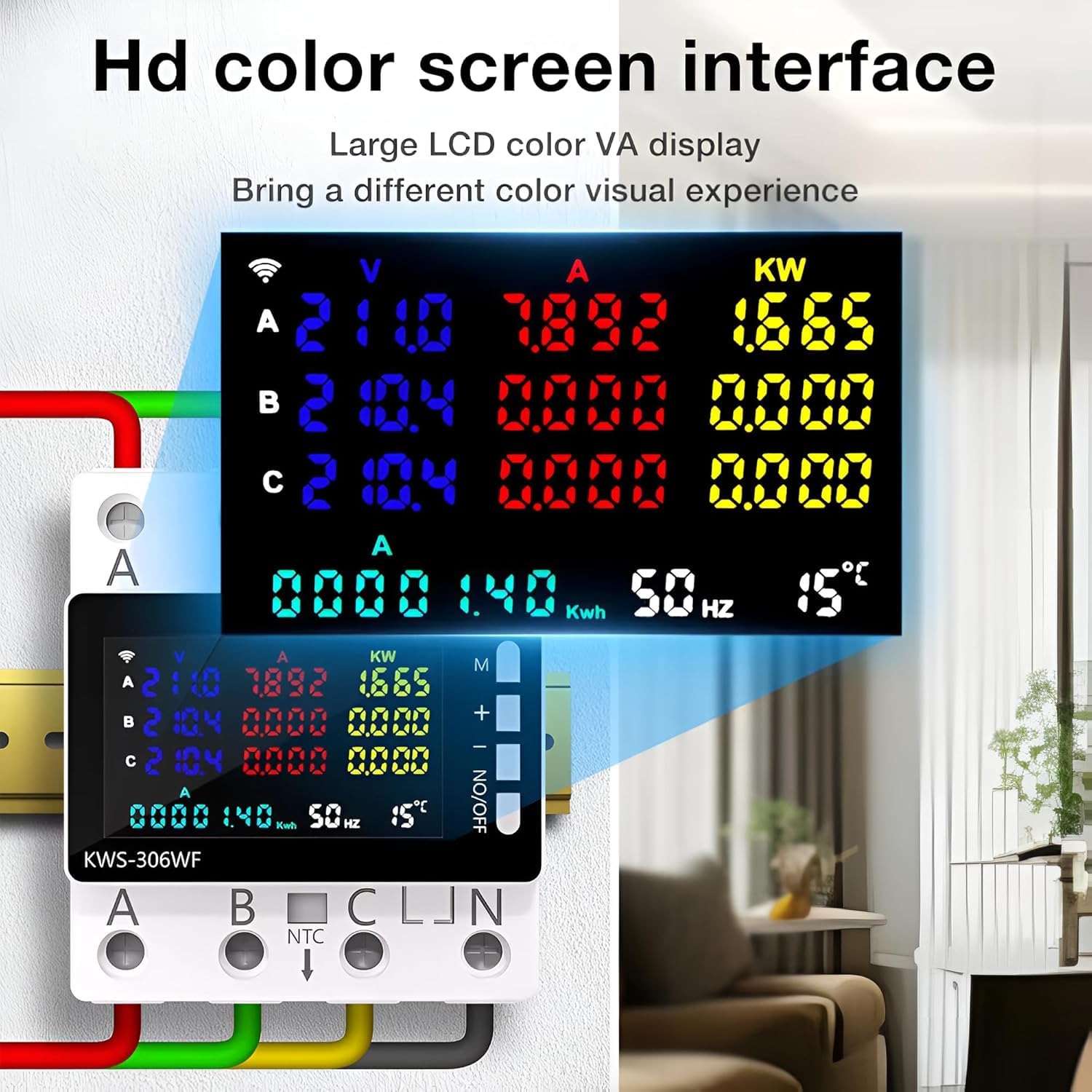
Figure 5: HD Color Screen Interface.
5. Setup & Installation
5.1. DIN-Rail Mounting
The KWS-306WF is designed for standard 35mm DIN-rail mounting. Simply snap the device onto the DIN rail using its tool-free buckle mechanism. Ensure it is securely fastened.
5.2. Wiring Connections
The device supports single-phase and three-phase four-wire connection methods. Refer to the diagrams below for correct wiring. Always ensure power is OFF before wiring.

Figure 6: Wiring Diagrams and Installation Display.
- Single-Phase Connection: Connect the N zero line and A fire line to the upper input terminals. The output terminal is connected to the load.
- Three-Phase Four-Wire Connection: Connect the N zero line, A, B, C fire lines to the upper input terminals. The output terminal is connected to the load.
- NTC Temperature Sensor: Connect the NTC temperature sensor to the designated terminals if temperature monitoring is required.
- RS485 Port: This hole provides an RS485 port. Note that the RS485 function is not enabled by default.
6. Operating Instructions
6.1. Power On/Off
The device acts as a circuit breaker. Use the physical ON/OFF button on the side of the device or the mobile app to switch the circuit on or off.
6.2. Display Navigation
Use the 'M', '+', and '-' buttons on the device to navigate through the display screens:
- Press the 'M' button to cycle through main display modes.
- Use the '-' button to view individual phase energy (A, B, C) separately.
- Use the '+' button to view timing, total active power, and total active energy.
6.3. Initial Setup (Voltage Adjustment)
Important Note for 110VAC Systems: If your voltage is 110VAC, the protector may trigger undervoltage protection upon first use. You must adjust the overvoltage and undervoltage protection thresholds according to your specific voltage requirements via the mobile app or device settings.
7. App Remote Control
The KWS-306WF seamlessly integrates with the Smart Life App and Tuya App, allowing for comprehensive remote control and monitoring.
7.1. Connecting to the App
- Download the
Ask a question about this manual
Ask about setup, troubleshooting, compatibility, parts, safety, or missing instructions. Manuals+ will review the question and use this page’s manual context to help answer it.