
Introduction
Thank you for choosing the Kyltoor A4 4K Dash Cam. This device is designed to provide reliable video recording of your journeys, enhancing your driving safety and providing crucial evidence in case of incidents. Featuring 4K front and 1080P rear recording, 5G WiFi connectivity, advanced night vision, and parking surveillance, the Kyltoor A4 is a comprehensive solution for vehicle monitoring. Please read this manual thoroughly before use to ensure proper installation and operation.

Image: The Kyltoor A4 Dash Cam main unit and rear camera, showcasing its sleek design and dual recording capability.
Package Contents
Please check the package for the following items:
- 1 x Kyltoor A4 4K Dash Cam (Front Camera)
- 1 x 1080P Rear Camera
- 1 x 11.5ft Power Supply Cable with Car Charger
- 1 x 19.7ft Rear Camera Cable
- 1 x Adhesive Mount
- 1 x Memory Card (32GB, pre-installed or included separately)
- 2 x Electrostatic Stickers
- 1 x User Manual (this document)

Image: All components of the Kyltoor A4 Dash Cam package, including the main unit, rear camera, cables, mount, and manual.
Product Overview
The Kyltoor A4 Dash Cam offers a range of features designed for comprehensive vehicle surveillance:
- Dual Recording: 4K Ultra HD front camera (170° wide-angle) and 1080P Full HD rear camera (150° wide-angle).
- 5G WiFi & App Control: Fast video transfer and easy management via the Viidure mobile app (Android/iOS).
- Superior Night Vision: Equipped with HDR/WDR technologies, F1.8 aperture, and a 6-layer optical lens for clear recordings in low light.
- 24H Parking Surveillance: Automatically records impacts/vibrations when parked (requires optional hardwire kit).
- G-Sensor: Detects collisions and automatically locks emergency video clips to prevent overwriting.
- Loop Recording: Continuously records, overwriting the oldest files when the memory card is full.
- 3.16" IPS Screen: Provides a clear and vibrant display for live view and playback.
- Included 32GB Memory Card: Ready for immediate use, supports up to 128GB microSD cards.

Image: Visual summary of the Kyltoor A4 Dash Cam's key features, including 4K UHD, 32GB card, wide-angle lenses, G-Sensor, Wi-Fi, Loop Recording, Night Vision, and 24Hr Parking Monitor.
Setup and Installation
1. Prepare the Memory Card
Insert the included 32GB microSD card into the dash cam's memory card slot. Ensure the card is inserted correctly until it clicks into place. The dash cam supports up to 128GB microSD cards.
2. Mount the Front Dash Cam
- Clean the windshield area where you intend to mount the dash cam.
- Apply one of the electrostatic stickers to the cleaned area. This helps protect your windshield and makes removal easier.
- Attach the adhesive mount to the electrostatic sticker.
- Slide the dash cam onto the mount, ensuring it is securely fastened. Adjust the lens angle to capture the road ahead clearly.
3. Install the Rear Camera
- Identify a suitable location on your rear windshield for the rear camera. Ensure it has a clear view and does not obstruct your vision.
- Clean the chosen area and attach the rear camera using its adhesive.
- Route the 19.7ft rear camera cable from the rear camera to the front dash cam. Conceal the cable along the headliner and A-pillars for a neat installation.
- Connect the rear camera cable to the designated port on the main dash cam unit.
4. Power Connection
- Connect the 11.5ft power supply cable to the dash cam.
- Plug the car charger end into your vehicle's 12V power outlet (cigarette lighter socket).
- Route the power cable neatly to avoid interference with driving controls.

Image: Diagram illustrating the dual channel recording setup with the front 4K camera and rear 1080P camera, showing their respective fields of view.
Operating Instructions
Power On/Off
- Automatic: The dash cam will automatically power on and begin recording when your vehicle's ignition is turned on (and power is supplied to the 12V outlet).
- Manual: Press and hold the power button on the dash cam to manually turn it on or off.
Recording Modes
- Normal Recording: When powered on, the dash cam continuously records video in short segments (e.g., 1, 3, or 5 minutes) to the memory card. When the card is full, the oldest files are overwritten by new recordings (Loop Recording).
- Emergency Recording (G-Sensor): In the event of a sudden impact or collision, the built-in G-Sensor will trigger, automatically locking the current video segment to prevent it from being overwritten. These files are stored in a separate folder.
- Parking Surveillance: With the optional hardwire kit (sold separately), the dash cam can monitor your vehicle while parked. It will automatically record if it detects impacts or vibrations.
Screen Display and Navigation
The 3.16" IPS screen displays live video from the front and/or rear cameras. Use the physical buttons on the dash cam to navigate menus, change settings, and review recordings. Refer to the on-screen icons for current status (e.g., recording, Wi-Fi, battery).
Video: A demonstration of the Kyltoor A4 Dash Cam's screen display, showing the live view and user interface during operation.
Video: This video illustrates the dash cam's display, specifically showing the rear camera view with parking assist lines, useful for reversing.
Advanced Features
5G WiFi & App System
The Kyltoor A4 features advanced 5G Wi-Fi for fast connectivity to your smartphone. Download the Viidure app from your device's app store (Android/iOS). Once connected, you can:
- View live footage from the dash cam.
- Play back recorded videos.
- Download video clips directly to your phone at speeds up to 25MB/s.
- Adjust dash cam settings.

Image: Illustration of the easy WiFi-APP control, showing how users can view, replay, share, and download footage using a smartphone or laptop.
Superior Night Vision
Equipped with HDR (High Dynamic Range) and WDR (Wide Dynamic Range) technologies, an F1.8 aperture, and a premium 6-layer optical lens, the dash cam performs exceptionally well in various lighting conditions. This ensures clear video capture during the day, in harsh light, backlight situations, and at night.

Image: Demonstrates the 4K UHD Night Vision with WDR, highlighting the Starvis Sensor, F/1.8 Big Aperture, 6-glass lens, and Night Vision Filter for clear recording in dark, WDR, and light conditions.
24H Parking Surveillance
To activate 24-hour parking surveillance, an optional hardwire kit is required (sold separately). Once installed, the dash cam will enter standby mode when your vehicle is parked. It will automatically begin recording if it detects any impact or vibration, providing continuous protection against vandalism or theft.

Image: Visual explanation of the 24Hr Parking Monitor feature, showing how the dash cam protects the car from impacts and theft while parked. Note: Hardwire kit is required and sold separately.
G-Sensor & Loop Recording
The built-in G-Sensor detects sudden movements or impacts. When triggered, it automatically locks the current video file, preventing it from being overwritten by loop recording. This ensures critical evidence is secured. Loop recording ensures that your dash cam continuously records by overwriting the oldest files when the memory card reaches its capacity, providing seamless video capture without manual intervention.
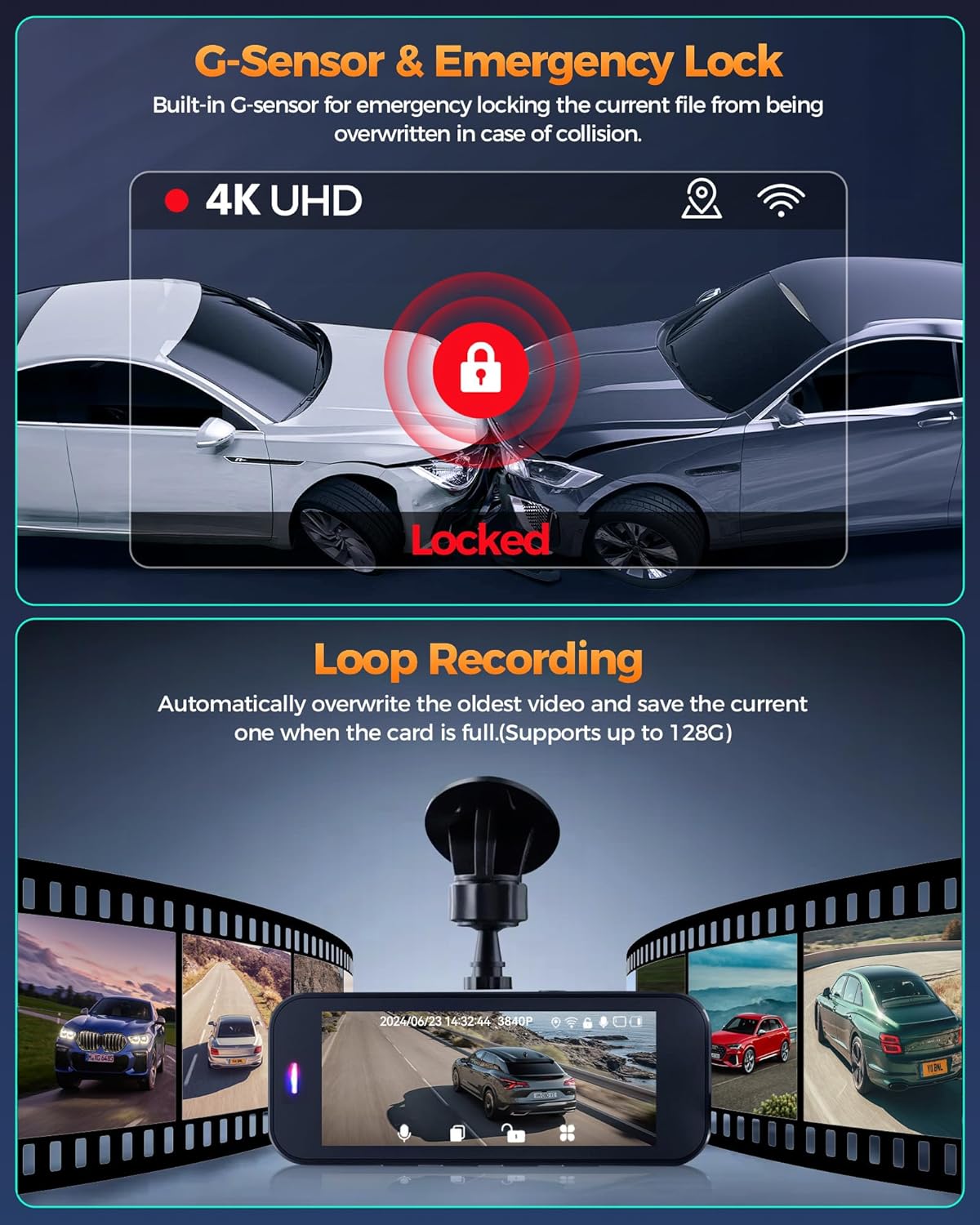
Image: Illustrates the G-Sensor's function in locking emergency clips during a collision and the continuous nature of Loop Recording, which overwrites old files when the card is full.
Maintenance
- Cleaning: Gently wipe the camera lenses and screen with a soft, lint-free cloth. Avoid using abrasive cleaners or solvents.
- Memory Card: Periodically format the memory card (at least once a month) within the dash cam's settings to ensure optimal performance and prevent data corruption. Back up any important videos before formatting.
- Temperature: Avoid exposing the dash cam to extreme temperatures for extended periods.
- Firmware Updates: Check the Kyltoor website or the Viidure app for any available firmware updates to ensure your dash cam has the latest features and bug fixes.
Troubleshooting
- Dash Cam not powering on: Ensure the power cable is securely connected to both the dash cam and the car's 12V outlet. Check if the car charger is working.
- Recording stops unexpectedly: Format the memory card. Ensure you are using a high-speed (Class 10 or U3) microSD card. The card might be full or corrupted.
- Poor video quality: Clean the camera lenses. Ensure the protective film has been removed from the lenses. Check video resolution settings.
- Wi-Fi connection issues: Ensure the dash cam's Wi-Fi is enabled. Restart both the dash cam and your smartphone. Make sure you are within range.
- Rear camera not working: Check the connection of the rear camera cable to both the rear camera and the main dash cam unit.
- Dash cam freezes: Press and hold the power button for 10 seconds to force a restart. If the issue persists, try formatting the memory card.
Specifications
| Feature | Specification |
|---|---|
| Brand | Kyltoor |
| Model | A4 |
| Front Camera Resolution | 4K UHD |
| Rear Camera Resolution | 1080P FHD |
| Front Camera Angle | 170 degrees |
| Rear Camera Angle | 150 degrees |
| Screen Size | 3.16 inches IPS |
| Connectivity | 5G Wi-Fi, USB |
| Special Features | App Control, G-Sensor, Loop Recording, Night Vision (HDR/WDR), Parking Monitor, Automatic Incident Detection |
| Included Memory Card | 32 GB microSD |
| Max Memory Card Support | 128 GB microSD |
| Mounting Type | Windshield Mount (Adhesive) |
| Power Source | Car Charger (12V) |
| Dimensions (D x W x H) | 3.26"D x 1.29"W x 2.86"H |
| Weight | 3.04 ounces |
Warranty and Support
The Kyltoor A4 Dash Cam comes with a warranty. Please refer to the product packaging or the official Kyltoor website for specific warranty terms and conditions. For technical support, troubleshooting assistance, or any inquiries regarding your product, please contact Kyltoor customer service.
Kyltoor is committed to providing reliable products and exceptional customer service. Our advanced devices are equipped with features like loop recording, G-sensor technology, and night vision to ensure peak performance in all driving conditions. Drive with confidence—choose Kyltoor as your trusted road companion.

Image: Information regarding Kyltoor's service plan, including 12 months protection, 7 days return policy, and return on defects, along with customer support options like 24H service, Email, and WhatsApp.