
Introduction
The Boahaus Luna Vanity Desk is designed to provide a functional and organized space for daily routines. This integrated makeup station features eleven drawers for storage, an LED lighted mirror for adjustable illumination, and built-in power outlets with USB-A and USB-C ports. Select configurations also include Bluetooth speakers for an enhanced audio experience. This manual provides detailed instructions for assembly, operation, maintenance, and troubleshooting to ensure optimal use of your vanity desk.
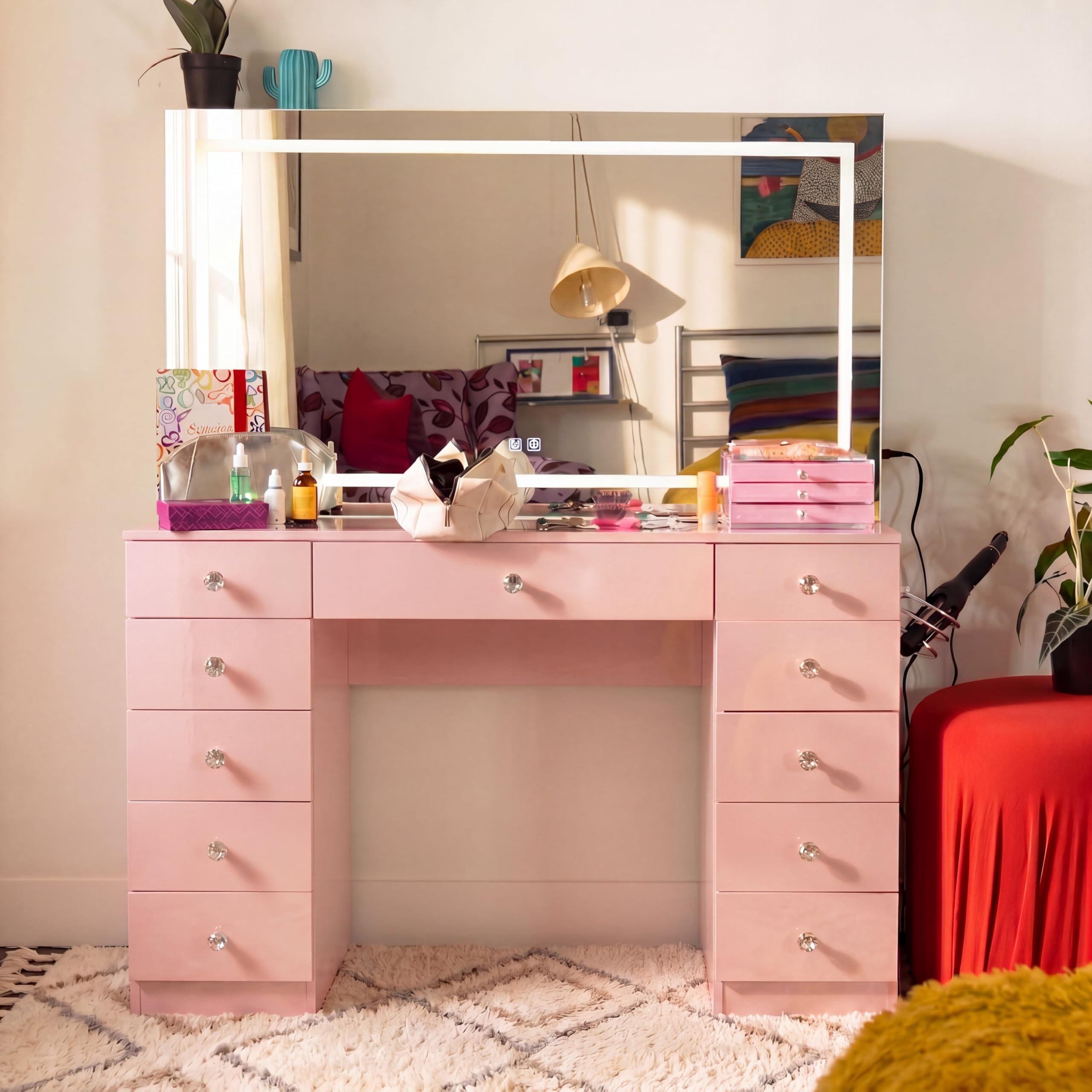
Image: The Boahaus Luna Vanity Desk with its LED lighted mirror and multiple drawers, showcasing its design and functionality.
Setup and Assembly
Assembly of the Boahaus Luna Vanity Desk is required. The package includes detailed step-by-step instructions and all necessary hardware. For a smoother assembly process, it is recommended that two adults participate. Ensure all components are present before beginning assembly.
Important Note: Carefully follow the provided assembly diagrams and instructions. Identify each part by its label to avoid errors. Do not overtighten screws during initial assembly; tighten fully once the section is complete.

Image: A diagram showing the dimensions of the Boahaus Luna Vanity Desk, useful for planning placement and assembly.
Operating Instructions
LED Lighted Mirror
The integrated LED lighted mirror provides consistent illumination for detailed tasks. The lights can be adjusted for brightness and color temperature (if applicable to your model) using the controls located on the mirror frame or an inline switch. Ensure the vanity is connected to a power source for the lights to function.

Image: A close-up view of the integrated 110V power outlet, USB-A, and USB-C ports on the side of the vanity desk.
Integrated Power Outlets and USB Ports
The vanity desk includes a built-in 110V power outlet, a USB-A port, and a USB-C port. These are designed to power styling tools and charge electronic devices conveniently. Simply plug your devices into the appropriate ports.
Bluetooth Speakers (Select Models)
For models equipped with Bluetooth speakers, activate Bluetooth on your mobile device and search for available devices. Select 'Boahaus Luna' (or similar name) to pair. Once paired, audio from your device will play through the vanity's speakers. Controls for volume and playback may be located on the vanity or managed directly from your paired device.

Image: A composite image highlighting various features of the vanity, including the immersive audio and power hub, styling hook, jewelry care compartments, Pro-Glow lighting, diamond knobs, and crystal top.
Drawer Usage
The vanity features eleven spacious drawers for organized storage of cosmetics, accessories, and other items. The tempered glass top provides a protected workspace and allows visibility into the top drawers (if applicable to your model). Utilize the included jewelry divider for enhanced organization.
Video: An overview demonstrating the features and functionality of the Boahaus Luna Vanity Desk, including its storage and lighting.
Video: A demonstration highlighting the durability and design of the vanity desk, suitable for long-term use.
Maintenance and Care
To maintain the appearance and longevity of your Boahaus Luna Vanity Desk, follow these care instructions:
- Cleaning: Wipe surfaces with a dry or slightly damp cloth.
- Chemicals: Do not use harsh chemicals, abrasive cleaners, or polishes, as these can damage the finish.
- Spills: Promptly clean any spills to prevent staining, especially on the tempered glass top.
- Drawer Slides: Periodically check and ensure drawer slides are clean and free of debris for smooth operation.
Troubleshooting
LED Lights Not Functioning or Turning Off Randomly
- Power Connection: Ensure the vanity is securely plugged into a working electrical outlet.
- Switch Check: Verify that the light switch (either on the mirror frame or inline) is in the 'on' position.
- Bulb Check: For models with replaceable bulbs, ensure all bulbs are securely screwed in and not faulty.
- Loose Connections: If lights turn off randomly, check all wiring connections, especially if the issue started after assembly. If the issue persists, contact customer support.
Drawers Not Sliding Smoothly
- Assembly Check: Re-check the assembly of the drawer slides and ensure they are correctly aligned and installed according to the instructions.
- Obstructions: Clear any debris or objects that might be obstructing the drawer slides.
- Lubrication: A small amount of silicone-based lubricant can be applied to the drawer slides if they are stiff.
Bluetooth Speakers Not Connecting
- Power: Ensure the vanity is powered on.
- Bluetooth Activation: Confirm Bluetooth is enabled on your mobile device.
- Proximity: Ensure your device is within range of the vanity.
- Pairing Mode: If the speakers have a pairing button, activate pairing mode. If previously paired, try unpairing and re-pairing the device.
Specifications
| Feature | Detail |
|---|---|
| Model Number | VN.16.64 |
| Color | Pink |
| Dimensions (H x W x D) | 56.10" H x 46.46" W x 14.69" D |
| Material | Engineered Wood, Glass, Mirror |
| Item Weight | 135 pounds |
| Number of Drawers | 11 |
| Power Outlet | 110V with USB-A & USB-C |
| Included Components | Vanity Desk, Framed Bulb Mirror, Tempered Glass Top, Power Outlet, Jewelry Divider, Hair Dryer Holder, Bluetooth Speakers, Assembly Hardware, Installation Instructions |
Warranty Information
The Boahaus Luna Vanity Desk comes with a 6-month limited manufacturer's warranty. This warranty covers defects in materials and workmanship under normal use. Please retain your proof of purchase for any warranty claims. For specific details regarding coverage and claims, refer to the warranty documentation included with your product or contact Boahaus customer support.
Customer Support
If you encounter any issues not covered in this manual, require replacement parts, or have questions regarding your Boahaus Luna Vanity Desk, please contact Boahaus customer support. Refer to the contact information provided in your product packaging or visit the official Boahaus website for assistance.
When contacting support, please have your model number (VN.16.64) and proof of purchase readily available to expedite the service process.