
Product Overview
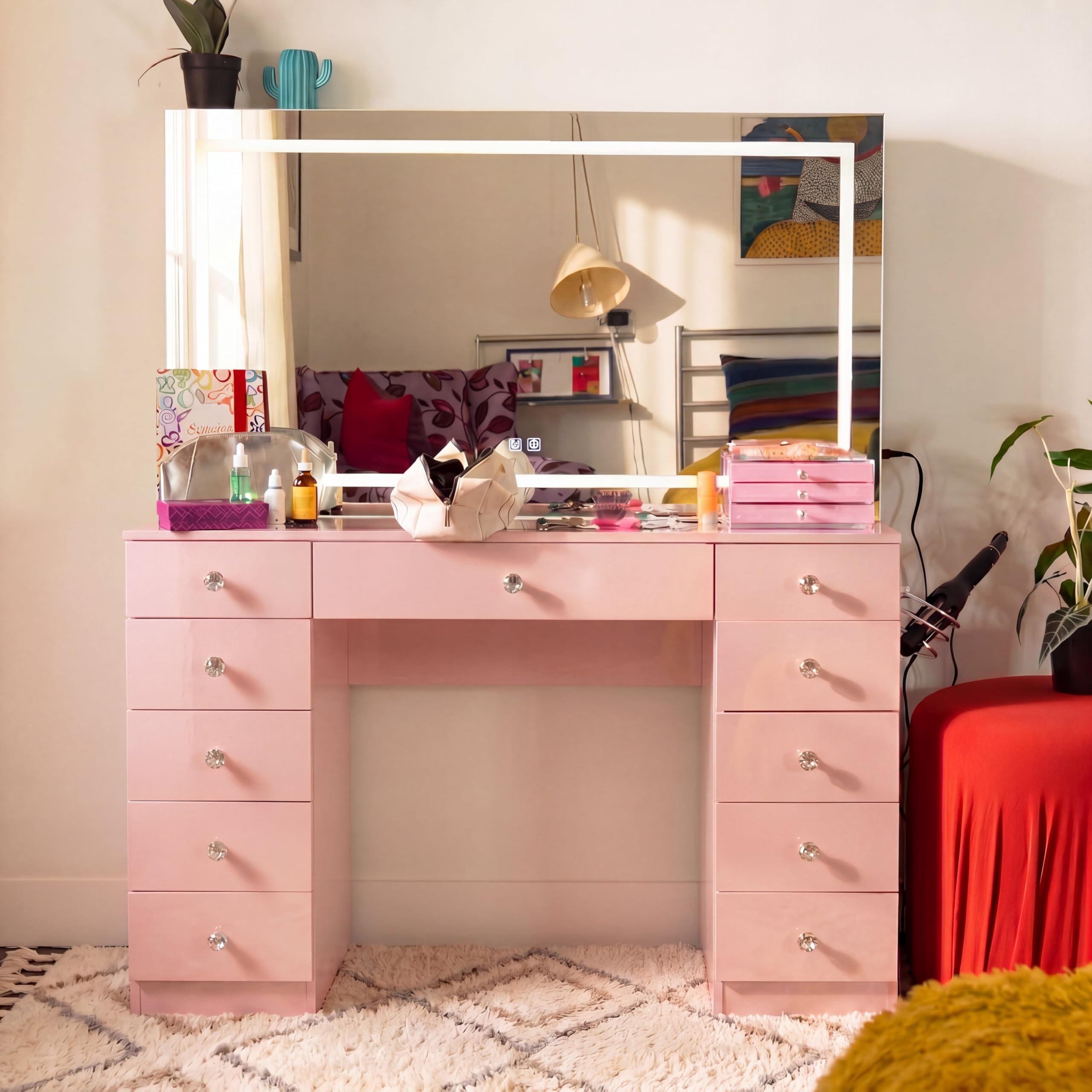
The Boahaus Cleo Vanity Desk is a streamlined makeup station designed for daily preparation. It features a dimmable LED lighted mirror, 11 spacious drawers for organized storage, and integrated Bluetooth speakers for an enhanced experience. The desk also includes a built-in 110V power outlet with USB-A and USB-C ports to support various styling tools and devices, maintaining a clean and organized appearance. Crystal knobs, a jewelry divider, and a dedicated hair dryer holder contribute to its functional design.
Setup and Assembly
Assembly is required for the Boahaus Cleo Vanity Desk. The package includes detailed step-by-step instructions and all necessary hardware. For optimal assembly, it is recommended that two adults work together. Please ensure all components are present and undamaged before beginning assembly. Follow the provided instructions carefully to ensure proper construction and stability of the vanity desk.
Unpack all components on a soft, clean surface to prevent scratches. Identify each part using the labels and diagrams in the instruction manual. Keep all hardware organized and within reach during the assembly process.
Operating Instructions
LED Lighted Mirror
The vanity desk features a dimmable LED lighted mirror. To operate the lighting, locate the touch controls on the mirror surface. Tap to turn the lights on or off. Press and hold to adjust the brightness level to your preference. The LED lights provide consistent illumination for various tasks.
Bluetooth Speakers
Integrated Bluetooth speakers are located on the side of the mirror. To connect your device, ensure Bluetooth is enabled on your smartphone or tablet. Search for available devices and select 'Boahaus Cleo' (or similar name indicated in the specific Bluetooth instructions). Once paired, you can stream audio directly through the vanity's speakers.
Power Outlets
The vanity includes a built-in 110V power outlet, along with USB-A and USB-C ports. These are designed to power and charge your styling tools, mobile devices, and other electronics. Simply plug your devices into the appropriate ports. Ensure the vanity is properly connected to a power source for these outlets to function.

Care and Maintenance
To maintain the appearance and longevity of your Boahaus Cleo Vanity Desk, wipe all surfaces with a dry cloth. Avoid using abrasive cleaners or harsh chemicals, as these can damage the engineered wood, glass, or mirror finishes. For glass and mirror surfaces, use a non-ammonia glass cleaner and a soft, lint-free cloth. Regularly check and tighten any loose hardware to ensure structural integrity.
Troubleshooting
Lighting Issues
If the LED mirror lights are not functioning, ensure the vanity is properly plugged into a working power outlet. Check the power cord for any damage. If the lights are dim or flickering, try adjusting the brightness using the touch controls. If issues persist, contact customer support.
Bluetooth Connectivity
If you are unable to connect to the Bluetooth speakers, ensure Bluetooth is enabled on your device and the vanity is powered on. Try unpairing and re-pairing the device. Move your device closer to the vanity to ensure a strong signal. If the problem continues, restart both your device and the vanity (by unplugging and replugging).
Power Outlet Malfunction
If the 110V or USB outlets are not providing power, verify that the vanity is securely plugged into a live electrical outlet. Check if the circuit breaker for the room has tripped. Avoid overloading the outlets with too many high-power devices simultaneously.
Drawer Operation
If drawers are stiff, sticky, or do not glide smoothly, check for any obstructions within the drawer slides. Ensure that the drawer slides were installed correctly and are properly aligned. A small amount of silicone lubricant can be applied to the slides if needed, but avoid oil-based lubricants.
Product Specifications
| Model Number | VN.1664 |
| Color | Pink |
| Dimensions (H x W x D) | 56.10" H x 46.46" W x 14.69" D |
| Material | Engineered Wood, Glass, Mirror |
| Item Weight | 135 pounds |
| Number of Drawers | 11 |
| Included Components | Vanity Desk, LED Mirror, Built-In Bluetooth Speakers, Tempered Glass Top, Power Outlet (110V with USB-A & USB-C), Jewelry Divider, Hair Dryer Holder, Assembly Hardware, Installation Instructions |

Warranty Information
The Boahaus Cleo Vanity Desk comes with a 6-month limited manufacturer's warranty. This warranty covers defects in materials and workmanship under normal use. Please retain your proof of purchase for any warranty claims. For specific details regarding coverage and how to make a claim, refer to the documentation included with your product or contact the manufacturer directly.
Customer Support
For any questions, assistance with assembly, or to report missing/damaged parts, please contact Boahaus customer support. You can typically find contact information on the product packaging, the manufacturer's official website, or through your retailer's support channels. When contacting support, please have your model number (VN.1664) and proof of purchase readily available.