
1. Introduction
This manual provides comprehensive instructions for the installation, operation, maintenance, and troubleshooting of your DATOUBOSS 24V 3300W Hybrid Solar Inverter. This device is designed to efficiently convert DC power from solar panels and batteries into stable 110/120V AC power for various applications, including RVs, cabins, home solar systems, and off-grid backup power. Please read this manual thoroughly before installation and operation to ensure safe and optimal performance.
2. Safety Information
Always observe the following safety precautions to reduce the risk of electric shock, fire, or injury:
- Professional Installation Recommended: Installation should be performed by qualified personnel.
- Ventilation: Ensure adequate ventilation around the inverter to prevent overheating.
- Water Exposure: Do not expose the inverter to rain, snow, spray, or any liquids.
- Flammable Materials: Do not install the inverter near flammable materials.
- Grounding: The inverter must be properly grounded.
- Disconnect Power: Always disconnect all power sources (solar, battery, utility) before performing any maintenance or wiring.
- Battery Safety: Work with batteries carefully. Wear eye protection and avoid contact with battery acid.
- Overload Protection: The inverter includes overload protection. Do not exceed the rated output power.

Image: The inverter features comprehensive safety protections including reverse connection, short circuit, high temperature, overload, overcurrent, over-discharge, anti-islanding, and backfill protection.
3. Product Overview
The DATOUBOSS 24V 3300W Hybrid Solar Inverter is a compact and lightweight unit designed for efficient energy management. It integrates an inverter, MPPT solar charger, and battery charger into a single system.
Key Features:
- Compact Design: Simplifies installation and saves space.
- Pure Sine Wave Output: Provides stable 120V AC output for sensitive electronics.
- MPPT Solar Charge Controller: Maximizes solar charging efficiency with a 99.9% tracking efficiency.
- Multiple Operating Modes: Supports Grid-Tie, Hybrid, and Off-Grid configurations.
- Battery Compatibility: Compatible with 24V LiFePO4 and lead-acid batteries.
- Battery-Free Operation: Can operate without a battery connected.
- Efficient Heat Dissipation: Optimized thermal structure and intelligent cooling fan system.
- LCD Display: Real-time monitoring of system status.
- Optional WiFi Monitoring: Remote monitoring via mobile app (module sold separately).
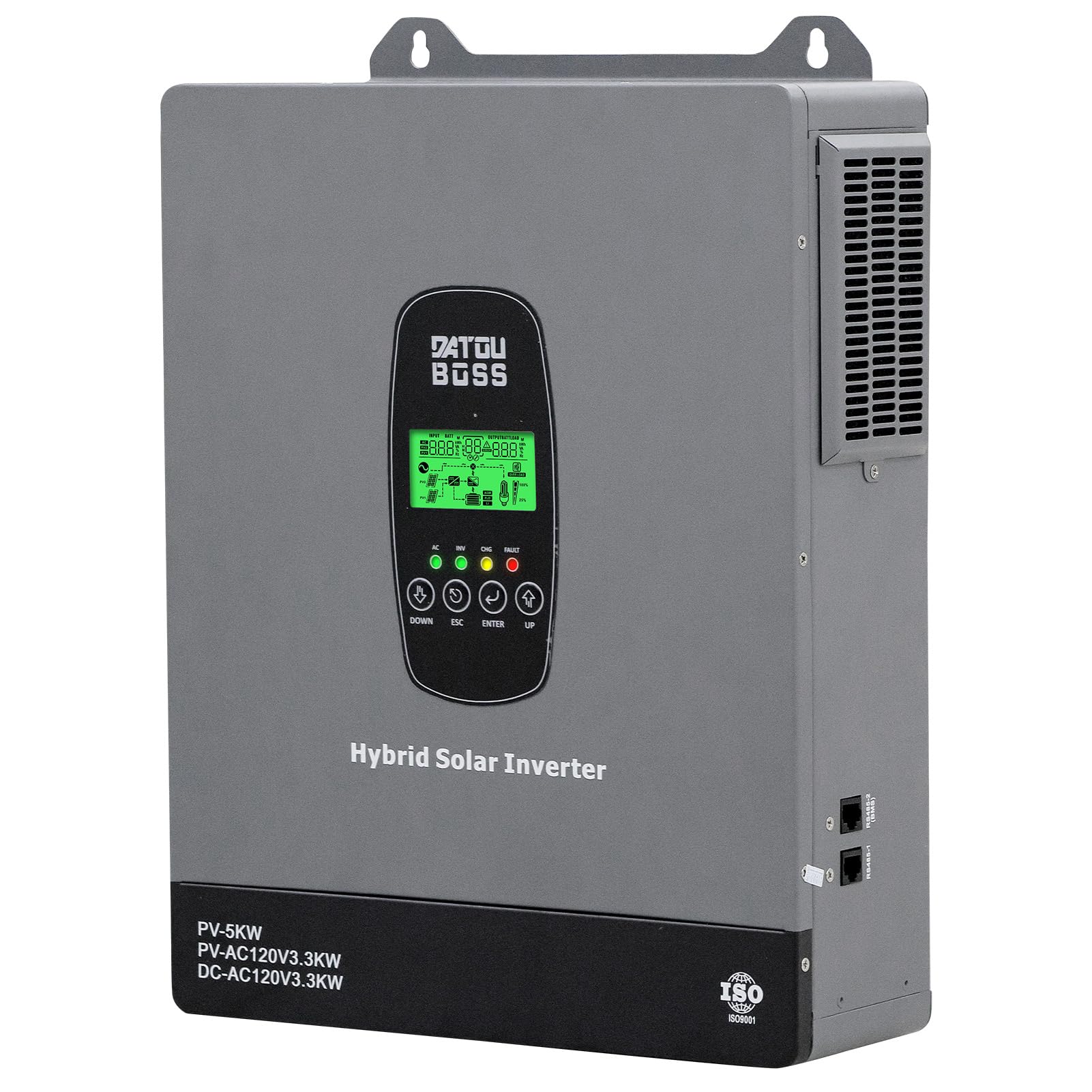
Image: Front view of the DATOUBOSS 24V 3300W Hybrid Solar Inverter, highlighting its compact size (30.9cm x 37.5cm x 10.2cm) and key specifications like 5000W Max PV Input Power and 3300W Rated Output Power.
Component Identification:

Image: Detailed views of the inverter showing the bottom, front, and right sides. Key components include battery terminal ports, PV input terminal port, AC input (on-grid) terminal, AC output, Earth terminal, LCD display, LED indicator, function buttons, power on/off switch, RS485-2 communication interface (EMS), and RS485-1 communication interface (External communication/WiFi).
4. Setup and Installation
The inverter is designed for wall-mounted installation. Professional installation is highly recommended to ensure safety and optimal performance.
Installation Steps:
- Mounting: Securely mount the inverter on a vertical surface in a well-ventilated area, away from direct sunlight and moisture.
- Wiring: Connect the solar panels, batteries, utility grid (if applicable), and AC loads according to the wiring diagram. Ensure all connections are tight and correct polarity is observed.
- Grounding: Connect the inverter to a reliable earth ground.
- Power On: Once all connections are verified, switch on the power sources in the recommended sequence (typically battery first, then solar, then utility).

Image: A detailed wiring diagram illustrating connections for solar panels, utility power, AC loads, 24V battery bank, and earth wire (PE) to the DATOUBOSS Hybrid Solar Inverter.
5. Operating Modes
The inverter supports various operating modes to suit different energy management needs.
Output Priority Settings (A0):
These settings control the power supply sequence for the connected loads.
- GRD: Grid Power Priority: Utility grid powers the load first. The solar system only charges the battery. During a power outage, the system switches to solar plus battery power.
- PV Priority: Solar power is prioritized to supply the load. When solar power is insufficient, the utility grid automatically supplements the supply, enabling a hybrid solar-grid output.
- PBG: Battery Priority (Default): PV + battery are prioritized for power delivery. When the battery voltage drops below a certain level, the system switches to mains bypass without a separate PV-grid hybrid output. The PV module automatically enables simultaneous power output from both PV and the grid.

Image: Diagram illustrating the three output priority modes: GRD (Grid Power Priority), PV Priority, and PBG (Battery Priority), showing how power is sourced for the load.
Charging Priority Settings (A10):
These settings control how the battery is charged.
- SNU: Hybrid Charging: Charging is done simultaneously using solar power and grid power, with solar power taking priority.
- CSO: Solar Priority Charging: If solar power is available, charge using solar power only. If not, switch to grid power to supplement the charge.
- OSO: Solar-Powered Only: Mains power is not used at any stage of the charging process, making it suitable for fully off-grid use. This unit does not have a mains-priority charging mode.

Image: Diagram illustrating the three charging priority modes: SNU (Hybrid Charging), CSO (Solar Priority Charging), and OSO (Solar-Powered Only), showing how the battery is charged from solar and/or grid.
Full-System Operation Mode (A15):
This setting determines the grid-connection capability, independent of A0.
- GRD: Hybrid Mode: Supports solar/photovoltaic/battery hybrid systems and grid-connected power supply, and inverter operation during power outages. This is the ideal choice for home use.
- GRE: Grid-Connected Feeder Mode: Excess power is fed into the grid. The machine shuts down when the mains power is cut off. It cannot operate off-grid while carrying a load.
- DIS: Offline Mode: Grid connection is prohibited. Power is supplied solely by local PV/batteries.

Image: Diagram illustrating the three full-system operation modes: GRD (Hybrid Mode), GRE (Grid-Connected Feeder Mode), and DIS (Offline Mode), detailing how the inverter interacts with the grid and power sources.
6. Display and Monitoring
The inverter features an intuitive LCD display for real-time system monitoring and configuration.
LCD Display:
The high-definition LCD screen provides information on battery status, PV input, load power, charging information, and overall system performance. Use the function buttons (UP, DOWN, ESC, ENTER) to navigate menus and adjust parameters.

Image: A close-up view of the inverter's high-definition LCD display, showing various icons and data points such as page number, fault code, numeric display, PV1/PV2 icons, battery capacity, load percentage, and function key controls.
Optional WiFi Monitoring:
An optional WiFi monitoring module (sold separately) can be connected to the inverter. This module enables remote monitoring of your system via a mobile application, providing convenience and real-time data access from anywhere.

Image: The DATOUBOSS Hybrid Solar Inverter shown alongside an optional WiFi module, indicating its capability for remote monitoring.
7. Battery Compatibility
The DATOUBOSS 24V 3300W Hybrid Solar Inverter is designed to be compatible with various 24V battery types and also supports battery-free operation.
- Compatible Battery Types: LiFePO4 (Lithium Iron Phosphate) and Lead-Acid batteries (AGM, GEL, FLD, SLD).
- User Configuration: Users can configure the specific battery type via the LCD display settings. For lithium batteries, select the 'User-defined' type for configuration.
- Battery-Free Operation: The inverter can function directly from solar panels and/or utility power without a connected battery.
- Maximum Battery Charging Current: 120A.

Image: Illustration showing the inverter's compatibility with various 24V battery types, including AGM, GEL, FLD, SLD, LI, and USER-defined, and noting that users can configure the battery type on the LCD display.
8. Maintenance
Regular maintenance ensures the longevity and optimal performance of your inverter.
- Cleaning: Keep the inverter's exterior clean and free from dust. Use a dry cloth for cleaning.
- Ventilation: Ensure cooling vents are unobstructed to allow for proper airflow.
- Connections: Periodically check all electrical connections for tightness and signs of corrosion.
- Environment: Ensure the operating environment remains within specified temperature and humidity ranges.
- Firmware Updates: Check the manufacturer's website for any available firmware updates.
9. Troubleshooting
This section provides solutions to common issues you might encounter.
| Problem | Possible Cause | Solution |
|---|---|---|
| Inverter not turning on | No input power (battery, solar, utility); Power switch off; Loose connections. | Check battery voltage, solar input, and utility connection. Ensure power switch is ON. Verify all wiring connections. |
| No AC output | Overload; Short circuit; Low battery voltage; Inverter fault. | Reduce load. Check for short circuits in AC wiring. Charge batteries. Check LCD for error codes. |
| Battery not charging | Solar panels not connected or insufficient power; Utility not connected; Charging settings incorrect; Battery fault. | Check solar panel connections and sunlight. Verify utility connection. Adjust charging priority settings. Inspect battery health. |
| Overheating warning | Blocked ventilation; Excessive ambient temperature; Overload. | Clear obstructions from vents. Ensure proper room temperature. Reduce load. |
If the problem persists after attempting these solutions, please contact customer support.
10. Specifications
Detailed technical specifications for the DATOUBOSS 24V 3300W Hybrid Solar Inverter (Model DT-2433).

Image: A table detailing the specifications of the DATOUBOSS DT-2433U model, including power, voltage, current, battery type, display, cooling, communication, and physical dimensions.
| Parameter | Value |
|---|---|
| Model Name | DT-2433 |
| Rated Output Power | 3300 Watts |
| Peak Output Power | 3300 Watts |
| Electrical Output Waveform | Pure Sine Wave |
| Output Voltage | 110/120V AC |
| Frequency | 60 Hz |
| Max PV Input Power | 5000W |
| MPPT Tracking Range | 40VDC-450VDC |
| Max PV Input Current | 18A |
| Rated Battery Voltage | 24VDC |
| Max PV Charging Current | 120A |
| Input Voltage (Utility) | 85VAC-140VAC |
| Display Type | LCD + LED |
| Item Weight | 7.5 kg |
| Product Size (L*W*H) | 375x309x102 mm |
| Operating Temperature | -10°C to 50°C |
11. Warranty and Support
Warranty:
The DATOUBOSS 24V 3300W Hybrid Solar Inverter comes with a 1-Year Manufacturer Warranty from the date of purchase. This warranty covers defects in materials and workmanship under normal use. Please retain your proof of purchase for warranty claims.
Customer Support:
For technical assistance, troubleshooting, or warranty inquiries, please contact DATOUBOSS customer support:
- Email: Service@datouboss.com
- Phone/WhatsApp/Line: +86 15693693672
Please have your model number (DT-2433) and purchase information ready when contacting support.


