
Product Overview
The COSTWAY Nugget Ice Maker is designed to produce chewable pellet ice efficiently for various settings, including home kitchens, offices, and RVs. This portable unit features rapid ice production, an audible ice full alarm, and an auto-cleaning function for user convenience.

Image: The COSTWAY Nugget Ice Maker in a kitchen setting, demonstrating its compact size and suitability for family use.
Key Features:
- Rapid Ice Production: Produces up to 33 lbs of chewable pellet ice daily, with the first batch ready in 6-8 minutes.
- Audible Ice Full Indicator: Features a "Didi" alert when the ice basket is full, and an indicator light for low water levels.
- Effortless Maintenance: Includes a removable top cover for easy interior access and a 5-minute deep self-cleaning function activated by a 3-second long press. A bottom drain plug facilitates water emptying.
- Low Noise Performance: Operates quietly at under 35dB, ensuring a peaceful environment.
- Lightweight & Portable Design: Equipped with a sturdy handle for easy transport, making it ideal for various locations.
Setup
- Unpacking: Carefully remove the ice maker from its packaging. Inspect for any damage.
- Placement: Place the ice maker on a flat, stable surface away from direct sunlight and heat sources. Ensure adequate ventilation around the unit. It is recommended to let the unit sit upright for at least 24 hours before initial use to allow the refrigerant to settle.
- Initial Cleaning: Before first use, clean the interior of the ice maker. Refer to the "Maintenance" section for detailed cleaning instructions.
- Add Water: Open the top cover and fill the water reservoir with clean, potable water up to the MAX fill line. Do not overfill. The water tank capacity is 0.3 gallons.
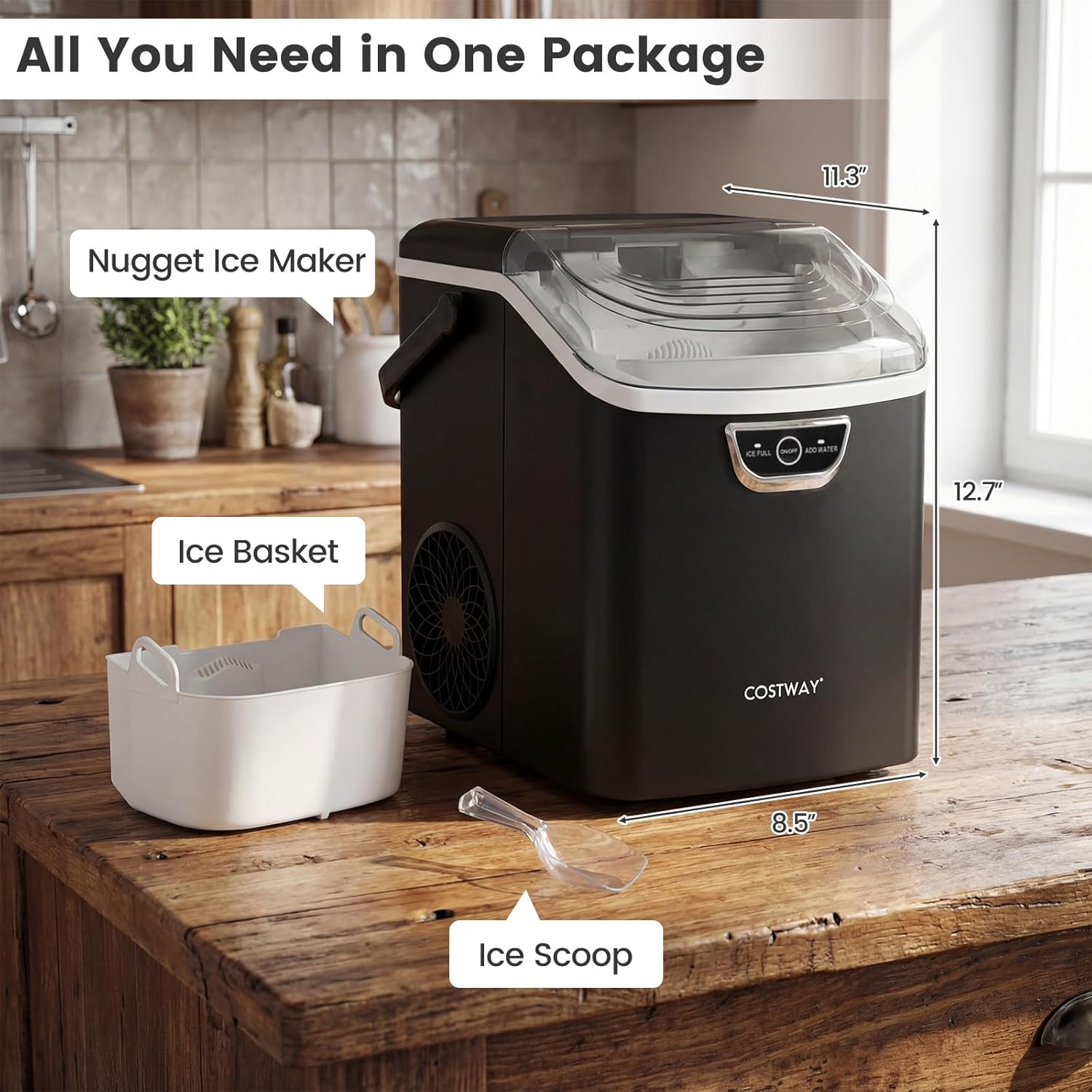
Image: The ice maker with its accessories (ice basket, ice scoop) and dimensions (11.3"D x 8.5"W x 12.7"H).
Operating Instructions
- Power On: Plug the ice maker into a grounded electrical outlet. Press the "ON/OFF" button to start the ice making process.
- Ice Production: The machine will begin producing ice. The first batch of nugget ice typically forms within 6-8 minutes.
- Ice Full Indicator: When the ice basket is full, the "ICE FULL" indicator light will illuminate, and an audible "Didi" alert will sound, pausing ice production. Remove ice from the basket to resume operation.
- Add Water Indicator: If the water level in the reservoir is low, the "ADD WATER" indicator light will illuminate. Add more water to the reservoir to continue ice production.
- Scooping Ice: Use the provided ice scoop to retrieve ice from the basket.
- Power Off: Press the "ON/OFF" button again to stop the ice maker. Unplug the unit when not in use for extended periods.

Image: Visual guide to the one-button operation, including adding water, pressing the power button, and scooping ice.

Image: The ice maker's smart ice full audio alert feature, notifying users when the ice basket is full.
Maintenance
Self-Cleaning Function:
- Ensure the water reservoir is filled with clean water.
- Press and hold the "ON/OFF" button for 3 seconds to activate the self-cleaning cycle.
- The machine will perform a 5-minute deep cleaning process.
- After the cycle, drain the water using the bottom drain plug.

Image: The self-cleaning feature, highlighting the activation method and the bottom drain for water removal.
Manual Cleaning:
- Unplug the ice maker before cleaning.
- Remove the top cover and ice basket for easy access to the interior.
- Wipe the interior surfaces with a soft cloth dampened with mild soap and water. Rinse thoroughly.
- Ensure all parts are dry before reassembling and operating the machine.
- Regularly clean the exterior with a soft, damp cloth.
Troubleshooting
| Problem | Possible Cause | Solution |
|---|---|---|
| Ice is not completely solid or melts quickly. | Water temperature too high; ambient temperature too high. | Use colder water. Ensure the ice maker is in a cool, well-ventilated area. |
| Ice freezes into a solid block in the evaporator. | Mineral buildup; improper water circulation. | Perform a deep self-cleaning cycle. If the issue persists, turn off the machine for 24 hours to allow the ice block to melt, then restart. Consider using distilled or filtered water to reduce mineral buildup. |
| Loud grinding noise during operation. | Ice blockage; mechanical issue. | Turn off the machine and check for any visible ice blockages. If none, power off for 30 minutes and restart. If the noise continues, contact customer support. |
| Incessant beeping from "ICE FULL" or "ADD WATER" alerts. | Sensors triggered; ice basket full or water level low. | Remove ice from the basket or add water to the reservoir. Ensure sensors are clean and unobstructed. |
| Machine does not turn on. | No power; faulty power cord. | Check if the power cord is securely plugged into a working outlet. Test the outlet with another appliance. |
Specifications
| Feature | Detail |
|---|---|
| Brand | COSTWAY |
| Model Number | 10677US-BK-CYSE |
| Product Dimensions (D x W x H) | 11.3" x 8.5" x 12.7" |
| Ice Production Capacity | 33 lbs / 24 hours |
| Water Tank Capacity | 0.3 gallons (approx. 1.14 liters) |
| Ice Basket Capacity | 1.5 pounds |
| Voltage | 120 volts AC |
| Frequency | 60Hz |
| Current | 1.35A |
| Item Weight | 17 pounds |
| Material Type | ABS, PP |
| Refrigerant | R600a (0.04) |
| Included Components | 1 x Countertop Ice Maker, 1 x Ice Basket, 1 x Ice Scoop, 1 x Instruction Manual |
Customer Support
For further assistance, technical support, or warranty inquiries, please contact COSTWAY customer service. Communication is typically handled via email. Please refer to your purchase documentation or the official COSTWAY website for specific contact details.

