
Introduction
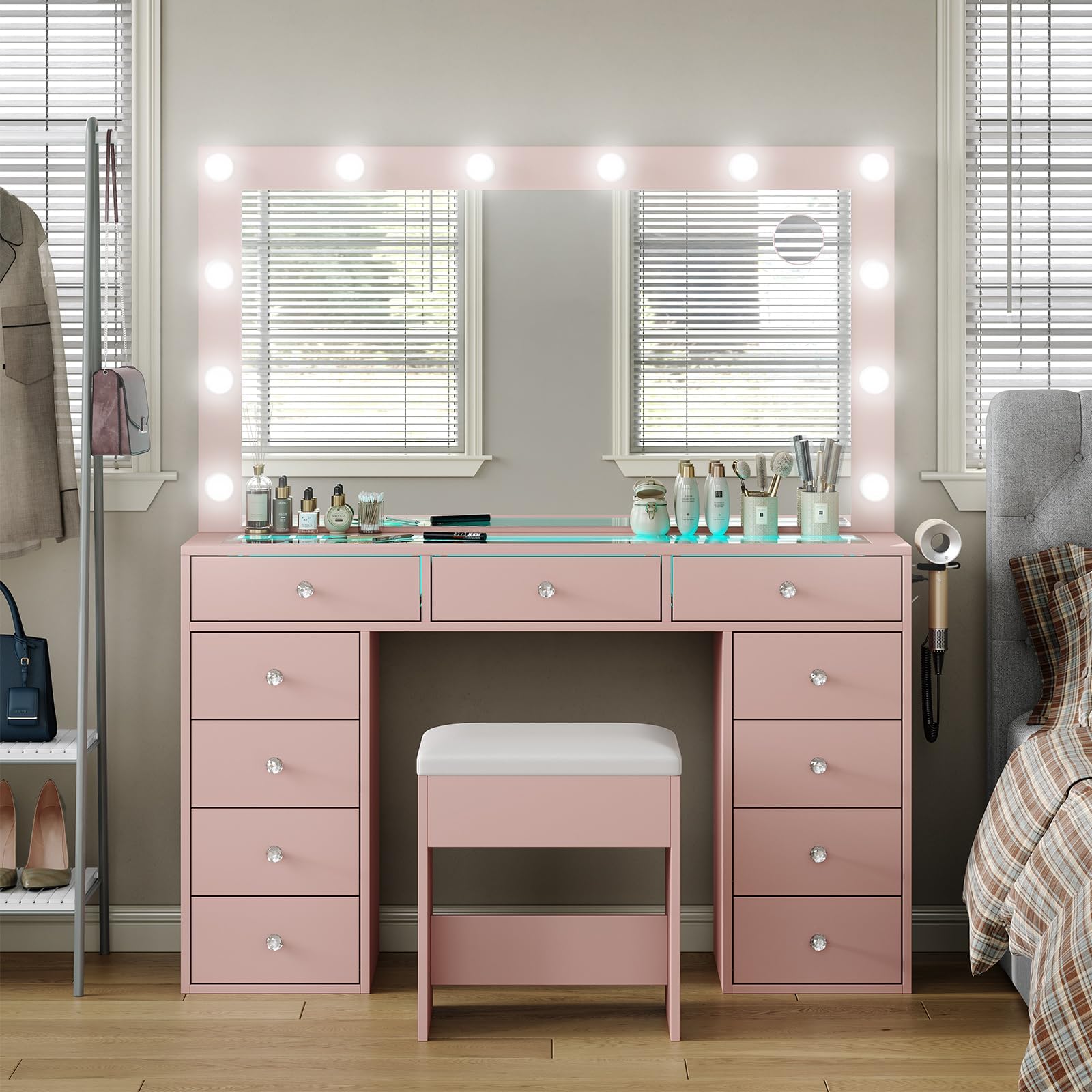
Thank you for choosing the PUNICE Vanity Desk. This elegant and functional vanity desk is designed to enhance your daily routine with its Hollywood-style lighting, spacious mirror, and innovative RGB drawers. This manual provides essential information for safe assembly, operation, maintenance, and troubleshooting to ensure you get the most out of your new vanity desk.
Safety Information
Please read and understand all safety instructions before assembly and use. Keep this manual for future reference.
- Ensure all components are securely fastened during assembly to prevent instability.
- Do not overload drawers or the tabletop. Refer to specifications for weight limits.
- Keep electrical cords away from water and heat sources.
- Unplug the vanity desk from the power outlet before cleaning or performing any maintenance.
- Handle the mirror with care to avoid breakage.
- This product is intended for indoor use only.
Package Contents
Before beginning assembly, verify that all parts listed below are present and undamaged. If any parts are missing or damaged, please contact customer service.
- Vanity Desk Frame
- Large Mirror with 11 Hollywood Lights
- 11 Drawers (some with RGB lighting)
- Padded Stool
- Hardware Pack (screws, connectors, tools)
- Power Adapter for Lights and Outlets
- RGB Remote Control (if applicable)
- Instruction Manual
Setup and Assembly
The vanity desk is designed for easy assembly with labeled parts and clear instructions. We recommend two adults for assembly to ensure safety and efficiency.
- Unpack and Identify Parts: Carefully unpack all components and lay them out on a clean, soft surface to prevent scratches. Refer to the parts list in your included assembly guide to identify each piece.
- Assemble the Base: Follow the step-by-step diagrams in the assembly guide to construct the main desk frame and drawer units.
- Install Drawers: Insert the 11 drawers into their respective slots. Ensure they slide smoothly.
- Attach the Mirror: Securely attach the mirror unit to the main desk frame using the provided hardware. Ensure it is stable and level.
- Connect Electrical Components: Plug in the Hollywood lights and RGB drawer lights according to the instructions. Connect the main power adapter.
- Assemble the Stool: Follow the separate instructions for assembling the padded stool.

Operating Instructions
Hollywood Lights
The vanity mirror features 11 Hollywood-style LED bulbs with three adjustable lighting modes and brightness control.
- Power On/Off: Locate the touch sensor or button on the mirror frame to turn the lights on or off.
- Change Lighting Mode: Tap the touch sensor or press the mode button to cycle through the three color temperatures: Warm White, Natural White, and Cool White.
- Adjust Brightness: Press and hold the touch sensor or use the brightness control buttons to increase or decrease the light intensity.

RGB Drawer Lights
Certain drawers are equipped with RGB LED light strips that offer a wide range of colors and dynamic modes, controllable via an app or remote.
- Power On/Off: Use the provided remote control or the dedicated mobile app to turn the RGB lights on or off.
- Change Colors: Select from over 600,000 colors using the color wheel in the app or specific color buttons on the remote.
- Dynamic Modes: Choose from various dynamic modes, including fading, jumping, and flashing effects.
- Music Sync Mode: Activate music sync mode to have the lights react to audio played nearby.
- Brightness Adjustment: Adjust the brightness of the RGB lights using the app or remote.

Built-in Power Outlet
The vanity desk includes a convenient built-in power strip for charging devices and powering accessories.
- AC Outlets: Two 125V/12A AC outlets are available for hair dryers, curling irons, or other small appliances.
- USB Port: One 5V/2A USB port is provided for charging smartphones and other USB-powered devices.
- Type-C Port: One 5V/2A Type-C port is available for compatible devices.
- Usage: Simply plug your devices into the appropriate ports. Ensure the vanity desk is connected to a wall power outlet.

Maintenance
Proper care will extend the life and appearance of your vanity desk.
- Cleaning: Wipe surfaces with a damp cloth. Avoid harsh chemicals or abrasive cleaners that may damage the finish.
- Mirror Care: Use a glass cleaner specifically designed for mirrors. Spray cleaner onto a cloth, not directly onto the mirror, to prevent liquid from seeping into the edges.
- Drawer Maintenance: Periodically check drawer slides for smooth operation. If they become stiff, a small amount of silicone lubricant can be applied.
- Electrical Components: Ensure all electrical connections are secure. Do not attempt to repair electrical components yourself.

Troubleshooting
If you encounter any issues, refer to the following common problems and solutions:
| Problem | Possible Cause | Solution |
|---|---|---|
| Hollywood lights not turning on. | Power cable disconnected; bulb failure; touch sensor issue. | Check power connections. Ensure the main power adapter is plugged in. If individual bulbs are replaceable, check them. Contact support if the touch sensor is unresponsive. |
| RGB drawer lights not responding. | Remote battery low; app not connected; light strip connection loose. | Replace remote batteries. Ensure Bluetooth is enabled and the app is correctly paired. Check the physical connection of the RGB light strips. |
| Power outlets/USB/Type-C not working. | Main power adapter disconnected; overloaded circuit. | Verify the main power adapter is securely plugged into a working wall outlet. Ensure the total power draw does not exceed the vanity's capacity. |
| Drawers are stiff or difficult to open/close. | Overloaded drawer; debris in slides; misaligned slides. | Remove items to reduce weight. Clean drawer slides. Gently adjust drawer alignment if necessary. |
Specifications
| Feature | Detail |
|---|---|
| Brand | PUNICE |
| Model Number | VD004 |
| Color | Pink |
| Size | 11 RGB Drawers |
| Material | Engineered Wood |
| Product Dimensions (D x W x H) | 14.17"D x 45.27"W x 52.75"H |
| Item Weight | 110 pounds |
| Number of Drawers | 11 |
| Mirror Size | 45.27'' (width, approximate) |
| Lighting Modes | 3 (Warm, Natural, Cool White) |
| Power Outlets | 2 AC (125V/12A), 1 USB (5V/2A), 1 Type-C (5V/2A) |
| Product Care Instructions | Wipe with Damp Cloth |

Warranty and Support
PUNICE is committed to providing quality products and customer satisfaction. While specific warranty details are not provided in the product description, our customer service team is available to assist with any issues.
- Damaged or Missing Components: If you receive damaged or missing components, please contact our customer service team immediately for a quick resolution.
- Technical Support: For any questions regarding assembly, operation, or troubleshooting, please reach out to our support team.
- Contact Information: Please refer to the contact details provided with your purchase documentation or visit the official PUNICE website for support.