
RHNLMGKL SH360 Three-Phase Power Filter Instruction Manual
Model: SH360-20-TB
1. Introduction
This manual provides essential information for the safe and effective installation, operation, and maintenance of the RHNLMGKL SH360 Three-Phase Power Filter. This device is designed to reduce electromagnetic interference (EMI) in three-phase electrical systems, ensuring stable and reliable performance of connected equipment. Please read this manual thoroughly before installation and retain it for future reference.
2. Safety Information
WARNING: Electrical shock hazard. Improper installation or use can result in serious injury or death. Only qualified personnel should install and service this equipment.
- Always disconnect power to the circuit before installing, servicing, or inspecting the filter.
- Ensure proper grounding of the filter and all connected equipment.
- Verify that the voltage and current ratings of the filter match the requirements of your electrical system.
- Do not operate the filter in wet or damp conditions.
- Avoid touching live terminals.
3. Product Overview
The RHNLMGKL SH360 series three-phase power filter is an industrial-grade component designed to suppress conducted electromagnetic interference. It features a robust metallic housing and clearly marked input (LINE) and output (LOAD) terminals. The filter is suitable for 50/60Hz systems with a voltage range of 380V to 440VAC.
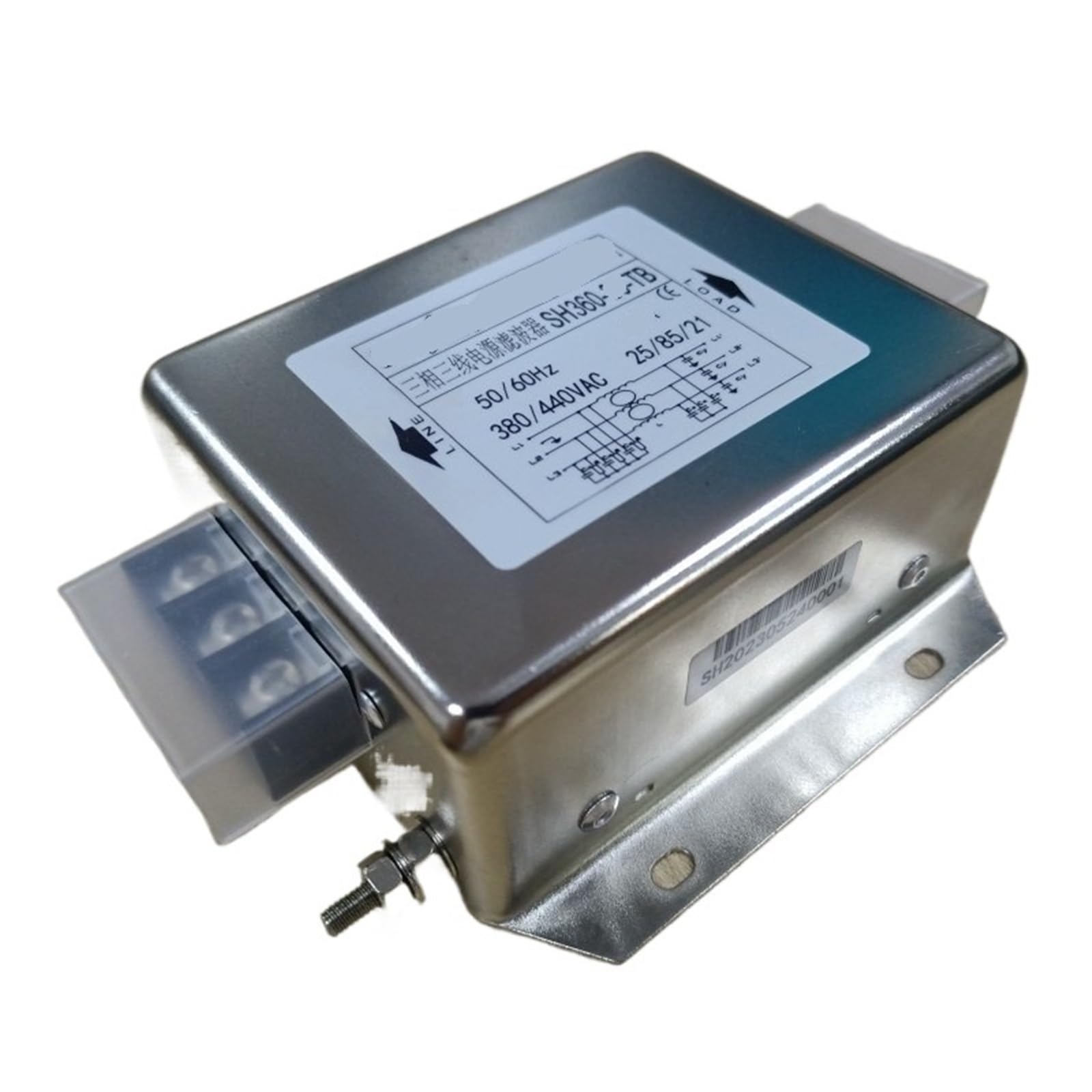
Image 1: RHNLMGKL SH360 Three-Phase Power Filter. The label on the filter indicates it is a three-phase, three-wire power filter, model SH360, operating at 50/60Hz and 380/440VAC. It also shows 'LINE' and 'LOAD' connections and a basic wiring diagram.
4. Setup and Installation
Follow these steps for safe and correct installation:
- Mounting: Securely mount the power filter to a stable, non-vibrating surface using appropriate fasteners. Ensure adequate ventilation around the unit.
- Wiring - Disconnect Power: Before making any electrical connections, ensure that the main power supply to the circuit is completely disconnected and locked out.
- Connect Line Input: Connect the three-phase input lines (L1, L2, L3) from the power source to the terminals marked 'LINE' on the filter. Refer to the wiring diagram on the product label for correct phase sequence.
- Connect Load Output: Connect the three-phase output lines (L1, L2, L3) to the equipment requiring filtering, using the terminals marked 'LOAD' on the filter.
- Grounding: Connect the ground terminal of the filter to a reliable earth ground. This is critical for safety and effective EMI suppression.
- Verify Connections: Double-check all wiring connections for tightness and correctness before restoring power.
5. Operating Instructions
The RHNLMGKL SH360 Three-Phase Power Filter operates passively once correctly installed. No user interaction is required for its normal function. Upon restoration of power to the circuit, the filter will automatically begin to suppress electromagnetic interference, providing a cleaner power supply to your connected equipment.
- Ensure the power filter is installed in an environment within its specified operating temperature and humidity ranges.
- Monitor the performance of your connected equipment to confirm effective EMI reduction.
6. Maintenance
Regular maintenance helps ensure the longevity and optimal performance of your power filter.
- Power Disconnection: Always disconnect power to the filter before performing any maintenance.
- Visual Inspection: Periodically inspect the filter for any signs of physical damage, corrosion, or overheating. Check for loose connections at the terminals.
- Cleaning: If necessary, gently clean the exterior of the filter with a dry, soft cloth. Do not use liquid cleaners or solvents. Ensure no dust or debris accumulates around the terminals or ventilation areas.
- Connection Check: Verify that all electrical connections remain tight and secure. Loose connections can lead to poor performance or safety hazards.
7. Troubleshooting
If you experience issues with your power filter or connected equipment, consider the following troubleshooting steps:
- No Power to Equipment:
- Check if the main power supply to the circuit is active.
- Inspect all wiring connections to ensure they are secure and correctly installed.
- Verify that the filter's internal components are not damaged (e.g., signs of burning or melting).
- Poor EMI Suppression:
- Ensure the filter is correctly grounded. A poor ground connection can significantly reduce filtering effectiveness.
- Confirm that the filter's current rating is appropriate for the connected load. Overloading can reduce performance.
- Check for external sources of interference that might be bypassing the filter.
- Unusual Noise or Heat:
- Immediately disconnect power.
- This may indicate an internal fault or overload. Do not reapply power until the issue is diagnosed by a qualified technician.
If problems persist after performing these checks, contact a qualified electrician or the product manufacturer for assistance.
8. Specifications
| Feature | Specification |
|---|---|
| Model | SH360-20-TB |
| Brand | RHNLMGKL |
| Current Rating (Specific Model) | 20A |
| Current Range (SH360 Series) | 5A ~ 1600A |
| Voltage Rating | 380/440VAC |
| Frequency | 50/60Hz |
| Operating Temperature Range | -25°C to +85°C (based on CE 25/85/21 marking) |
| Dimensions (Approximate) | 13 x 9 x 8 cm |
| Manufacturer | RHNLMGKL |
| Country of Origin | China |
9. Warranty and Support
For information regarding the product warranty, please refer to the terms and conditions provided by your seller or contact RHNLMGKL directly. Keep your purchase receipt as proof of purchase.
For technical support or further inquiries, please reach out to the manufacturer or your authorized distributor.