
FITKOL NB2
FITKOL AI-Adaptive Treadmill NB2 User Manual
Model: NB2
1. Introduction
Thank you for choosing the FITKOL AI-Adaptive Treadmill NB2. This manual provides essential information for the safe and effective use of your new treadmill. The NB2 features an AI-adaptive training system that automatically adjusts speed and incline based on your heart rate, a smart fat-burning zone control, and a real-time AI running coach. Please read this manual thoroughly before operation and retain it for future reference.

2. Important Safety Information
Before using the FITKOL AI-Adaptive Treadmill NB2, please read and understand all safety precautions. Failure to follow these instructions may result in injury or damage to the product.
- Always consult with a healthcare professional before starting any new exercise program.
- Place the treadmill on a level, stable surface with adequate clearance around it (at least 6 feet behind and 2 feet on each side).
- Keep children and pets away from the treadmill during operation.
- Wear appropriate athletic footwear and clothing.
- Use the safety key at all times. Attach the clip to your clothing before starting your workout.
- Do not operate the treadmill if it is damaged or malfunctioning.
- Keep hands and feet clear of moving parts.
- Unplug the treadmill from the power outlet when not in use or before cleaning and maintenance.
- Maximum user weight capacity is 440 lbs (200 kg). Do not exceed this limit.
3. What's in the Box
Carefully unpack all components and ensure you have received the following items:
- FITKOL AI-Adaptive Treadmill NB2 Main Unit
- Safety Key
- Tool Kit
- User Manual (this document)
- Power Cord
4. Setup and Assembly
The FITKOL AI-Adaptive Treadmill NB2 is designed for straightforward assembly. While some components may come pre-assembled, it is recommended to have two people for the assembly process to ensure safety and ease.
- Unpacking: Remove all packaging materials and place the treadmill frame on a clear, level surface.
- Frame Assembly: Follow the detailed instructions in the included assembly guide (part of the tool kit) to secure the uprights and console to the base. Ensure all bolts are tightened securely.
- Console Connection: Connect any necessary cables from the uprights to the console as indicated in the assembly guide.
- Power Connection: Plug the power cord into a grounded electrical outlet.
- Initial Profile Setup: Power on the treadmill. The system will guide you through a one-time profile setup, which includes entering basic biometric data for the AI coaching system.


5. Operating Instructions
The FITKOL AI-Adaptive Treadmill NB2 offers an intelligent and personalized workout experience. Familiarize yourself with its features for optimal use.
5.1 Getting Started
- Power On: Ensure the treadmill is plugged in and the main power switch (usually located near the front base) is in the "ON" position.
- Attach Safety Key: Clip the safety key to your clothing and insert the other end into the designated slot on the console. The treadmill will not operate without the safety key in place.
- Select Workout Mode:
- AI-Adaptive Mode (SportMind AI): This is the primary mode where the treadmill automatically adjusts speed and incline based on your real-time heart rate and pre-set goals. Select this mode for a guided, optimized workout.
- Manual Mode: For traditional workouts, you can manually control speed (0.6-9.6 MPH) and incline (0-10%) using the console buttons.
- Start Workout: Press the "Start" button. The belt will begin to move at a low speed. Gradually increase your pace.
- End Workout: To stop, press the "Stop" button or pull the safety key. The treadmill will gradually slow down and stop.
5.2 AI-Adaptive Training System (SportMind AI)
The SportMind AI system continuously monitors your heart rate and adjusts the treadmill's speed and incline to keep you in your optimal training zone. This system learns and evolves with each workout, providing a personalized experience without manual adjustments.
- Real-Time Heart Rate Tracking: The AI uses your heart rate data (from compatible devices like Apple Watch or Fitkol wristband) to make adjustments.
- Auto Speed & Incline Adjustment: The treadmill will automatically increase or decrease speed and incline to maintain your target heart rate zone for fat burning or cardiovascular improvement.
- Free AI Coaching: The integrated AI coach provides guidance and feedback throughout your session, helping you maintain proper form and motivation.


5.3 Console and Display
The LED display provides key workout metrics:
- Speed: Current running speed.
- Incline: Current incline level.
- Time: Duration of your workout.
- Distance: Total distance covered.
- Calories Burned: Estimated calories expended.
- Heart Rate: Your current heart rate (requires compatible heart rate monitor).
5.4 Connectivity
The treadmill supports Bluetooth and Wi-Fi connectivity for enhanced features:
- App Integration: Connect to the FITKOL app for advanced tracking, workout history, and AI optimization.
- Device Compatibility: Compatible with Apple Watch and the FITKOL Bio-Sync Watch for accurate heart rate tracking.

6. Maintenance and Care
Regular maintenance ensures the longevity and optimal performance of your FITKOL AI-Adaptive Treadmill NB2.
6.1 Cleaning
- Daily: Wipe down the console and handrails with a soft, damp cloth after each use to remove sweat and dust.
- Weekly: Clean the running belt and deck with a mild detergent solution. Ensure the treadmill is unplugged before cleaning.
- Monthly: Vacuum around and under the treadmill to prevent dust buildup from affecting motor performance.
6.2 Lubrication
The running belt requires periodic lubrication to reduce friction and extend its lifespan. Refer to the assembly guide for specific lubrication points and frequency. Typically, lubrication is needed every 3-6 months depending on usage.
6.3 Belt Adjustment
Over time, the running belt may require tension or centering adjustments. If the belt feels loose, slips, or drifts to one side, consult the assembly guide for instructions on how to adjust the belt tension and alignment using the provided tool kit.
7. Troubleshooting
If you encounter any issues with your FITKOL AI-Adaptive Treadmill NB2, refer to the following common problems and solutions:
| Problem | Possible Cause | Solution |
|---|---|---|
| Treadmill does not power on. | Power cord not plugged in; main power switch off; safety key not inserted. | Ensure power cord is securely plugged into a grounded outlet. Turn main power switch ON. Insert safety key fully into its slot. |
| Running belt slips or hesitates. | Belt tension too loose; belt requires lubrication. | Adjust belt tension according to the assembly guide. Apply lubricant to the running deck as per maintenance instructions. |
| Running belt drifts to one side. | Belt alignment is off. | Adjust belt alignment using the rear roller bolts as described in the assembly guide. |
| Unusual noise during operation. | Loose components; motor issue; belt friction. | Check all bolts and screws for tightness. Ensure belt is lubricated. If noise persists, contact customer support. |
| Heart rate reading is inaccurate. | Sensor placement incorrect; incompatible device; low battery in external device. | Ensure heart rate sensor (e.g., wristband) is worn correctly. Verify device compatibility. Check battery levels of external devices. |
8. Specifications
Detailed technical specifications for the FITKOL AI-Adaptive Treadmill NB2:
| Feature | Detail |
|---|---|
| Brand | FITKOL |
| Model Name | NB2 |
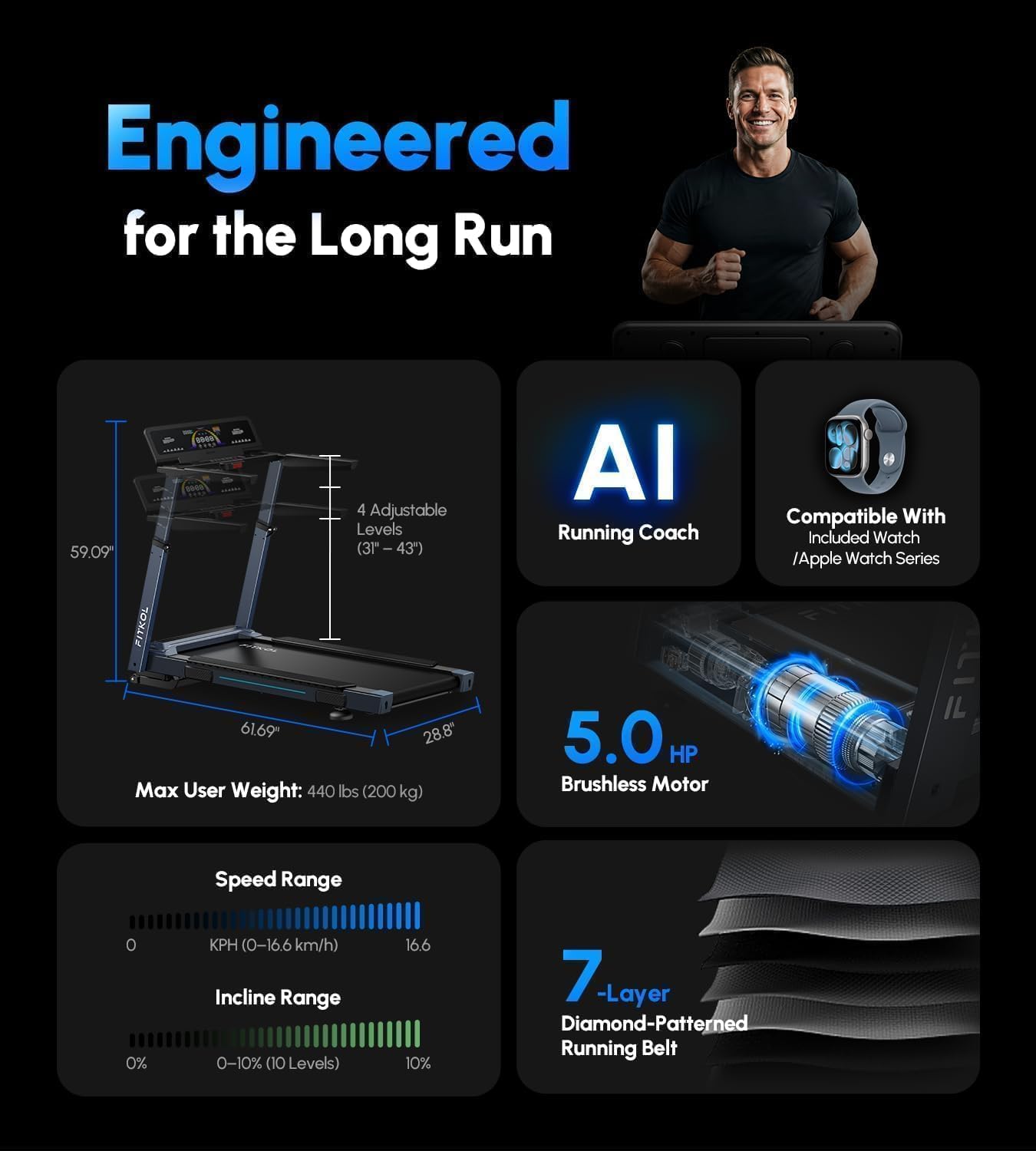
| Product Dimensions (D x W x H) | 61.69"D x 59.09"W x 28.8"H |
| Item Weight | 136 pounds |
| Material | Alloy Steel |
| Maximum Speed | 9.6 MPH (16 km/h) |
| Maximum Incline Percentage | 10% (10 Levels) |
| Motor Horsepower | 5.0 HP (Peak) |
| Maximum Weight Recommendation | 440 pounds (200 kg) |
| Running Deck Dimensions | 20" W x 54" L (approximate, derived from "Spacious 20” X 54” Running Deck") |
| Display Type | LED |
| Connectivity Technology | Bluetooth, Wi-Fi |
| Metrics Measured | Calories Burned, Distance, Heart Rate, Speed |
| Power Source | Corded Electric |
| Special Features | AI-Adaptive Speed & Incline, Smart Heart Rate Control, Real-Time AI Running Coach, Built-In Speaker, Multi-Layer Cushioned Belt, Multi-Point Shock Absorption |


9. Warranty Information
FITKOL provides the following warranty for your AI-Adaptive Treadmill NB2:
- Frame: Ten (10) years from the initial date of purchase.
- Motor and Other Parts: One (1) year from the initial date of purchase.
- Labor: One (1) year free-of-charge from the initial date of purchase.
Please retain your proof of purchase for warranty claims. The warranty covers manufacturing defects and does not cover damage resulting from misuse, neglect, or unauthorized modifications.
10. Customer Support
For any questions, assistance, or technical support regarding your FITKOL AI-Adaptive Treadmill NB2, please contact our customer service team.
- Email Support: Professional customer assistance whenever you need it. Expect replies within 24 hours.
- AI App Support: Assistance with software updates, AI optimization, and training guidance.
- Returns: 30-day easy returns policy.
For the most up-to-date contact information and support resources, please visit the official FITKOL website or refer to the contact details provided with your purchase documentation.

Ask a question about this manual
Ask about setup, troubleshooting, compatibility, parts, safety, or missing instructions. Manuals+ will review the question and use this page’s manual context to help answer it.