
MESWAO MES LD-408D9M-T
MESWAO Tablet Floor Stand User Manual
Model: MES LD-408D9M-T
1. Product Overview
The MESWAO Tablet Floor Stand is designed to provide a stable and adjustable viewing solution for tablets, particularly 15.6-inch models. Its robust construction ensures stability, preventing wobbling or drooping common with flexible-arm stands. The stand features lockable wheels for easy mobility and a vertical sliding mechanism for precise height adjustments.
Key features include:
- Ultimate Stability: Engineered with a solid vertical straight pole to eliminate screen wobble, especially for large tablets.
- Smooth Mobility with Secure Lock: Equipped with 360° rolling wheels that include integrated safety locks for stationary use.
- Precise Vertical Adjustment: Height can be adjusted smoothly from 80cm to 121cm.
- Heavy-Duty Compact Base: A low-profile base (31cm x 28.1cm, 4.5cm height) designed to slide under furniture, ensuring stability and saving space.
- Versatile Compatibility: Securely accommodates various tablet sizes, highly recommended for 15.6-inch devices.

Figure 1: Comparison illustrating the superior stability of the MESWAO stand's vertical structure against traditional wobbly stands.

Figure 2: The MESWAO Tablet Floor Stand used for movie watching, work & reading, and video conferencing.
2. Assembly Instructions
Follow these steps to assemble your MESWAO Tablet Floor Stand. Ensure all components listed in the specifications are present before beginning.
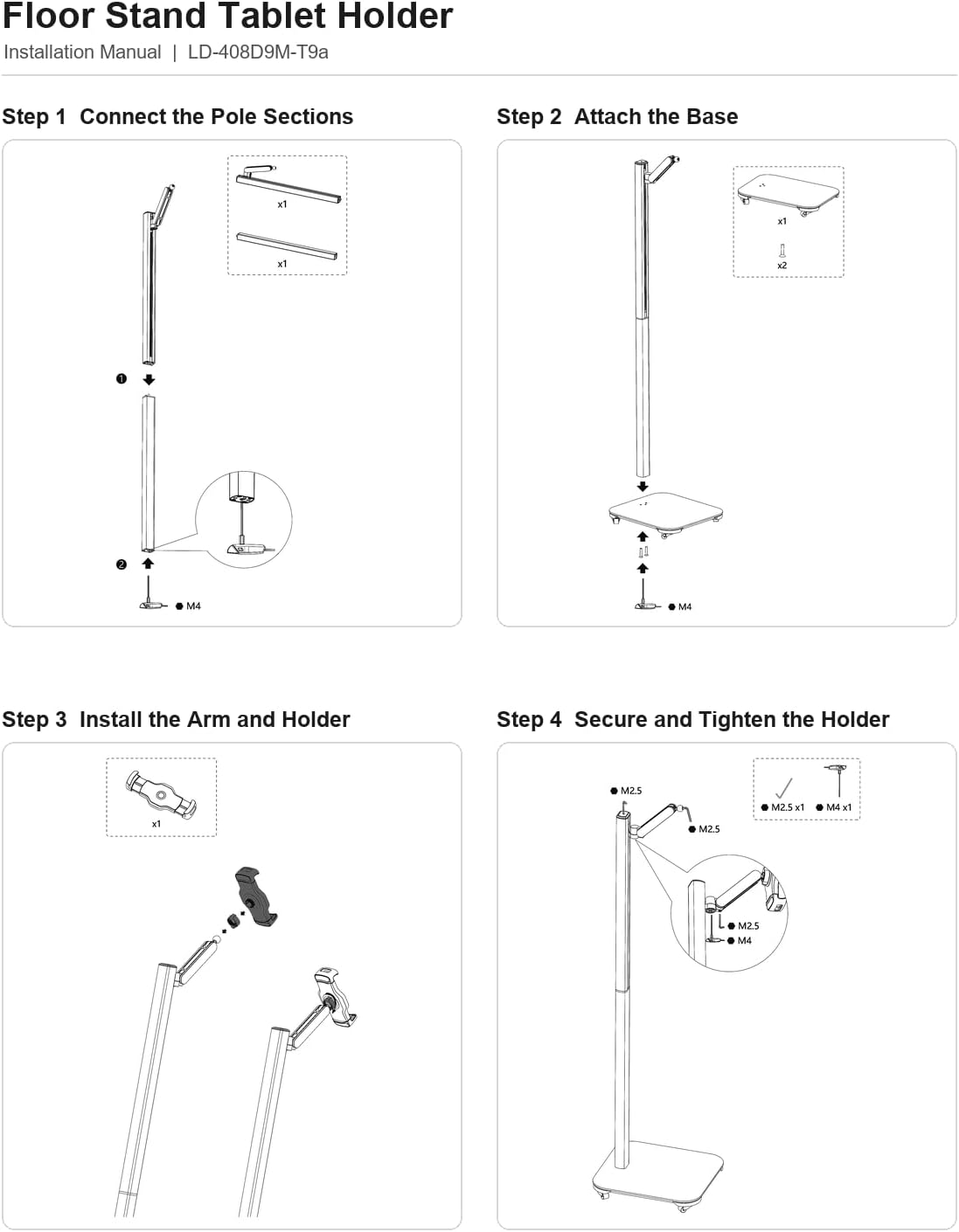
Figure 3: Visual guide for assembling the MESWAO Tablet Floor Stand.
- Step 1: Connect the Pole Sections.
Insert the upper pole section into the lower pole section. Secure them using the provided M4 screw and tighten with the assembly tool.
- Step 2: Attach the Base.
Align the assembled pole with the heavy-duty base. Secure the pole to the base using the two M4 screws from underneath the base. Ensure they are tightly fastened.
- Step 3: Install the Arm and Holder.
Slide the tablet clamp holder onto the top of the vertical pole. Ensure it is oriented correctly for tablet placement.
- Step 4: Secure and Tighten the Holder.
Use the M2.5 screws to secure the tablet holder to the pole. There are typically multiple M2.5 screws and one M4 screw for final tightening to ensure the holder is firmly attached and does not rotate freely.
Note: An assembly tool kit (screws and wrenches) is included with your purchase.
3. Operating Instructions
3.1 Adjusting Height
The stand features a vertical sliding mechanism for height adjustment. To adjust the height:
- Loosen the locking mechanism on the back of the tablet holder assembly.
- Gently slide the tablet holder up or down the main pole to your desired viewing height (between 80cm and 121cm).
- Once the desired height is reached, tighten the locking mechanism securely to prevent the holder from sliding.

Figure 4: Illustration of the adjustable viewing height, demonstrating sofa, desk, and standing modes.
3.2 Using Lockable Wheels
The heavy-duty base is equipped with 360° rolling wheels for easy movement and integrated safety locks for stability.
- To Move: Ensure all wheel locks are in the "UNLOCKED" position. Gently push the stand to your desired location.
- To Secure: Once the stand is in position, press down on the lever of each wheel lock until it clicks into the "LOCKED" position. This will prevent the stand from rolling.
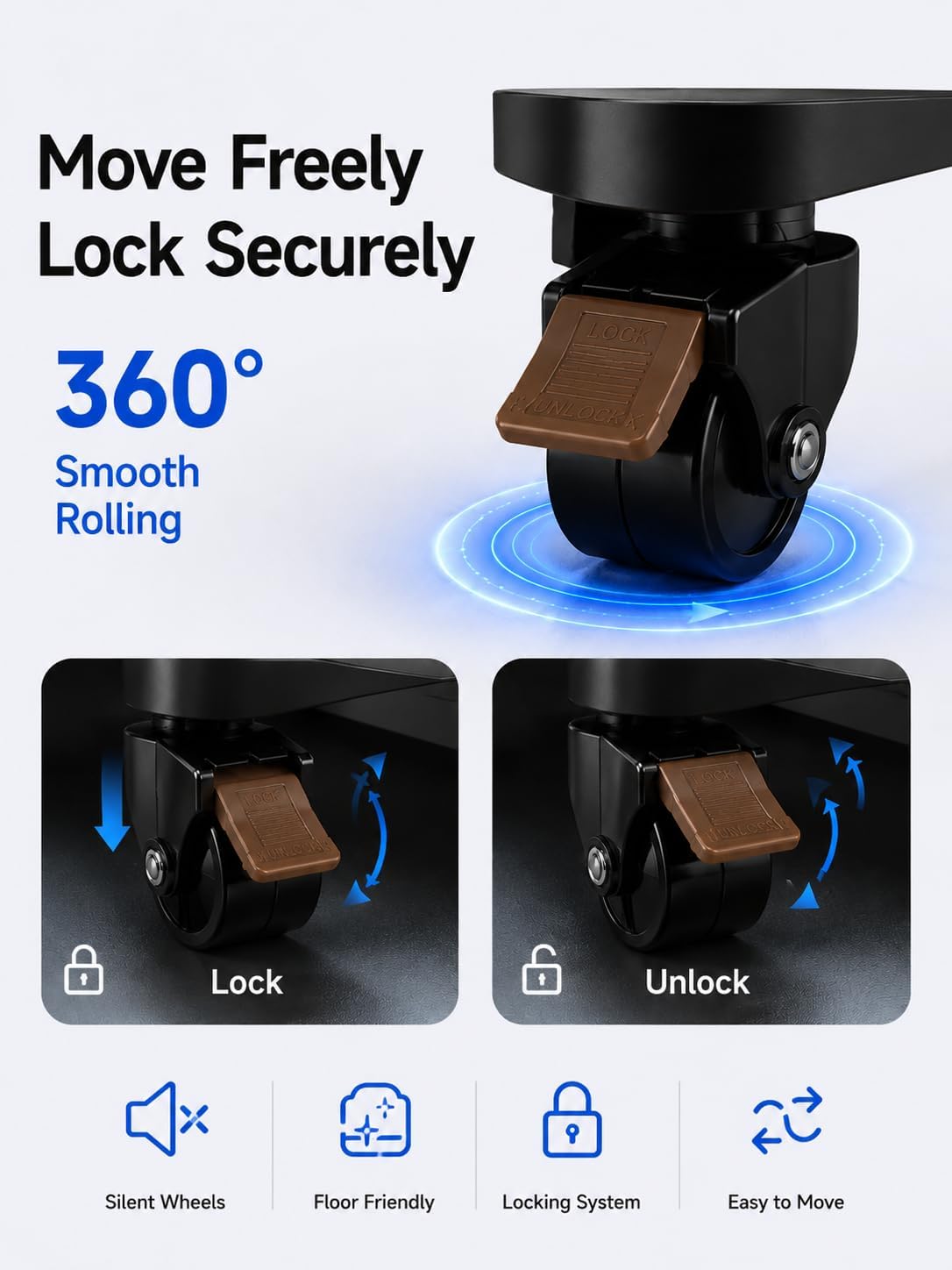
Figure 5: Detailed view of the lockable wheels, showing the lock and unlock positions.
3.3 Placing Your Tablet
The tablet clamp holder is designed to securely hold various tablet sizes. Gently expand the spring-loaded clamps, insert your tablet, and release the clamps to secure it. Ensure the tablet is centered and firmly held before use.
3.4 Using the Storage Tray
The stand includes a smart storage tray for small items such as watches, earbuds, styluses, phones, or other accessories. Place items securely on the tray as needed.

Figure 6: The integrated storage tray for keeping small items within reach.
4. Maintenance
- Cleaning: Wipe the stand with a soft, damp cloth. Avoid using abrasive cleaners or solvents that may damage the finish.
- Inspecting: Periodically check all screws and connections to ensure they remain tight. Re-tighten if necessary to maintain stability.
- Storage: When not in use for extended periods, store the stand in a dry, cool place.
5. Troubleshooting (FAQ)
Q: How is this stand different from long-arm or gooseneck tablet stands?
A: Most long-arm stands vibrate and slowly drop when holding heavy, large-screen tablets (like 15.6-inch models). The MESWAO stand features a solid vertical straight pole where the device clip slides directly up and down. This structural design provides maximum load-bearing stability and eliminates wobbling.
Q: Can the stand be fixed in one place without rolling away while I tap the screen?
A: Yes. The base is equipped with specialized lockable wheels. Once you roll the stand into your desired indoor position, simply engage the safety locks on the wheels to anchor the stand completely.
Q: Will the base fit under my sofa or bed to save space?
A: Absolutely. The base features a highly compact and flat profile with a height of only 4.5cm. It is designed to slide effortlessly under most standard indoor furniture, bringing the screen closer to your viewing area without wasting valuable floor space.
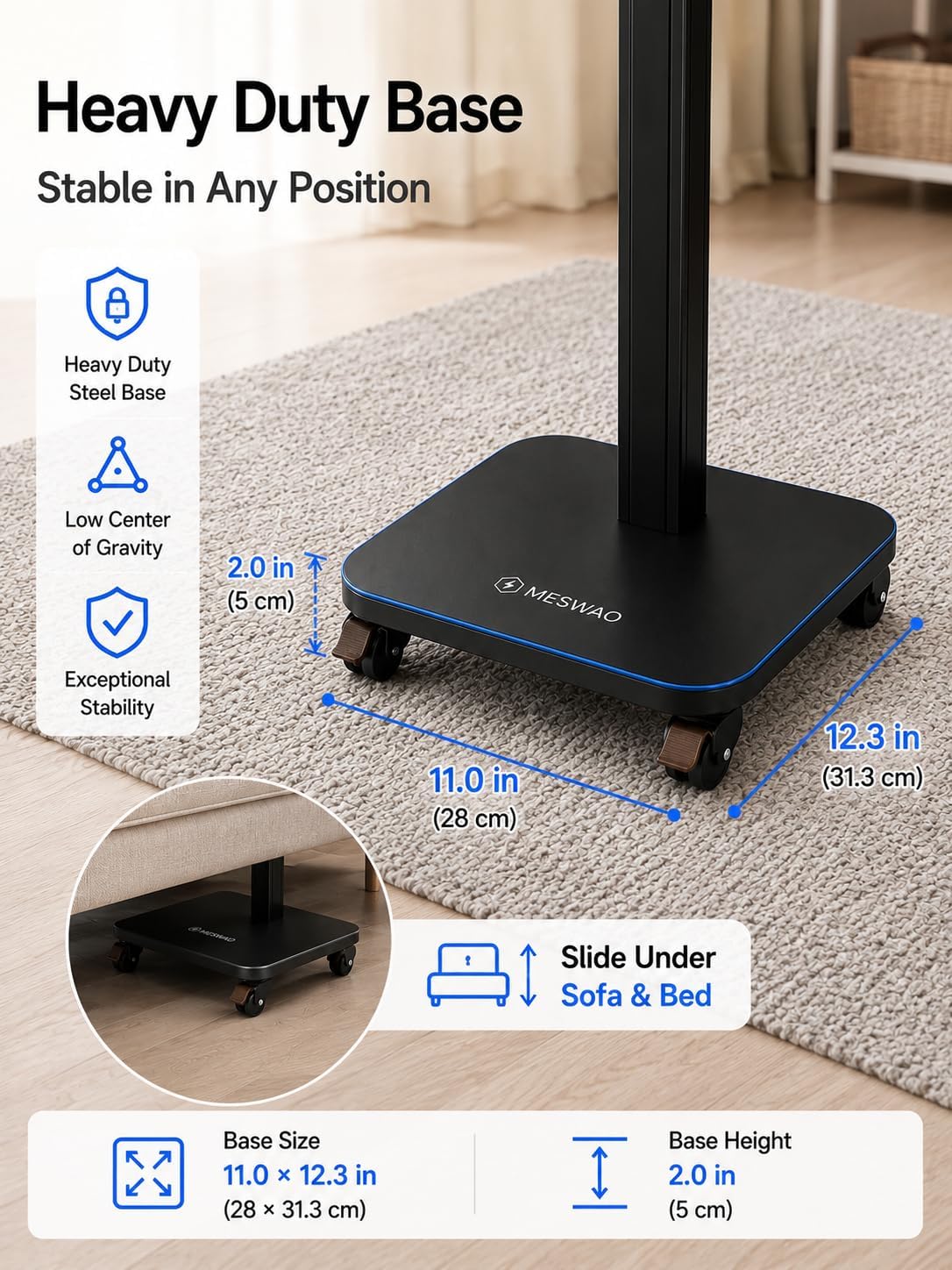
Figure 7: The heavy-duty base with dimensions, illustrating its low profile for sliding under furniture.
6. Specifications
| Feature | Detail |
|---|---|
| Brand | MESWAO |
| Model Number | MES LD-408D9M-T |
| Material | Metal |
| Color | Black |
| Height Adjustment Range | 80cm to 121cm |
| Base Dimensions | 31cm x 28.1cm (12.3 in x 11.0 in) |
| Base Height | 4.5cm (2.0 in) |
| Item Weight | 5 Kilograms |
| Compatible Devices | Tablets (7-15.6 inch, e.g., meswao 15.6 inch Tablet, iPad Pro 13/12.9/11 inch, iPad Air 6/5/4, iPad 10th/9th Generation, iPad mini 6, Samsung Galaxy Tab S9 Ultra/S9+/S8 Ultra, Microsoft Surface Pro 9/8) |
| Special Features | Adjustable, Heavy Duty, Lockable Wheels, Vertical Sliding, Wide Compatibility |
| Included Components | 1 x Adjustable Vertical Pole Set, 1 x Assembly Tool Kit (Screws and Wrenches), 1 x Heavy Duty Base with Lockable Wheels, 1 x Tablet Clamp Holder |
7. Warranty and Support
For warranty information or technical support, please refer to the documentation included with your purchase or contact MESWAO customer service through their official website or the retailer from whom the product was purchased. Please have your model number (MES LD-408D9M-T) and purchase details ready when contacting support.
Ask a question about this manual
Ask about setup, troubleshooting, compatibility, parts, safety, or missing instructions. Manuals+ will review the question and use this page’s manual context to help answer it.