
1. Product Overview
This manual provides instructions for the SEDETA 94-inch Two-Person Electric Standing Desk. This desk features independent electric height adjustment for two users, integrated power outlets, four storage drawers, and a CPU stand, designed for a versatile and organized workspace.
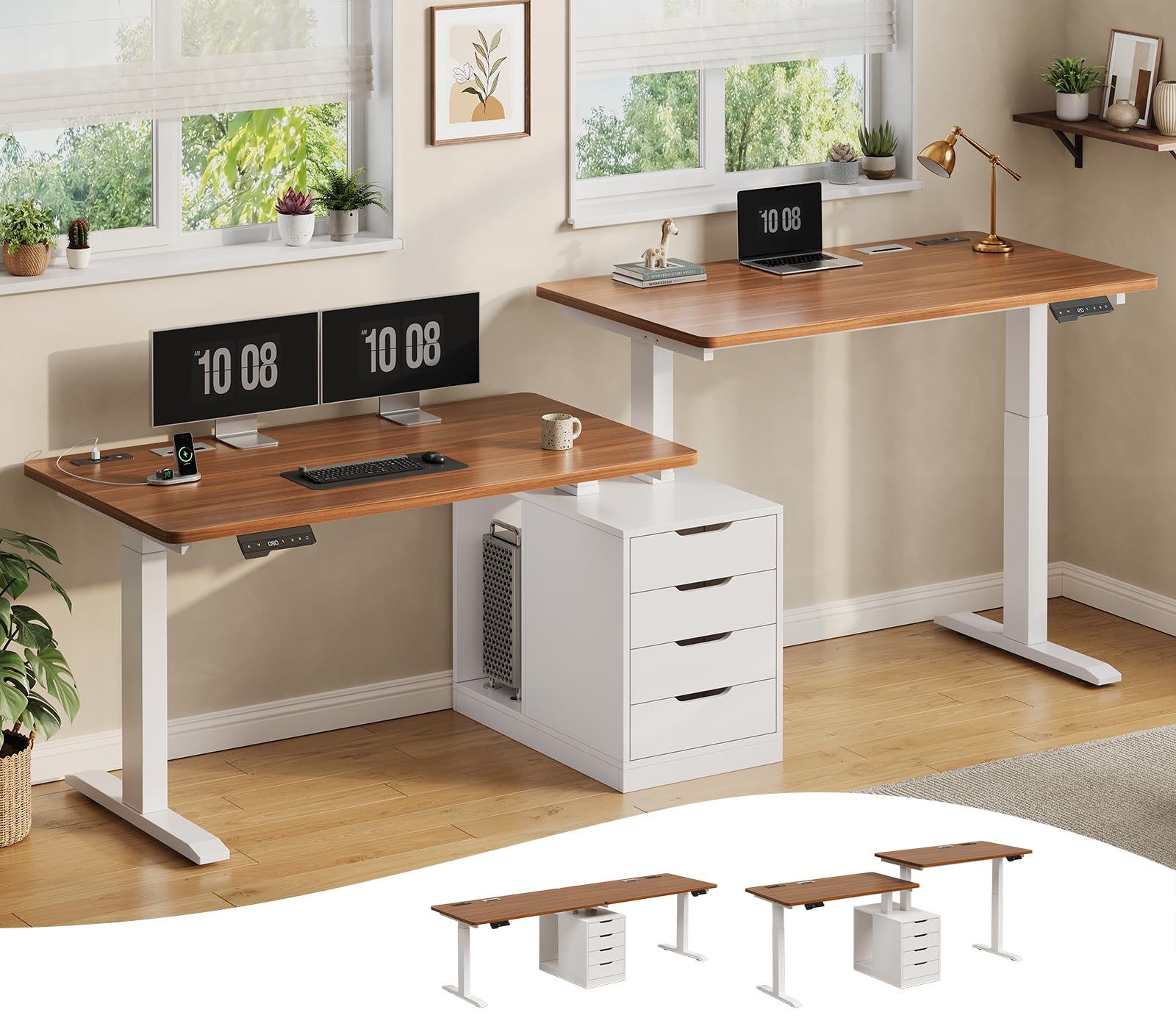
Image: The SEDETA 94-inch Two-Person Electric Standing Desk in a home office setting, showcasing its dual workstations and central storage unit.
2. Key Features
- Independent Electric Height Adjustment: Each side of the desk features its own electric lift system, LED display, and 3 memory presets, allowing individual height settings from 28.7 inches to 47.2 inches.
- Dual Integrated Power Hubs: Two separate power hubs are provided, one for each user. Each hub includes 4 AC outlets (120V/12A) and 2 USB ports (5V/2A) to keep devices charged.
- Ample Storage: The desk includes four smooth-gliding wooden storage drawers and a spacious CPU shelf, which can also be used for additional storage bins.
- Spacious Work Surface: A 94-inch wide by 23.6-inch deep tabletop provides generous space for two users, accommodating multiple monitors, laptops, and office essentials.
- Quiet Operation: Dual motors operate at under 30dB, ensuring quiet height adjustments suitable for any environment.
- Robust Construction: A reinforced steel frame supports up to 400 lbs, providing stability and durability. The desktop is made from engineered wood, designed to be scratch-resistant and easy to clean.
- Cable Management: Two cable management trays are included to help organize and conceal power cords and other cables.

Image: Illustration of the dual independent height adjustment feature, showing one user sitting at 28.7 inches and another standing at 47.2 inches.

Image: Close-up view of the integrated power hub with AC outlets and USB ports, demonstrating a tidy workspace compared to a cluttered one with external power strips.

Image: Overhead view of the desk highlighting the four storage drawers and the open CPU shelf for organized storage.
3. Setup and Assembly
The SEDETA Two-Person Electric Standing Desk requires assembly. Please ensure all components are present before beginning. Refer to the separate assembly guide provided with your product for detailed step-by-step instructions and diagrams.
3.1 Unpacking
- Carefully open the packaging and remove all components. The desk ships in two boxes.
- Verify that all parts listed in the assembly guide are included and undamaged.
- Keep packaging materials until assembly is complete in case of returns or missing parts.

Image: Diagram showing the overall dimensions of the desk and indicating that it ships in two separate boxes.
3.2 Assembly Overview
General assembly involves attaching the desk legs to the tabletop, installing the central storage unit, connecting the electrical components for height adjustment and power outlets, and inserting the drawers. It is recommended to assemble the desk with at least two people due to its size and weight.
- Assemble the desk frame and legs according to the provided instructions.
- Attach the desktop panels.
- Install the central storage cabinet and drawers.
- Connect the motor cables and power hubs.
- Route cables through the integrated cable management trays.
4. Operating Instructions
4.1 Electric Height Adjustment
Each side of the desk has an independent control panel for height adjustment.

Image: Close-up of the desk's control panel, showing up/down arrows, LED display, memory presets (1, 2, 3), and a reset button.
- Adjusting Height: Use the ▲ (Up) and ▼ (Down) buttons to raise or lower the desk to your desired height. The current height will be displayed on the LED screen.
- Setting Memory Presets:
- Adjust the desk to your preferred height.
- Press the M button (or similar memory set button, if present).
- Press one of the numbered preset buttons (1, 2, or 3) within 3 seconds to save the current height to that preset.
- Using Memory Presets: Press a saved preset button (1, 2, or 3) to automatically move the desk to the stored height.
- Reset Function: If the desk encounters an error or needs recalibration, press and hold the RST button (or similar reset icon) until the desk moves to its lowest position and then slightly rises, indicating a successful reset.
4.2 Using Power Outlets
Each power hub provides 4 AC outlets and 2 USB ports. Ensure the main power switch for the desk is turned on.
- Plug your devices into the AC outlets (120V/12A) or USB ports (5V/2A) as needed.
- The power hubs are designed for convenience and to reduce cable clutter.
- Do not overload the outlets. Refer to the maximum wattage specified in the specifications section.
5. Maintenance
5.1 Cleaning
- Wipe the desktop surface with a soft, damp cloth. Avoid abrasive cleaners or harsh chemicals that could damage the finish.
- For the metal frame, use a mild cleaner and a soft cloth.
- Ensure no liquids enter the control panel or power outlets.
5.2 General Care
- Regularly check all screws and bolts to ensure they are tight. Retighten if necessary.
- Avoid placing excessively heavy items on the desk, exceeding the 400 lbs weight capacity.
- Keep the area around the desk legs clear to prevent obstructions during height adjustment.
6. Troubleshooting
| Problem | Possible Cause | Solution |
|---|---|---|
| Desk does not move. | Power cable disconnected, motor error, overload. | Check power connections. Perform a reset (see 4.1). Reduce weight on the desk. |
| Desk moves unevenly or makes unusual noise. | Obstruction, loose connections, motor issue. | Check for obstructions under the desk. Ensure all frame connections are secure. Perform a reset. |
| LED display shows an error code. | Specific error detected by the control system. | Refer to the detailed error code list in the full assembly manual or contact customer support. Often, a reset can resolve minor errors. |
| Power outlets not working. | Main power switch off, circuit breaker tripped, faulty connection. | Ensure the desk's main power switch is on. Check if the circuit breaker on the power hub has tripped (if applicable). Verify all power connections. |
7. Specifications
| Feature | Detail |
|---|---|
| Model Number | 5886_1 |
| Product Dimensions (D x W x H) | 23.6"D x 94"W x 28.7"H |
| Height Adjustment Range | 28.7" - 47.2" |
| Maximum Load Capacity | 400 lbs |
| Number of Drawers | 4 |
| Power Outlets per Hub | 4 AC (120V/12A), 2 USB (5V/2A) |
| Motor Noise Level | Under 30dB |
| Top Material | Engineered Wood |
| Base Material | Metal |
| Item Weight | 65 Pounds (Note: This weight may refer to a single component or package. Refer to shipping labels for total weight.) |

Image: Visual representation of the desk's robust construction, illustrating its 400 lbs weight capacity.
8. Warranty and Support
The SEDETA 94-inch Two-Person Electric Standing Desk comes with a 3-Year Warranty from the date of purchase, covering manufacturing defects and malfunctions under normal use.
- For warranty claims, technical assistance, or to report missing/damaged parts, please contact SEDETA customer support.
- Please have your model number (5886_1) and proof of purchase ready when contacting support.
For further assistance, please visit the official SEDETA website or contact their customer service department.