
Important Safety Information
Please read and understand all instructions before assembling and using this product. Failure to follow these instructions may result in serious injury.
- Weight Capacity: The upper bunk is designed to support a maximum weight of 400 lbs. Do not exceed this limit.
- Guardrails: The upper bunk is equipped with full-length high guardrails. Ensure they are properly installed and secured at all times to prevent falls.
- Mattress Size: Use only a full-size mattress that fits snugly within the bed frame to prevent gaps.
- Assembly: Assembly should be performed by at least two adults. Ensure all bolts, screws, and connectors are securely tightened before use. Periodically check and re-tighten all connections.
- Staircase: The 4-step staircase is designed for safe climbing. Ensure it is securely attached and stable.
- Charging Station: Do not overload the charging station. Use only with compatible devices. Keep liquids away from electrical outlets.
- Ventilation: Ensure adequate ventilation around the bed, especially if using the desk area for extended periods.
- Children: This loft bed is intended for children and teens. Supervise younger children to prevent misuse.
Product Overview
The KEIKI Full Size Loft Bed is a multi-functional furniture piece designed to maximize space in smaller bedrooms. It features a full-size sleeping area, a built-in desk with a charging station, a wardrobe, and storage stairs.
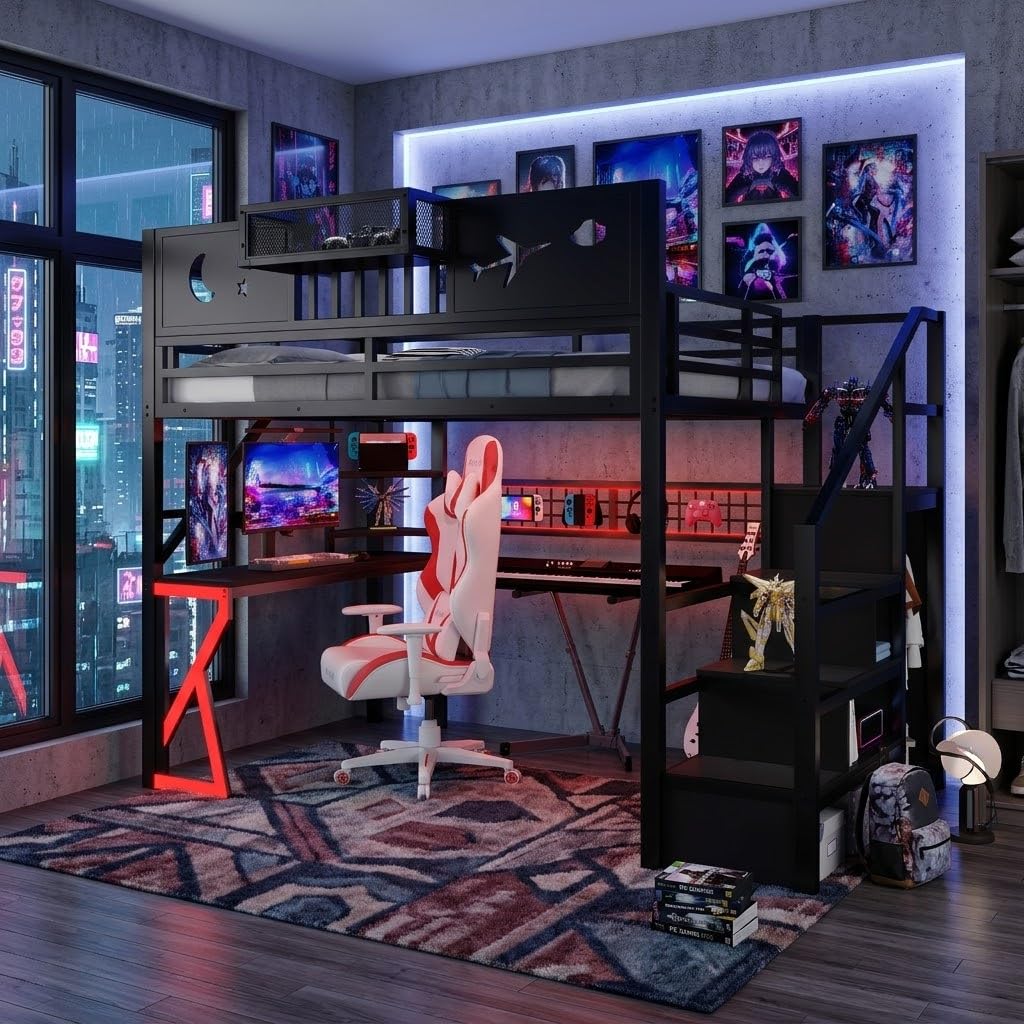
Image 1: Overall dimensions of the KEIKI Full Size Loft Bed. The bed measures 94.3 inches in length, 56 inches in width, and 74 inches in height. The sleeping platform is 67 inches high.

Image 2: A full view of the KEIKI Full Size Loft Bed, showcasing the integrated desk, storage stairs, and the upper bunk with guardrails. The desk area is beneath the bed, and the staircase provides access to the top bunk.

Image 3: Detailed view of the 4-step storage staircase. Each step features a compartment for storage, and a wardrobe section is integrated on the side.

Image 4: Close-up of the desk area located beneath the loft bed. It includes a built-in charging station with power outlets and USB ports, and a mesh grid for hanging items.
Setup Instructions
Assembly of the KEIKI Full Size Loft Bed requires careful attention to detail. It is recommended that two adults perform the assembly.
- Unpack Components: Carefully unpack all boxes and identify all parts against the provided parts list (refer to the separate assembly manual included with your product).
- Prepare Workspace: Clear a spacious area for assembly. Lay out all hardware and components within easy reach.
- Assemble Base Frame: Begin by assembling the main metal frame components according to the step-by-step diagrams in your assembly manual. Ensure all bolts are finger-tightened initially.
- Install Desk and Storage: Attach the desk, wardrobe, and storage stair components as instructed. Pay close attention to the orientation of each piece.
- Secure Guardrails: Install the full-length guardrails on the upper bunk. These are crucial for safety.
- Tighten All Connections: Once all components are in place, systematically tighten all bolts and screws using the provided tools. Do not overtighten.
- Staircase Placement: The staircase can be installed on either the left or right side of the bed to suit your room layout. Follow the specific instructions for your chosen orientation.
- Install LED Strip: Attach the RGB LED strip to the designated area, typically around the mesh grid under the bed. Connect it to the power source.
- Connect Charging Station: Ensure the charging station is properly integrated into the desk and its power cord is accessible for connection to a wall outlet.
- Final Check: Before use, thoroughly inspect the entire structure to ensure stability, security, and proper alignment of all parts.
For detailed, step-by-step assembly instructions and diagrams, please refer to the dedicated assembly manual included in your product packaging.
Operating Instructions
Using the Loft Bed
- Accessing the Upper Bunk: Use the integrated 4-step staircase to safely access the upper sleeping area. Always face the stairs when climbing up or down.
- Sleeping Area: Place a full-size mattress directly on the metal slat foundation. No box spring is required.
Using the Desk and Charging Station
- Desk Usage: The spacious desk area beneath the bed can be used for studying, working, or gaming.
- Charging Devices: Plug the bed's 6.5 ft power cord into a standard wall outlet. Use the 2 AC outlets and 2 USB ports on the desktop charging station to power and charge your electronic devices.
- Reflective Strips: The reflective strips on the desk legs enhance visibility in low light conditions.
Utilizing Storage Features
- Staircase Storage: Each step of the staircase contains a hidden compartment. Lift the step covers to access these storage areas for books, toys, or other items.
- Wardrobe: The integrated wardrobe includes a hanging rod for clothes and additional compartments for shoes or bags.
- Desk Compartments: The desk area includes two storage compartments for organizing supplies.
Controlling RGB LED Lighting
- Power On/Off: Use the included remote control or the dedicated mobile application to turn the LED lights on or off.
- Color Selection: Choose from over 60,000 vibrant colors using the remote or app.
- Adjustments: Adjust brightness, speed, and various timing modes to customize the lighting effect.
- App Control: Download the specific app (details usually provided in the LED light kit manual) to unlock full control features.

Image 5: The KEIKI Loft Bed with its RGB LED lighting system activated, showing the customizable colors and how they illuminate the desk area and mesh grid.

Image 6: A closer look at the desk area, highlighting the LED lighting strip and the integrated charging station with AC outlets and USB ports.
Maintenance
- Cleaning: Wipe down the metal frame and wooden surfaces with a soft, damp cloth. Avoid harsh chemicals or abrasive cleaners.
- Hardware Check: Periodically (e.g., every 3-6 months) inspect all bolts, screws, and connections. Re-tighten any loose hardware to ensure the bed's stability and safety.
- LED Lights: If the LED strip becomes dusty, gently wipe it with a dry, soft cloth. Do not use liquids directly on the LED strip or electrical components.
- Charging Station: Keep the charging station free of dust and debris. Ensure no liquids are spilled near the outlets.
Troubleshooting
| Problem | Possible Cause | Solution |
|---|---|---|
| Bed feels wobbly or unstable. | Loose hardware. Uneven floor. | Check and tighten all bolts and screws. Ensure the bed is on a level surface. |
| LED lights are not turning on. | Power cord unplugged. Remote battery dead. LED strip damaged. | Ensure the LED power adapter is securely plugged into a wall outlet. Check remote battery. Inspect LED strip for visible damage. |
| Charging station not working. | Bed's main power cord unplugged. Device not properly connected. Overload. | Verify the bed's main power cord is plugged into a live wall outlet. Ensure devices are correctly plugged into the charging station. Unplug some devices if overloaded. |
| Staircase feels loose. | Mounting hardware is loose. | Re-tighten all bolts connecting the staircase to the main bed frame. |
Specifications
| Feature | Detail |
|---|---|
| Model Number | MM00122-3 |
| Size | Full |
| Material | Metal |
| Product Dimensions (L x W x H) | 94.3" x 56" x 74" |
| Upper Bunk Weight Capacity | 400 lbs |
| Included Components | Loft Bed Frame, Desk, Wardrobe, Storage Stairs, Guardrails, Charging Station (2 AC outlets, 2 USB ports), RGB LED Strip |
| Color | Black |
| Assembly Required | Yes |
Warranty and Support
This KEIKI product is covered by a manufacturer's warranty. For specific warranty details, including coverage period and terms, please refer to the warranty card included with your purchase or visit the official KEIKI website.
If you encounter any issues during assembly or use, or if you have questions regarding your product, please contact KEIKI customer support:
- Website: Visit the KEIKI Store on Amazon
- Email: Refer to your product packaging or warranty card for direct email support.
- Phone: Refer to your product packaging or warranty card for direct phone support.
When contacting support, please have your model number (MM00122-3) and proof of purchase ready.