Introduction
Thank you for choosing the ELECANE Smart Bark Collar OB10. This collar is designed to provide a humane and effective solution for managing your dog's excessive barking. Utilizing advanced AI chip technology, it offers three training modes and five sensitivity levels to ensure a stress-free training experience for small to medium-sized dogs.
Product Overview
The ELECANE Smart Bark Collar OB10 is an ultra-lightweight, waterproof, and rechargeable device. It features an intelligent bark detection system to prevent false triggers and offers customizable training options.

Image: ELECANE Smart Bark Collar OB10, showing the compact device and adjustable strap.
Package Contents
- 1 x ELECANE Smart Bark Collar OB10
- 1 x Adjustable Nylon Strap
- 1 x Magnetic Charging Cable
- 1 x User Manual
Setup
1. Charging the Collar
Before first use, fully charge the collar. Connect the magnetic charging cable to the collar's charging port and a USB power source. The indicator light will show charging status.
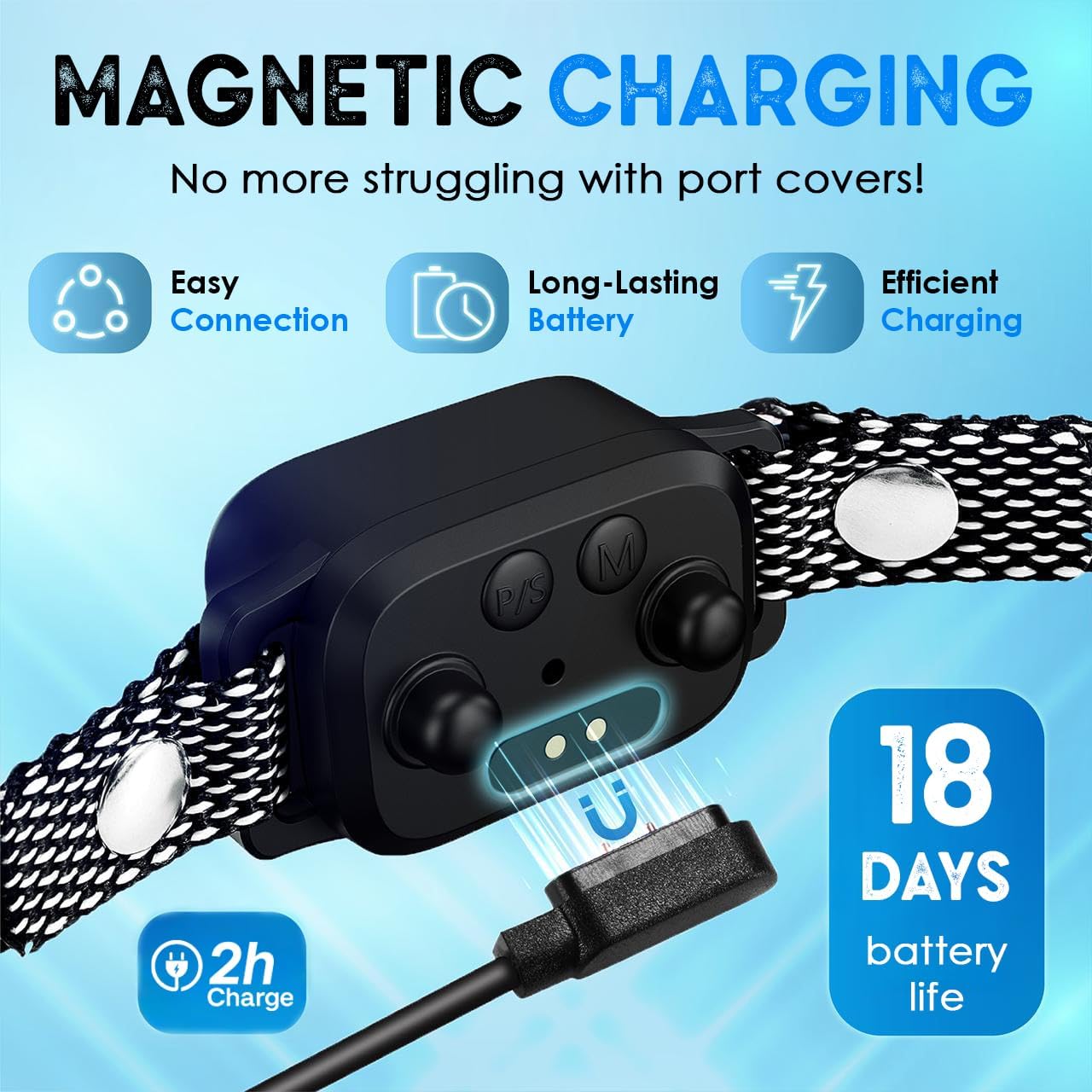
Image: Close-up of the collar showing the magnetic charging cable connected to the device. The display indicates charging status.
2. Fitting the Collar
Ensure the collar fits snugly but comfortably around your dog's neck. It should be positioned so that the sensor module rests against your dog's throat. You should be able to fit one to two fingers between the collar and your dog's neck.

Image: Various small to medium dogs wearing the ELECANE bark collar, demonstrating proper fit for different breeds and sizes.
The collar is suitable for dogs weighing 8-40 lbs with neck sizes from 6 to 20 inches.
Operating Instructions
1. Power On/Off
Press and hold the power button for 2 seconds to turn the collar on or off. The display will illuminate when powered on.
2. Selecting Training Modes
The collar offers three training modes: Beep, Vibration, and Beep + Vibration. Press the 'M' button to cycle through the modes. The selected mode will be indicated on the display.
- Beep Mode: Emits an audible tone when barking is detected.
- Vibration Mode: Delivers a gentle vibration when barking is detected.
- Beep + Vibration Mode: Combines both a beep and a vibration.

Image: Diagram illustrating the three training modes (Beep, Vibration, Beep + Vibration) available on the collar's display.
Video: A full review and demonstration of the ELECANE Smart Bark Collar, highlighting its features and how it works on small dogs.
Video: A demonstration explaining how the ELECANE Smart Bark Collar functions, including its automatic adjustment technology.
3. Adjusting Sensitivity Levels
The collar has 5 adjustable sensitivity levels (1-5) to detect barking. Press the 'S' button to adjust the sensitivity. Level 0 is a test mode. Higher sensitivity levels detect softer barks. Start with a lower sensitivity and increase if needed.

Image: Graphic illustrating the 5 sensitivity levels and their recommended use cases (e.g., Level 1-2 for noisy environments, Level 3 for normal conditions, Level 4-5 for quiet settings).
4. AI Chip for False Trigger Prevention
The integrated AI chip ensures the collar activates only when your dog barks, minimizing false triggers from other dogs, loud noises, or head shaking.

Image: Illustration showing the AI chip technology and examples of external factors (other dogs, outside noise, head shaking) that will not trigger the collar.
Maintenance
1. Cleaning
Wipe the collar and strap with a damp cloth as needed. Ensure the charging port area is dry before charging.
2. Waterproof Design
The collar has an IP67 waterproof rating, making it suitable for outdoor use and exposure to rain. However, prolonged submersion is not recommended.

Image: A dog wearing the ELECANE bark collar in the rain, emphasizing its IP67 waterproof feature and magnetic charging for full water protection.
3. Battery Care
The collar features a long-lasting battery, typically requiring only 1-2 charges per month. Avoid extreme temperatures to prolong battery life.
Troubleshooting
- Collar not activating:
- Ensure the collar is powered on.
- Check battery level and recharge if necessary.
- Adjust sensitivity to a higher level.
- Verify the collar is positioned correctly on the dog's throat.
- False activations:
- Adjust sensitivity to a lower level.
- Ensure the collar is not too loose, allowing movement that might trigger the sensor.
- Collar not charging:
- Ensure the magnetic charging cable is properly connected.
- Try a different USB power source.
Specifications
| Model Number | OB10 |
| Dimensions | 4.53 x 3.62 x 1.85 inches |
| Weight | 4.16 ounces |
| Battery | 1 Lithium Polymer (included) |
| Waterproof Rating | IP67 |
| Training Modes | Beep, Vibration, Beep + Vibration |
| Sensitivity Levels | 5 (plus Test Mode 0) |
| Recommended Dog Weight | 8-40 lbs |
| Recommended Neck Size | 6-20 inches |
| Material | Nylon |
Warranty and Support
The ELECANE Smart Bark Collar OB10 comes with a 1-Year Warranty from the date of purchase. This warranty covers manufacturing defects and malfunctions under normal use.
For technical support, warranty claims, or any questions regarding your product, please contact ELECANE customer service through the retailer's platform or visit the official ELECANE store online.
We are committed to providing effective and humane training solutions for your pet.


