
1. Introduction
This manual provides instructions for the Re-Flix Light Remote Control, specifically designed for use with the BLAUPUNKT 40FGC5500S television. This remote offers immediate functionality without complex programming, serving as an ideal replacement or secondary remote.
Key features include:
- Immediate Use (Plug & Play): No complicated programming or code entry is required; simply insert batteries and immediately use all functions.
- Smart TV Control: Designed for modern smart TVs, it may include dedicated buttons for popular streaming services like Netflix and YouTube. Please verify the presence of these specific buttons on your remote.
- Ergonomic Design: Engineered for comfortable handling and ease of use.
2. Setup
2.1 Battery Installation
To begin using your Re-Flix Light Remote Control, you must first install the batteries.
- Locate the battery compartment on the back of the remote control.
- Slide the battery compartment cover downwards or press the latch and lift to open.
- Insert two AAA batteries (not included), ensuring the positive (+) and negative (-) terminals align correctly with the indicators inside the compartment.
- Replace the battery compartment cover by sliding it back into place until it clicks securely.

Figure 1: Back view of the remote control, illustrating the battery compartment location.
2.2 Initial Use
Once batteries are installed, the remote control is ready for immediate use with your BLAUPUNKT 40FGC5500S TV. No additional pairing or programming steps are required. Point the remote control towards your television and press any button to confirm functionality.
3. Operating the Remote Control
The Re-Flix Light Remote Control provides full functionality for your BLAUPUNKT 40FGC5500S TV. Familiarize yourself with the button layout for optimal use.
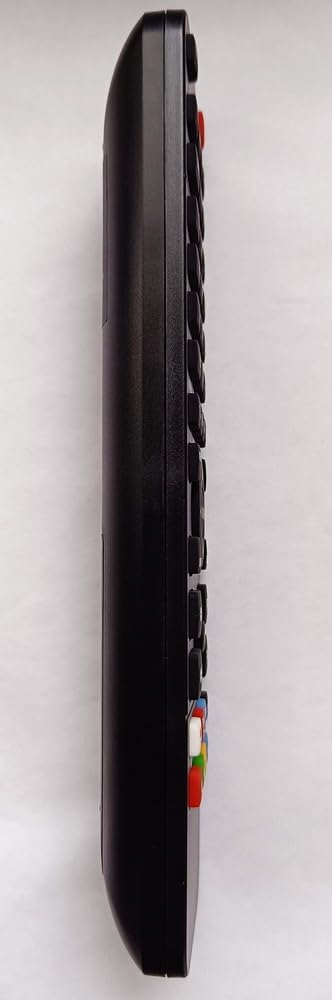
Figure 2: Side view of the remote control, highlighting the ergonomic design and button placement.
3.1 Basic Functions
- Power Button: Turns the TV on or off.
- Volume Up/Down: Adjusts the sound level.
- Channel Up/Down: Changes TV channels.
- Mute Button: Silences the TV audio.
- Number Buttons (0-9): Directly select channels.
- Input/Source Button: Switches between different input sources (HDMI, AV, etc.).
3.2 Smart TV Functions
If your BLAUPUNKT 40FGC5500S TV is a Smart TV, this remote may include dedicated buttons for quick access to streaming services and smart features. Look for buttons labeled with service logos such as Netflix, YouTube, or a 'Smart Hub' button. Pressing these buttons will launch the corresponding application directly.
Note: The availability and functionality of Smart TV buttons depend on your specific TV model and its installed applications.
4. Maintenance
4.1 Cleaning
To maintain the remote control's appearance and functionality, clean it regularly:
- Use a soft, dry cloth to wipe the surface.
- For stubborn dirt, slightly dampen the cloth with water or a mild, non-abrasive cleaner.
- Avoid using harsh chemicals, solvents, or abrasive materials, as these can damage the remote's finish or internal components.
4.2 Battery Replacement
Replace the batteries when the remote control's response becomes sluggish or stops working. Always replace both batteries at the same time with new AAA batteries. Do not mix old and new batteries, or different types of batteries.
5. Troubleshooting
If you experience issues with your Re-Flix Light Remote Control, refer to the following common solutions:
- Remote not responding:
- Check if the batteries are inserted correctly with the correct polarity.
- Replace the batteries with fresh ones.
- Ensure there are no obstructions between the remote control and the TV's infrared sensor.
- Make sure you are within the effective range of the TV's IR receiver.
- Specific buttons not working:
- Clean the remote control, especially around the problematic buttons, to remove any dirt or debris that might be preventing contact.
- If it's a Smart TV button, ensure your TV model supports that specific function or streaming service.
- TV not responding to any remote:
- Check if the TV's power is on.
- Try using the manual controls on the TV itself to rule out a TV issue.
6. Specifications
| Brand | Re-Flix |
| Model Number | 747516 |
| Color | Black |
| Compatible Devices | Television (BLAUPUNKT 40FGC5500S) |
| Connectivity Technology | Infrared |
| Maximum Supported Devices | 1 |
7. Warranty and Support
For information regarding warranty coverage or technical support, please refer to the documentation provided with your purchase or contact the retailer. Keep your proof of purchase for any warranty claims.