
1. Introduction
Thank you for choosing the Jocoevol C-2022 L-Shaped Gaming Desk. This manual provides detailed instructions for the assembly, operation, and maintenance of your new desk. This versatile L-shaped desk features a spacious desktop, an LED-lit tempered glass display cabinet, a built-in power outlet, fabric drawers, and a CPU stand. Its reversible design allows for flexible placement in various room layouts.
Please read this manual thoroughly before assembly and use to ensure proper setup and to maximize the lifespan of your product. Keep this manual for future reference.
2. Safety Information
- Always assemble the desk on a soft, clean surface to prevent scratches.
- Ensure all parts are present and undamaged before beginning assembly. Do not proceed with assembly if any parts are missing or damaged.
- Follow the assembly instructions carefully, step-by-step.
- Do not overtighten screws during assembly, as this may damage the material.
- Keep small parts and packaging materials away from children and pets to prevent choking hazards.
- Do not stand or sit on the desk.
- Distribute weight evenly across the desktop. The desk supports up to 130 lbs.
- Ensure the built-in power outlet is used with compatible devices and within its specified electrical limits. Do not overload the power strip.
- For the LED lights, use only the provided power adapter.
3. Package Contents
Before assembly, verify that all components listed in the packing list are present. If any parts are missing or damaged, please contact customer support.

Image: All components and hardware for assembly.
4. Setup and Assembly
Assembly of the Jocoevol C-2022 L-Shaped Gaming Desk is designed to be straightforward. All parts are labeled, and step-by-step instructions are provided in the included assembly guide. A 3D video assembly guide may also be available via a QR code in the packaging or on the product page.
4.1 Reversible Design
The display cabinet section of the desk can be installed on either the left or right side, allowing you to customize the desk layout to fit your space and preferences.

Image: Reversible desk configuration options.
4.2 Assembly Steps
- Unpack all components and lay them out on a protected surface.
- Identify each part using the labels and the assembly guide.
- Follow the numerical sequence in the assembly guide to connect parts.
- Ensure all screws and fasteners are securely tightened once the desk is fully assembled.
5. Operating Instructions
5.1 LED-Lit Tempered Glass Display Cabinet
The display cabinet features integrated LED lighting to showcase your collectibles. The LED lights can be controlled via a remote control or a dedicated smartphone application.
- Power On/Off: Use the remote control or app to turn the lights on or off.
- Color Selection: Choose from over 60,000 colors and DIY options to match your mood or setup.
- Music Sync: The lights can synchronize with music, creating an immersive experience.
- Timing Function: Set schedules for the lights to turn on or off automatically.
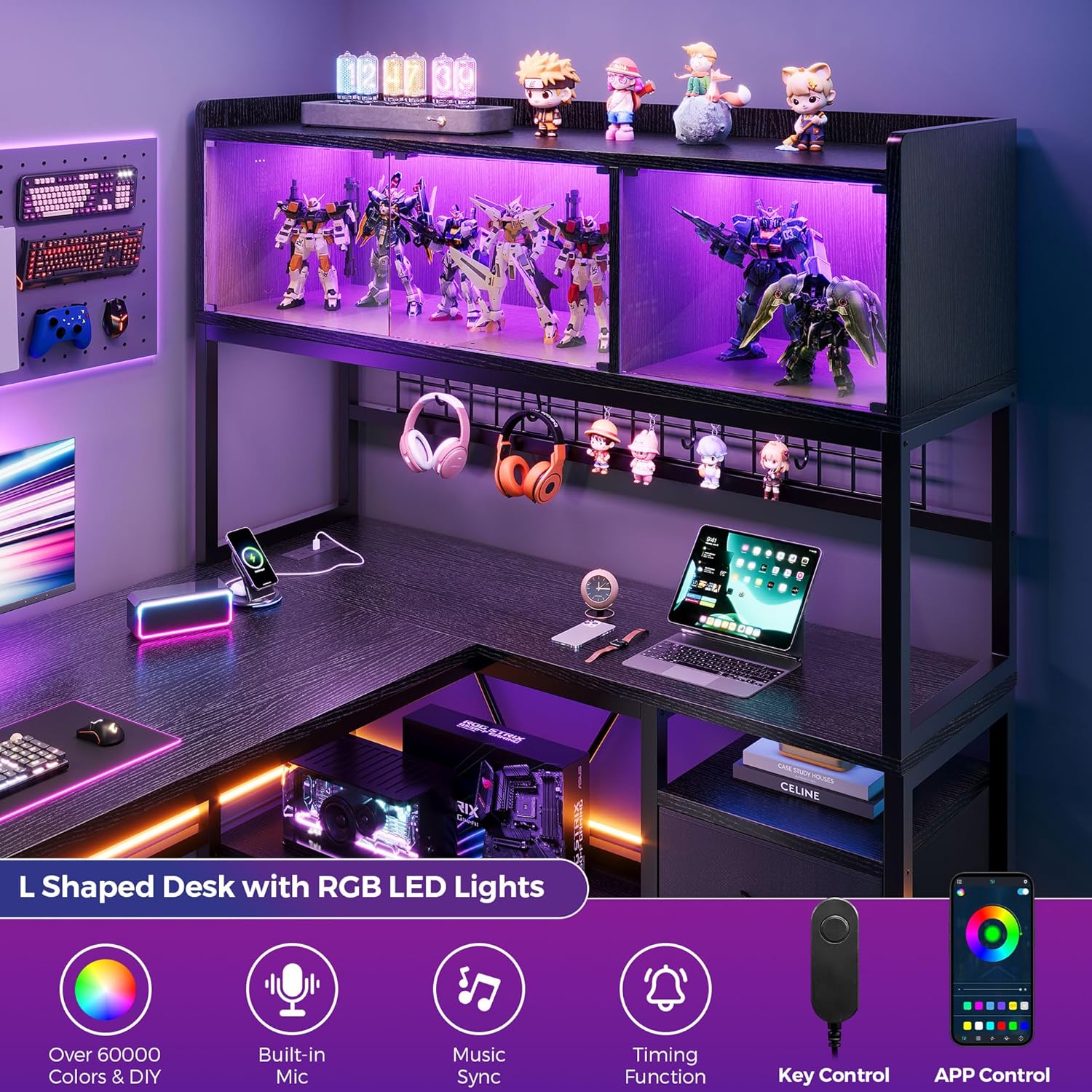
Image: LED light features and control options.

Image: Display cabinet in gaming and working modes.
5.2 Built-in Power Outlet
The desk includes a recessed power strip with 2 AC outlets, 1 USB port, and 1 Type-C port for convenient charging of your devices.
- Connect the desk's power cord to a standard wall outlet.
- Plug your PC, monitor, and other devices directly into the integrated outlets.
- Use the USB and Type-C ports for charging smartphones, tablets, and other compatible USB-powered devices.

Image: Built-in power outlet detail.
5.3 Fabric Drawers
The desk is equipped with two large fabric drawers and a file drawer, suitable for organizing legal, A4, and letter-sized documents and other items.
- Insert the fabric drawers into their designated slots.
- Utilize the file drawer for hanging folders to keep documents tidy.

Image: Fabric drawers for storage.
5.4 CPU Stand and Open Shelves
The integrated CPU stand and open shelves provide additional storage and organization for your PC tower, books, and accessories, promoting better airflow for your computer.
6. Maintenance
- Cleaning: Wipe the wood grain desktop and metal frame with a soft, damp cloth. Avoid harsh chemicals or abrasive cleaners.
- Spills: Clean up spills immediately to prevent staining or damage to the desktop.
- Fasteners: Periodically check all screws and fasteners to ensure they remain tight. Retighten if necessary.
- LED Lights: If LED lights malfunction, check the power connection and ensure the remote control batteries are functional.
- Fabric Drawers: Spot clean fabric drawers with a mild detergent and allow to air dry. Do not machine wash.
7. Troubleshooting
- Desk is wobbly: Ensure all screws are tightened. Check that the desk is on a level surface. Adjust leveling feet if present.
- LED lights not working: Verify the power adapter is securely plugged into both the desk and a working wall outlet. Check remote control batteries. If using the app, ensure Bluetooth connection is active.
- Power outlet not providing power: Ensure the desk's main power cord is plugged into a live wall outlet. Check if the wall outlet itself is working by plugging in another device. Do not exceed the power strip's maximum load.
- Difficulty with assembly: Refer to the step-by-step assembly guide. Ensure you are using the correct hardware for each step. If a 3D video is available, review it for visual guidance.
8. Specifications
- Model: C-2022
- Brand: Jocoevol
- Dimensions (D x W x H): 43.3" x 54.3" x 63" (110cm x 138cm x 160cm)
- Item Weight: 82 Pounds (37.2 kg)
- Material: Engineered Wood (desktop), Metal (frame)
- Color: Black
- Weight Capacity: Up to 130 lbs (59 kg)
- Special Features: Reversible L-shape design, LED-lit tempered glass display cabinet, Built-in power outlet (2 AC, 1 USB, 1 Type-C), 2 Fabric drawers, CPU stand, Open shelves.

Image: Product dimensions overview.
9. Warranty Information
Please refer to your purchase documentation or the retailer's website for specific warranty details regarding your Jocoevol C-2022 L-Shaped Gaming Desk. Warranty terms typically cover manufacturing defects and material flaws for a specified period from the date of purchase.
10. Customer Support
For any questions, concerns, or assistance with your Jocoevol C-2022 L-Shaped Gaming Desk, please contact Jocoevol customer service through your retailer or the official brand website. When contacting support, please have your model number (C-2022) and proof of purchase readily available.