
VOFUOTI MAX YK-55
VOFUOTI MAX YK-55 Electric Heated Blanket User Manual
Model: YK-55
Introduction
Thank you for choosing the VOFUOTI MAX YK-55 Electric Heated Blanket. This portable, battery-operated heated shawl is designed to provide warmth and comfort in various settings. Please read this manual thoroughly before use to ensure safe and efficient operation.
Important Safety Instructions
WARNING: To reduce the risk of burns, electric shock, fire, or injury to persons, this product must be used in accordance with the following instructions:
- Do not use with an infant, a child, an incapacitated person, or anyone insensitive to heat.
- Do not use on areas of insensitive skin.
- Do not use if the blanket is wet.
- Never use the blanket folded, bunched, or crumpled. This can cause overheating.
- Do not insert pins or other metallic objects into the blanket.
- Do not use if the power cord or battery pack is damaged.
- Always disconnect the battery pack when the blanket is not in use.
- Do not dry clean this product. Cleaning solvents may damage the insulation.
- Do not use this blanket with pets.
- Store the blanket properly when not in use. Allow it to cool down before folding.
Package Contents
- VOFUOTI MAX YK-55 Electric Heated Blanket
- 20,000 mAh Rechargeable Battery Pack
- USB Charging Cable (Type-C)
- User Manual
Product Overview
The VOFUOTI MAX YK-55 Electric Heated Blanket features a thoughtful design for comfort and portability.

Figure 1: Product Components. This image illustrates the key features of the heated blanket, including the zipper design, power/switch button, battery pocket, advanced heating wire, and extra-soft flannel fleece material.
Key Features:
- Zipper Design: Allows for versatile wear and secure fit.
- Power/Switch Button: Controls power and heat settings.
- Battery Pocket: Securely holds the rechargeable battery pack.
- Advanced Heating Wire: Provides rapid and even heat distribution.
- Extra-Soft Flannel Fleece: Ensures comfort and warmth.
- 20,000 mAh Battery: High-capacity battery for extended use.
- USB & Type-C Phone Charging: The battery pack can also charge external devices.
- Overheating Protection: Integrated safety feature to prevent excessive temperatures.

Figure 2: Key Features Overview. This image highlights the blanket's main attributes: cordless operation, up to 8 hours of heat on low setting, ultra-soft and skin-friendly material, built-in overheating protection, and the ability to charge a phone.

Figure 3: Battery and Charging Functionality. This image demonstrates the 20,000 mAh large-capacity battery and its dual functionality for powering the blanket and charging mobile devices via USB and Type-C ports.
Setup
- Charge the Battery Pack: Before first use, fully charge the 20,000 mAh battery pack using the provided USB charging cable and a compatible USB power adapter (not included). The battery indicator lights will show charging progress.
- Insert Battery Pack: Locate the battery pocket on the blanket (refer to Figure 1). Insert the fully charged battery pack into the pocket.
- Connect Battery to Blanket: Connect the blanket's internal power cable to the output port on the battery pack. Ensure a secure connection.
Operating Instructions
The blanket features three heating levels, indicated by LED colors.

Figure 4: Heating Levels and Blanket Structure. This image details the three heating levels (Low, Medium, High) with their respective temperature ranges and LED indicators. It also illustrates the layered construction of the blanket and the internal heating element.
- Power On: Press and hold the power button (located on the blanket, refer to Figure 1) for approximately 3 seconds until the LED light illuminates. The blanket will typically start on the High heat setting (Red LED).
- Adjust Heat Level: Briefly press the power button to cycle through the heat settings:
- High (Red LED): Approximately 131°F–149°F (55°C–65°C). The blanket automatically switches from High to Medium after five minutes to prevent overheating and maintain comfort.
- Medium (White LED): Approximately 113°F–131°F (45°C–55°C).
- Low (Blue LED): Approximately 0°F–113°F (0°C–45°C).
- Power Off: Press and hold the power button for approximately 3 seconds until the LED light turns off. Always disconnect the battery pack from the blanket when not in use.
Note: The actual temperature may vary slightly based on ambient conditions and individual perception. The battery life can range from 4 to 8 hours depending on the heat setting used.
Care and Maintenance
Proper care ensures the longevity and performance of your heated blanket.
- Before Cleaning: Always disconnect the battery pack from the blanket and remove it from the battery pocket.
- Machine Washable: The blanket is machine washable. Use a gentle cycle with cold water. Do not bleach.
- Drying: Tumble dry on low heat or hang to air dry. Ensure the blanket is completely dry before reconnecting the battery pack or storing. Do not iron.
- Storage: When not in use, store the blanket in a cool, dry place. Avoid folding tightly or placing heavy objects on it.
- Battery Care: Store the battery pack in a cool, dry place away from direct sunlight. Charge it periodically if not used for extended periods to maintain battery health.
Troubleshooting
| Problem | Possible Cause | Solution |
|---|---|---|
| Blanket is not heating. | Battery pack is not connected or discharged. | Ensure the battery pack is fully charged and securely connected to the blanket. |
| Blanket turns off unexpectedly. | Battery pack is low on charge or overheating protection activated. | Recharge the battery pack. If the blanket was on high heat, it may have automatically adjusted or shut off due to safety features. Allow it to cool before restarting. |
| LED indicator is not lighting up. | Battery pack is not connected, discharged, or power button not pressed correctly. | Check battery connection and charge. Press and hold the power button for 3 seconds to activate. |
| Battery pack is not charging. | Charging cable or adapter issue. | Ensure the USB charging cable is properly connected to a working power source and the battery pack. Try a different cable or adapter. |
Specifications
| Feature | Detail |
|---|---|
| Model Number | YK-55 |
| Brand | VOFUOTI MAX |
| Material | Polyester |
| Dimensions (L x W) | 63"L x 44"W (160cm x 112cm approx.) |
| Battery Capacity | 20,000 mAh |
| Heating Levels | 3 (Low, Medium, High) |
| Max Operating Time | Up to 8 hours (on Low setting) |
| Care Instructions | Machine Washable |
| Special Features | Battery Powered, Overheating Protection, Phone Charging Capability |
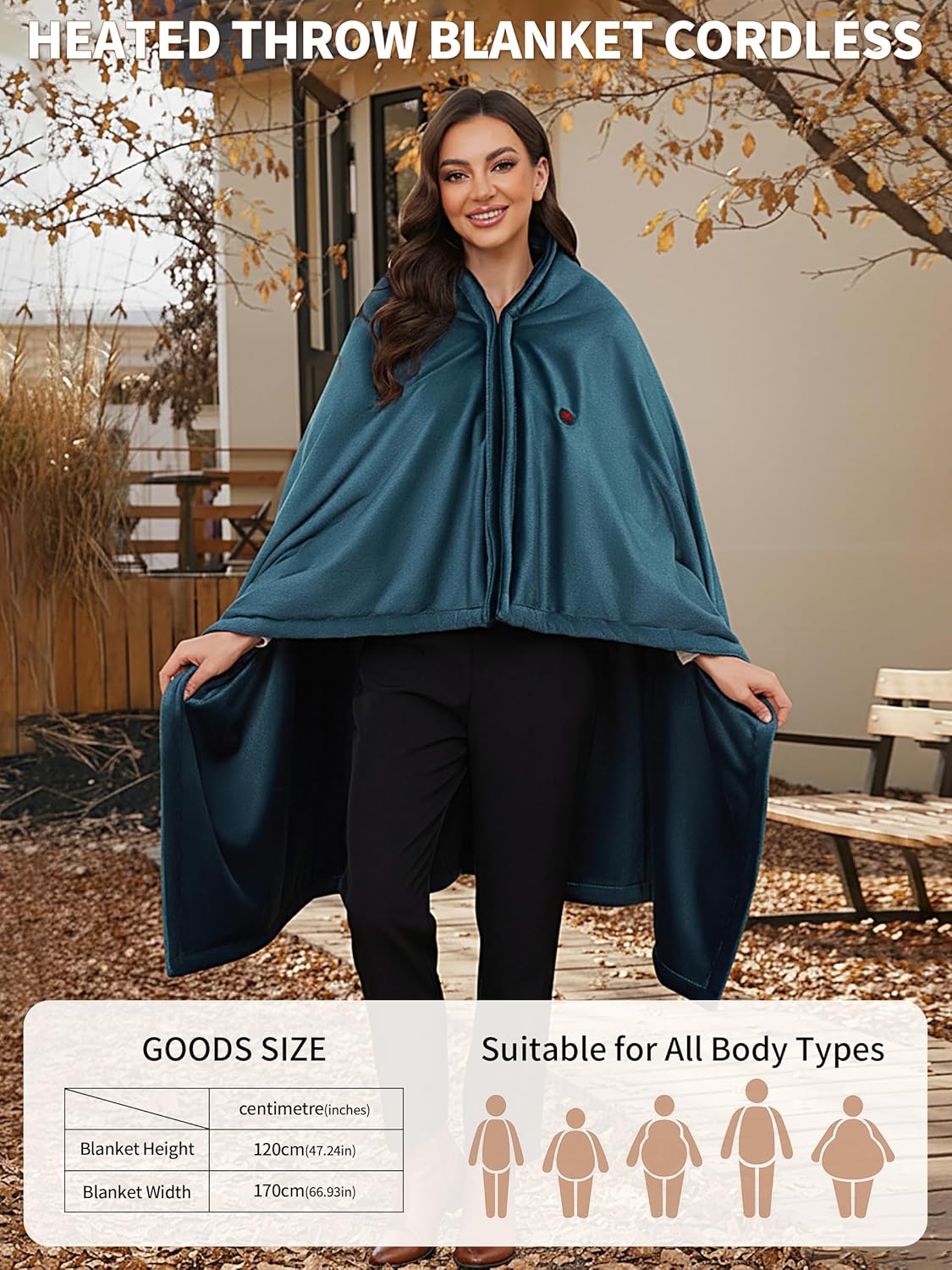
Figure 5: Product Dimensions. This image provides the dimensions of the heated blanket, indicating a height of 120cm (47.24 inches) and a width of 170cm (66.93 inches), suitable for various body types.
Warranty and Support
VOFUOTI MAX products are manufactured to high-quality standards. For warranty information or technical support, please refer to the contact details provided with your purchase or visit the official VOFUOTI MAX website.
Please retain your proof of purchase for warranty claims.
Ask a question about this manual
Ask about setup, troubleshooting, compatibility, parts, safety, or missing instructions. Manuals+ will review the question and use this page’s manual context to help answer it.