
YOMILUVE B0GYCSHKHV
YOMILUVE 47" Farmhouse Computer Desk with 4 Drawers User Manual
Model: B0GYCSHKHV
Introduction
Thank you for choosing the YOMILUVE 47" Farmhouse Computer Desk. This desk is designed to enhance your home office or bedroom with its functional features and stylish farmhouse aesthetic. It includes four spacious drawers, an integrated charging station with USB ports and AC outlets, and a full monitor stand for ergonomic comfort. This manual provides essential information for assembly, operation, maintenance, and troubleshooting to ensure you get the most out of your new desk.

Image: YOMILUVE 47-inch Farmhouse Computer Desk in grey, featuring a monitor stand and four drawers.
Safety Information
- Read all instructions carefully before assembly and use.
- Keep all small parts and packaging materials away from children.
- Assemble the desk on a soft, clean surface to prevent scratches.
- Ensure all screws and fasteners are securely tightened before use. Periodically check and re-tighten as needed.
- Do not overload drawers or the desktop. Refer to specifications for weight limits.
- Use the integrated charging station only with compatible devices and within specified electrical ratings.
- Avoid placing hot items directly on the desk surface without protection.
Package Contents
Before beginning assembly, verify that all components are present and undamaged. If any parts are missing or damaged, please contact YOMILUVE customer support.
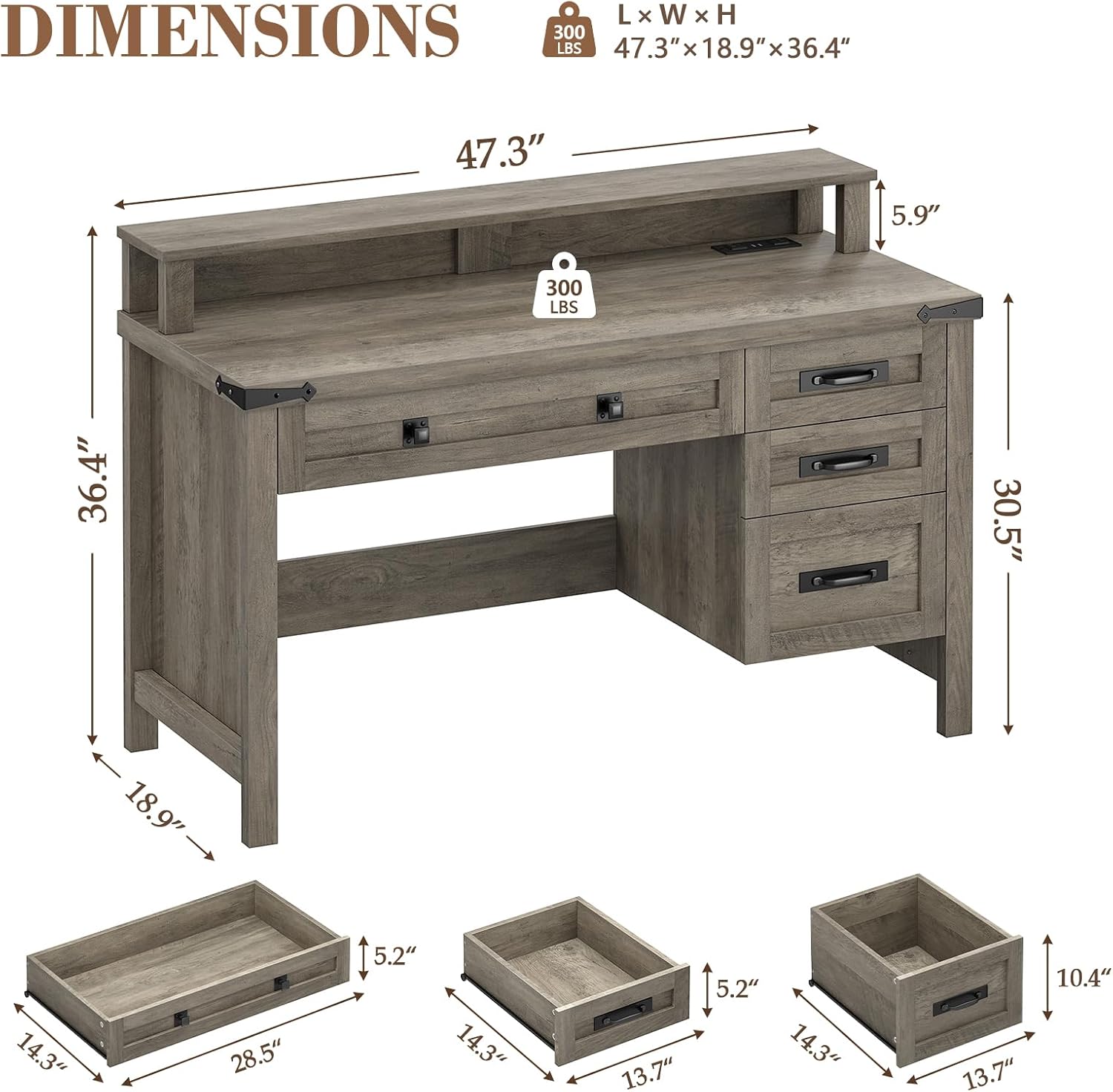
Image: Exploded view of YOMILUVE 47-inch Farmhouse Computer Desk components and dimensions.
Typical Components:
- Desktop Panel
- Side Panels (Left and Right)
- Back Panels
- Drawer Panels (Front, Back, Sides, Bottom)
- Monitor Stand Components
- Integrated Power Strip (with USB and AC outlets)
- Hardware Pack (Screws, dowels, cam locks, drawer slides, handles, corner brackets)
Setup and Assembly
Assembly instructions are provided with your product. Please follow the detailed pictorial guide included in your package. Below are general steps:
- Prepare the Area: Clear a spacious, clean, and soft area for assembly to prevent damage to the desk components.
- Identify Parts: Lay out all numbered panels and lettered hardware bags. Match them with the parts list in your instruction manual.
- Assemble the Main Frame: Connect the side panels to the main desktop using the provided hardware. Ensure all connections are snug.
- Install Drawer Slides: Attach the drawer slides to the inner side panels of the desk frame according to the instructions.
- Assemble Drawers: Construct each of the four drawers by connecting the front, back, and side panels, then inserting the bottom panel. Attach the drawer handles.
- Insert Drawers: Carefully slide the assembled drawers onto their respective slides.
- Attach Monitor Stand: Secure the monitor stand components to the top of the desk.
- Install Power Strip: Place the integrated power strip into its designated slot on the monitor stand or desktop.
- Final Check: Verify all connections are secure and the desk is stable.

Image: Details of the YOMILUVE desk construction, including the 1.2-inch thick desktop, chic metal handles, and hand-polished hardware.
Operating Instructions
Using the Drawers:
The desk features one wide drawer (28.5 inches) and three smaller drawers (13.7 inches). Pull the chic metal handles to open and push to close. Ensure drawers are not overloaded to maintain smooth operation.

Image: YOMILUVE desk with drawers open, showcasing ample storage for laptop, books, files, and office supplies.
Integrated Charging Station:
The built-in power strip includes 2 AC outlets (120V/12A) and 2 USB ports (5V/2A). Connect your computer, tablet, phone, or other electronic devices for convenient power access. The power cord is 4.9 feet long.

Image: Close-up of the integrated power strip on the YOMILUVE desk, showing two AC outlets and two USB ports.
Full Monitor Stand:
Utilize the full monitor stand to elevate your screen to an ergonomic height, reducing eye strain and neck fatigue. This also provides additional storage or display space on your desktop.

Image: Illustration demonstrating the ergonomic benefits of the YOMILUVE desk's full monitor stand, promoting better posture.
Maintenance
- Cleaning: Wipe the desk surface with a soft, damp cloth. Avoid harsh chemicals or abrasive cleaners, which can damage the finish.
- Spills: Clean up spills immediately to prevent staining or water damage to the engineered wood.
- Hardware: Periodically check all screws and fasteners to ensure they remain tight. Re-tighten if necessary to maintain stability.
- Sunlight: Avoid prolonged exposure to direct sunlight, which can cause fading or discoloration.
- Heat: Use coasters or protective pads under hot items to prevent heat damage to the desktop.
Troubleshooting
Desk is Wobbly:
Ensure all assembly screws and fasteners are fully tightened. Check that the desk is placed on a level surface. If the floor is uneven, use furniture pads or shims to stabilize the desk.
Drawers are Sticking or Not Closing Smoothly:
Check for any obstructions in the drawer slides. Ensure the drawer slides are properly aligned and securely attached. Do not overload the drawers, as excessive weight can affect their operation.
Charging Station Not Working:
Verify that the desk's power cord is securely plugged into a functional wall outlet. Check if the devices you are trying to charge are properly connected to the USB ports or AC outlets. Test the outlets with another device to confirm functionality.
Specifications
| Feature | Detail |
|---|---|
| Brand | YOMILUVE |
| Model | B0GYCSHKHV |
| Product Dimensions (D x W x H) | 18.9"D x 47.3"W x 36.4"H |
| Color | Grey |
| Material Type | Engineered Wood |
| Number of Drawers | 4 |
| Integrated Charging Station | 2 USB ports (5V/2A), 2 AC outlets (120V/12A) |
| Power Cord Length | 4.9 feet |
| Special Feature | Integrated Charging Station, Full Monitor Stand |
| Assembly Instructions | Provided with product |
Warranty and Support
YOMILUVE stands behind the quality of its products. For specific warranty details, please refer to the documentation included with your purchase or visit the official YOMILUVE website. If you encounter any issues or have questions regarding your desk, please contact YOMILUVE customer support for assistance.
You can visit the YOMILUVE Store for more information: YOMILUVE Store on Amazon
Ask a question about this manual
Ask about setup, troubleshooting, compatibility, parts, safety, or missing instructions. Manuals+ will review the question and use this page’s manual context to help answer it.