
1. Introduction
Thank you for purchasing the taopodo S18 Portable Bluetooth Speaker. This manual provides essential information for setting up, operating, and maintaining your speaker. Please read it carefully before use and retain it for future reference.
2. What's in the Box
- 1 x taopodo S18 Portable Bluetooth Speaker
- 1 x Type-C Charging Cable
- 1 x Quick Start Guide (This manual serves as a detailed guide)
3. Product Overview
Familiarize yourself with the speaker's components and controls.
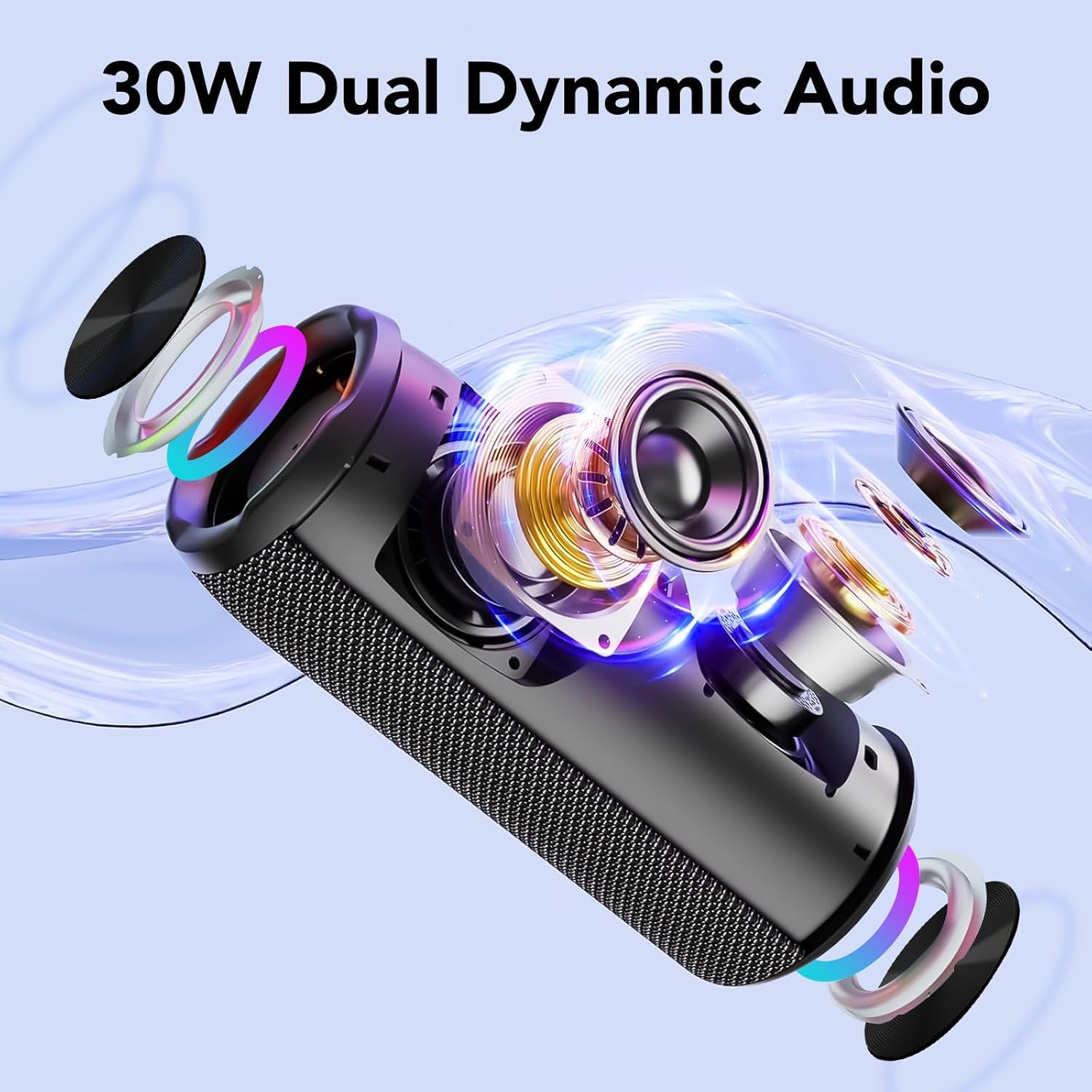
Figure 3.1: Internal Structure of the S18 Speaker, highlighting the 30W dual dynamic audio system.

Figure 3.2: Control Buttons and Port Layout.
Button Functions:
| Button | Action | Function |
|---|---|---|
| Power Button (⏻) | Press and hold for 2s | Power On/Off |
| Power Button (⏻) | Single press | Toggle RGB Light Mode |
| Power Button (⏻) | Double press | Turn RGB Lights On/Off |
| Volume Down (◀) | Single press | Decrease Volume |
| Volume Down (◀) | Press and hold for 2s | Previous Track |
| Volume Up (▶) | Single press | Increase Volume |
| Volume Up (▶) | Press and hold for 2s | Next Track |
| Play/Pause (⏸) | Single press | Play/Pause Music |
| Play/Pause (⏸) | Single press | Answer/End Call |
| Play/Pause (⏸) | Press and hold for 2s | Reject Call |
| TWS Button | Press and hold for 2s | Initiate TWS Pairing |
| EQ Button | Single press | Cycle EQ Modes |
Ports:
- Type-C Charging Port: For charging the speaker.
- AUX Input: For connecting devices via a 3.5mm audio cable.
- TF Card Slot: For playing music directly from a MicroSD/TF card.
4. Setup
4.1 Charging the Speaker
Before first use, fully charge the speaker. Use the provided Type-C charging cable to connect the speaker to a USB power adapter (not included) or a computer's USB port. The charging indicator will show the charging status and turn off when fully charged.
- A full charge provides approximately 30-40 hours of playtime at 20% volume with lights off.
- The speaker features a 4000mAh battery.
4.2 Power On/Off
- To power on, press and hold the Power button (⏻) for 2 seconds.
- To power off, press and hold the Power button (⏻) for 2 seconds again.
5. Operating Instructions
5.1 Bluetooth Pairing (Single Speaker)
- Power on the speaker. It will automatically enter Bluetooth pairing mode, indicated by a flashing LED light.
- Enable Bluetooth on your device (smartphone, tablet, computer).
- Search for "S18" in the list of available Bluetooth devices.
- Select "S18" to connect. Once connected, the LED indicator will stop flashing and remain solid.
- The speaker will automatically reconnect to the last paired device when powered on, if the device's Bluetooth is active and within range.
The speaker uses Bluetooth 5.4 technology for stable connections up to 100 feet.
Video 5.1: Demonstrating Bluetooth 5.4 connectivity and features of the taopodo S18 speaker.
5.2 TWS Pairing (True Wireless Stereo)
To achieve a true wireless stereo experience, you can pair two S18 speakers together.
- Ensure both S18 speakers are powered on and not connected to any Bluetooth device.
- On one of the speakers (this will be the primary speaker), press and hold the TWS button for 2 seconds. The speaker will emit a prompt sound, indicating it's searching for another speaker.
- The two speakers will automatically connect to each other. Once connected, you will hear a confirmation sound, and the LED indicators on both speakers will change to a solid state.
- Now, connect your device to the primary speaker via Bluetooth as described in Section 5.1. The primary speaker will appear as "S18" in your device's Bluetooth list.
- Once connected, audio will play in stereo through both speakers.
To disconnect TWS, press and hold the TWS button on either speaker for 2 seconds.

Figure 5.2: TWS Pairing for an immersive stereo experience.
5.3 Music Playback Controls
- Play/Pause: Single press the Play/Pause button (⏸).
- Volume Up: Single press the Volume Up button (▶).
- Volume Down: Single press the Volume Down button (◀).
- Next Track: Press and hold the Volume Up button (▶) for 2 seconds.
- Previous Track: Press and hold the Volume Down button (◀) for 2 seconds.
5.4 Call Functions
- Answer/End Call: Single press the Play/Pause button (⏸).
- Reject Call: Press and hold the Play/Pause button (⏸) for 2 seconds.
The built-in microphone allows for hands-free calls.
5.5 RGB Light Modes
The speaker features dynamic RGB lights with multiple modes.
- Cycle Light Modes: Single press the Power button (⏻) to switch between different RGB light effects.
- Turn Lights On/Off: Double press the Power button (⏻) to toggle the RGB lights on or off.

Figure 5.3: Dynamic RGB Lighting Effects.
5.6 EQ Modes
The speaker offers three equalization (EQ) modes to optimize your listening experience.
- Cycle EQ Modes: Single press the EQ button to switch between Bass, Treble, and Vocal modes.

Figure 5.4: EQ Mode Selection.
6. Maintenance
6.1 Cleaning
- Wipe the speaker with a soft, damp cloth.
- Do not use abrasive cleaners, alcohol, or chemical solvents.
6.2 Water Resistance (IPX7)
The taopodo S18 speaker is IPX7 waterproof, meaning it can be submerged in water up to 1 meter for 30 minutes. While it is water-resistant, it is not designed for continuous underwater use. Ensure the charging port cover is securely closed before exposing the speaker to water.

Figure 6.1: IPX7 Waterproof Feature.
6.3 Storage
- Store the speaker in a cool, dry place away from direct sunlight and extreme temperatures.
- If storing for an extended period, charge the battery to about 50% every few months to prolong battery life.
7. Troubleshooting
| Problem | Possible Cause | Solution |
|---|---|---|
| Speaker does not power on. | Low battery. | Charge the speaker fully using the provided Type-C cable. |
| Cannot pair via Bluetooth. | Bluetooth is off on your device; speaker is already paired; speaker is too far. | Ensure Bluetooth is enabled on your device. Disconnect from other devices. Move speaker closer to your device. Restart both devices. |
| No sound. | Volume too low; device not connected; incorrect input mode. | Increase volume on both speaker and device. Ensure successful Bluetooth connection. Check if AUX or TF card is inserted and switch modes if necessary. |
| TWS pairing fails. | Speakers are too far apart; one speaker is already connected to a device. | Ensure both speakers are within close proximity and not connected to any other Bluetooth device before initiating TWS pairing. |
| Sound distortion. | Volume too high; low battery; interference. | Reduce volume. Charge the speaker. Move away from sources of interference (e.g., Wi-Fi routers, other Bluetooth devices). |
8. Specifications
| Feature | Detail |
|---|---|
| Model Number | S18 |
| Brand | taopodo |
| Connectivity Technology | Bluetooth 5.4 |
| Speaker Output Power | 30 Watts |
| Audio Output Mode | Stereo (2.0 Channel) |
| Driver Size | Dual 55mm drivers |
| Battery Capacity | 4000mAh |
| Playtime | Up to 30-40 hours (at 20% volume, lights off) |
| Waterproof Rating | IPX7 |
| Dimensions (D x W x H) | 4"D x 1.9"W x 2.5"H (Approximate, based on product info) |
| Built-in Features | Microphone, RGB Lights, EQ Modes, TWS Pairing |
| Input Ports | Type-C (charging), AUX, TF Card |
9. Warranty and Support
The product comes with a 1-year warranty as per the manufacturer's specifications. For technical support, warranty claims, or further assistance, please contact your retailer or refer to the contact information provided in the original product packaging.
For more information about taopodo products, visit the official taopodo website.


