
Introduction
Thank you for choosing the Indesit PAI212COW Portable Air Conditioner. This manual provides essential information for the safe and efficient operation, installation, and maintenance of your appliance. Please read it thoroughly before use and keep it for future reference.
Safety Information
- Ensure the power supply matches the voltage specified on the rating label.
- Do not operate the unit with a damaged power cord or plug.
- Keep the appliance away from heat sources and direct sunlight.
- Do not block the air inlets or outlets.
- Always unplug the unit before cleaning or maintenance.
- This appliance is not intended for use by persons (including children) with reduced physical, sensory or mental capabilities, or or lack of experience and knowledge, unless they have been given supervision or instruction concerning use of the appliance by a person responsible for their safety.
- Children should be supervised to ensure that they do not play with the appliance.
Product Overview
Package Contents
Before installation, check that all items are present and undamaged:
- Portable Air Conditioner Unit
- Exhaust Hose
- Installation Kit (for window sealing)
- Remote Control
- User Manual (this document)
Unit Components

Figure 1: The Indesit PAI212COW portable air conditioner, shown in a modern living space, ready for use.

Figure 2: The front of the air conditioner, featuring the Indesit logo and air outlet grille.
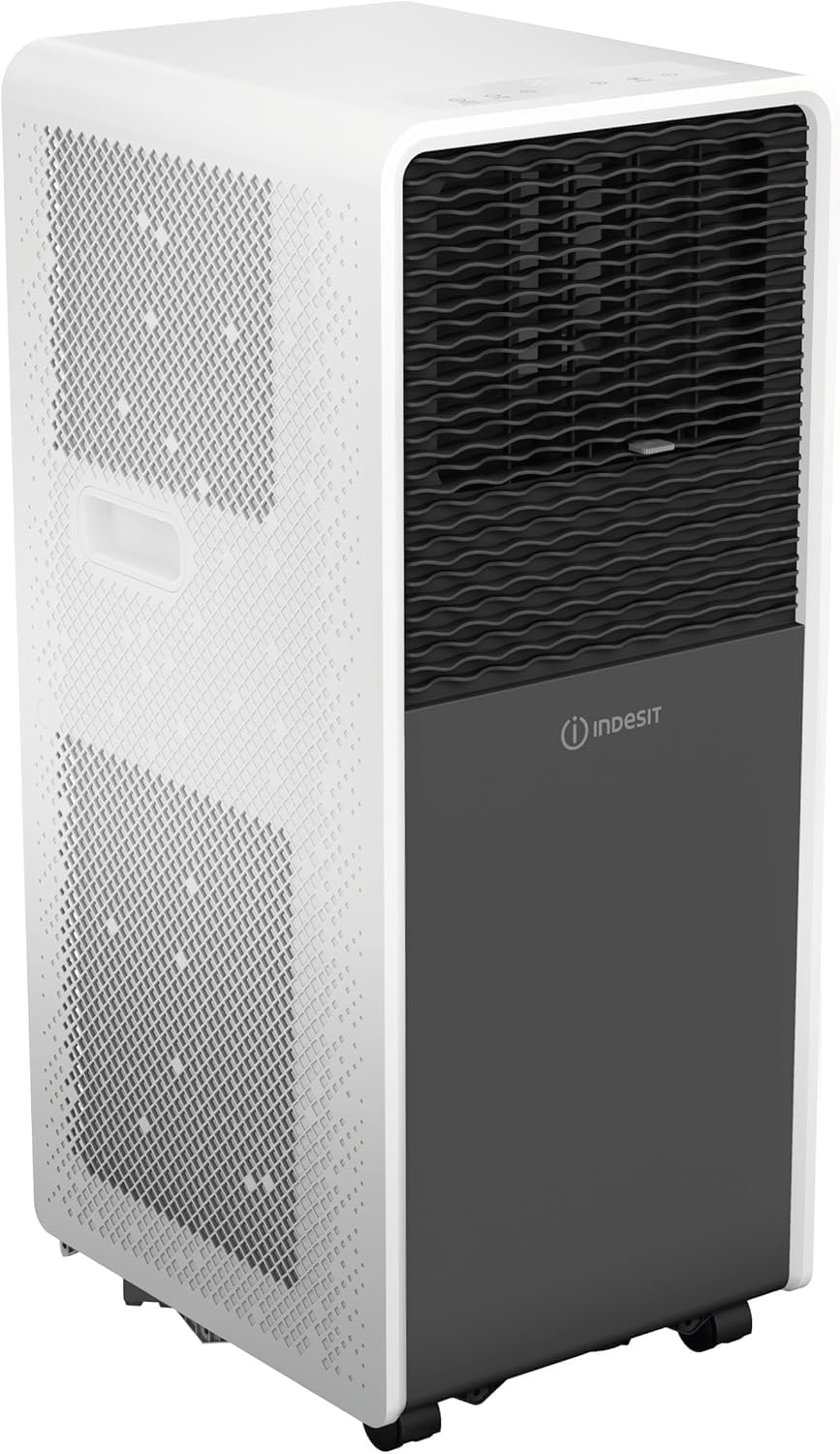
Figure 3: The side profile of the unit, showing its compact design and air intake vents.
- Air Outlet: Adjustable louvers for directing airflow.
- Control Panel: Touch buttons and digital display for settings.
- Air Intake Grilles: Located on the sides/rear, for drawing in room air.
- Exhaust Air Outlet: Connection point for the exhaust hose.
- Drainage Port: For continuous drainage or manual emptying of condensed water.
- Casters: For easy mobility of the unit.
Setup and Installation
Proper installation is crucial for the efficient operation of your portable air conditioner. Ensure the unit is placed on a flat, stable surface and there is at least 30 cm of clear space around it for proper airflow.
1. Exhaust Hose Installation

Figure 4: The flexible exhaust hose, 150 cm long with a 12.5 cm diameter, designed for expelling hot air. It is easy to clean, flexible, heat-resistant, and made of polypropylene.
- Extend the exhaust hose (length 1.5 m, diameter 12.5 cm) by gently pulling both ends.
- Attach one end of the exhaust hose to the air outlet connector on the back of the air conditioner unit. Twist clockwise until securely fastened.
- Attach the other end of the exhaust hose to the window kit adapter.
2. Window Kit Installation
- Open the window or sliding door where you intend to vent the hot air.
- Place the window sealing kit into the window opening. Adjust its length to fit snugly.
- Insert the exhaust hose adapter into the opening of the window sealing kit.
- Close the window as much as possible to seal around the kit and hose, minimizing air leakage.
- Ensure the exhaust hose is as straight and short as possible to maximize cooling efficiency. Avoid sharp bends.
3. Power Connection
- Plug the power cord into a grounded electrical outlet.
- Ensure the outlet meets the electrical requirements of the unit (240V).
Operating Instructions
Your Indesit PAI212COW can be operated using the control panel on the unit or the included remote control.
Control Panel

Figure 5: The top panel features touch controls for power, mode selection, temperature adjustment, and fan speed.

Figure 6: Another view of the control panel, highlighting the digital temperature display and function icons.
- Power Button ( ⏻ ): Turns the unit ON or OFF.
- Mode Button (MODE): Cycles through operating modes: Cooling ( ❄ ), Dehumidify ( ☔ ), Fan ( 💨 ).
- Temperature Up ( + ) / Down ( - ) Buttons: Adjusts the desired temperature in Cooling mode.
- Fan Speed Button (SPEED): Selects fan speed (Low, Medium, High).
- Timer Button (TIMER): Sets the auto-on or auto-off timer.
- Sleep Button (SLEEP): Activates Sleep mode.
- Digital Display: Shows current temperature, timer settings, and mode indicators.
Remote Control

Figure 7: The remote control for the Indesit PAI212COW, with buttons for power, speed, temperature, mode, sleep, and timer functions.
The remote control duplicates most functions of the control panel for convenient operation from a distance. Insert two AAA batteries (not included) into the remote control.
- POWER: Turns the unit ON or OFF.
- MODE: Selects operating mode (Cooling, Dehumidify, Fan).
- TEMP+ / TEMP-: Adjusts temperature.
- SPEED: Adjusts fan speed.
- TIMER: Sets the timer.
- SLEEP: Activates Sleep mode.
Operating Modes
- Cooling Mode: The unit cools the room. Set your desired temperature using the TEMP+ / TEMP- buttons.
- Dehumidify Mode: Reduces humidity in the air without significant cooling. The fan speed is typically fixed in this mode.
- Fan Mode: Circulates air without cooling. You can select the fan speed.
Special Functions
- 24-Hour Timer: Allows you to program the unit to turn ON or OFF automatically within a 24-hour period. Press the TIMER button and use TEMP+ / TEMP- to set the desired time.
- Sleep Mode (Dolce Sonno): Reduces noise and gradually adjusts the temperature for comfortable sleep. Press the SLEEP button to activate.
- Auto Restart: In case of a power interruption, the unit will automatically restart with the previous settings once power is restored.
- ZoneFollow Technology: Automatically adjusts temperature to maintain desired comfort in the area around the unit.
Maintenance
Regular maintenance ensures optimal performance and extends the lifespan of your air conditioner. Always unplug the unit before performing any maintenance.
Filter Cleaning
The air filter should be cleaned every two weeks or more frequently depending on usage and air quality.
- Turn off and unplug the air conditioner.
- Locate and remove the air filter from the back or side of the unit (refer to unit diagram for exact location).
- Wash the filter with lukewarm water and a mild detergent.
- Rinse thoroughly and allow it to air dry completely before reinserting.
- Do not operate the unit without the filter.
Water Drainage
The unit has an internal water collection tank. When full, the unit will stop operating and display an indicator. You will need to drain the water manually.
- Turn off and unplug the air conditioner.
- Place a shallow pan or tray under the drainage port at the bottom rear of the unit.
- Remove the drain plug/cap.
- Allow all water to drain out.
- Replace the drain plug/cap securely.
- For continuous drainage, connect a drain hose (not included) to the drainage port and direct it to a floor drain or suitable container.
Cleaning the Unit Exterior
- Wipe the exterior with a soft, damp cloth.
- Do not use harsh chemicals, abrasive cleaners, or solvents.
Storage
If storing the unit for an extended period:
- Drain all condensed water from the unit.
- Clean the air filter.
- Run the unit in fan-only mode for a few hours to dry the internal components.
- Unplug the power cord and coil it neatly.
- Store the unit in a dry, cool place, preferably in its original packaging.
Troubleshooting
Before contacting customer service, please refer to the following table for common issues and solutions.
| Problem | Possible Cause | Solution |
|---|---|---|
| Unit does not turn on. | No power, power cord unplugged, circuit breaker tripped. | Check power connection, reset circuit breaker. |
| Unit does not cool effectively. | Windows/doors open, room too large, air filter dirty, exhaust hose blocked/bent, temperature setting too high. | Close windows/doors, ensure proper room size, clean air filter, check exhaust hose, lower temperature setting. |
| Unit is noisy. | Unit not on a flat surface, fan speed too high, internal components vibrating. | Place on a flat surface, reduce fan speed, ensure no obstructions. (Note: Portable ACs generate some noise during operation). |
| Water leakage. | Drain plug loose, continuous drainage hose improperly connected. | Ensure drain plug is secure, check continuous drainage hose connection. |
| "Full Water" indicator light is on. | Internal water tank is full. | Drain the water from the unit as per the "Water Drainage" section. |
Technical Specifications
| Feature | Specification |
|---|---|
| Brand | Indesit |
| Model Name | PAI212COW |
| Cooling Capacity | 12000 BTU/h |
| Special Features | Dehumidifier, Dust filter, Silent mode, Remote controlled |
| Product Dimensions (DxWxH) | 33.5P x 28.5l x 69.8H cm (13.2D x 11.2W x 27.5H inches) |
| Color | White |
| Voltage | 240 Volts |
| Noise Level | 65 Decibels |
| Refrigerant | R-290 |
| Filter Type | Electrostatic filter |
| Power Source | Corded Electric |
| Electrical Power | 3500 watts |
| Item Weight | 23.5 Kilograms (51.8 lbs) |
| Coverage Area | Up to 40 square meters (430 sq ft) |
| Room Type | Bedroom, Living Room |
| Installation Type | Portable |
| External Unit Required | No |
| Control Method | Remote, Touch |
| Number of Power Levels | 2 |
| Operating Modes | Cooling, Dehumidification, Fan |
| Energy Efficiency Class | A |
Warranty and Customer Support
Warranty Information
This Indesit PAI212COW Portable Air Conditioner comes with a 2-year manufacturer's warranty. This warranty covers defects in materials and workmanship under normal use. Please retain your proof of purchase for warranty claims.
The warranty does not cover damage caused by improper installation, misuse, neglect, unauthorized repairs, or normal wear and tear.
Customer Support
For technical assistance, troubleshooting beyond this manual, or warranty service, please contact Indesit Customer Support. You can find contact details on the official Indesit website or through your retailer.
When contacting support, please have your model number (PAI212COW) and proof of purchase readily available.


