
Introduction
The Varin Smart Ceiling Fan with Light combines modern design, quiet air circulation, and intelligent lighting control to create a comfortable indoor climate and effective illumination in any room. This manual provides essential information for the safe installation, operation, and maintenance of your new ceiling fan.
Key features include 6 fan speeds, a quiet operation (20-35 dB), summer and winter modes for year-round comfort, dimmable LED lighting (3000-6000K CCT), and multiple control options via Tuya app, remote control, or wall switch. The fan is also compatible with voice control systems.
Setup
Safety Information
- Ensure the power supply is disconnected before installation.
- Installation should be performed by a qualified electrician or in accordance with local electrical codes.
- The mounting surface must be capable of supporting the fan's weight (5.5 kg).
Unpacking and Components
Carefully unpack all components and ensure all parts are present before beginning installation. Refer to the image below for a visual guide to the package contents.

Image: Package contents including the fan, remote, mounting hardware, and manual.
Installation Steps
Installation is recommended for two people due to the motor's weight. Two 8mm drill holes are required in concrete ceilings for secure fastening. Metal expansion anchors are included.
- Mounting Bracket: Secure the mounting bracket to the ceiling using the provided screws and anchors. Ensure it is firmly attached and can support the fan's weight.
- Wiring: Connect the electrical wires using the connection terminals. Match blue to blue (neutral), brown to brown (live), and yellow/green to yellow/green (ground). Ensure all cables are securely fastened. Grounding is mandatory for the metal housing.
- Attach Fan Body: Carefully lift the fan body and place it into the prepared mount. Secure it with the 4 small screws.
- Install Blades: Attach the fan blades to the motor housing according to the instructions in the included manual.
- Install Light Cover: Secure the LED light cover to the bottom of the fan.
- Power On: Restore power to the fan.
Important: The fan must be continuously powered and should not be switched off via a standard wall switch if you intend to use the app or remote control for full functionality.
App Pairing (Tuya Smart App)
For smart control, pair your fan with the Tuya Smart app (available for iOS/Android).
- Download and install the Tuya Smart app on your smartphone.
- Register or log in to your Tuya account.
- Ensure your fan is powered on and your smartphone is connected to a 2.4GHz Wi-Fi network.
- In the app, follow the on-screen instructions to add a new device. The fan will typically enter pairing mode automatically when first powered on.
- Once paired, you can control the fan from multiple devices and remotely via an internet connection.
Operating Instructions
Fan Control
The fan offers 6 speed settings for optimal air circulation and operates quietly (approx. 20-35 dB).

Image: Summer mode (cooling) and Winter mode (warming) airflow.
- Summer Mode: The fan blades rotate to push air downwards, creating a cooling breeze.
- Winter Mode: The fan blades rotate in reverse to draw air upwards, circulating warm air trapped near the ceiling throughout the room for a more consistent temperature.
Light Control
The integrated LED light provides versatile illumination for any situation.
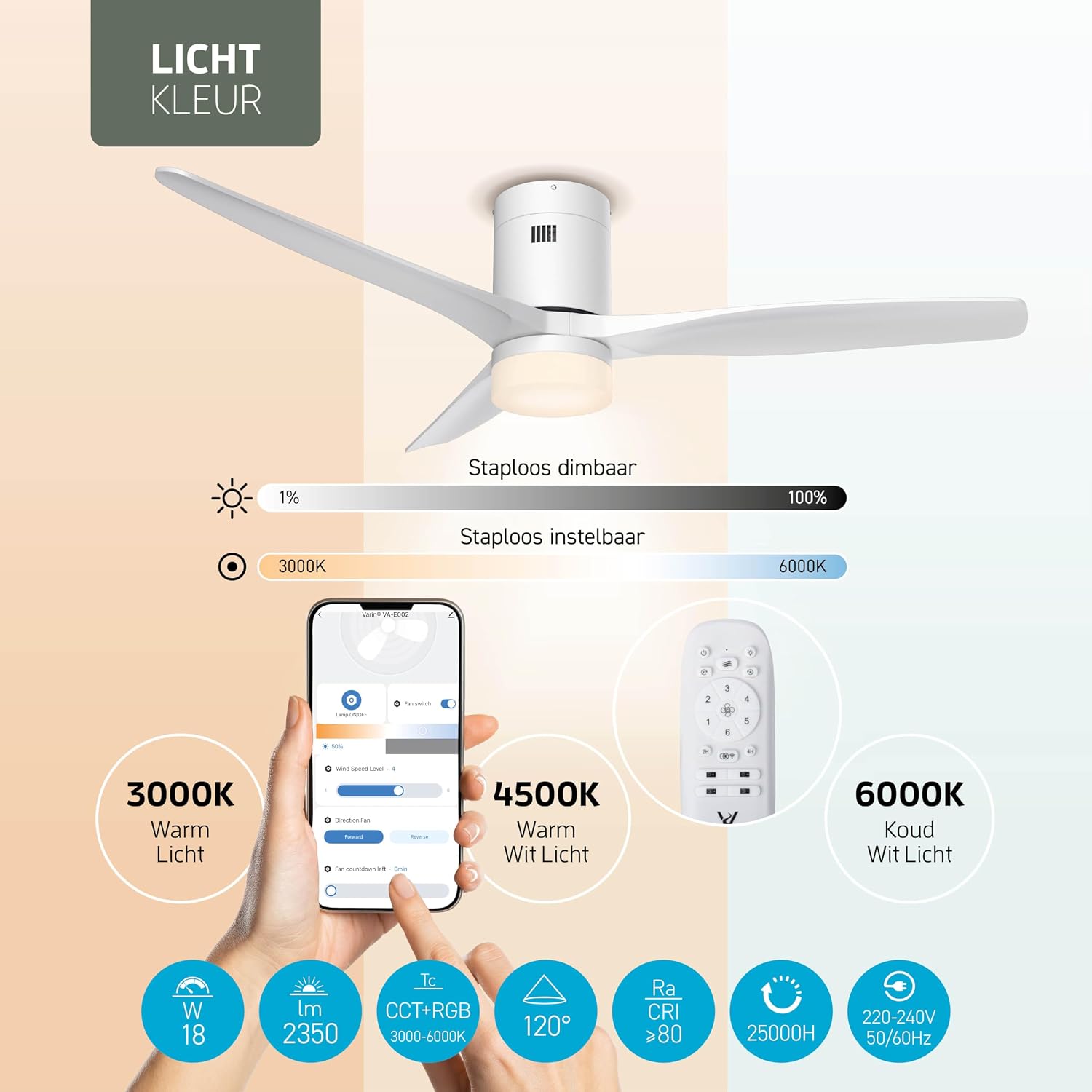
Image: Light color temperature and dimming options.
- Dimmable: Adjust the brightness from 1% to 100% to suit your needs.
- Color Temperature (CCT): Change the light color from warm white (3000K) to cool white (6000K).
Control Methods
Your Varin Smart Ceiling Fan can be controlled using several convenient methods:

Image: Overview of control options.
- Tuya Smart App: Full control over fan speeds, light dimming, color temperature, scenes, timers, and alarm functions. Remote access is available with an active internet connection.
- Remote Control: The included remote allows direct control of fan speeds, light on/off, dimming, and color temperature. (Requires 2 AAA batteries, not included).
- Wall Switch: A standard wall switch can turn the light on/off, and the fan on/off (if not using app/remote for continuous power).
- Voice Control: Compatible with Amazon Alexa and Google Home for basic commands like turning the light or fan on/off. Advanced fan speed or direction changes may require the app or remote.
Smart Features
Leverage the smart capabilities of your fan for enhanced comfort and convenience.

Image: Smart fan scheduling and app control.
- Timer Function: Set the fan or light to turn off automatically after a specified period (e.g., 4 hours).
- Schedules: Program the fan and light to turn on or off at specific times, such as turning on the fan at 4:00 PM or turning off the lights at 11:00 PM.
- Alarm Function: Use the alarm feature to gently wake up with light and/or airflow.

Image: Benefits of extra ventilation.
The fan's powerful airflow can also provide additional benefits, such as creating a pleasant breeze in conjunction with air conditioning for more efficient cooling, or accelerating the drying of laundry indoors.
Maintenance
Regular maintenance ensures optimal performance and longevity of your Varin Smart Ceiling Fan.
- Cleaning: Before cleaning, ensure the power supply to the fan is disconnected. Use a soft, damp cloth to wipe down the fan blades and motor housing. Do not use abrasive cleaners or solvents.
- Dust Removal: Periodically dust the fan blades and light cover to prevent accumulation, which can affect performance and light output.
- Blade Balance: If the fan wobbles, check that all blade screws are tight. A balancing kit (not included) can be used if necessary.
- Light Source: The LED light source is integrated and not user-replaceable. Contact customer support if the light fails.
Troubleshooting
If you encounter issues with your Varin Smart Ceiling Fan, refer to the table below for common problems and solutions.
| Problem | Possible Cause | Solution |
|---|---|---|
| Fan does not turn on | No power supply; loose wiring; remote control batteries dead. | Check circuit breaker; ensure wiring is secure; replace remote control batteries. |
| Light does not turn on | No power supply; loose wiring; LED module failure. | Check circuit breaker; ensure wiring is secure; contact support if LED module is faulty. |
| Fan wobbles excessively | Loose mounting screws; unbalanced blades. | Tighten all mounting screws; ensure blades are securely attached; use a blade balancing kit if needed. |
| Fan makes unusual noise | Loose screws; internal component issue. | Check and tighten all screws; ensure no wires are rubbing; contact support if noise persists. |
| Remote control not working | Dead batteries; remote not paired. | Replace AAA batteries; refer to the pairing instructions in the full manual. |
| App control not working / WiFi issues | Incorrect WiFi password; fan not paired; 5GHz WiFi network. | Ensure correct WiFi password; re-pair the fan with the Tuya app; ensure your router is broadcasting a 2.4GHz network for initial setup. |
| Low airflow (even on high speed) | Incorrect fan direction (winter mode); obstruction. | Ensure fan is in summer mode for cooling; check for any obstructions around the fan blades. |
Specifications
Detailed technical specifications for the Varin Smart Ceiling Fan with Light.
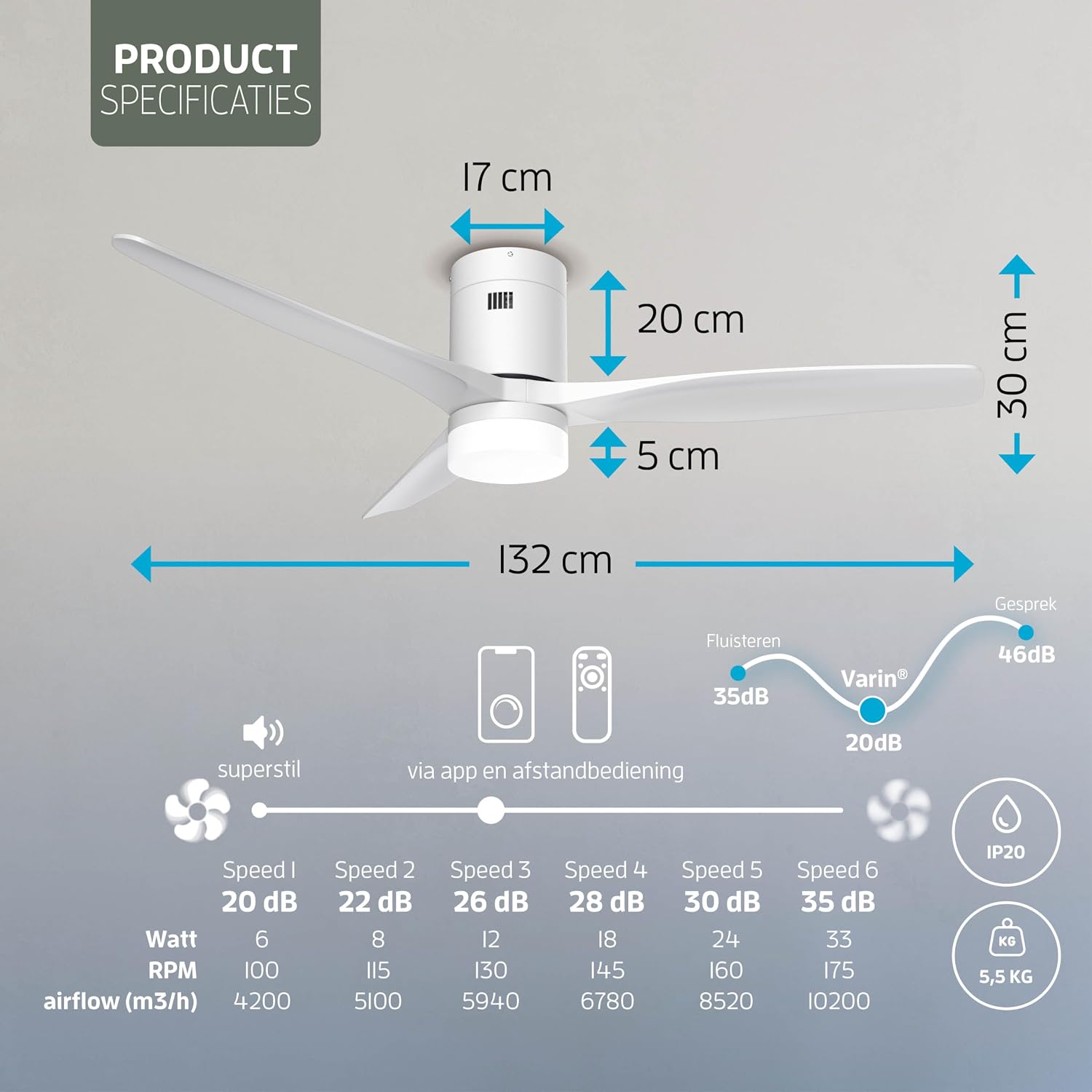
Image: Product specifications overview.
| Feature | Detail |
|---|---|
| Model Number | 8720828286319 |
| Product Dimensions (D x W x H) | 132D x 132W x 30H cm |
| Weight | 5.5 kg |
| Fan Design | Ceiling Fan |
| Number of Blades | 3 |
| Number of Speeds | 6 |
| Airflow Capacity | 10200 m³/h (Max) |
| Noise Level | 20-35 dB (depending on speed) |
| Power Source | Corded Electric |
| Fan Wattage | 35W |
| Light Wattage | 18W LED |
| Light Output | 1800 lumens |
| Color Temperature | 3000-6000K (Warm White to Cool White) |
| Material | Metal (housing), ABS (blades) |
| Special Features | WiFi enabled, Smart Home compatible (Tuya App, Alexa, Google Home) |
| Control Method | Remote Control, App |
| Mounting Type | Ceiling Mount |
| Usage Environment | Indoor |
Warranty Information
For specific warranty details regarding your Varin Smart Ceiling Fan, please refer to the warranty card included in your product packaging or contact the retailer where you purchased the product. Warranty terms typically cover manufacturing defects for a specified period from the date of purchase.
Customer Support
If you have any questions, require technical assistance, or need to report an issue that cannot be resolved using the troubleshooting guide, please contact Varin customer support or your retailer. Have your model number (8720828286319) and proof of purchase ready when contacting support.