
1. Important Safety Information
WARNING: Read all safety warnings, instructions, illustrations, and specifications provided with this power tool. Failure to follow all instructions listed below may result in electric shock, fire, and/or serious injury.
General Safety
- Always wear appropriate personal protective equipment, including eye protection, hearing protection, and sturdy footwear.
- Keep children and bystanders away while operating the lawn mower.
- Do not operate the mower in wet conditions or rain.
- Inspect the area to be mowed and remove any objects that could be thrown by the blade.
- Never place hands or feet near rotating parts.
Battery Safety
- Use only the specified battery packs and charger.
- Do not charge batteries in damp or wet locations.
- Do not incinerate the battery pack even if it is severely damaged or completely worn out.
- Store batteries away from metal objects that could short the terminals.
2. Package Contents
Verify that all items are included in your package:
- 1x MZK 13-inch Cordless Electric Lawn Mower
- 2x 20V 4.0Ah Lithium Batteries
- 1x Single-Port Battery Charger
- 1x 8-Gallon Grass Bag
- Instruction Manual
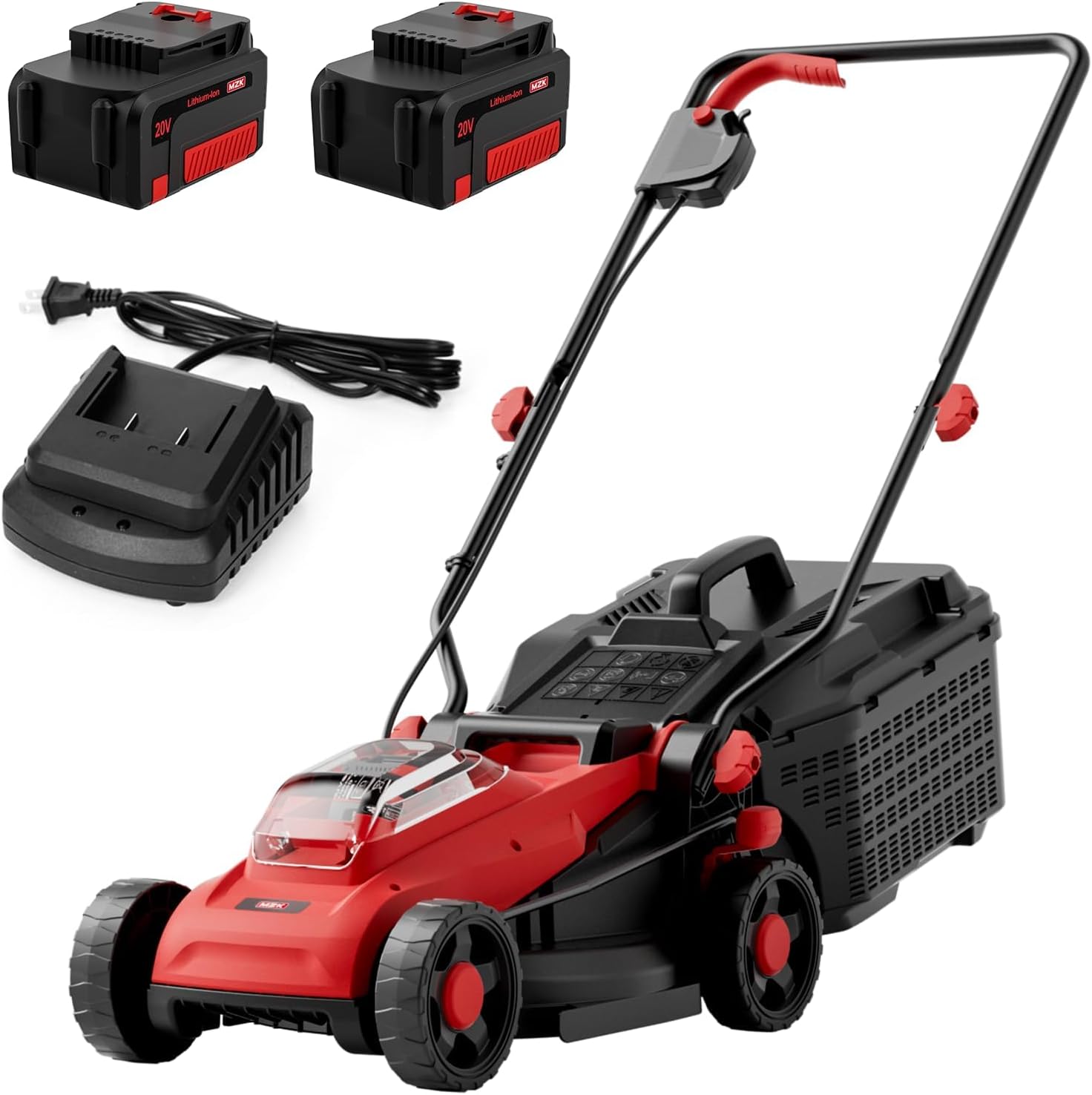
Image: MZK 20V 13-inch Electric Lawn Mower with its components, including the main unit, two batteries, a charger, and the grass collection bag.
3. Assembly Instructions
The MZK Electric Lawn Mower requires minimal assembly. Follow these steps:
- Handle Assembly: Attach the lower handle to the mower body using the provided knobs and bolts. Ensure it is securely fastened.
- Upper Handle Attachment: Connect the upper handle to the lower handle. Secure the power cable along the handle using the clips.
- Grass Bag Assembly: Assemble the grass bag frame and attach the fabric bag.
- Attach Grass Bag: Lift the rear discharge flap and hook the grass bag onto the mower.

Image: The MZK lawn mower shown in its compact, folded state, illustrating its space-saving design for storage.
4. Operating Instructions
4.1. Charging the Batteries
- Insert the 20V 4.0Ah lithium battery into the single-port charger.
- Plug the charger into a standard electrical outlet.
- The indicator light on the charger will show the charging status. Charge until fully charged.
4.2. Installing Batteries
- Open the battery compartment cover on the top of the mower.
- Slide both fully charged 20V 4.0Ah batteries into their respective slots until they click into place.
- Close the battery compartment cover securely.
4.3. Adjusting Cutting Height
The mower offers 4 cutting height settings from 1.3 inches to 2.6 inches.
- Ensure the mower is off and batteries are removed for safety.
- Locate the height adjustment levers on each wheel.
- Pull the lever outwards and move the wheel to the desired height setting. Ensure all four wheels are set to the same height.

Image: A hand adjusting one of the four cutting height levers on the mower's wheel, showing the different height settings.
4.4. Starting the Mower
The mower features a 2-step safety start mechanism:
- Press and hold the safety button on the handle.
- While holding the safety button, pull the bail lever towards the handle. The mower will start.
- Release the safety button, but continue to hold the bail lever to keep the mower running.

Image: A user's hands engaging the safety button and bail lever on the mower's handle to initiate the 2-step easy start.
4.5. Mowing Tips
- For best results, mow dry grass.
- Overlap cutting swaths slightly to ensure an even cut.
- Avoid cutting more than one-third of the grass blade length at a time.
- The 13-inch deck allows for efficient coverage of small to medium lawns.
- The dual 20V 4.0Ah batteries provide up to 30 minutes of runtime. Swap batteries to extend mowing time.
4.6. Emptying the Grass Bag
- Turn off the mower and remove the batteries.
- Lift the rear discharge flap and detach the 8-gallon grass bag.
- Empty the grass clippings into a suitable receptacle.
- Reattach the grass bag securely before resuming operation.

Image: A user removing the 8-gallon grass collection bag, which is filled with grass clippings, from the rear of the lawn mower.
5. Maintenance
5.1. Cleaning
- After each use, disconnect the batteries and clean the mower deck and exterior with a damp cloth.
- Remove any grass clippings or debris from the blade area and vents.
- Do not use water hoses or high-pressure washers directly on the mower.
5.2. Blade Care
- Regularly inspect the blade for sharpness and damage. A dull blade can tear grass, leading to an unhealthy lawn.
- If the blade is dull or damaged, have it sharpened or replaced by a qualified service technician.
5.3. Storage
- Store the mower in a dry, secure location, away from children.
- The mower features a compact folding design for space-saving storage. Fold the handle down for reduced footprint.
- Remove batteries from the mower before long-term storage.
6. Troubleshooting
| Problem | Possible Cause | Solution |
|---|---|---|
| Mower does not start |
|
|
| Poor cutting performance |
|
|
| Reduced runtime |
|
|
7. Specifications
| Feature | Detail |
|---|---|
| Brand | MZK |
| Model Number | ET2601 |
| Power Source | Battery Powered (2x 20V 4.0Ah Lithium Batteries) |
| Motor Type | Brushless Motor |
| Motor Speed (Low/High) | 2800 RPM / 3400 RPM |
| Cutting Width | 13 Inches |
| Cutting Height Adjustment | 4 Positions (1.3 inches to 2.6 inches) |
| Grass Bag Capacity | 8 Gallons (30 Liters) |
| Product Dimensions (D x W x H) | 30"D x 40"W x 15"H |
| Assembly Required | Yes |

Image: Detailed product dimensions of the MZK lawn mower, including height, width, and depth in both its operational and folded configurations.
8. Warranty and Support
For warranty information or technical support, please refer to the warranty card included in your package or contact MZK customer service. Keep your purchase receipt for warranty claims.
MZK is committed to providing efficient and economic garden tools. For further assistance, visit the official MZK website or contact their support channels.
Contact Information: Refer to your product packaging or the MZK official website for the most up-to-date contact details.
