
1. Introduction
Thank you for choosing the Mixcous King Adjustable Bed Frame. This manual provides essential information for the safe and efficient use of your new adjustable bed frame. Please read these instructions thoroughly before assembly and operation to ensure proper functionality and longevity of your product.
The Mixcous King Adjustable Bed Frame is designed to enhance your comfort and sleep experience with independent head and foot incline adjustments, a wireless remote, and a heavy-duty construction.
2. Safety Information
Important Safety Precautions:
- Do not exceed the maximum weight capacity of 750 lbs.
- Keep the remote control out of reach of children and pets to prevent entanglement.
- Follow the assembly instructions carefully to ensure the bed frame is stable and secure.
- Ensure all power cords are properly routed and not pinched or damaged.
- Avoid placing liquids directly on or near the motor and electrical components.
3. Package Contents
Your Mixcous King Adjustable Bed Frame is shipped in two separate boxes. It is crucial to wait for both boxes to arrive before beginning the installation process, as components may be distributed between them.

Figure 3.1: The bed frame ships in two separate packages. Please ensure both boxes are received before starting assembly.
Upon receiving both packages, verify that all components listed in the included installation manual are present and undamaged.
4. Assembly and Setup
The Mixcous King Adjustable Bed Frame is designed for easy installation, typically taking less than 20 minutes. Follow the step-by-step instructions provided in the separate installation manual included with your product. Ensure you have adequate space and, if possible, assistance for handling the heavy components.

Figure 4.1: Overview of the bed frame's adjustable components and wireless remote for setup.
4.1 Key Assembly Steps
- Unpack all components from both boxes.
- Carefully unfold the frame sections.
- Attach the legs securely to the frame.
- Connect the motor cables to the control box, ensuring a snug fit.
- Plug the power cord into a grounded electrical outlet.
- Pair the wireless remote control with the bed frame according to the specific instructions in your manual.
Video 4.1: This video demonstrates the assembly and initial setup process for an adjustable bed frame, including motor installation and remote pairing.
5. Operation
Your Mixcous Adjustable Bed Frame features a wireless remote control for easy adjustment of head and foot positions. The remote allows you to customize your comfort with various preset modes.

Figure 5.1: The wireless remote control for adjusting bed positions.
5.1 Remote Control Functions
- Head Up/Down: Adjusts the head section incline from 0-61°.
- Foot Up/Down: Adjusts the foot section incline from 0-37°.
- Flat: Returns the bed to a completely flat position.
- Zero Gravity (ZG): Elevates both head and foot sections to a position that mimics weightlessness, designed to relieve pressure on the back and improve circulation.
- Anti-Snore: Slightly elevates the head to open airways and reduce snoring.
- TV Mode: Adjusts the bed to an optimal position for watching television or reading.
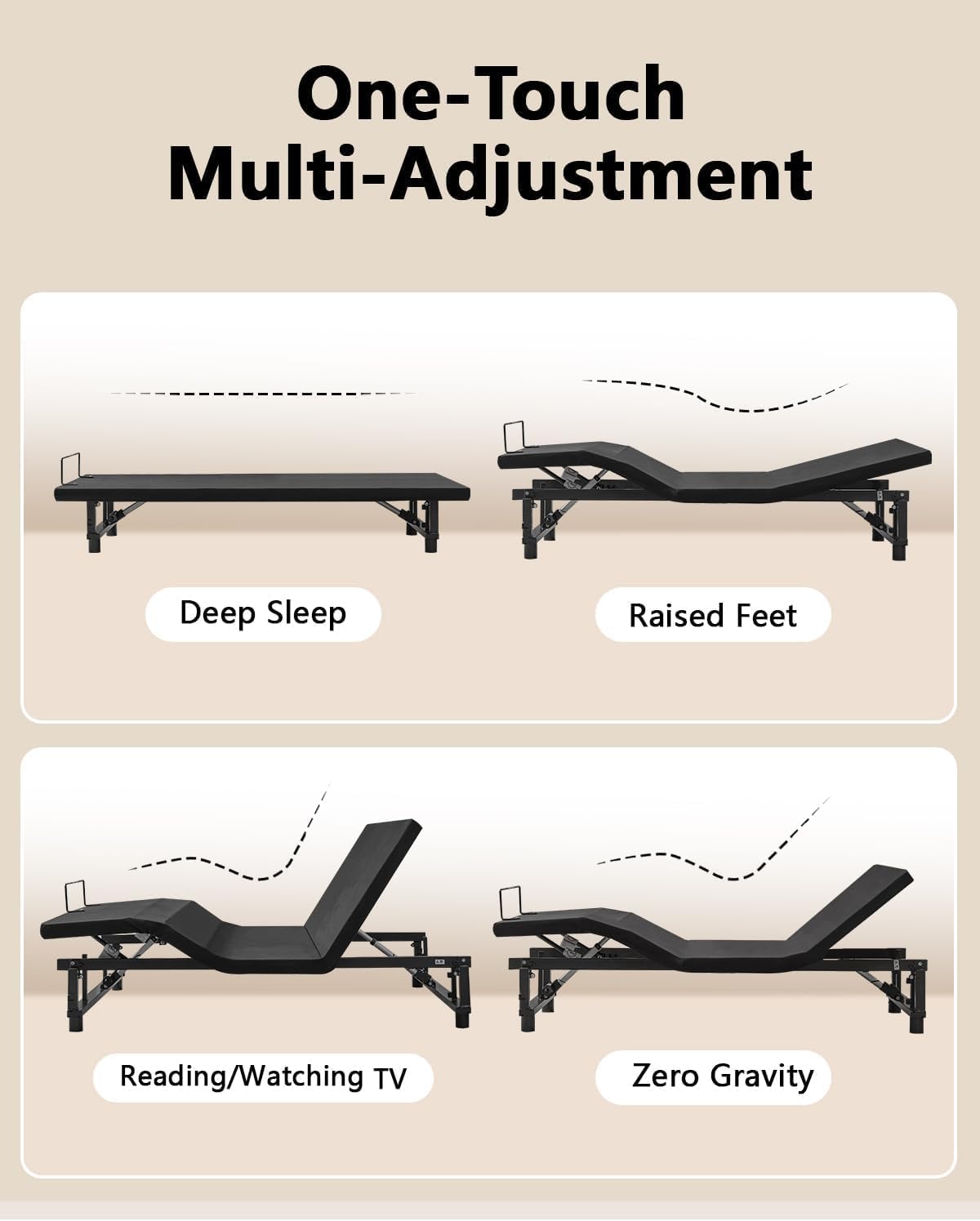
Figure 5.2: Various comfort positions achievable with the adjustable bed frame.

Figure 5.3: Detailed view of different relaxation and sleep positions.
6. Features
- Adjustable Comfort: Independently adjust head (0-61°) and foot (0-37°) inclines for personalized comfort.
- Heavy-Duty Metal Build: Constructed from reinforced steel, supporting up to 750 lbs.
- Wireless Remote: Features preset modes including Zero Gravity, Anti-Snore, and TV mode.
- Whisper-Quiet Motor: Engineered OKIN motor operates under 45dB, ensuring undisturbed sleep.
- Universal Mattress Fit: Compatible with various mattress types including memory foam, latex, hybrid, and gel foam.

Figure 6.1: The bed frame's motor operates quietly, below 45dB.

Figure 6.2: The adjustable bed frame is compatible with various mattress types.
7. Maintenance
To maintain your Mixcous Adjustable Bed Frame in optimal condition:
- Cleaning: Wipe the frame with a dry cloth. Avoid using harsh chemicals or abrasive cleaners.
- Inspections: Periodically check all bolts and connections to ensure they are tight.
- Cables: Ensure all electrical cables are free from kinks, pinches, or damage.
- Motor: The motor is designed for long-term use and generally requires no special maintenance.
8. Troubleshooting
If you encounter issues with your adjustable bed frame, please refer to the following common troubleshooting steps:
- Bed Not Responding to Remote:
- Check the remote control batteries and replace if necessary.
- Ensure the remote is properly paired with the bed frame (refer to your specific manual for pairing instructions).
- Verify that the power cord is securely plugged into a working electrical outlet.
- Motor Not Operating:
- Check all motor connections to the control box to ensure they are secure.
- Unplug the bed from the power outlet for 30 seconds, then plug it back in to reset the system.
- Check your household circuit breaker to ensure it has not tripped.
- Unusual Noises During Operation:
- Ensure no objects are obstructing the moving parts of the bed frame.
- Check that all bolts and connections are tight.
If these steps do not resolve the issue, please contact Mixcous customer support for further assistance.
9. Specifications
| Feature | Detail |
|---|---|
| Model Number | W2354-EB-K |
| Size | King (U.S. Standard) |
| Material | Metal |
| Product Dimensions (L x W x H) | 78.74"L x 73.46"W x 12.72"H |
| Item Weight | 131 Pounds |
| Maximum Weight Recommendation | 750 Pounds |
| Head Incline Range | 0-61° |
| Foot Incline Range | 0-37° |
| Motor Noise Level | Under 45dB |
| Included Components | Adjustable Bed Frame, Wireless Remote Control, Installation Manual |
| Required Assembly | Yes |
| Product Care Instructions | Wipe with Dry Cloth |
10. Warranty and Support
For warranty information, technical support, or any questions regarding your Mixcous King Adjustable Bed Frame, please contact Mixcous customer support. Refer to the contact details provided in your product packaging or visit the official Mixcous website.