
1. Introduction
The UltraCare PRO TENS 1.0 is a dual-channel rechargeable Transcutaneous Electrical Nerve Stimulation (TENS) unit designed for effective pain relief and muscle stimulation. This portable, battery-operated device delivers small electrical pulses to stimulate nerves, promoting the release of natural pain-killing endorphins. It is intended for use in relieving various types of joint and muscle pain.
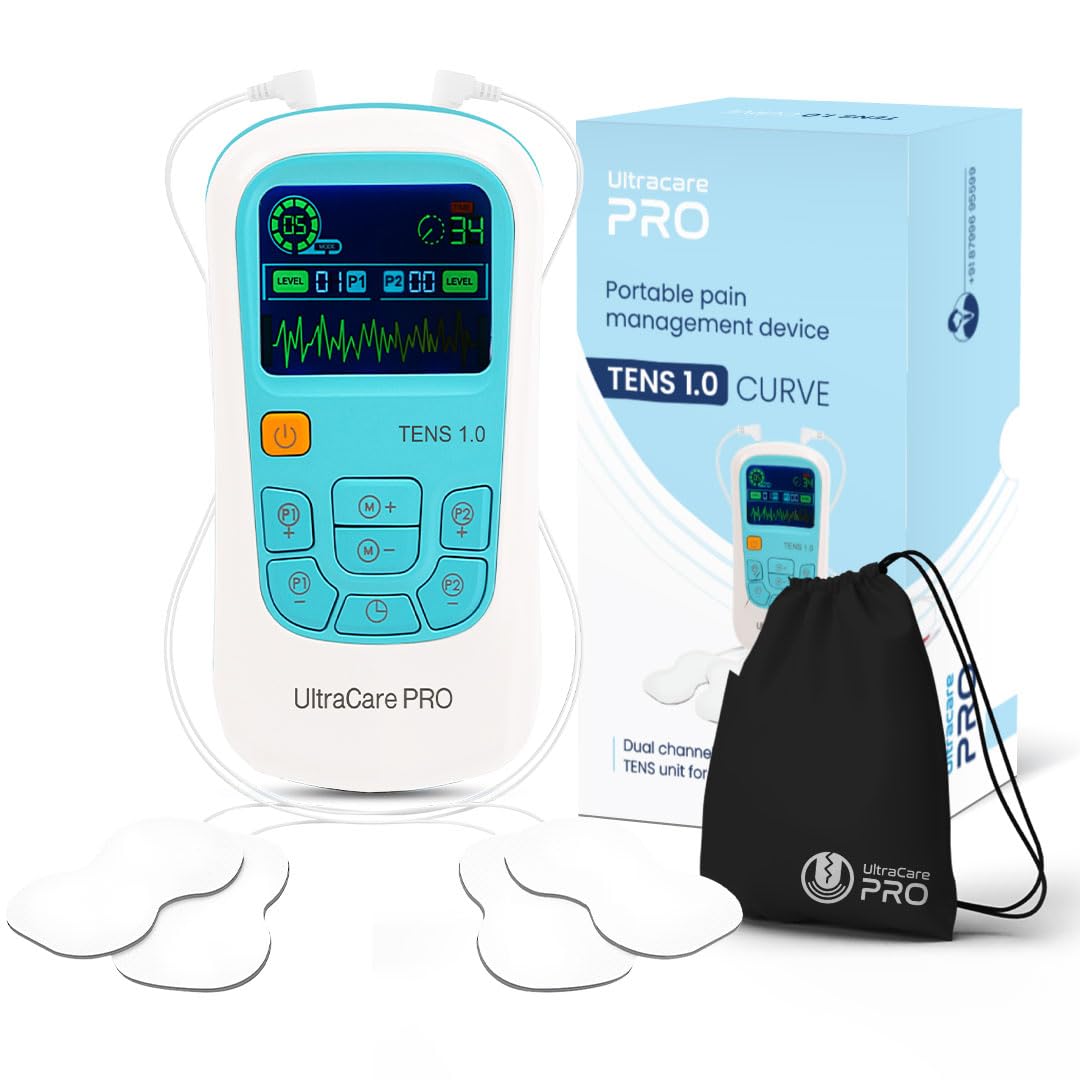
Image: The UltraCare PRO TENS 1.0 TENS Machine, a portable device for pain relief.
The TENS 1.0 is suitable for addressing pain in areas such as the back, neck, shoulders, knees, and other joints and muscles. It offers a drug-free approach to pain management and can aid in healing from various conditions including fibromyalgia, joint injuries, overuse injuries, inflammation, tennis elbow, trapezitis, frozen shoulder, sciatica, and sports injuries.
2. What's in the Box
Upon opening your UltraCare PRO TENS 1.0 package, you should find the following components:
- 1 x TENS 1.0 Device
- 4 x Reusable Self-adhesive Electrode Pads
- 2 x Lead Wires
- 1 x USB Charging Cable
- 1 x Storage Pouch
- 1 x Instruction Manual (this document)

Image: Visual representation of the TENS 1.0 device, electrode pads, lead wires, charging cable, storage pouch, and user manual included in the package.
3. Setup and Assembly
- Charge the Device: Before first use, ensure the TENS 1.0 device is fully charged using the provided USB charging cable. Connect the cable to the device and a suitable USB power source. The battery indicator on the screen will show charging status.
- Connect Lead Wires: Insert the lead wires into the output ports on the top of the TENS unit. The device has two channels (P1 and P2), allowing for simultaneous treatment of two areas or use with four pads.
- Attach Electrode Pads: Connect the electrode pads to the ends of the lead wires. Ensure a secure connection. Remove the protective film from the adhesive side of the pads.
- Apply Electrode Pads: Clean and dry the skin area where you intend to apply the pads. Place the self-adhesive electrode pads firmly onto the skin over the area of pain or discomfort. Ensure the pads are not overlapping and are making full contact with the skin.
Video: This video demonstrates the unboxing, connection of lead wires, and application of electrode pads for the UltraCare PRO TENS 1.0 device.
4. Operating Instructions
- Power On: Long press the orange power button on the device to turn it on. The display will illuminate, showing the current settings.
- Select a Mode: Use the 'M+' and 'M-' buttons to cycle through the 25 available treatment modes. Each mode offers a different pulse pattern for varied therapeutic effects.
- Set Treatment Time: Press the 'T' (Time) button to adjust the treatment duration. The device typically offers various time settings, usually in increments of 5 or 10 minutes, up to a maximum of 60 minutes.
- Adjust Intensity: Use the 'P1+' and 'P1-' buttons to increase or decrease the intensity for Channel 1. Similarly, use 'P2+' and 'P2-' for Channel 2. Start with the lowest intensity and gradually increase it until you feel a comfortable, tingling sensation. Avoid setting the intensity too high, which can cause discomfort.
- Begin Treatment: Once the mode, time, and intensity are set, the treatment will begin automatically.
- Power Off: Long press the orange power button to turn off the device after your session or if you need to stop treatment prematurely.

Image: Diagram illustrating the buttons and display functions of the UltraCare PRO TENS 1.0 for easy operation.
5. Modes and Intensity Levels
The UltraCare PRO TENS 1.0 offers 25 preset modes and 50 intensity levels, allowing for a personalized pain relief experience. Experiment with different modes and intensity settings to find what works best for your specific pain and comfort level.
- 25 Modes: These modes vary in pulse frequency, width, and pattern to target different types of pain and muscle stimulation.
- 50 Intensity Levels: Provides fine-tuned control over the strength of the electrical impulses. Always start low and increase gradually.

Image: Graphic illustrating the range of 50 intensity levels and 25 preset modes available on the TENS 1.0 device, categorized by therapeutic effect.
6. Safety Information
Please read and understand all safety warnings before using the TENS 1.0 device.
- Do not use if you have a pacemaker, implanted defibrillator, or other metallic or electronic implanted devices.
- Do not use if you are pregnant or suspect you might be pregnant.
- Do not use on areas of broken skin, open wounds, or rashes.
- Do not use over the carotid sinus nerves (front of the neck), on the head, or over the eyes.
- Consult a physician before use if you have epilepsy, heart disease, or any other serious medical condition.
- Keep out of reach of children.
- Discontinue use if you experience any adverse reactions such as skin irritation or increased pain.
- The device is FDA and CE approved, ensuring it meets safety and quality standards.

Image: Certification badges indicating the UltraCare PRO TENS 1.0 device is FDA and CE approved.
7. Maintenance and Care
- Cleaning the Device: Wipe the device with a soft, damp cloth. Do not use abrasive cleaners or immerse the device in water.
- Electrode Pad Care: After each use, place the electrode pads back on their protective film. If the pads lose their adhesiveness, they may need to be replaced. Do not share electrode pads with others.
- Storage: Store the TENS 1.0 device and accessories in the provided storage pouch in a cool, dry place, away from direct sunlight and extreme temperatures.
- Battery: The device uses a Lithium Ion battery. Follow proper disposal guidelines for batteries when the device reaches its end of life.
8. Troubleshooting
- Device not turning on: Ensure the device is fully charged. If the battery is low, connect it to the USB charging cable.
- No sensation or weak sensation: Check that the lead wires are securely connected to both the device and the electrode pads. Ensure the electrode pads are firmly applied to clean, dry skin. Increase the intensity level gradually.
- Skin irritation: Reduce the intensity level. Ensure the electrode pads are clean and not expired. If irritation persists, discontinue use and consult a healthcare professional.
- Pads not sticking: Clean the skin area thoroughly before application. If pads are old or dirty, replace them with new ones.
9. Specifications
| Feature | Detail |
|---|---|
| Model Name | TENS 1.0 |
| Channels | Dual Channel |
| Modes | 25 Preset Modes |
| Intensity Levels | 50 Levels |
| Power Source | Battery Powered (1 Lithium Ion battery included) |
| Product Dimensions | 14.7L x 7.5W x 2.2H Centimeters |
| Item Weight | 115 Grams |
| Country of Origin | India |
| Manufacturer | Zealmax Innovations Pvt Ltd |
10. Warranty and Support
The UltraCare PRO TENS 1.0 device comes with a 1-year warranty provided by Zealmax Innovations Pvt. Ltd. This warranty is non-transferable and is valid for 1 year from the original date of purchase. Please note that the warranty is applicable only to the device itself; accessories such as electrode pads, lead wires, and charging cables are not covered under warranty.
For any support, queries, or warranty claims, please contact Zealmax Innovations Pvt. Ltd. at +918799695599 or refer to the contact information provided in your product packaging.