
1. Introduction and Overview
This manual provides essential information for the safe and effective use of your VortexLumen 80A 8bit Electronic Speed Controller (ESC). This ESC is designed for compatibility with Axisflying Argus Pro 8S Drones. Please read this manual thoroughly before installation and operation to ensure proper functionality and to prevent damage to the unit or your drone.
The VortexLumen 80A 8bit ESC is a critical component for controlling the speed of your drone's motors, ensuring stable and responsive flight. It is engineered for specific drone platforms where the Axisflying Argus Pro 80A ESC was originally intended.
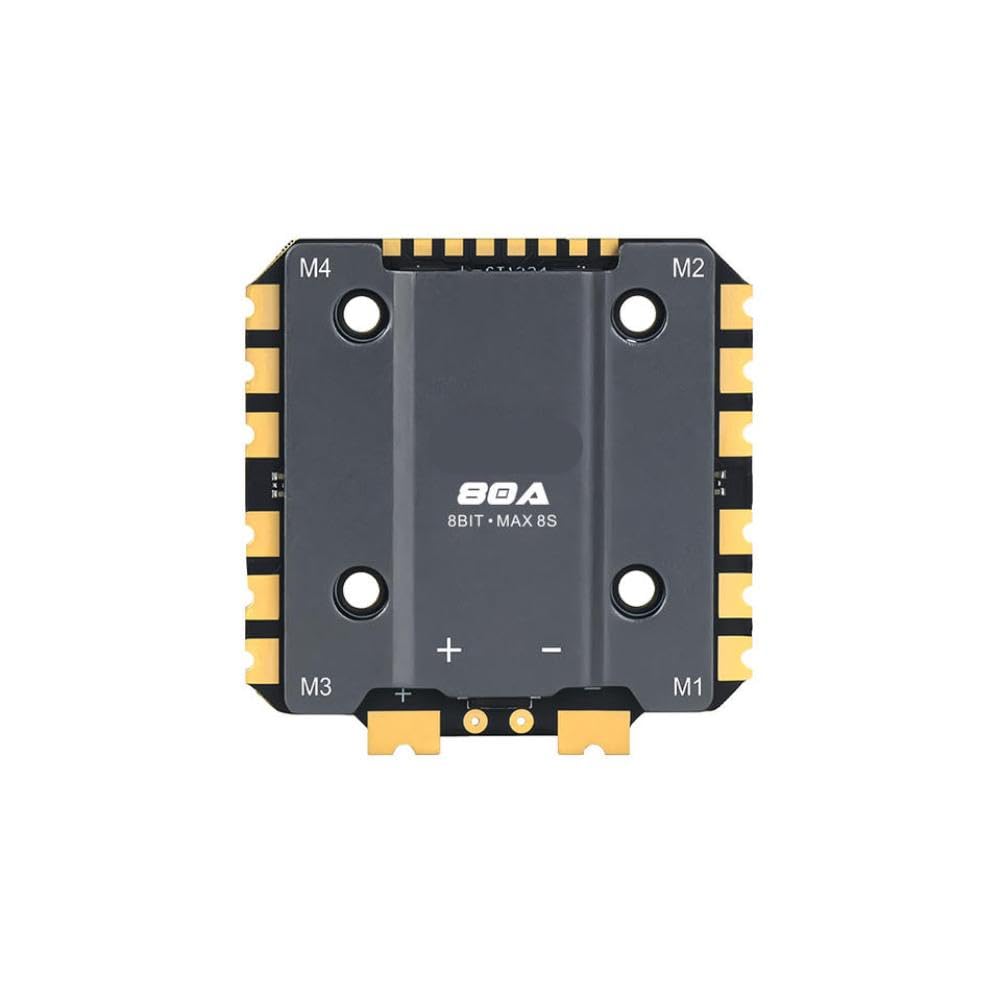
Figure 1: VortexLumen 80A 8bit ESC Controller. This image shows the compact design of the electronic speed controller with its various connection points.
2. Key Features
- Model Compatibility: Designed for drones utilizing Axisflying Argus Pro 80A speed controllers with 8-bit firmware and an 8S configuration.
- Firmware Compatibility: Functions with 8-bit firmware versions as specified for the Axisflying Argus Pro ESC series.
- Physical Fit: Sized and configured to fit standard mounting layouts used in 13-inch drone airframes requiring this ESC model.
- Application Scope: Intended for use in drone platforms where the Axisflying Argus Pro 80A ESC was originally installed.
3. Setup and Installation
Proper installation is crucial for the performance and safety of your drone. Always ensure the drone's battery is disconnected before beginning any installation or maintenance.
3.1 Pre-Installation Checklist
- Verify the ESC model (80A 8bit) matches your drone's requirements.
- Ensure all necessary tools (soldering iron, heat shrink, wires, etc.) are available.
- Confirm the drone frame has appropriate mounting points for the ESC.
3.2 Mounting the ESC
- Carefully place the ESC onto the designated mounting area on your drone frame.
- Secure the ESC using appropriate screws or vibration-damping standoffs. Avoid overtightening.
3.3 Wiring Connections
Refer to your drone's flight controller and motor documentation for specific wiring diagrams. General connections include:
- Battery Input: Connect the main power leads (positive and negative) from your drone's power distribution board (PDB) or battery connector to the corresponding pads on the ESC. Ensure correct polarity.
- Motor Output: Connect the three motor phase wires from the ESC to the respective motor wires. The order may affect motor direction, which can be adjusted later via firmware or by swapping two wires.
- Signal Wire: Connect the signal wire from the ESC to the appropriate motor output pin on your flight controller.
- Ground Wire: Connect the ground wire from the ESC to a ground pin on your flight controller.
After soldering, inspect all connections for cold joints or shorts. Use heat shrink tubing to insulate exposed solder joints.
4. Operating Instructions
Once the ESC is physically installed and wired, it needs to be configured and tested.
4.1 Firmware Configuration
This ESC is compatible with 8-bit firmware. Connect your flight controller to a computer and use the appropriate configurator software (e.g., BLHeliSuite for 8-bit ESCs) to:
- Flash the latest compatible firmware.
- Calibrate the ESCs to ensure proper throttle range.
- Set motor direction (if not already correct).
- Adjust other parameters such as Damped Light, timing, and startup power as needed for your specific motors and drone setup.
4.2 Pre-Flight Checks
- Ensure all motor screws are tight and propellers are securely attached (or removed for initial testing).
- Verify that the ESC is firmly mounted and all wires are secured, preventing contact with moving parts.
- Perform a motor spin test (without propellers) to confirm correct motor direction and smooth operation.
4.3 Flight Operation
Operate your drone according to its flight controller manual. The ESC will respond to commands from the flight controller to regulate motor speed. Always fly in a safe environment and adhere to local regulations.
5. Maintenance
Regular maintenance helps prolong the life of your ESC and ensures reliable performance.
- Visual Inspection: Periodically check the ESC for any signs of physical damage, burnt components, or loose connections.
- Cleaning: Keep the ESC free from dust, dirt, and moisture. Use compressed air or a soft brush to gently clean the board.
- Temperature Monitoring: During operation, ensure the ESC does not overheat. Excessive heat can indicate an issue with motor load, propeller size, or airflow.
- Firmware Updates: Check for and apply firmware updates as recommended by the flight controller or ESC manufacturer to benefit from performance improvements and bug fixes.
6. Troubleshooting
If you encounter issues with your ESC, refer to the following common problems and solutions:
| Problem | Possible Cause | Solution |
|---|---|---|
| Motor not spinning or stuttering | Loose motor wire, incorrect motor direction, ESC not calibrated, damaged motor/ESC. | Check all motor connections. Reverse motor direction in firmware or by swapping two motor wires. Recalibrate ESCs. Inspect motor and ESC for damage. |
| ESC gets excessively hot | Overloaded motor, incorrect propeller size, poor airflow, short circuit. | Reduce motor load. Use appropriate propellers. Ensure adequate cooling. Check for shorts. |
| Drone unstable or twitchy | Incorrect ESC calibration, PID tuning issues, motor desync. | Recalibrate ESCs. Adjust PID settings in flight controller firmware. Ensure ESC firmware is up to date. |
| No power to ESC | Disconnected battery, faulty power lead, damaged ESC. | Check battery connection. Inspect power leads for damage. Test ESC with a known good power source. |
If the problem persists after attempting these solutions, contact VortexLumen customer support or consult an experienced drone technician.
7. Specifications
The following specifications apply to the VortexLumen 80A 8bit ESC Controller (Model: VortexLumen111):
| Specification | Value |
|---|---|
| Brand | VortexLumen |
| Model Name | VortexLumen111 |
| Current Rating | 80A |
| Firmware Type | 8-bit |
| Battery Compatibility | 8S (8-cell LiPo) |
| Product Dimensions (L x W x H) | 10L x 10W x 10H millimeters |
| Item Weight | 400 Grams |
| Manufacturer | VortexLumen |
| Country of Origin | China |
8. Warranty and Support
For warranty information, please refer to the terms and conditions provided by your retailer at the time of purchase. Typically, warranty coverage addresses manufacturing defects under normal use conditions.
For technical support or inquiries regarding your VortexLumen ESC Controller, please contact the seller or manufacturer directly. Ensure you have your product model number (VortexLumen111) and purchase details available when seeking support.