
1. Important Safety Instructions
Read all instructions before using this appliance. Failure to follow these instructions may result in electric shock, fire, or serious injury.
- Do not touch hot surfaces. Use handles or knobs.
- To protect against electrical shock, do not immerse cord, plugs, or the appliance in water or other liquid.
- Close supervision is necessary when any appliance is used by or near children.
- Unplug from outlet when not in use and before cleaning. Allow to cool before putting on or taking off parts.
- Do not operate any appliance with a damaged cord or plug, or after the appliance malfunctions or has been damaged in any manner.
- The use of accessory attachments not recommended by the appliance manufacturer may cause injuries.
- Do not use outdoors.
- Do not let cord hang over edge of table or counter, or touch hot surfaces.
- Do not place on or near a hot gas or electric burner, or in a heated oven.
- Extreme caution must be used when moving an appliance containing hot oil or other hot liquids.
- Always attach plug to appliance first, then plug cord into the wall outlet. To disconnect, turn any control to “off”, then remove plug from wall outlet.
- Do not use appliance for other than intended use.
- Oversized foods or metal utensils must not be inserted in a toaster oven as they may create a fire or risk of electric shock.
- A fire may occur if the oven is covered or touching flammable material, including curtains, drapes, walls, and the like, when in operation.
- Do not place any of the following materials in the oven: paper, cardboard, plastic, or similar materials.
- Do not store any materials, other than manufacturer’s recommended accessories, in this oven when not in use.
- Do not place cooking utensils or baking dishes on the glass door.
2. Product Overview
The OLIXIS 29.6QT Air Fryer Toaster Oven Combo is a versatile kitchen appliance designed for various cooking tasks. It features a spacious interior and multiple cooking functions.
Components and Accessories
- Main Unit (Toaster Oven)
- Smart Probe
- Rotisserie Set
- Handle
- Fry Basket
- Baking Pan
- Wire Rack

Image 2.1: The OLIXIS 29.6QT Air Fryer Toaster Oven Combo, showcasing its overall design and stainless steel finish.

Image 2.2: Product dimensions of the OLIXIS Toaster Oven, measuring 19 inches deep, 13.8 inches wide, and 8.3 inches high.
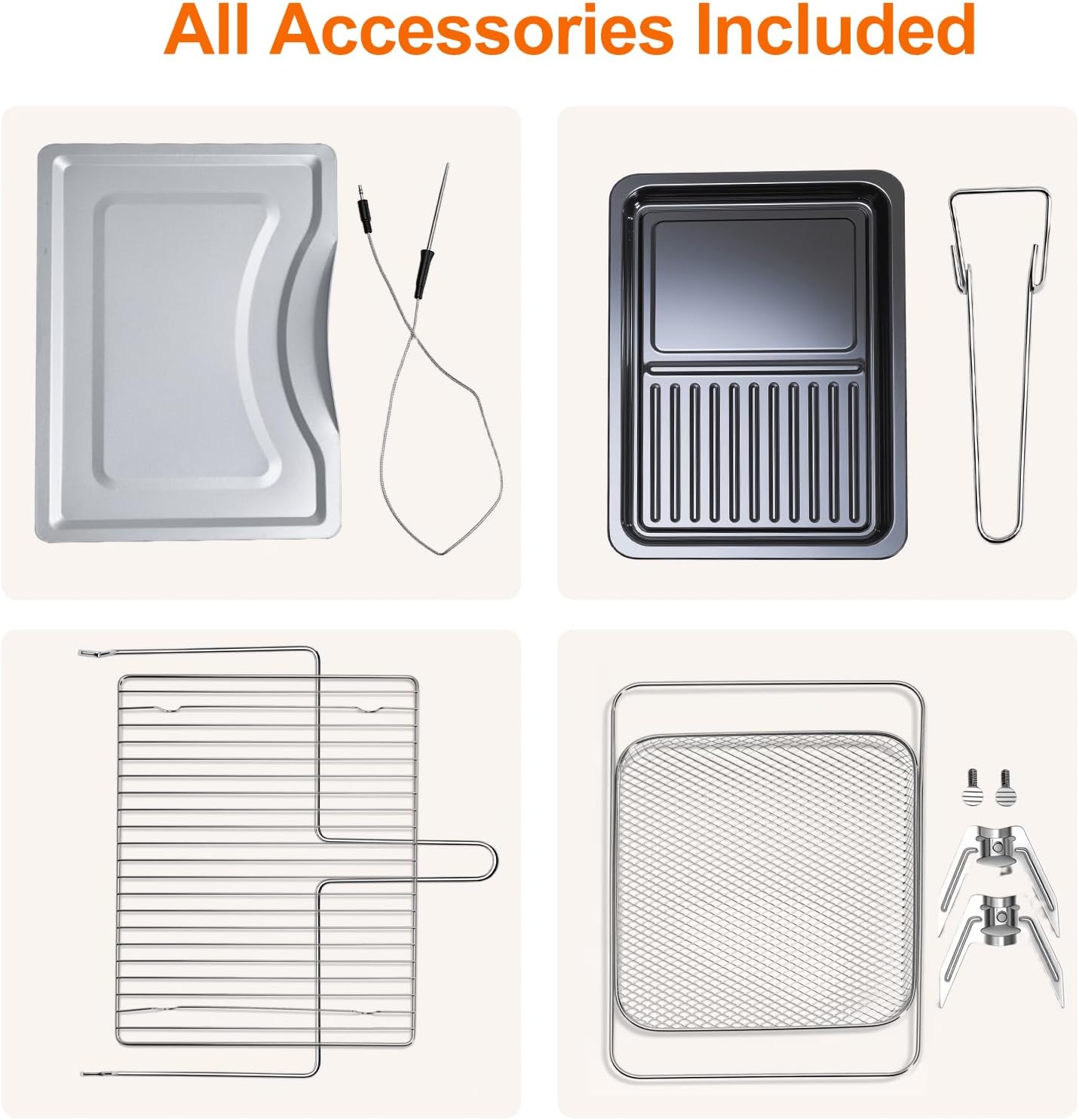
Image 2.3: A display of all six included accessories: rotisserie set, handle, fry basket, baking pan, wire rack, and smart probe.
3. Setup
Proper setup ensures optimal performance and safety of your OLIXIS Toaster Oven.
Unpacking and Placement
- Carefully remove all packaging materials and accessories from the oven.
- Place the oven on a stable, level, heat-resistant surface. Ensure there is at least 4 inches (10 cm) of clearance on all sides and above the oven for proper ventilation.
- Do not place the oven near flammable materials such as curtains or drapes.
- Wipe down the exterior of the oven with a damp cloth. Wash all accessories (fry basket, baking pan, wire rack, rotisserie set, handle) in warm, soapy water, rinse, and dry thoroughly.
First Use
- Before first use, operate the oven on the 'Bake' function at 450°F (230°C) for approximately 15 minutes without any food inside. This will burn off any manufacturing residues and odors. Some smoke and odor are normal during this process.
- Ensure the area is well-ventilated during the first use.
- Allow the oven to cool completely before proceeding with cooking.
4. Operating Instructions
Your OLIXIS Toaster Oven offers 12 versatile cooking functions and precise controls for various culinary needs.
Control Panel Overview
The control panel features an HD screen, function buttons, a Start/Stop button, a Detection button (for smart probe), a Manual button, and a control knob for adjustments.

Image 4.1: Detailed view of the control panel, showing the function buttons, Start/Stop, Detection, Manual buttons, and the rotary knob for settings adjustment.
Basic Operation
- Power On: Plug the appliance into a grounded electrical outlet. The display will illuminate.
- Select Function: Press the 'Function' button repeatedly or turn the control knob to cycle through the 12 available cooking modes (Broil, Bake, Toast, Bread, Cake, Pizza, Steak, Chicken, Chips, Tart, Fermentation, Unfreeze). The selected function will be highlighted on the display.
- Adjust Settings: Once a function is selected, use the control knob to adjust the temperature and cooking time. The display will show the current settings.
- Start Cooking: Press the 'Start/Stop' button to begin the cooking process. The oven will preheat if necessary, and the timer will begin counting down.
- Stop Cooking: Press the 'Start/Stop' button again to pause or stop cooking at any time.
Using the Smart Probe
The Smart Probe allows for precise internal temperature monitoring of food, ensuring perfect doneness.
- Insert the Smart Probe into the thickest part of the food, avoiding bones.
- Plug the probe's connector into the designated port on the side of the oven.
- Select your desired cooking function and set the target internal temperature using the control knob. The probe can monitor temperatures from 0°F to 250°F.
- Press the 'Detection' button to activate the smart probe feature. The display will show both the oven temperature and the probe's internal food temperature.
- The oven will automatically stop cooking or alert you once the target internal temperature is reached.

Image 4.2: The smart probe in use, accurately measuring the internal temperature of a roasting chicken to ensure optimal cooking results.
Video Demonstration: OLIXIS Air Fryer Toaster Oven Combo Overview
Video 4.1: A brief 9-second overview of the OLIXIS Air Fryer Toaster Oven Combo, demonstrating its appearance and key features. This video is a short preview from the seller.
5. Maintenance and Cleaning
Regular cleaning and maintenance will extend the life of your OLIXIS Toaster Oven and ensure optimal performance.
Cleaning the Oven Interior and Exterior
- Always unplug the oven and allow it to cool completely before cleaning.
- Wipe the exterior with a damp cloth and mild detergent. Do not use abrasive cleaners or scouring pads.
- For the interior, remove any food crumbs. Wipe down the interior walls with a damp cloth and mild, non-abrasive cleaner. For stubborn stains, a paste of baking soda and water can be used, then wiped clean.
- Clean the glass door with a glass cleaner or a damp cloth.
- Ensure all surfaces are dry before plugging the oven back in.
Cleaning Accessories
All included accessories (rotisserie set, handle, fry basket, baking pan, wire rack) are dishwasher safe, except for the smart probe.

Image 5.1: The fry basket, baking pan, and wire rack being placed into a dishwasher, demonstrating the ease of cleaning for these accessories.
- Wash the smart probe by hand with warm, soapy water. Do not immerse the probe's electrical connector in water.
- For baked-on food on accessories, soak them in warm, soapy water before washing.
6. Troubleshooting
If you encounter issues with your OLIXIS Toaster Oven, refer to the following common problems and solutions.
| Problem | Possible Cause | Solution |
|---|---|---|
| Oven does not turn on. | Not plugged in; power outage; circuit breaker tripped. | Ensure the oven is securely plugged into a working outlet. Check your home's circuit breaker. |
| Food is not cooking evenly. | Incorrect rack position; overcrowding; uneven food placement. | Refer to recipe for recommended rack position. Do not overcrowd the oven. Arrange food in a single layer for air frying. Rotate food halfway through cooking. |
| Excessive smoke during cooking. | Food residue in the oven; high-fat foods; oil/grease buildup. | Clean the oven interior and accessories thoroughly. Use a drip tray for high-fat foods. Ensure proper ventilation. |
| Smart Probe not reading temperature. | Probe not fully inserted into food or port; damaged probe. | Ensure the probe is fully inserted into both the food and the oven port. If issues persist, contact customer support. |
| Control panel unresponsive. | Temporary electronic glitch. | Unplug the oven from the power outlet for 1 minute, then plug it back in. |
If the problem persists after attempting these solutions, please contact customer support.
7. Specifications
Technical details for the OLIXIS 29.6QT Air Fryer Toaster Oven Combo.
| Feature | Specification |
|---|---|
| Brand | OLIXIS |
| Model Number | AH-KKX2D01-28SR |
| Capacity | 29.6 Quarts (29L) |
| Product Dimensions (D x W x H) | 19" x 13.8" x 8.3" (48.3 cm x 35.1 cm x 21.1 cm) |
| Item Weight | 21 Pounds (9.5 kg) |
| Material | Stainless Steel |
| Color | Silver |
| Wattage | 1600 watts |
| Temperature Range | Up to 450°F (230°C) |
| Smart Probe Temperature Range | 0°F to 250°F (-17.8°C to 121°C) |
| Control Type | Button Control with Rotary Knob |
| Door Style | French Door |
| Included Components | Air Fryer Toaster Oven Combo, Smart Probe, Rotisserie Set, Handle, Fry Basket, Baking Pan, Wire Rack |
8. Warranty Information
OLIXIS products are manufactured to high-quality standards and are warranted against manufacturing defects. Please refer to the warranty card included with your purchase for specific terms and conditions, including warranty duration and coverage details. Keep your proof of purchase for warranty claims.
9. Customer Support
For any questions, assistance, or troubleshooting not covered in this manual, please contact OLIXIS customer support.
- Website: Visit the official OLIXIS website for FAQs and support resources.
- Email: Refer to your product packaging or warranty card for customer service email address.
- Phone: Refer to your product packaging or warranty card for customer service phone number.
Please have your model number (AH-KKX2D01-28SR) and purchase date ready when contacting support.