
Introduction
This manual provides comprehensive instructions for the Generico Sekoda GPS Sports Smartwatch. It covers setup, operation, maintenance, and troubleshooting to ensure optimal use of your device. The smartwatch features advanced GPS, 24/7 health monitoring, and a durable design suitable for sports and daily activities.
The Generico Sekoda GPS Sports Smartwatch is designed to monitor your health, optimize sports performance, and enhance daily life, combining fashion with technology.

Image: Generico Sekoda GPS Sports Smartwatch, front view.
What's in the Box
Verify that all items are present in the package:
- 1 x Generico Sekoda GPS Sports Smartwatch
- 1 x Charging Cable
- 1 x User Manual
Setup
1. Charging the Smartwatch
Before first use, fully charge your smartwatch. Connect the charging cable to the charging port on the back of the watch and plug the USB end into a power adapter or computer USB port. The watch display will indicate charging status.
2. Powering On/Off
- To Power On: Press and hold the power button (usually on the side) until the screen lights up.
- To Power Off: Press and hold the power button, then select 'Power Off' on the screen.
3. Pairing with Your Smartphone
The smartwatch uses Bluetooth 5.3 for connectivity and is compatible with both iOS and Android devices.
- Download the official companion application for your smartwatch from your phone's app store.
- Ensure Bluetooth is enabled on your smartphone.
- Open the companion app and follow the on-screen instructions to search for and pair with your smartwatch.
- Confirm the pairing request on both your phone and smartwatch.
4. Initial Configuration
After pairing, the app will guide you through setting up personal information such as age, gender, height, weight, and preferred units. This information helps improve the accuracy of health and fitness tracking.
Operating Instructions
Display and Navigation
The smartwatch features a 1.43-inch AMOLED high-definition touchscreen with 466x466 resolution. It offers rich colors, low power consumption, clear visuals even under direct sunlight, and responsive touch technology for smooth operation.
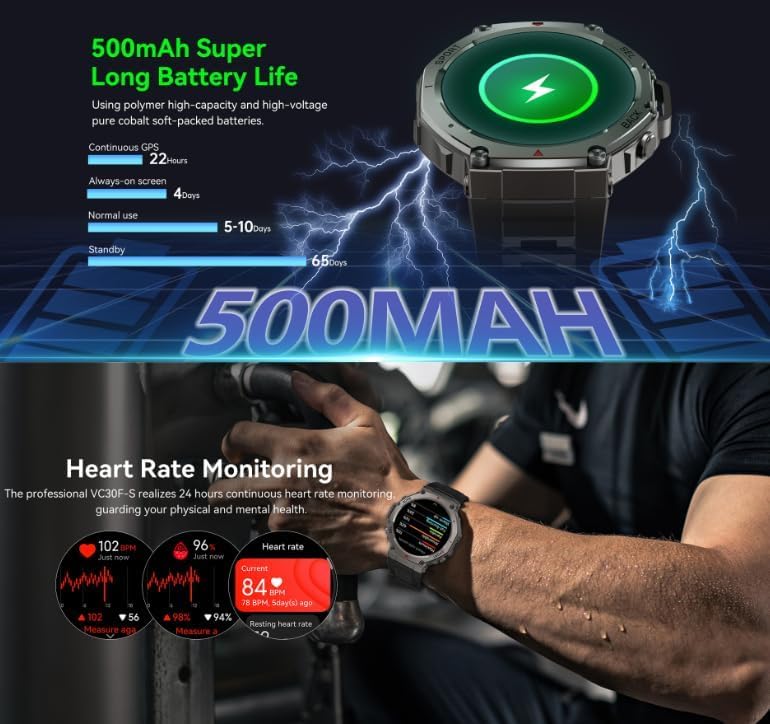
Image: Illustrates the AMOLED display quality and GPS satellite positioning capabilities.
GPS Positioning
The smartwatch integrates an advanced dual-band and six-satellite system (GPS, GLONASS, BDS, Galileo, NAVIC, QZSS) for precise location tracking and accurate route recording during outdoor activities. It supports simultaneous joint positioning of multiple systems.
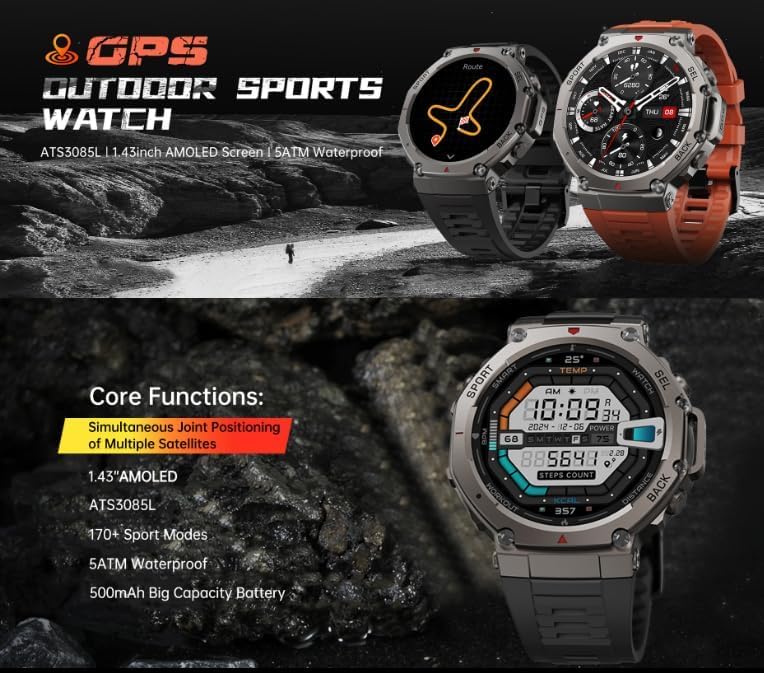
Image: Depicts the smartwatch tracking an outdoor route using GPS, showing core functions.

Image: Shows the compass, altitude, and barometer functions available on the smartwatch.
Sports and Activity Tracking
The smartwatch features multifunctional sensors that accurately track over 170 sports and health data points. It intelligently identifies your movement to automatically record workout data.
24/7 Health Monitoring
The device acts as a 24/7 health guardian, providing real-time monitoring of key health metrics:
- Heart Rate Monitoring: Continuous heart rate tracking with safety alerts.
- Blood Oxygen Monitoring: Real-time blood oxygen level measurement.
- Stress Monitoring: Tracks stress levels throughout the day.
- Sleep Tracking: Monitors sleep stages and provides insights into sleep quality.

Image: Demonstrates continuous heart rate monitoring and highlights the smartwatch's long battery life.

Image: Shows the sleep tracking interface, detailing sleep stages and duration.
Bluetooth Calls
With high-fidelity waterproof speakers and Bluetooth hands-free calling, you can answer calls directly from your smartwatch. This feature allows for clear communication, whether you are exercising or driving, freeing your hands for convenience.
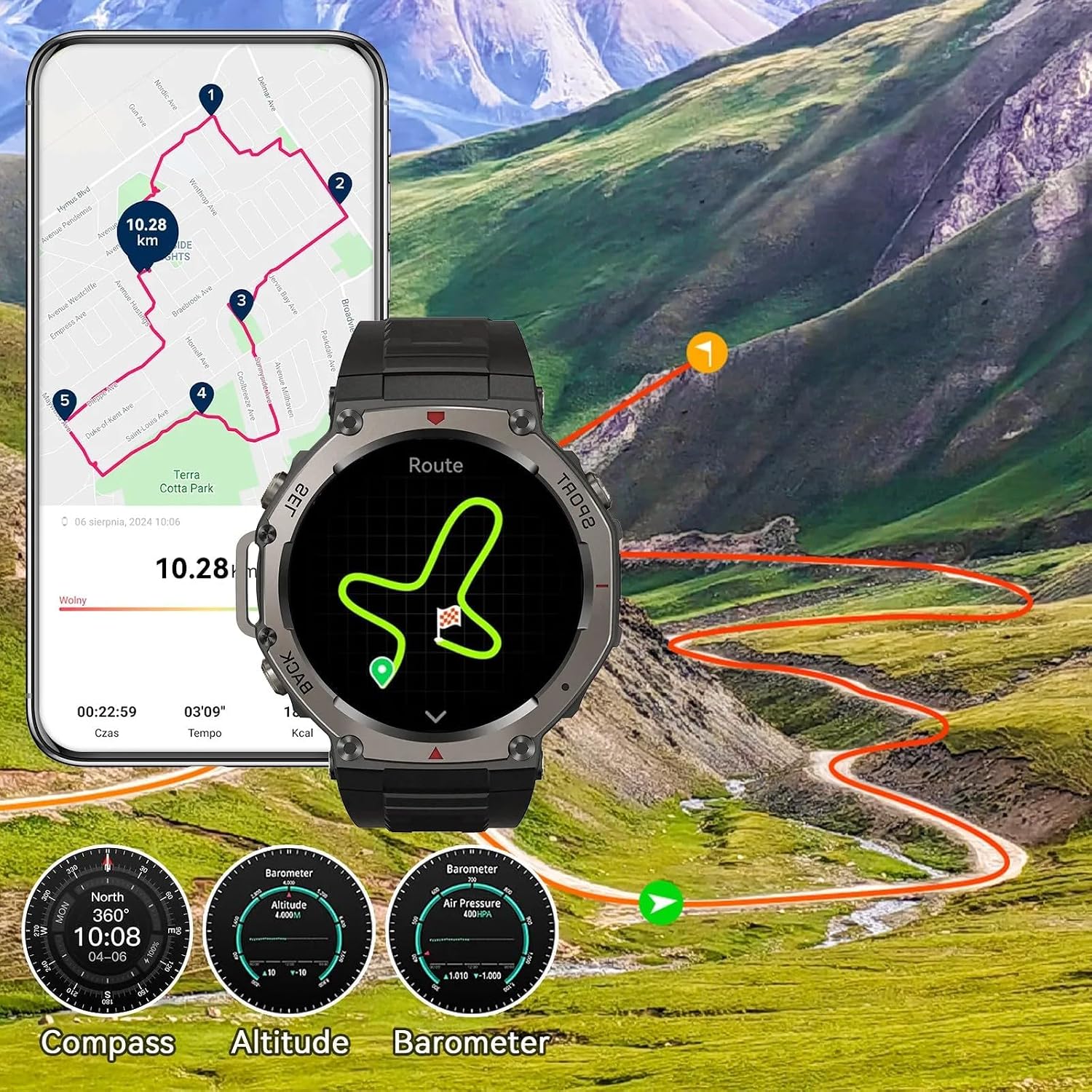
Image: A user interacting with the smartwatch to answer a Bluetooth call.
Battery Life
The powerful 380 mAh battery provides an ultra-long battery life, offering approximately 15 days of daily use or up to 35 hours in continuous GPS mode.
Maintenance
Cleaning
Regularly clean your smartwatch and strap to prevent skin irritation and maintain device functionality. Use a soft, dry, lint-free cloth. For stubborn dirt, slightly dampen the cloth with water. Avoid using harsh chemicals, abrasive cleaners, or solvents, as these can damage the device.
Water Resistance
The smartwatch is designed to be water resistant. This means it can withstand splashes, rain, and brief immersion in shallow water. However, it is not suitable for diving, high-pressure water activities, or prolonged submersion. Ensure the watch is dry before charging.
Durability
Constructed with a zinc alloy casing and a durable silicone band, the smartwatch offers military-grade durability. It is designed to be resistant to water and dust, capable of withstanding various environmental challenges.

Image: Highlights the military-grade durability of the smartwatch's construction.
Storage
When not in use for extended periods, store the smartwatch in a cool, dry place away from direct sunlight and extreme temperatures. Ensure it has a partial charge to prevent deep discharge of the battery.
Troubleshooting
Smartwatch Not Turning On
- Ensure the battery is charged. Connect the smartwatch to its charging cable and a power source for at least 30 minutes.
- Try pressing and holding the power button for 10-15 seconds to force a restart.
Unable to Pair with Smartphone
- Verify that Bluetooth is enabled on your smartphone and the smartwatch.
- Ensure the smartwatch is within the Bluetooth range of your phone (typically 10 meters).
- Restart both your smartphone and the smartwatch, then attempt pairing again.
- Check if the companion app is updated to the latest version.
Inaccurate GPS Readings
- Ensure you are in an open outdoor area with a clear view of the sky. GPS signals can be obstructed by buildings, dense foliage, or indoors.
- Allow the smartwatch sufficient time to acquire GPS signals before starting an activity.
- Check for any available firmware updates for your smartwatch through the companion app.
Health Sensor Readings Seem Incorrect
- Ensure the smartwatch is worn snugly on your wrist, but not too tight, allowing the sensors to make proper contact with your skin.
- Clean the sensor area on the back of the watch to remove any dirt or sweat buildup.
- Avoid excessive movement during measurements for more accurate readings.
Specifications
| Model Number | 159c5293-7f85-4161-b59d-b4b51a255a38 |
| Brand | Generico |
| Display Type | Digital, AMOLED, Touchscreen |
| Connectivity Technology | Bluetooth 5.3 |
| GPS | Integrated GPS, GLONASS, BDS, Galileo, NAVIC, QZSS |
| Battery Capacity | 380 mAh (Alkaline) |
| Typical Battery Life | Up to 15 days |
| GPS Mode Battery Life | Up to 35 hours |
| Water Resistance Level | Water Resistant |
| Band Material | Silicone |
| Compatible Devices | iOS and Android smartphones, laptops, tablets, PCs |
| Health Monitoring | Heart Rate Monitor, Blood Oxygen Monitor, Stress Monitor |
| Manufacturer | Generico |
| Country of Origin | China |

Image: Details the product dimensions and highlights the powerful chip for enhanced performance.
Warranty and Support
Warranty Information
This Generico Sekoda GPS Sports Smartwatch comes with a limited warranty of 1 year from the date of purchase. The warranty covers manufacturing defects under normal use. It does not cover damage caused by misuse, accidents, unauthorized modifications, or normal wear and tear.
Customer Support
For technical assistance, warranty claims, or any questions regarding your smartwatch, please contact the seller or manufacturer directly through the platform where the product was purchased. Please have your purchase receipt and model number ready when contacting support.