
Introduction
Thank you for choosing the CECER Queen Murphy Bed with Mattress. This innovative furniture piece is designed to maximize space utilization in your home, offering a comfortable queen-size bed that conveniently folds into a stylish cabinet. It features a built-in charging station and integrated storage drawers for added functionality. This manual provides essential information for the safe assembly, operation, and maintenance of your new Murphy bed.
Safety Information
- Always ensure the bed is securely latched in its cabinet position when not in use.
- Assembly requires at least two adults. Do not attempt to assemble alone.
- Keep children and pets away from the unit during assembly and conversion to prevent injury.
- Do not exceed the maximum weight capacity of 1000 pounds.
- Ensure all hardware is tightened securely before use and periodically check for looseness.
Setup and Assembly
Your CECER Murphy bed will be delivered in multiple packages (typically 4). Please ensure all packages have arrived before beginning assembly. All necessary hardware is included. We recommend having a Phillips head screwdriver and a rubber mallet on hand, though a small screwdriver is provided.
Preparation:
- Unpack all components and lay them out on a clean, soft surface to prevent scratches.
- Identify all parts against the included parts list in your separate assembly guide.
- Familiarize yourself with the hardware.
Assembly Steps:
Follow the detailed, step-by-step instructions provided in the separate assembly manual included with your product. Pay close attention to the orientation of each piece to avoid re-assembly. Two people are recommended for a smoother setup process.

Image: Simple, guided assembly process for the CECER Murphy bed, highlighting the recommendation for two people, clear instructions, and included hardware.
Note on Drawer Handles: Some users have found that longer screws and bolts may be beneficial for the drawer handles if they are frequently pulled. Ensure handles are securely fastened.
Operating Instructions
Converting from Cabinet to Bed:
- Ensure the area in front of the cabinet is clear of obstructions.
- Unlatch the cabinet doors.
- Gently pull the bed frame forward from the cabinet. The frame will unfold smoothly.
- Extend the support legs if necessary, ensuring they are locked into place for stability.
- The included mattress will be ready for use.
Converting from Bed to Cabinet:
- Remove any bedding or pillows that would obstruct the folding mechanism.
- Fold the support legs back into their stored position.
- Lift the bed frame and push it back into the cabinet opening until it is fully retracted.
- Secure the cabinet doors with the latches to prevent accidental opening.
Video: Demonstration of converting the CECER Murphy bed from a cabinet to a bed and back, highlighting the latch mechanism.
Using the Built-in Charging Station:
The Murphy bed includes a convenient charging station located on the right side of the cabinet. It features 2 USB ports and 2 AC outlets. Simply plug the bed's power cord into a wall outlet to activate the charging station. This allows you to charge your devices while relaxing on the bed or using the cabinet as a console.
Utilizing Storage Drawers:
A large drawer is located at the bottom of the bed frame, providing ample space for storing seasonal clothes, bed sheets, blankets, or other items. The drawers operate on quiet, smooth glide rails.

Image: Detailed view of the thoughtful design features, including the charging station and storage drawer.
Maintenance
- Cleaning: Wipe the wood surfaces with a soft, damp cloth. Avoid harsh chemicals or abrasive cleaners that may damage the finish.
- Hardware Check: Periodically inspect all screws, bolts, and latches to ensure they remain tight. Re-tighten as needed to maintain structural integrity and safe operation.
- Mattress Care: Follow the care instructions provided with the mattress. Rotate the mattress regularly to ensure even wear.
- Mechanism: Keep the folding mechanism free of dust and debris. Do not lubricate unless specifically instructed by CECER support.
Troubleshooting
Common Issues and Solutions:
- Difficulty during assembly:
- The assembly process involves many parts. Ensure you are following the step-by-step guide precisely. If a part does not fit, re-check its orientation. Do not force components together.
- Bed does not fold/unfold smoothly:
- Check for any obstructions in the mechanism. Ensure all support legs are properly retracted or extended. Verify that the latches are fully disengaged or engaged.
- Missing or damaged parts:
- If you discover any missing or damaged accessories during installation, please contact CECER customer service immediately for assistance. Do not proceed with assembly if critical parts are missing.
- Charging station not working:
- Ensure the main power cord for the Murphy bed is securely plugged into a functional wall outlet. Check if the outlet itself is receiving power.
Specifications
| Brand: | CECER |
| Model Number: | 16045 |
| Size: | Queen |
| Color: | Grey |
| Material: | Wood (MDF) |
| Product Dimensions (L x W x H): | 79.9" x 63" x 28.5" |
| Item Weight: | Approximately 1000 pounds (total shipping weight) |
| Special Feature: | Space Saving, Built-in Charging Station, Storage Drawer |
| Included Components: | Murphy Bed Cabinet, Queen Mattress, Drawer |
| UPC: | 747492807785 |
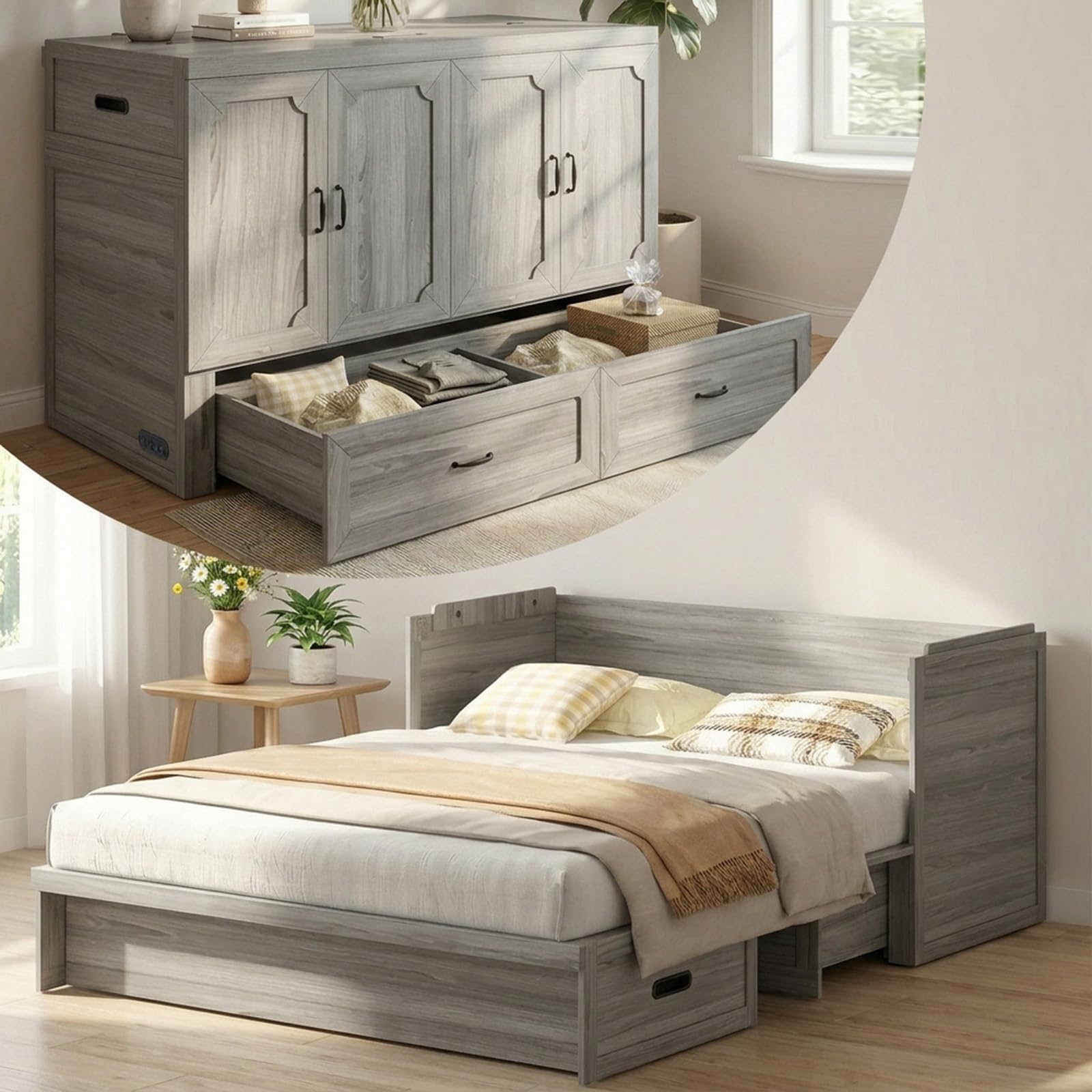
Image: The CECER Queen Murphy Bed in Grey, illustrating its dual functionality as a compact cabinet and a comfortable bed.
Warranty and Support
CECER is committed to providing quality products and customer satisfaction. While specific warranty details are not provided in this document, please retain your proof of purchase for any warranty claims.
For any questions, concerns, or assistance with missing/damaged parts, please contact CECER customer service. Our specialists aim to reply and resolve your problem within 24 hours.
Please refer to the contact information provided with your purchase or visit the official CECER website for support.