
1. Introduction
Thank you for choosing the Lysole LY-RM03 Folding Vibration Walking Pad Treadmill. This 4-in-1 device combines walking, running, and vibration functions with a manual incline, designed for both home and office environments. It features a robust design, LED display, and smart app control to enhance your fitness routine. Please read this manual thoroughly before use to ensure safe and optimal operation.
2. Safety Information
To prevent injury and ensure proper operation, observe the following safety precautions:
- Always place the treadmill on a hard, flat surface. Avoid soft surfaces like carpets, which can impede motor heat dissipation and affect performance.
- Ensure the safety clip is properly installed before starting the treadmill.
- Do not exceed the maximum weight capacity of 350 lbs (158 kg).
- Keep children and pets away from the treadmill during operation.
- Wear appropriate athletic footwear.
- If you experience pain, dizziness, or shortness of breath, stop exercising immediately.
- Unplug the treadmill when not in use or before cleaning/maintenance.
- Be aware of pinch hazards, especially during folding and unfolding.

3. Package Contents
Verify that all items are present in the package:
- Lysole LY-RM03 Walking Pad Treadmill
- Power Cord
- Safety Key
- Tool Kit
- User Manual (this document)
4. Setup
Follow these steps to set up your treadmill:
- Unpacking: Carefully remove the treadmill and all components from the packaging.
- Positioning: Place the treadmill on a stable, level, hard surface. Ensure there is adequate space around the unit for safe operation.
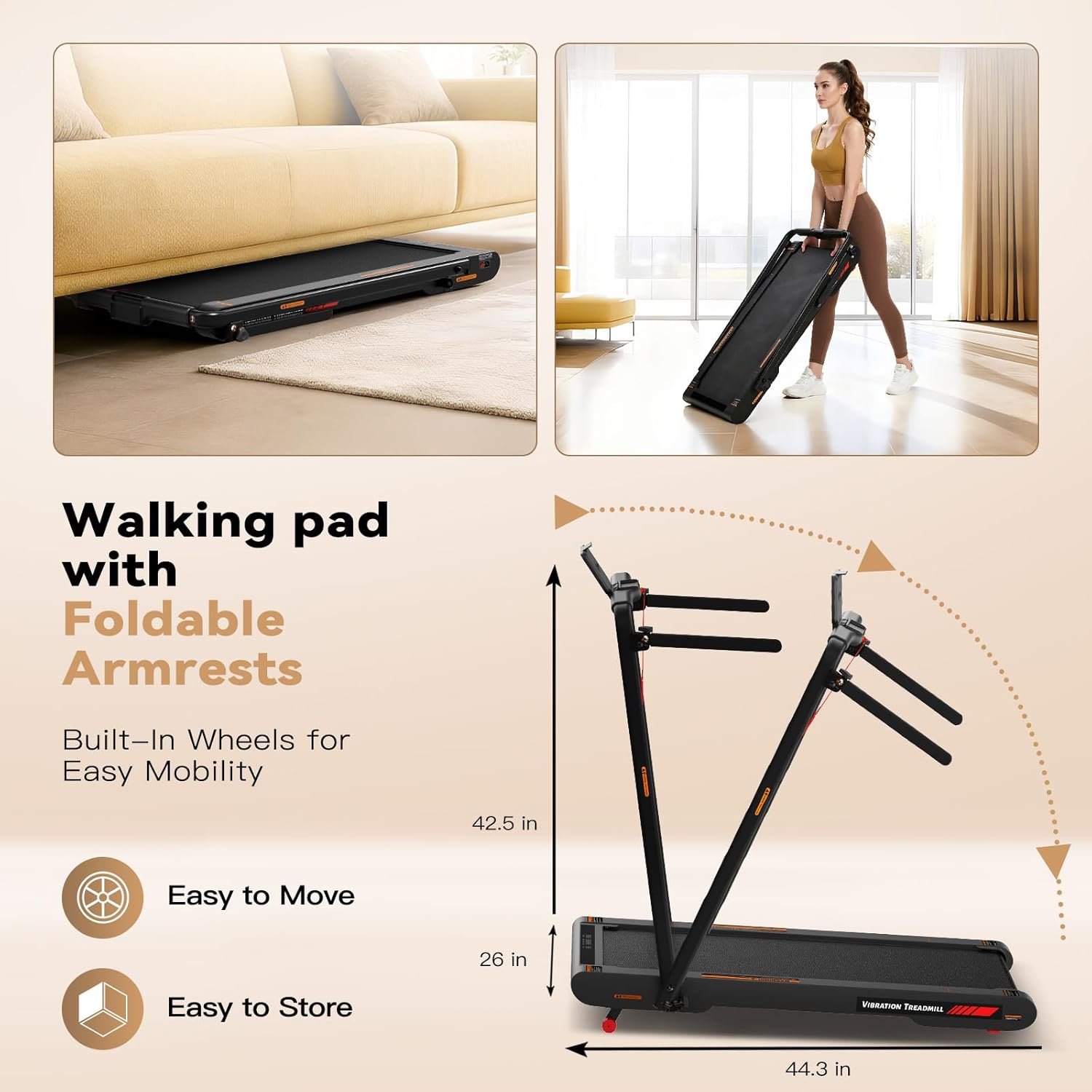
- Unfolding the Handrails: If the handrails are folded, gently lift them into the upright position. Secure them using the provided knobs or locking mechanisms. Ensure they are firmly locked before use.
- Connecting Power: Plug the power cord into the treadmill's power port and then into a grounded electrical outlet.
- Attaching Safety Key: Attach the safety clip to your clothing and insert the safety key into its designated slot on the console. The treadmill will not operate without the safety key in place.

5. Operating Instructions
Your Lysole treadmill offers multiple ways to control your workout:
5.1 Power On/Off
- To power on, ensure the treadmill is plugged in and the safety key is inserted. Press the power button on the remote control or the main unit.
- To power off, press the power button again or remove the safety key.
5.2 Remote Control Operation
The included remote control allows for easy adjustment of speed and modes:
- Start/Stop: Press the power button to start or pause the treadmill.
- Speed Adjustment: Use the '+' and '-' buttons to increase or decrease the speed in 0.1 MPH increments. The speed range is 0.3-7.5 MPH.
- Mode Switching: Use the mode button (often indicated by an 'M' or an icon) to switch between walking, running, and vibration modes.

5.3 Manual Incline
The treadmill features a 6% manual incline. To adjust the incline, you will need to manually raise or lower the rear of the treadmill using the designated adjustment points. Ensure the treadmill is stable and locked in place after adjusting the incline.
5.4 Emergency Stop
In case of an emergency, pull the safety key from its slot. The treadmill will immediately stop. Always keep the safety clip attached to your clothing during workouts.
6. Vibration Function
The Lysole treadmill includes a vibration pad with four professional modes to aid in muscle recovery and relaxation after exercise:
- Light Vibration: Gentle vibration for mild muscle relief.
- Light High-Frequency Vibration: Faster, lighter pulses for increased circulation.
- Strong Vibration: More intense vibration for deeper muscle massage.
- Strong Superposition: A combination of strong and high-frequency vibrations for comprehensive recovery.
Refer to the remote control or app for specific instructions on activating and switching between vibration modes.

7. App Control
Enhance your workout experience by connecting your treadmill to the dedicated Lysole fitness app:
- Download the App: Search for the Lysole fitness app on your smartphone's app store (iOS or Android).
- Pairing: Follow the in-app instructions to pair your device via Bluetooth.
- Features: The app allows for intelligent operation, tracking of fitness data (distance, time, steps, speed), and access to various workout programs.

8. Maintenance
Regular maintenance ensures the longevity and performance of your treadmill:
- Cleaning: Wipe down the treadmill with a damp cloth after each use. Avoid abrasive cleaners.
- Belt Lubrication: Periodically check the running belt for proper lubrication. Refer to the specific instructions in your tool kit for applying lubricant if needed.
- Storage: The treadmill is designed to be compact and easy to store. Fold the handrails down and slide it under furniture or store it upright in a corner.
9. Troubleshooting
If you encounter issues with your treadmill, refer to the following common solutions:
- Treadmill not powering on: Check if the power cord is securely plugged into both the treadmill and the outlet. Ensure the safety key is fully inserted.
- Running belt slipping: The belt may need adjustment or lubrication. Refer to the maintenance section or contact customer support.
- Unusual noises: Stop the treadmill immediately and inspect for any loose parts or obstructions. If the noise persists, contact customer support.
For further assistance, please contact Lysole customer support.
10. Specifications
| Brand | Lysole |
| Model Number | LY-RM03 |
| Item Weight | 39.8 Pounds |
| Product Dimensions | 44"D x 26.2"W x 4.5"H |
| Material | Acrylonitrile Butadiene Styrene (ABS) |
| Controls Type | App Control, Remote Control |
| Handle Type | Adjustable |
| Maximum Incline Percentage | 6% (Manual) |
| Maximum Speed | 7.5 Miles per Hour |
| Minimum Speed | 0.3 Miles per Hour |
| Motor Horsepower | 750 Watts (Max 1500 Watts) |
| Operation Mode | Manual |
| Power Source | Corded Electric |
| Maximum Weight Recommendation | 350 Pounds |
11. Warranty and Support
Your Lysole LY-RM03 Folding Vibration Walking Pad Treadmill comes with a manufacturer's warranty. For detailed warranty information, product support, or to purchase replacement parts, please refer to the warranty card included in your package or visit the official Lysole website. You can also contact Lysole customer service directly for assistance.