
Introduction
Thank you for choosing the Generic Home Office Desk with Storage. This manual provides essential information for the safe assembly, proper use, and maintenance of your new desk. Please read these instructions carefully before assembly and retain them for future reference.
Safety Information
- Ensure all parts are present and undamaged before assembly. Do not use if any parts are missing or damaged.
- Assemble the desk on a soft, clean surface to prevent scratches.
- Do not overtighten screws during assembly, as this may damage the material.
- Keep small parts away from children during assembly to avoid choking hazards.
- Do not stand or sit on the desk.
- Place the desk on a level surface to ensure stability.
Setup and Assembly
The Generic Home Office Desk requires assembly. All necessary hardware and clear instructions are included to facilitate a quick and hassle-free setup. It is recommended to have a second person assist with assembly for ease and safety.
Included Components:
- Desktop Surface
- Desk Frame
- Legs (4)
- Storage Drawer components
- Assembly Hardware (screws, bolts, Allen wrench)
Assembly Steps:
- Unpack and Identify Parts: Carefully unpack all components and lay them out on a clean, soft surface. Compare them with the parts list in the included instruction booklet to ensure everything is present.
- Assemble the Frame: Attach the desk frame components using the provided screws and Allen wrench. Do not fully tighten screws until all frame parts are loosely connected.
- Attach Legs: Secure the four legs to the assembled frame. Ensure they are oriented correctly for stability.
- Install Drawer Slides: Attach the drawer slides to the desk frame according to the instructions.
- Assemble Drawer: Construct the storage drawer using its individual components. Ensure the drawer slides are properly attached to the drawer box.
- Insert Drawer: Carefully slide the assembled drawer into the desk frame. Test its movement to ensure it glides smoothly.
- Attach Desktop: Place the desktop surface onto the assembled frame and secure it with the remaining screws.
- Final Tightening: Once all parts are in place and aligned, carefully tighten all screws and bolts. Do not overtighten.
- Leveling: If the desk wobbles, adjust the leveling feet (if present) on the bottom of the legs until the desk is stable.
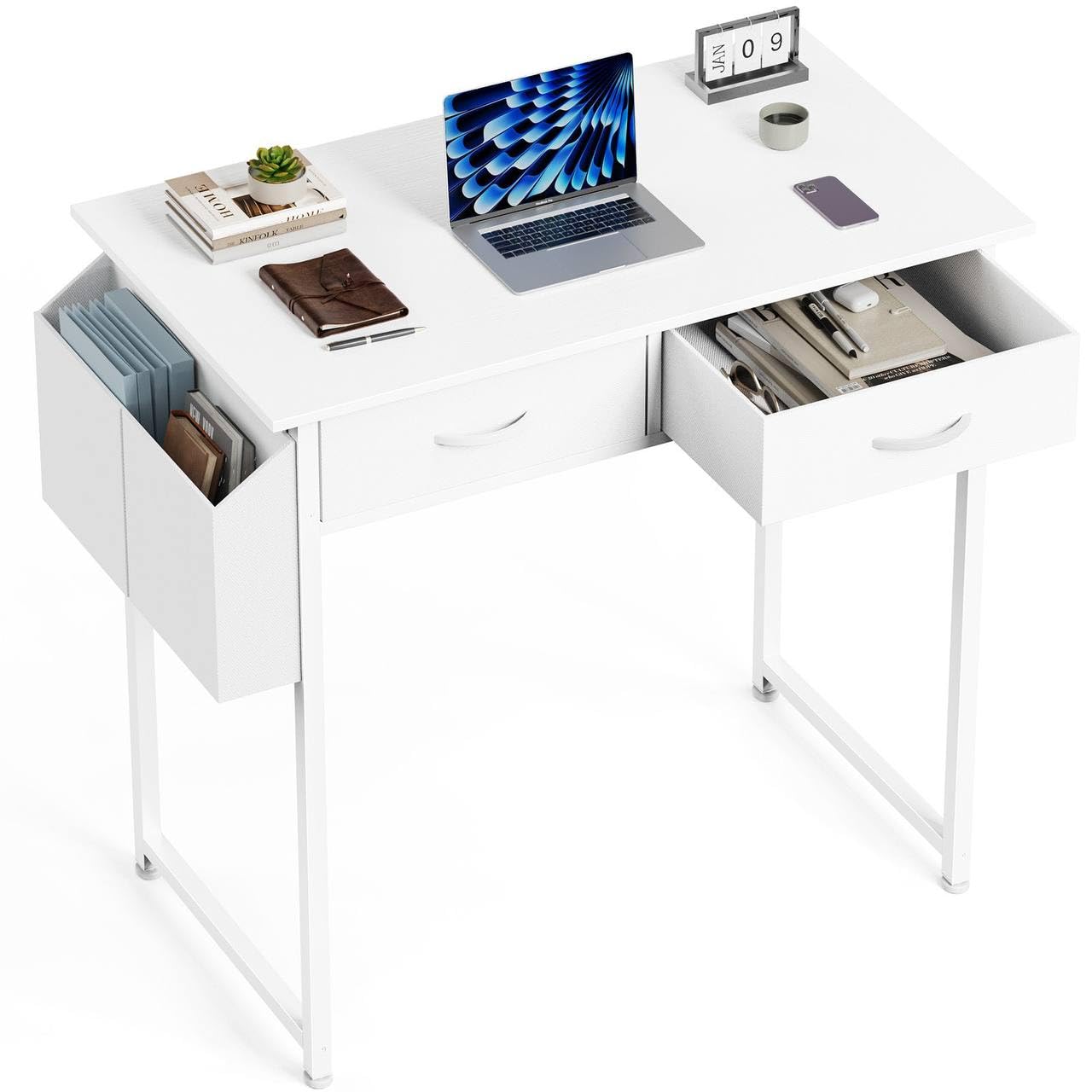
Image 1: The fully assembled Generic Home Office Desk with Storage, featuring a white finish and a single drawer. This image shows the desk from a front-angle view, highlighting its compact design and integrated storage.
Operating Instructions
Your Generic Home Office Desk is designed for versatile use in various settings. Its primary function is to provide a stable and organized workspace.
Using the Work Surface:
The generous desktop measures approximately 32 x 15.7 inches, offering ample space for your computer, monitor, keyboard, mouse, and other office essentials. Arrange your items to maximize productivity and maintain a clutter-free environment.
Utilizing the Storage Drawer:
The built-in drawer, measuring approximately 14.8 x 13.4 x 4.6 inches, is ideal for storing office supplies, documents, notebooks, and personal items. This helps keep your desktop clear and your essentials within easy reach.
Versatile Functionality:
This desk can serve multiple purposes:
- Home Office Desk: For daily work, remote tasks, and administrative duties.
- Study Table: Perfect for students for homework, reading, and research.
- Writing Desk: Provides a comfortable surface for writing, journaling, or creative tasks.
- Vanity Station: Can be adapted for personal grooming with a mirror and cosmetics.
- Craft Workspace: Suitable for various craft projects requiring a stable surface.
Care and Maintenance
Proper care will extend the life and maintain the appearance of your desk.
- Cleaning: Wipe clean with a soft, dry cloth. For stubborn marks, a slightly damp cloth followed by a dry cloth can be used.
- Avoid Harsh Chemicals: Do not use harsh chemicals, abrasive cleaners, or polishes that may damage the finish.
- Protect Surface: Use coasters or desk pads to protect the surface from scratches, heat, and moisture rings.
- Sunlight Exposure: Keep the desk away from direct sunlight to prevent fading or discoloration of the material.
- Regular Checks: Periodically check and tighten all screws and bolts to ensure the desk remains stable.
Troubleshooting
If you encounter any issues with your desk, refer to the following common solutions:
| Problem | Possible Cause | Solution |
|---|---|---|
| Desk wobbles | Uneven floor; loose screws; uneven leg assembly. | Ensure the desk is on a level surface. Check and tighten all assembly screws. Adjust leveling feet if available. |
| Drawer sticks or doesn't slide smoothly | Improperly installed drawer slides; debris in slides; drawer components not aligned. | Remove the drawer and inspect the slides for obstructions. Ensure slides are correctly installed and aligned. Reassemble the drawer carefully. |
| Parts do not fit together | Incorrect orientation of parts; manufacturing defect. | Double-check the instruction manual for correct part orientation. If parts still do not fit, contact customer support. |
Product Specifications
| Feature | Detail |
|---|---|
| Brand | Generic |
| Model Number | home |
| Manufacturer Part Number | Zhumi-d-2cz-32in-bk |
| ASIN | B0GWC419YY |
| Colour | White |
| Size | 32 inches (Desktop: 32 x 15.7 inches) |
| Item Dimensions (L x W x H) | 81.3 x 39.9 x 77.7 Centimetres (32 x 15.7 x 30.6 inches) |
| Item Weight | 20 Pounds |
| Material | Wood, Metal |
| Style | Modern |
| Number of Drawers | 1 (Drawer dimensions: 14.8 x 13.4 x 4.6 inches) |
| Number of Shelves | 1 |
| Is Assembly Required? | Yes |
| Special Features | Drawer Storage, Durable Construction, Large Sturdy Surface Area, Spacious Storage Space, Versatile Multifunctional Design |
Warranty and Support
Specific warranty information for this product is not available in the provided data. For details regarding warranty coverage, returns, or technical support, please refer to the product packaging or contact the retailer or manufacturer directly.
Manufacturer: Sweetcrispy
Retailer: VibrastoreUS (as per buybox_winner.fulfillment.third_party_seller)


