
1. Introduction
Thank you for choosing the LONTEK L10 Treadmill. This manual provides essential information for the safe assembly, operation, and maintenance of your new fitness equipment. Please read this manual thoroughly before using the treadmill and retain it for future reference.
2. Important Safety Information
To ensure your safety and prolong the life of your treadmill, please observe the following precautions:
- Weight Capacity: Do not exceed the maximum user weight of 400 lbs (181 kg).
- Clearance: Maintain a minimum clearance of 6.5 feet (2 meters) behind the treadmill and 2 feet (0.6 meters) on each side.
- Children and Pets: Keep children and pets away from the treadmill during operation.
- Power Cord: Ensure the power cord is not pinched or damaged. Do not place the treadmill on the power cord.
- Emergency Stop: Always attach the safety key to your clothing before starting the treadmill. In case of an emergency, the safety key will immediately stop the machine.
- Medical Conditions: Consult a physician before starting any exercise program, especially if you have pre-existing medical conditions.
- Stable Surface: Place the treadmill on a flat, stable surface.
3. Package Contents
Carefully unpack the box and ensure all items are present:
- LONTEK L10 Treadmill Main Unit (90% pre-assembled)
- Safety Key
- Allen Wrench (5#)
- Cross Wrench
- Screws and Washers (various sizes)
- Water Bottle Holder
- User Manual

Image: Treadmill components and tools, highlighting the 90% pre-assembled state.
4. Assembly Instructions
Your LONTEK L10 Treadmill comes 90% pre-assembled. Follow these steps to complete the setup:
4.1 Attaching the Display to Columns
- Use a 5# Allen wrench (#10) to lock the display to the columns with screw M8*20 (#62) and washer (#48).
Video: Step-by-step guide on how to install the treadmill's display and columns.
4.2 Securing the Columns to the Base
- Use a 5# Allen wrench (#10) to lock the left and right columns to the base of the treadmill with screw (#62), screw (#67), and washer (#48).
4.3 Attaching Bottom Covers
- Use a cross wrench (#11) to lock the left and right bottom cover (#77 & #78) to the columns with screw (#60).
4.4 Installing the Water Bottle Holder
- Use a cross wrench (#11) to lock the water bottle holder (79) to the right column with screw (#60).
4.5 Securing Moving Wheels
- Fold the running deck up, and then use a 5# Allen wrench (#10) to secure the moving wheel (22) to the treadmill's main frame with screws (#62) and washers (#46) and (#48).
4.6 Placing the Safety Lock
- Place the red safety lock (#37 circular magnet) in the yellow position on the treadmill's display.
5. Operating Instructions
5.1 Powering On/Off
- Connect the power cord to a grounded outlet.
- Flip the main power switch (usually located near the power cord inlet) to the 'ON' position.
- To power off, flip the main power switch to 'OFF' and unplug the unit.
5.2 Using the Display and Controls
The treadmill features an LED touchscreen and handlebar controls for easy operation.
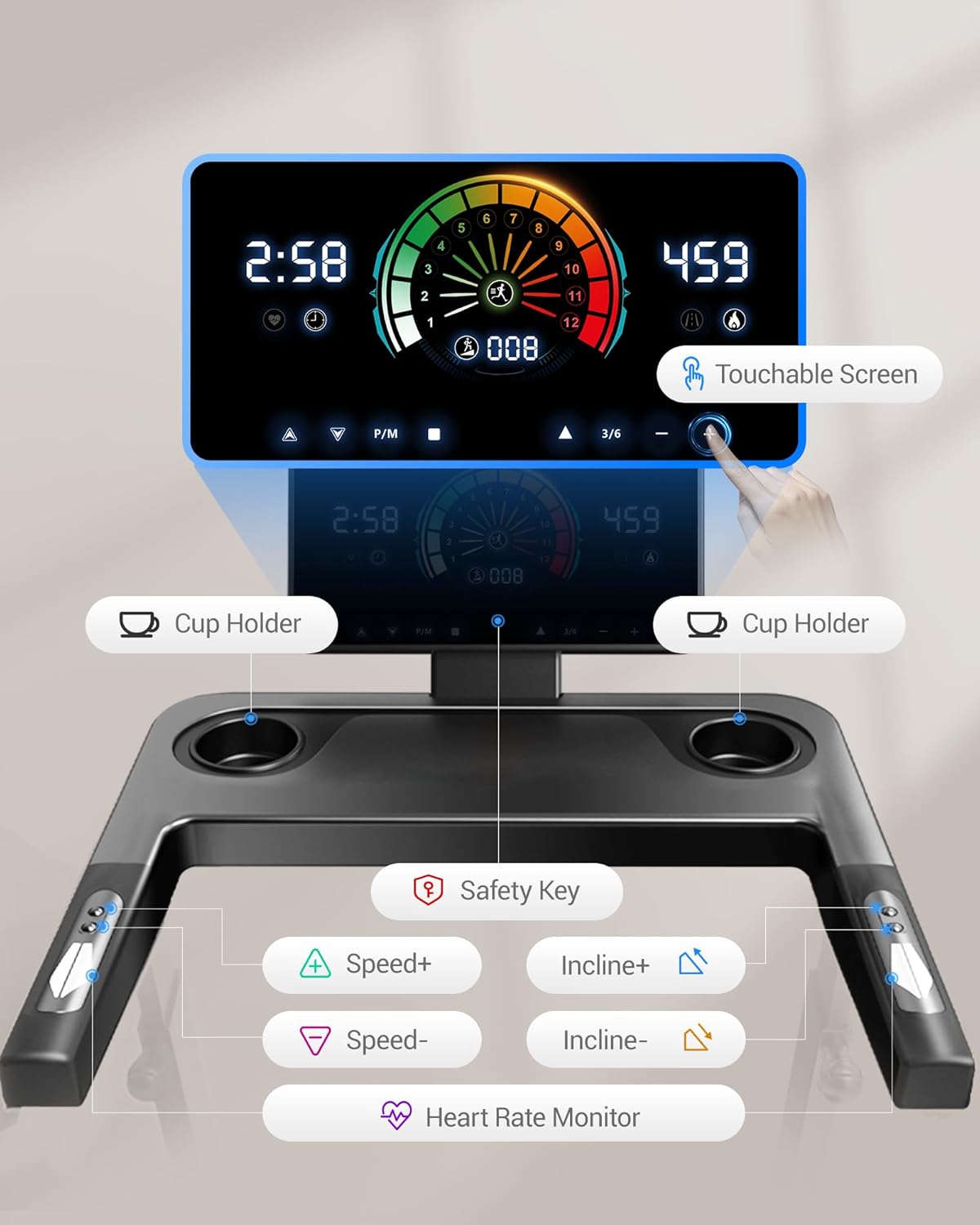
Image: LED touchscreen and handlebar controls with cup holders and safety key slot.
- Start/Stop: Press the 'Start' button on the touchscreen or handlebar to begin/end your workout.
- Speed Adjustment: Use the 'Speed+' and 'Speed-' buttons on the touchscreen or handlebars to adjust the speed from 0.6 to 8.7 MPH.
- Auto Incline: Use the 'Incline+' and 'Incline-' buttons to adjust the auto incline from 2% to 20% (20 levels).
- Preset Programs: Select from 20 preset programs designed for various workouts like walking, jogging, and HIIT.
- Heart Rate Monitor: Grip the heart rate sensors on the handlebars to monitor your heart rate in real-time.
- Safety Key: The treadmill will not operate without the safety key properly placed on the display. Pulling the safety key will immediately stop the treadmill.

Image: Detailed view of the LED touchscreen controls.

Image: Real-time data tracking on the treadmill display.
5.3 Adjustable Handle Height
The handlebar height can be adjusted to 3 levels for user comfort. Loosen both knobs, pull the handle to snap into place at the desired height, then tighten. Adjust each side separately.

Image: Adjustable handle height feature for various users.
5.4 Folding and Storage
The treadmill features a space-saving foldable design for convenient storage under a sofa, bed, or in a closet.

Image: Fully folded treadmill with dimensions, quick folding, and easy movement.
Video: Demonstration of the foldable design and auto incline feature.
6. Maintenance
Regular maintenance ensures optimal performance and longevity of your treadmill.
- Cleaning: Wipe down the treadmill with a damp cloth after each use to remove sweat and dust. Do not use abrasive cleaners.
- Belt Lubrication: Refer to the separate maintenance video or contact support for instructions on lubricating the running belt. Proper lubrication is crucial for smooth operation.
- Belt Tension and Alignment: Periodically check the running belt for proper tension and alignment. Adjust as needed according to the maintenance guidelines.
- Inspection: Regularly inspect all screws and bolts to ensure they are tight.
7. Troubleshooting
If you encounter any issues with your LONTEK L10 Treadmill, refer to the following common problems and solutions:
| Problem | Possible Cause | Solution |
|---|---|---|
| Treadmill does not power on | Power cord not plugged in, main switch off, circuit breaker tripped. | Ensure power cord is securely plugged in, main switch is ON, and check your household circuit breaker. |
| Running belt stops unexpectedly | Safety key dislodged. | Ensure the safety key is properly placed on the display. |
| Running belt slips or hesitates | Belt too loose, lack of lubrication. | Adjust belt tension (refer to maintenance section) or lubricate the belt. |
| Unusual noises during operation | Loose components, worn parts. | Inspect for loose screws or bolts and tighten. If noise persists, contact customer support. |
For further assistance, please contact our dedicated support team.
8. Specifications
- Model Name: L10-LONTEK
- Motor: 3.5 HP Quiet Brushless Motor
- Speed Range: 0.6 - 8.7 MPH
- Auto Incline: 2% - 20% (20 levels)
- Running Area: 42.5" x 16.2" (108 cm x 41.1 cm)
- Maximum User Weight: 400 lbs (181 kg)
- Product Dimensions (Unfolded): 52"D x 26"W x 45.5"H (132 cm x 66 cm x 115.6 cm)
- Folded Dimensions: 50" x 25" x 6.5" (127 cm x 63.5 cm x 16.5 cm)
- Item Weight: 87 lbs (39.5 kg)
- Material: Acrylonitrile Butadiene Styrene (ABS)
- Special Features: Adjustable Speed, Auto Incline, Foldable, Integrated Heart Rate Sensor, LCD Touchscreen, Transport Wheels, Shock Absorption System (6 silicone shock absorbers, 7-layer deck).
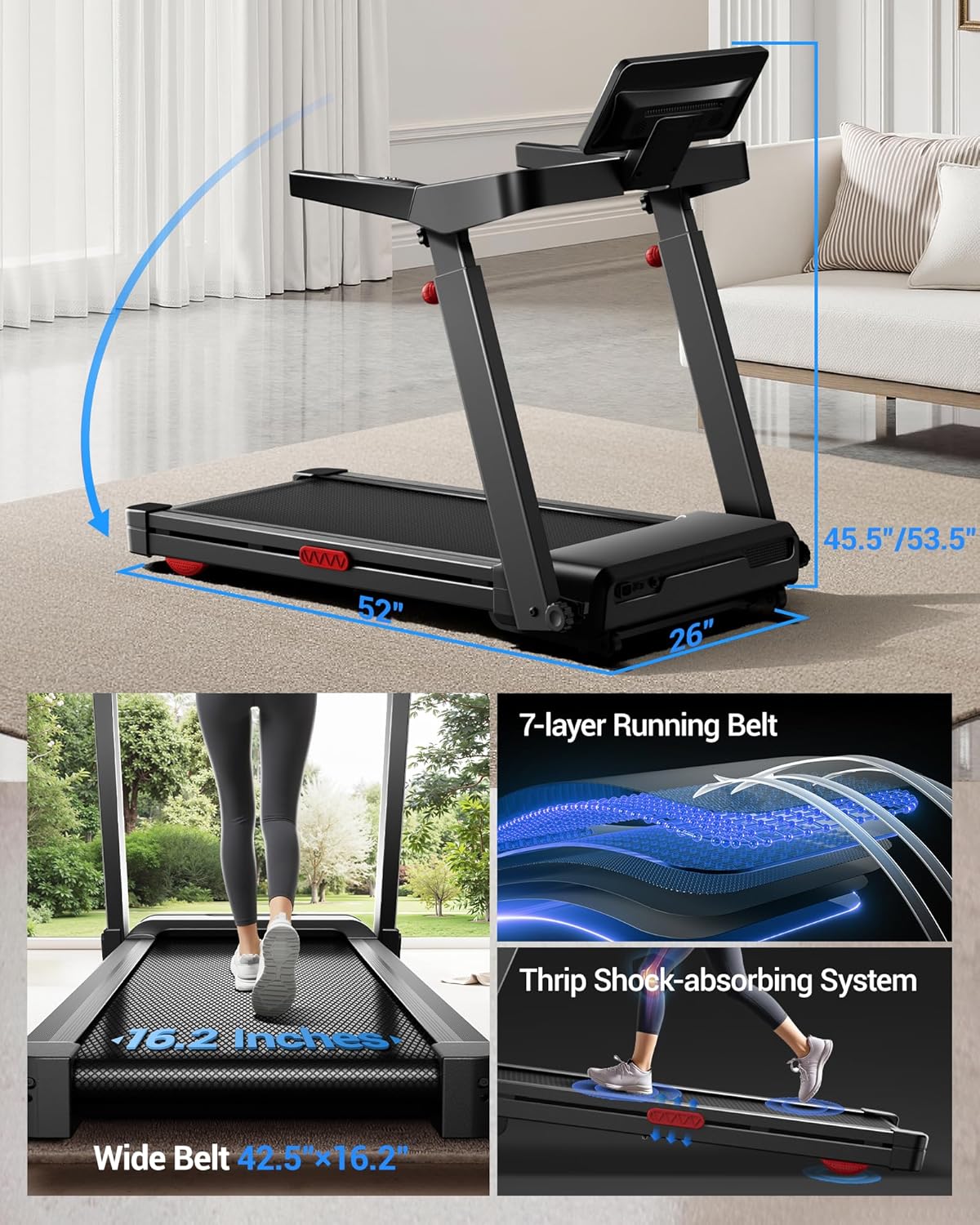
Image: Treadmill dimensions and running belt features.

Image: Treadmill in use, emphasizing motor power, weight capacity, and quiet operation.
9. Warranty and Support
The LONTEK L10 Treadmill comes with a 1-Year Warranty.
For any questions, concerns, or assistance with maintenance, please contact our dedicated support team. We are committed to providing comprehensive help and satisfaction solutions.


