
1. Introduction
The TESMEN TLP-528C is a versatile network cable tester designed for efficient tracing, locating, and fault detection of RJ11 and RJ45 Ethernet (CAT5/CAT6) and telephone lines. It features anti-interference capabilities, continuity testing, and a QC crimping check, making it an essential tool for home network maintenance, professional wiring, and automotive circuit diagnostics. Its detachable design and portable nature ensure ease of use in various environments.
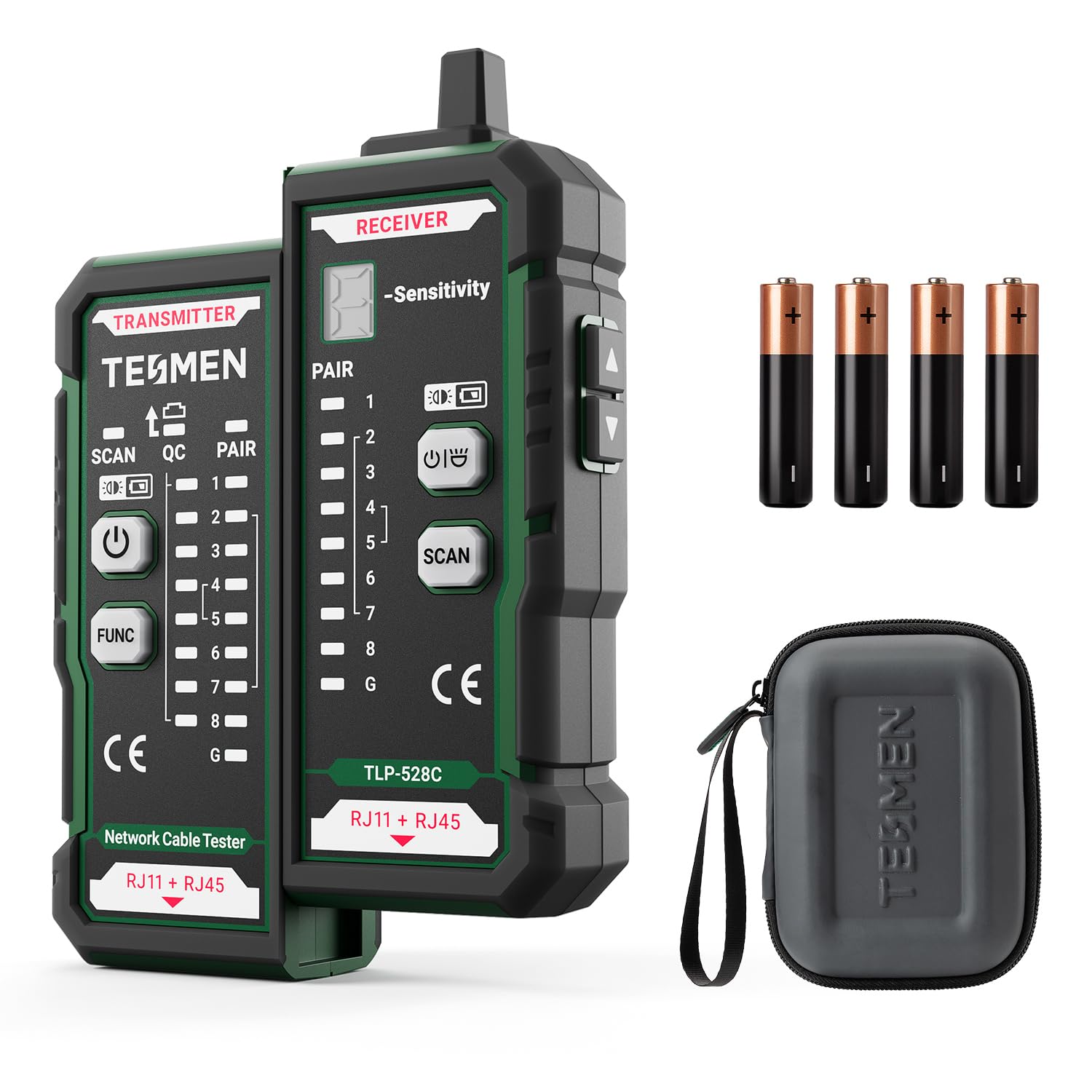
Figure 1: The TESMEN TLP-528C Network Cable Tester, highlighting its SCAN, CONT, QC, and LED functions.
2. What's in the Box
Upon opening your TESMEN TLP-528C package, you should find the following items:
- 1 x TLP-528C Main Unit with dual RJ11/RJ45 interface
- 1 x User Manual
- 4 x AAA 1.5V Batteries
- 1 x Storage Box
3. Product Overview and Features
The TESMEN TLP-528C is engineered with several key features to enhance your cable testing experience:
- Anti-interference Cable Locator: The TLP-528C allows you to trace and locate CAT5/CAT6 cables efficiently. Its sensitive, durable, non-metallic probe helps quickly find cables in bundles, under carpets, walls, or ceilings. Ideal for network wiring and maintenance.
- Line Fault Detection: Verifies sequence and continuity, with LED indicators to identify connection errors. The QC crimping check ensures comprehensive verification and quick feedback via LEDs, improving efficiency.
- Portable and Durable: Compact and lightweight design for easy portability. Equipped with a high-quality plastic shell and non-slip silicone, its robust structure ensures durability and stability. Perfect for home, IT, and maintenance use.
- Detachable Design: The main control unit and the remote unit can be separated and used independently, allowing you to test both ends of long cables. Ideal for wall sockets, long-distance wiring, and home or professional environments.

Figure 2: Detailed diagram of the TESMEN TLP-528C showing the functions of its buttons, indicators, and RJ11/RJ45 ports.
4. Setup
Before using your TESMEN TLP-528C, follow these simple setup steps:
- Install Batteries: Open the battery compartment on both the main unit (transmitter) and the remote unit (receiver). Insert the 4 AAA 1.5V batteries, ensuring correct polarity. Close the compartments securely.
- Familiarize with Ports: Identify the RJ11 and RJ45 ports on both the transmitter and receiver units.
- Power On: Press the power button on the transmitter to turn on the device.
5. Operating Instructions
The TLP-528C offers three primary operating modes: SCAN, PAIR, and QC.
5.1. Cable Scan Mode
This mode is used for tracing and locating specific cables within a bundle or behind walls.
- Insert one end of the cable into the transmitter's port (RJ11 or RJ45).
- Press the power switch to turn on the device.
- Use the receiver's probe to trace the cable. Adjust the sensitivity dial on the receiver.
- The fastest buzzing sound frequency from the receiver indicates the correct target cable.

Figure 3: Demonstrating the cable scanning function, showing the receiver unit tracing a cable among many. This function provides powerful, anti-interference, and precise detection for UTP/STP CAT5/CAT6/Telephone cables.
5.2. PAIR Mode (Cable Fault Detection)
This mode checks for continuity, open circuits, short circuits, and crossed wires.
- Connect both ends of the cable to be tested to the transmitter and receiver units respectively (RJ11 or RJ45).
- Switch the transmitter to PAIR mode.
- Observe the LED indicators on both the transmitter and receiver to determine the cable's physical status.
Indicator Interpretations:
- Correct Wiring: The sequence of indicator lights on both the transmitter and receiver will be: 1-2-3-4-5-6-7-8. The 'G' light illuminates for shielded cables.
- Open Circuit: If a cable (e.g., cable No. 2) is open-circuited, neither indicator No. 2 on the transmitter nor on the receiver will light up. If multiple wires (3 or more) are disconnected, none of the indicators will light up.
- Reversed Wires: If cable ends are reversed (e.g., swapping No. 1 and No. 2), the display will show: Transmitter: 1-2-3-4-5-6-7-8 / Receiver: 2-1-3-4-5-6-7-8.

Figure 4: Illustrating the cable fault detection feature, showing examples of short-circuited, open, and crossed cables with the tester connected. The device detects short circuits, inversions, and breaks.
5.3. QC Mode (Crimping Quality Check)
This mode verifies the quality of the crimped cable head.
- Press and hold the function key on the transmitter to switch to 'QC' mode.
- Insert the crimped cable head into the top port of the transmitter.
- If all QC lights on the transmitter illuminate, it indicates that the cable head has been crimped correctly.
6. Maintenance
To ensure the longevity and optimal performance of your TESMEN TLP-528C, follow these maintenance guidelines:
- Cleaning: Use a soft, dry cloth to clean the device. Do not use abrasive cleaners or solvents.
- Storage: Store the tester in its provided storage box in a cool, dry place away from direct sunlight and extreme temperatures.
- Battery Replacement: Replace batteries promptly when the low battery indicator appears or if the device shows signs of reduced performance. Remove batteries if the device will not be used for an extended period.
- Handle with Care: The device features a durable ABA rubber casing for shock resistance, but avoid dropping or subjecting it to severe impacts.

Figure 5: Highlighting the durable ABA rubber casing of the TESMEN TLP-528C, emphasizing its shock resistance and non-slip properties for enhanced durability.
7. Troubleshooting
Here are solutions to common issues you might encounter:
- Q: Why does the receiver keep beeping during network cable fault detection?
A: If you want to use the fault detection function, set the transmitter to 'PAIR' mode without turning on the receiver. Note: When the receiver is on, if both 'PAIR' and 'SCAN' are selected on the transmitter and the cable ends are connected to the transmitter and receiver, the receiver will emit a continuous beep, which is normal. - Q: Why does the receiver beep for every cable during tracing?
A: For long-distance tracing, set the receiver sensitivity to maximum, then gradually lower it until the desired cable is located. If not reduced, strong nearby signals may cause continuous buzzing. To confirm you have found the correct cable, set the transmitter to 'PAIR' and insert the cable end into the receiver port. If the LEDs on both panels light up, the cable is correct.
8. Specifications
| Specification | Value |
|---|---|
| Brand | TESMEN |
| Model | TLP-528C |
| Color | Green |
| Number of Items | 1 |
| Included Components | 1 TLP-528C, 1 user manual, 4 batteries, 1 storage box |
| Country of Origin | China |
9. Warranty and Support
TESMEN products are manufactured to high-quality standards. For any questions, technical support, or warranty claims, please contact TESMEN customer service through the retailer's platform or the official TESMEN website. Please retain your proof of purchase for warranty validation.
10. Applications
The TESMEN TLP-528C is suitable for a variety of applications, including:
- Home Network Micro-repair
- Professional Engineer Wiring and Maintenance
- Automotive Circuit Checking and Tracing
- Office Server Room Maintenance

Figure 6: Depicting various applications of the TESMEN TLP-528C, including technical line work, office server room maintenance, and home network setup.

Figure 7: The integrated LED light feature of the TESMEN TLP-528C, illuminating a dark network cabinet for improved visibility during work.