
1. Introduction
This manual provides detailed instructions for the installation, operation, and maintenance of the Dahua DH-HAC-B2A51P-U-0280B-S3-DIP 5MP 4-in-1 Outdoor Camera. This camera is designed for outdoor surveillance, offering high-resolution imaging and versatile compatibility with various video formats.
2. Product Features
- 5MP CMOS Sensor: Delivers a maximum resolution of 5MP (2880 × 1620) for clear and detailed images.
- 4-in-1 Technology: Compatible with CVI, TVI, AHD, and CVBS video formats, selectable via DIP switch.
- Advanced Night Vision: Equipped with 3 IR LEDs and Smart IR technology, providing illumination up to 30 meters without overexposure.
- Wide-Angle Fixed Lens: Features a 2.8 mm fixed lens with a 105.5° horizontal viewing angle, suitable for covering broad areas.
- Durable Design: IP67-rated metal casing ensures resistance to weather conditions and operates in temperatures from -40 °C to +60 °C.
- Flexible Installation: 3-axis adjustment (pan, tilt, rotation) allows for precise camera orientation.
- Long Transmission Distance: Supports video transmission up to 700 meters over coaxial cable, depending on resolution.
- Smart Functions: Includes Digital WDR, BLC, HLC, 2DNR noise reduction, and motion detection.
- Versatile Power: Operates on 12 VDC (±30%) with a maximum power consumption of 3.5 W (with IR on).
- Privacy Control: Offers privacy masking for up to 8 rectangular areas and a multi-language OSD menu.
3. Package Contents
The package for the Dahua DH-HAC-B2A51P-U-0280B-S3-DIP camera typically includes:
- Dahua DH-HAC-B2A51P-U-0280B-S3-DIP 4-in-1 Bullet Camera
- Mounting hardware (screws, wall plugs)
- Quick Start Guide (may be a separate document or integrated)
Note: Power adapter is typically sold separately.
4. Setup and Installation
4.1 Mounting the Camera
The camera is designed for wall, ceiling, or vertical pole mounting. Ensure the mounting surface is strong enough to support the camera's weight.
- Choose a suitable location that provides the desired viewing angle and is within reach of power and video cables.
- Use the mounting template (if provided) or the camera base to mark drill holes on the mounting surface.
- Drill the necessary holes and insert wall plugs if mounting on masonry.
- Secure the camera base to the mounting surface using the provided screws.
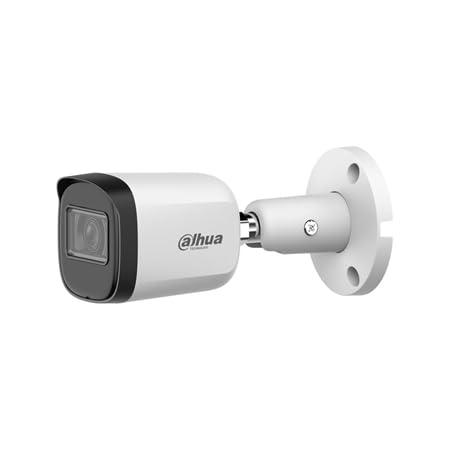
Figure 1: Front-side view of the Dahua DH-HAC-B2A51P-U-0280B-S3-DIP camera, showing the lens and housing.

Figure 2: Side view of the Dahua DH-HAC-B2A51P-U-0280B-S3-DIP camera, illustrating the adjustable mounting bracket.
4.2 Adjusting Camera Angle
The camera features 3-axis adjustment for pan, tilt, and rotation. Loosen the adjustment screws on the bracket, position the camera to the desired angle, and then tighten the screws securely.
4.3 Connecting Power and Video
- Connect a 12 VDC (±30%) power supply to the camera's power input. Ensure the power supply meets the camera's requirements.
- Connect the BNC video output cable from the camera to your DVR/HVR or monitor.
4.4 Selecting Video Format (DIP Switch)
The camera supports CVI, TVI, AHD, and CVBS video formats. The desired format is selected using a DIP switch located on the camera cable or body. Refer to the specific markings on the camera or its cable for the correct DIP switch settings for each format. Ensure the camera is powered off before changing DIP switch settings.
5. Operating the Camera
5.1 Accessing the OSD Menu
The camera's On-Screen Display (OSD) menu allows for configuration of various image settings and functions. The OSD menu is typically accessed via the connected DVR/HVR's control interface (e.g., UTC controller or coaxial control).
Common OSD menu options include:
- Day/Night Mode: Auto, Color, Black/White, or external control.
- Exposure Settings: Adjust shutter speed, AGC (Automatic Gain Control).
- White Balance: Auto, Manual, or Area-based settings.
- Image Enhancements: BLC (Backlight Compensation), HLC (Highlight Compensation), DWDR (Digital Wide Dynamic Range), 2DNR (2D Digital Noise Reduction).
- Smart IR: Controls the intensity of the infrared LEDs to prevent overexposure in close-up scenes.
- Motion Detection: Configure detection zones and sensitivity.
- Privacy Masking: Define up to 8 rectangular areas to block from view for privacy.
5.2 Smart IR Functionality
The Smart IR feature automatically adjusts the intensity of the camera's infrared LEDs to ensure uniform illumination in low-light conditions. This prevents objects close to the camera from being overexposed, which can happen with traditional IR illumination.
6. Maintenance
Regular maintenance helps ensure optimal performance and longevity of your camera.
- Cleaning: Periodically clean the camera lens and housing with a soft, damp cloth. Avoid abrasive cleaners that could scratch the lens.
- Cable Inspection: Check all power and video cables for any signs of wear, damage, or loose connections.
- Mounting Security: Ensure the camera remains securely mounted and that all adjustment screws are tight.
- Software Updates: Check the manufacturer's website for any firmware updates for your camera or connected DVR/HVR.
7. Troubleshooting
If you encounter issues with your camera, refer to the following common troubleshooting steps:
- No Image/Black Screen:
- Verify the power supply is connected and providing the correct voltage (12 VDC).
- Check the video cable connection between the camera and the DVR/HVR.
- Ensure the correct video format (CVI/TVI/AHD/CVBS) is selected via the DIP switch, matching your DVR/HVR.
- Poor Image Quality:
- Clean the camera lens.
- Check for obstructions in the camera's field of view.
- Adjust OSD settings such as brightness, contrast, and sharpness.
- Ensure the camera is receiving adequate power.
- Night Vision Issues:
- Verify that Smart IR is enabled in the OSD menu.
- Check for any reflective surfaces close to the camera that might be causing IR glare.
8. Specifications
| Feature | Specification |
|---|---|
| Brand | DAHUA |
| Model Name | DH-HAC-B2A51P-U-0280B-S3-DIP |
| Camera Type | Bullet 4-in-1 (CVI / TVI / AHD / CVBS) |
| Sensor | 5 MP CMOS, progressive scan |
| Max Resolution | 5 MP (2880 × 1620) |
| Supported Resolutions | 5MP, 4MP (2560×1440), 1080P (1920×1080), 960H (960×576/960×480), TVI 5MP 16:9 (2960×1665) |
| FPS (CVI PAL) | 5MP@25ips, 5MP@12.5ips, 4MP@25ips, 1080P@25ips |
| FPS (TVI) | 5MP 16:9@20ips |
| FPS (AHD) | 4MP@25ips |
| FPS (CVBS) | 960H (PAL) |
| Lens | 2.8 mm fixed lens, F2.0 |
| Viewing Angle | Horizontal 105.5°, Vertical 56.5°, Diagonal 125.3° |
| Min. Illumination | Color: 0.02 lux@F2.0; B/W: 0.002 lux@F2.0; 0 lux with IR on |
| IR LEDs | 3 LEDs with Smart IR, up to 30 m range |
| Day/Night Mode | Auto / ICR / Color / B/W |
| Image Functions | BLC, HLC, DWDR, Auto/Area White Balance, AGC, 2DNR |
| Motion Detection | Yes |
| Privacy Masking | Up to 8 rectangular areas |
| Video Output | 4-in-1 via BNC port |
| Power Supply | 12 VDC (±30%) |
| Max Power Consumption | 3.5 W (with IR on) |
| Operating Temperature | -40 °C to +60 °C |
| Operating Humidity | <95% (non-condensing) |
| Environmental Protection | IP67, basic anti-corrosion |
| Material | Metal shell |
| Dimensions | 150.0 × 69.7 × 70.0 mm |
| Net Weight | 0.31 kg |
| 3-Axis Adjustment | Pan 0°~360°, Tilt 0°~90°, Rotation 0°~360° |
| Certifications | CE-LVD (EN 62368-1), CE-EMC (EN 55032, EN 55035) |
9. Warranty and Support
For warranty information and technical support, please refer to the official Dahua website or contact your authorized Dahua dealer. Keep your purchase receipt as proof of purchase for warranty claims.
Official Dahua Website: www.dahuasecurity.com


