
V539
Generic V539 Car OBD2 Scanner Diagnostic Tool User Manual
Model: V539 | Brand: Generic
1. Introduction and Overview
The Generic V539 Car OBD2 Scanner Diagnostic Tool is designed to assist vehicle owners and technicians in diagnosing engine-related issues. This device provides comprehensive OBDII/EOBD diagnostic functions, including reading and clearing fault codes, viewing live data, checking I/M readiness status, and more. Its user-friendly interface and robust design make it an essential tool for vehicle maintenance.
Key Features:
- Reads and clears engine fault codes.
- Displays live data stream.
- Checks I/M readiness status for emissions.
- Built-in library of over 40,000 fault codes.
- 2.8-inch high-definition color screen.
- Durable, engineering-grade ABS protective shell.

Image 1.1: Front view of the Generic V539 OBD2 Scanner, showing its display and control buttons.
2. Setup and Initial Use
Follow these steps to set up and begin using your V539 OBD2 scanner:
- Locate the OBD2 Port: The OBD2 port is typically located under the dashboard on the driver's side, though its exact position may vary by vehicle model. Consult your vehicle's owner's manual if you cannot find it.
- Connect the Scanner: With the vehicle's ignition off, firmly plug the V539 scanner's OBDII connector into the vehicle's OBD2 port. Ensure a secure connection.
- Power On: Turn the vehicle's ignition to the 'ON' position (do not start the engine). The scanner will automatically power on and display the main menu.
- Select Language: If prompted, use the directional buttons to select your preferred language (English, German, Dutch, Spanish, French, Italian, Chinese, Portuguese, Russian) and press 'OK'.
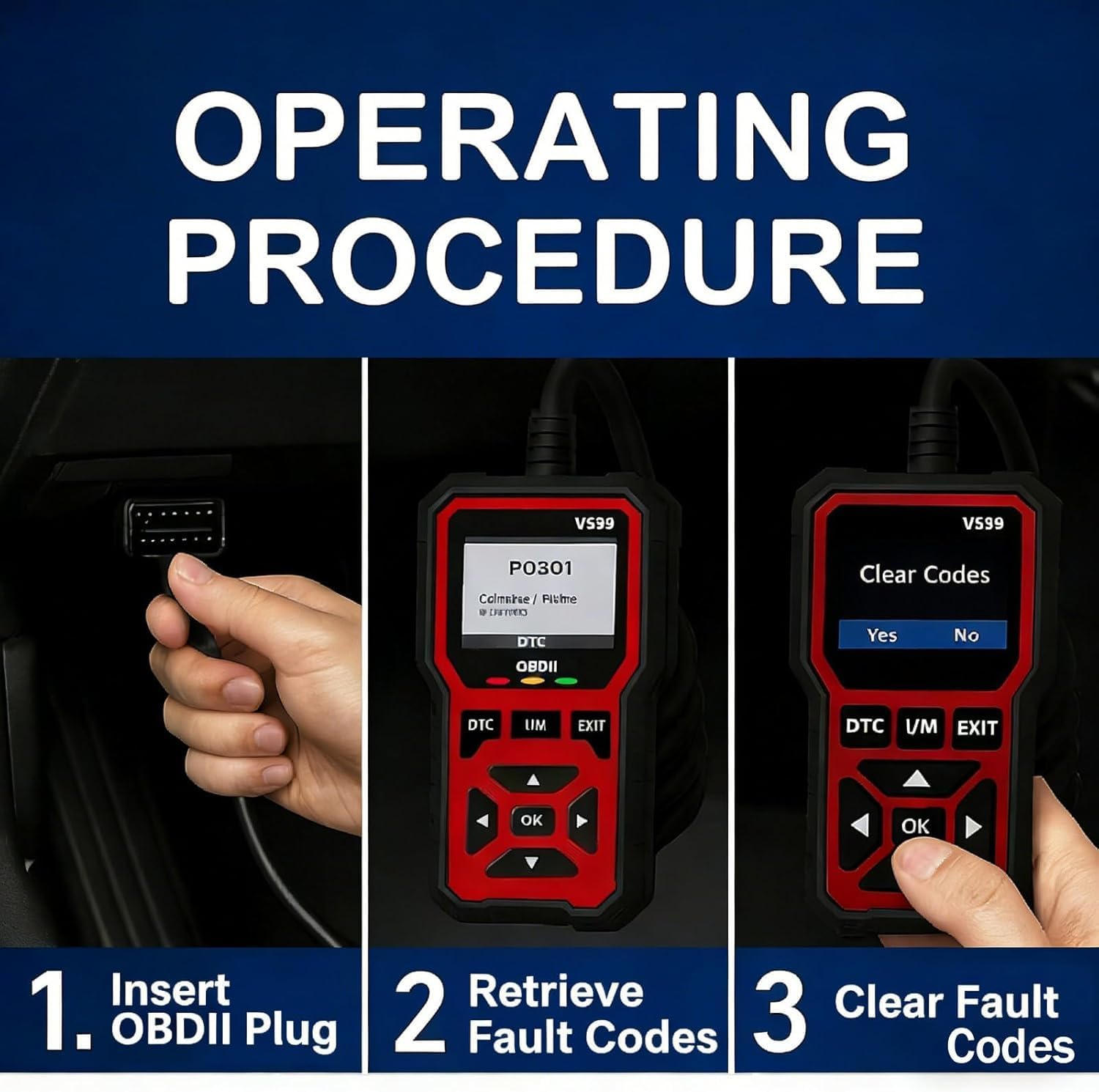
Image 2.1: Visual guide demonstrating the three-step operating procedure: 1. Insert OBDII Plug, 2. Retrieve Fault Codes, 3. Clear Fault Codes.
3. Operating Instructions
The V539 scanner features a user-friendly interface with dedicated buttons for easy navigation:
- Directional Buttons (Up/Down/Left/Right): Used to navigate through menus and select options.
- OK Button: Confirms a selection or enters a submenu.
- DTC Button: Directly accesses the Diagnostic Trouble Code (DTC) menu.
- I/M Button: Provides quick access to I/M Readiness status.
- EXIT Button: Returns to the previous menu or exits a function.
3.1. Reading and Clearing Fault Codes
- From the main menu, select "OBD/EOBD" or press the "DTC" button.
- The scanner will automatically scan for Diagnostic Trouble Codes (DTCs).
- View the displayed codes and their descriptions.
- To clear codes, navigate to the "Clear Codes" option (usually found within the DTC menu or as a separate option) and confirm. This will turn off the Check Engine Light if the underlying issue has been resolved.

Image 3.1: The V539 scanner displaying fault codes and the effect of clearing them, turning off the fault light on the vehicle's dashboard. The device includes a library of over 40,000 fault codes.
3.2. Checking I/M Readiness Status
The I/M Readiness function checks if the various emissions-related systems on the vehicle are operating correctly and have completed their self-tests. This is crucial for emissions inspections.
- From the main menu, select "I/M Ready Status" or press the dedicated "I/M" button.
- The scanner will display the status of various monitors (e.g., O2 Sensor Monitor, Catalyst Monitor). "OK" or "Complete" indicates the test is finished, while "INC" or "Not Complete" means the test has not run or passed.
3.3. Viewing Live Data Stream
The Live Data Stream displays real-time sensor data from the vehicle's engine control unit (ECU).
- From the main menu, select "Data Stream".
- Choose the parameters you wish to view. The scanner will display values such as engine RPM, vehicle speed, coolant temperature, oxygen sensor readings, and more.

Image 3.2: The V539 scanner's 2.8-inch high-definition color screen, showcasing its clear display of menu options including Diagnosis, Real-Time Data Stream, DTC Library, Playback, Battery, and Settings.
4. Core Functions and Features
The V539 diagnostic tool offers a comprehensive suite of functions to aid in vehicle diagnostics:
- Engine Fault Diagnosis: Identifies and displays current, pending, and permanent Diagnostic Trouble Codes (DTCs) related to the engine and emissions systems.
- Engine Fault Code Clearance: Erases DTCs from the vehicle's ECU and turns off the Check Engine Light (MIL) after repairs are made.
- Recording Freeze Frame Information: Captures a snapshot of critical engine parameters at the moment a fault code was set, providing valuable data for diagnosis.
- I/M Readiness Status: Checks the operational status of various emissions-related monitors to determine if the vehicle is ready for an emissions test.
- Vehicle Information Reading: Retrieves vehicle identification number (VIN), calibration ID (CALID), and calibration verification number (CVN).
- Real-time Data Stream Reading: Displays live sensor data from the vehicle's engine, such as RPM, speed, coolant temperature, and more, in numerical or graphical format.
- Mode 6 Detection: Accesses results of on-board diagnostic monitoring tests for specific components/systems that are not continuously monitored.
- Mode 8 Detection (Component Test): Allows initiation of a test of an on-board system or component.
- Oxygen Sensor Test: Retrieves O2 sensor monitor test results for the most recently completed tests from the vehicle's on-board computer.
- Fault Code Lookup: Provides definitions for generic (P0, P2, P3, B0, C0, U0) and manufacturer-specific (P1, P3, B1, B2, C1, C2, U1, U2) codes from its extensive 40,000+ code library.
- Fault Code Playback: Allows review of previously recorded fault codes.
- Data Stream Playback: Enables review of previously recorded live data streams.
- Battery Voltage Reading: Monitors the vehicle's battery voltage in real-time.

Image 4.1: A visual representation of the V539 scanner's core functions, including Engine Fault Diagnosis, Code Clearance, Freeze Frame Information, I/M Readiness, Vehicle Information, Real-time Data Stream, Battery Voltage Test, Oxygen Sensor Test, Retrieve Fault Code Library, and Playback Function.
5. Specifications
| Parameter | Specification |
|---|---|
| Product Model | V539 |
| Operating Voltage | 9~16V |
| Supported Languages | English, German, Dutch, Spanish, French, Italian, Chinese, Portuguese, Russian |
| Screen | 2.8-inch High-Definition Color Screen |
| Fault Code Library | Over 40,000 codes |
| Housing Material | Engineering-grade ABS protective shell |
| Product Dimensions (L x W x H) | 15.5 cm (6.1 in) x 7.3 cm (2.87 in) x 2.6 cm (1.02 in) |
| Item Weight | 1.76 pounds |
| Manufacturer | GLIYUAN |
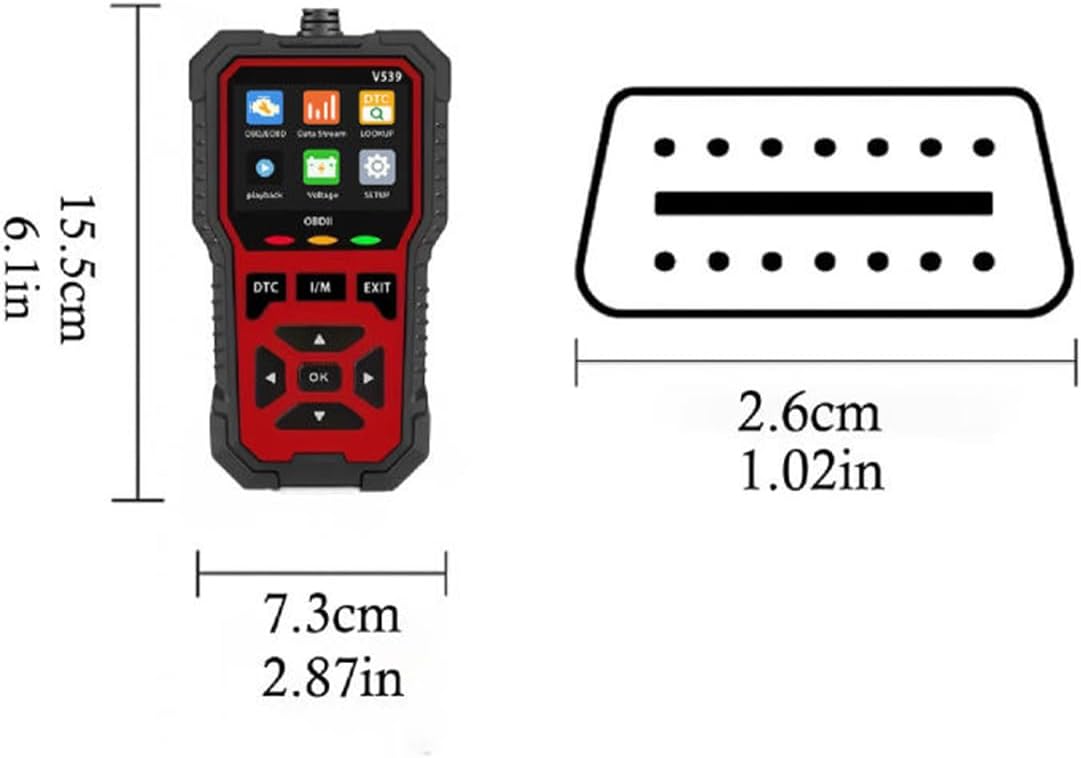
Image 5.1: Diagram illustrating the physical dimensions of the V539 OBD2 scanner, showing its length (15.5cm / 6.1in), width (7.3cm / 2.87in), and thickness (2.6cm / 1.02in).
6. Troubleshooting
If you encounter issues while using the V539 scanner, refer to the following common problems and solutions:
- Device Does Not Power On:
- Ensure the scanner is securely plugged into the vehicle's OBD2 port.
- Verify the vehicle's ignition is in the 'ON' position.
- Check the vehicle's battery voltage; the scanner requires 9-16V to operate.
- "Link Error" or "No Communication" Message:
- Confirm the vehicle is OBDII compliant (most vehicles manufactured after 1996 in the US, 2001 in the EU for gasoline, 2004 for diesel).
- Ensure the connection to the OBD2 port is firm and free of debris.
- Turn off the ignition, wait 10 seconds, and then turn it back on before attempting to connect again.
- Try the scanner on another OBDII-compliant vehicle to rule out a scanner issue.
- Fault Codes Not Clearing:
- Clearing codes only turns off the Check Engine Light; it does not fix the underlying problem. If the fault persists, the code will reappear.
- Ensure the ignition is in the 'ON' position (engine off) when attempting to clear codes.
- Screen is Unresponsive or Frozen:
- Disconnect the scanner from the vehicle and reconnect it.
- If the issue persists, contact customer support.
7. Maintenance
Proper maintenance ensures the longevity and reliable performance of your V539 OBD2 scanner:
- Cleaning: Use a soft, dry cloth to clean the device. Avoid using abrasive cleaners, solvents, or harsh chemicals, as these can damage the screen or casing.
- Storage: Store the scanner in a cool, dry place, away from direct sunlight, extreme temperatures, and excessive humidity. Keep it in its original packaging or a protective case when not in use to prevent physical damage.
- Cable Care: Avoid bending or twisting the OBDII cable excessively. Do not pull the cable to disconnect the scanner; always grasp the connector itself.
- Software Updates: While not explicitly mentioned for this model, many diagnostic tools benefit from periodic software updates. Check the manufacturer's website for any available firmware updates for the V539 model to ensure optimal performance and compatibility with newer vehicles.

Image 7.1: The V539 scanner held in hand, highlighting its engineering-grade ABS protective shell, which provides durability and an anti-slip, wear-resistant design.
8. Warranty and Support
For specific warranty information, return policies, or technical support regarding your Generic V539 Car OBD2 Scanner Diagnostic Tool, please refer to the documentation provided at the time of purchase or contact the seller directly. Keep your purchase receipt or order details handy when seeking support.
Ask a question about this manual
Ask about setup, troubleshooting, compatibility, parts, safety, or missing instructions. Manuals+ will review the question and use this page’s manual context to help answer it.