
Introduction
Thank you for choosing the SONGMICS BELLAH Collection 8-Drawer Dresser. This manual provides essential information for the safe assembly, operation, and maintenance of your new furniture. Please read these instructions carefully before beginning assembly and retain them for future reference.
This versatile dresser combines storage with modern conveniences, featuring eight spacious drawers, integrated power outlets, and customizable LED lighting. It is designed to enhance your bedroom or living space with both functionality and style.
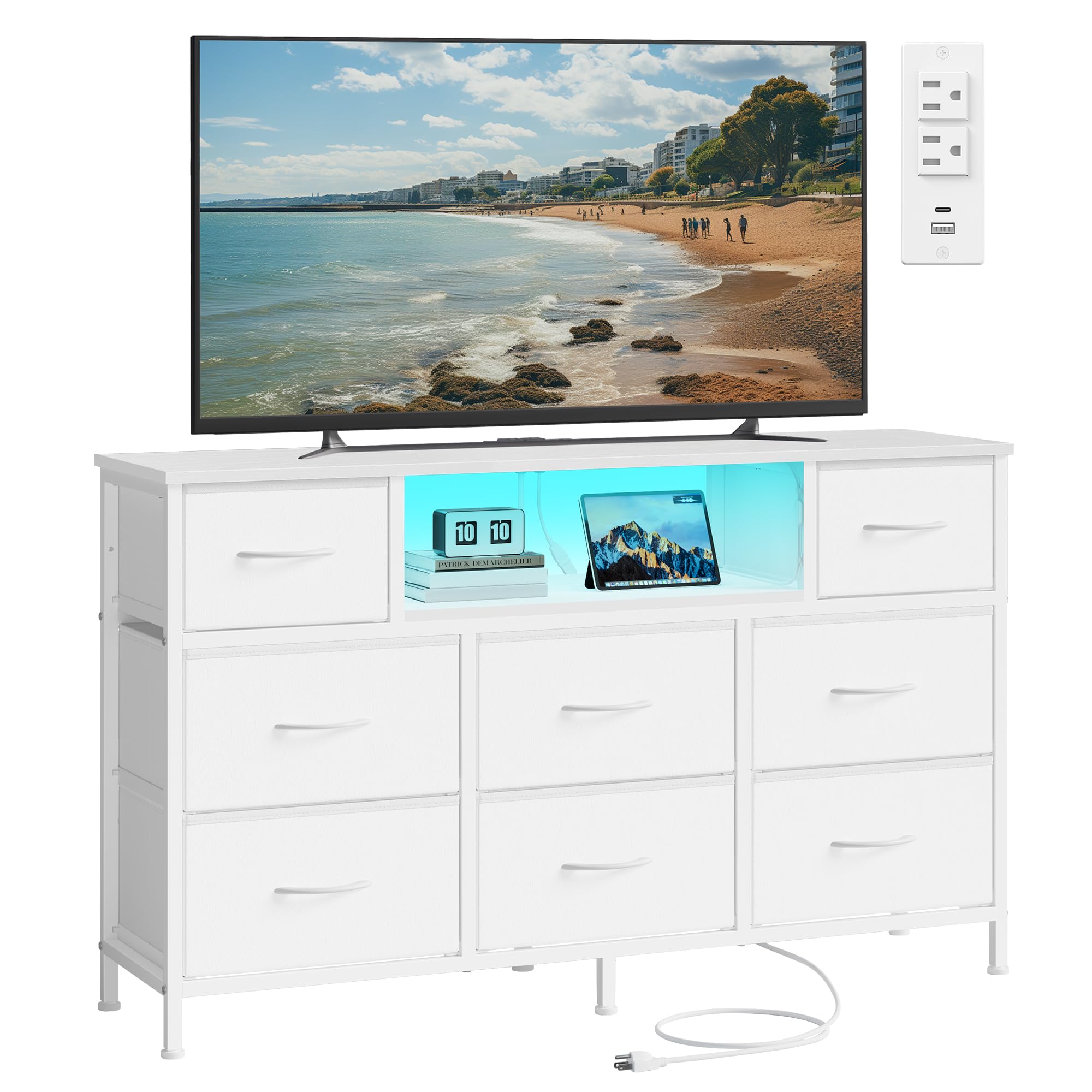
Image: The SONGMICS BELLAH Collection 8-Drawer Dresser in Cloud White, showcasing its design and functionality in a bedroom setting.
Safety Information
- Anti-Tip Kit: Always install the included anti-tip kit to prevent the dresser from tipping over, which can cause serious injury. Secure the dresser to a wall stud using the provided hardware.
- Weight Capacity: Do not exceed the maximum weight capacity for the top surface (11.8 lbs / 30 kg) or individual drawers (11 lbs / 5 kg for small drawers, 17.6 lbs / 8 kg for large drawers). Distribute weight evenly.
- Electrical Safety: Ensure the power cord is not pinched or damaged during assembly or use. Plug the dresser into a grounded outlet. Do not overload the electrical outlets. Keep liquids away from electrical components.
- Assembly: Assemble the unit on a soft, clean surface to prevent scratches. Ensure all screws and fasteners are tightened securely before use. Periodically check and re-tighten fasteners.
- Children: Keep small parts and packaging materials away from children during assembly. Do not allow children to climb on or play with the dresser.

Image: A diagram illustrating the dresser's dimensions, weight capacities for drawers and top surface, and the importance of installing the anti-tip kit for stability.
Package Contents
Before assembly, please verify that all components listed below are present and undamaged. If any parts are missing or damaged, please contact customer service.
- 1 x Chest of Drawers (Frame components)
- 8 x Fabric Drawers
- 1 x Accessory Kit (Screws, bolts, tools)
- 1 x Anti-Tip Kit
- 1 x Instructions Manual (This document)
Setup and Assembly Instructions
Assembly is required for this product. Please follow the step-by-step instructions provided in the separate assembly guide included in your package. A general overview of the process is provided below:
- Unpack and Identify: Carefully unpack all components and lay them out on a clean, soft surface. Identify each part using the labels and the assembly guide.
- Assemble Frame: Follow the diagrams to connect the steel frame components using the provided screws and tools. Ensure all connections are secure.
- Install Top Panel: Attach the particleboard top panel to the assembled frame.
- Insert Drawers: Fold and insert the MDF-reinforced fabric drawers into their designated slots.
- Install Charging Station: Secure the power strip with AC outlets and USB ports into its designated location on the top panel.
- Install LED Lights: Attach the LED light strip to the underside of the open shelf as per the instructions.
- Attach Adjustable Feet: Screw the adjustable feet into the bottom of the dresser frame. Adjust them to ensure the dresser is level and stable.
- Install Anti-Tip Kit: This is a critical safety step. Secure the anti-tip kit to the back of the dresser and firmly attach it to a wall stud.

Image: A close-up diagram illustrating the correct method for installing a fabric drawer into the dresser's frame.
Operating Instructions
LED Lighting System
The integrated LED lights offer customizable ambiance for your space.
- Control Methods: The LED lights can be controlled via a physical button on the unit or through a dedicated mobile application. Refer to the separate LED light manual for app download and pairing instructions.
- Color Selection: Choose from over 60,000 colors to match your mood or decor.
- Brightness Adjustment: Adjust the light intensity to your preference.
- Timers: Set schedules for the lights to turn on or off automatically.
- Music/Mic Sync: The lights can synchronize with music or ambient sounds detected by your device's microphone, creating dynamic lighting effects.

Image: An illustration of the LED lighting system, highlighting its various features such as color options, dimming, music sync, and app control.
Built-in Charging Station
The dresser includes a convenient charging station to power your electronic devices.
- Ports: The charging station features 2 AC outlets (250V/13A), 1 USB-A port (5V/2A), and 1 USB-C port (5V/2A).
- Usage: Plug in phones, tablets, game consoles, or other small electronic devices for charging.
- Power Cord: The dresser is equipped with a 4.9 ft power cord. Ensure it is fully extended and not obstructed.

Image: A close-up view of the built-in charging station, detailing the USB-A, USB-C, and AC outlets for effortless device charging.
Maintenance
- Cleaning: Wipe the dresser's surfaces with a dry, soft cloth. Avoid using harsh chemicals or abrasive cleaners, which can damage the finish.
- Fabric Drawers: The drawers are made of non-woven fabric with MDF reinforcement. For minor spills, gently blot with a damp cloth and allow to air dry. Do not machine wash or submerge in water.
- Adjustable Feet: Periodically check the adjustable feet and re-level the dresser if necessary to ensure stability.
- Fasteners: Over time, fasteners may loosen. Periodically check all screws and bolts and tighten them as needed to maintain structural integrity.

Image: A hand wiping the dresser surface with a dry cloth, demonstrating proper cleaning.

Image: A close-up of the adjustable feet, showing how they can be rotated to level the dresser on uneven surfaces.
Troubleshooting
| Problem | Possible Cause | Solution |
|---|---|---|
| LED lights not turning on or responding. | Power cord not connected; loose connection; app issue. | Ensure power cord is securely plugged into a working outlet. Check all LED strip connections. Restart the mobile app or try controlling via the physical button. |
| Charging ports (USB/AC) not working. | Dresser not plugged in; power strip issue; device compatibility. | Verify the dresser's main power cord is plugged in. Test with a different device or cable. Ensure the power strip is correctly installed and connected. |
| Drawers are difficult to open/close or fall out. | Overloaded drawers; incorrect installation; loose frame. | Reduce the weight in the drawers. Ensure drawers are correctly inserted into their slots. Check that all frame fasteners are tight. |
| Dresser feels unstable or wobbly. | Uneven floor; loose fasteners; anti-tip kit not installed. | Adjust the leveling feet on the bottom of the dresser. Tighten all assembly fasteners. Ensure the anti-tip kit is securely installed to a wall stud. |
Specifications
| Feature | Detail |
|---|---|
| Brand | SONGMICS |
| Model Name | BELLAH Collection - Dresser with Outlets and LED Lights |
| Model Number | ULGS433WH02S |
| Product Dimensions (D x W x H) | 11.8"D x 44.8"W x 26.8"H (30 cm x 114 cm x 68 cm) |
| Item Weight | 29 Pounds (13.15 kg) |
| Material | MDF (Medium Density Fiberboard), Particleboard, Steel, PVC Synthetic Leather (Fabric Drawers) |
| Finish Type | Cloud White |
| Number of Drawers | 8 |
| Power Cord Length | 4.9 ft |
| AC Outlets | 2 (250V/13A) |
| USB-A Port | 1 (5V/2A) |
| USB-C Port | 1 (5V/2A) |
| Required Assembly | Yes |
| Care Instructions | Wipe with Dry Cloth |
Warranty and Support
SONGMICS is committed to providing high-quality products. While specific warranty details may vary by region and retailer, we stand behind the quality of our products.
If you encounter any issues with your dresser, require replacement parts, or have questions regarding assembly or operation, please contact SONGMICS customer support. Our team is available to assist you.
Please have your model number (ULGS433WH02S) and purchase information ready when contacting support to ensure efficient service.


