
1. Introduction
This manual provides essential instructions for the safe and effective operation of your KASPARMP KP02 Car Battery Charger and Maintainer. This device is designed for charging and maintaining 6V and 12V lead-acid, AGM, and LiFePO4 batteries found in various vehicles and equipment. Please read this manual thoroughly before use and retain it for future reference.
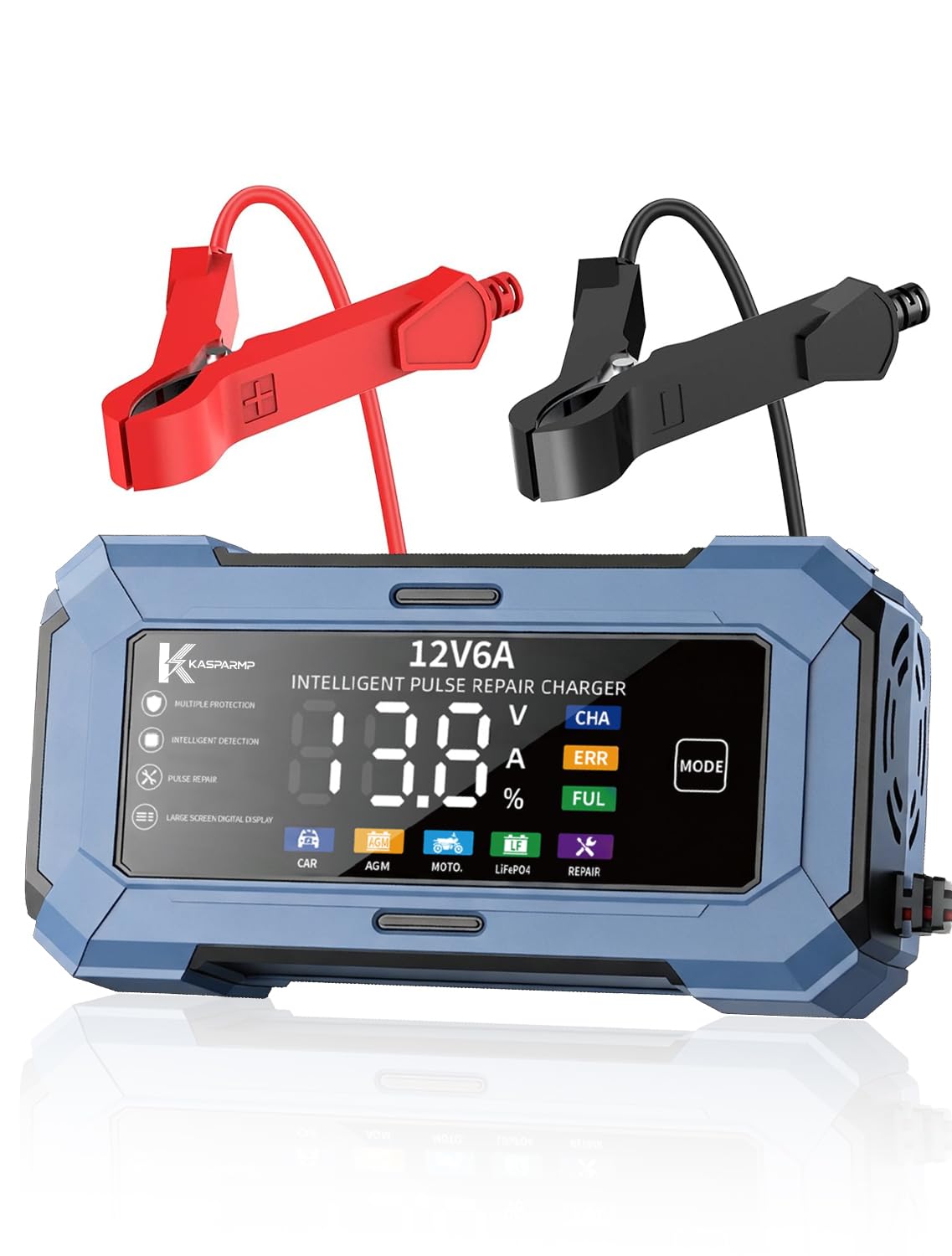
Image: KASPARMP KP02 Car Battery Charger, gray-blue model, showing its digital display and robust casing.
2. Safety Information
Always prioritize safety when operating electrical equipment. Failure to follow these instructions may result in electric shock, fire, or serious injury.
- Read All Instructions: Before using the charger, read all instructions and cautionary markings on the charger, the battery, and the product using the battery.
- Ventilation: Ensure adequate ventilation when charging. Batteries can produce explosive gases.
- Eye Protection: Always wear eye protection and protective clothing when working with batteries.
- Avoid Sparks: Do not smoke or allow a spark or flame in the vicinity of the battery or engine.
- Connection Order: Connect and disconnect DC output clips only after setting the charger switch to the OFF position and removing the AC cord from the electrical outlet.
- Reverse Polarity Protection: The charger features reverse connection protection, displaying "ERR" if connected incorrectly. However, always ensure correct polarity (red to positive, black to negative).
- Temperature: Do not expose the charger to rain or excessive moisture. Operate within the specified temperature range (-10°C to +45°C).
- LiFePO4 Batteries: This charger is exclusively designed for 14.6V LiFePO4 batteries. Do not use it with any other lithium battery chemistries or voltage configurations.
- Not a Jump Starter: This device is a battery charger and maintainer, not a jump starter or emergency power supply. It requires AC wall power to function and has no internal battery.

Image: Diagram illustrating the 6 smart protections of the KASPARMP KP02 charger: Short Circuit, Low Voltage, Overvoltage, Overcurrent, Overheat, and Reverse Connection Protection.
3. Product Features
- 2-in-1 Functionality: Functions as both a battery charger and a battery maintainer.
- Wide Compatibility: Suitable for 6V and 12V lead-acid, AGM, and LiFePO4 batteries. Compatible with cars, golf carts, motorcycles (max 2A), boats, lawn mowers, ATVs, UTVs, etc. (Note: No floating charge for AGM batteries).
- Digital Display: Intelligent digital display shows charging status, percentage, voltage, and current for clear monitoring.
- Pulse Repair Function: Designed for lead-acid batteries with mild sulfation. Uses positive pulse voltage to reduce sulfation, activate batteries, and resolve charging failures, extending battery lifespan. Not for lithium batteries.
- Comprehensive Safety Protection: Includes protection against reverse connection, short circuit, overheating, overcurrent, and overcharging. Automatically detects reverse connection and displays "ERR".
- Wide Operating Range: Supports 100-240V global universal voltage. Operates from -10°C to +45°C and at altitudes below 4000 meters.
- Seasonal Trickle Maintenance: Automatically activates floating charge to prevent overcharging, ideal for long-term storage of vehicles and equipment.

Image: The KASPARMP KP02 charger display showing 5 mode selections: Car, AGM, Moto, LiFePO4, and Repair.

Image: The KASPARMP KP02 charger operating in both cold (winter) and hot (summer) conditions, highlighting its stable performance across various temperatures.

Image: Various vehicles and equipment including a car, motorcycle, SUV, ATV, lawn mower, and boat, demonstrating the universal compatibility of the KASPARMP KP02 charger.
4. Specifications
| Feature | Detail |
|---|---|
| Brand | KASPARMP |
| Model Number | KP02 |
| Product Dimensions | 2.16"D x 5.3"W x 8.07"H |
| Output Voltage | 12 volts |
| Input Voltage | 100-240 volts |
| Current Rating | 6 A |
| Compatible Devices | Cars, golf carts, motorcycles, boats, lawn mowers, ATVs, UTVs |
| Battery Types | 6V/12V Lead-acid, AGM, LiFePO4 (14.6V only) |
| Operating Temperature | -10°C to +45°C |
| Altitude Limit | Below 4000 meters |
| UPC | 797541314801 |

Image: The KASPARMP KP02 charger with its dimensions (5.5in width, 2.68in height) and close-ups of its pure copper soft core cables and fully wrapped crocodile clips.
5. Setup and Connection
Follow these steps to safely connect the charger to your battery.
- Step 1: Connect Battery Clips. Ensure the charger is unplugged from the AC outlet. Connect the red positive (+) clip to the positive battery terminal and the black negative (-) clip to the negative battery terminal. For vehicles, connect the negative clip to a non-moving metal part of the chassis away from the battery and fuel line if the battery is still in the vehicle.
- Step 2: Plug in Charger. Plug the charger's AC input line into a standard electrical outlet.
- Step 3: Verify Connection. The digital display will show battery voltage or "OFF" if not connected. If "ERR" is displayed, check for reverse polarity and correct the connection before proceeding.

Image: A visual guide demonstrating the four easy steps to use the KASPARMP KP02 charger: connecting clips, plugging in, selecting mode, and observing "FUL" for completion.
Video: A demonstration of connecting the KASPARMP KP02 car battery charger to a car battery, showing the correct clip placement and mode selection process.
6. Operating Instructions
Once connected, select the appropriate charging mode.
- Step 1: Select Charging Mode. Press the "MODE" button to cycle through the available charging modes:
- CAR: Standard mode for 12V lead-acid batteries.
- AGM: For 12V AGM batteries (no floating charge).
- MOTO: For 6V/12V motorcycle batteries (max 2A).
- LiFePO4: For 14.6V LiFePO4 batteries only.
- REPAIR: Pulse repair mode for sulfated lead-acid batteries.
- Step 2: Begin Charging. After selecting the mode, the charger will automatically begin the charging process. The digital display will show charging status, voltage, current, and percentage.
- Step 3: Charging Completion. The display will show "FUL" when the battery is fully charged. For maintenance, the charger will automatically switch to trickle charge mode (except for AGM batteries).
- Step 4: Disconnect. Once charging is complete, unplug the AC cord from the outlet first, then disconnect the negative (-) clip, followed by the positive (+) clip.
Important Note: For batteries that have been discharged for a long time, it is recommended to charge them in "REPAIR" mode before switching to the appropriate charging mode.

Image: The KASPARMP KP02 charger display highlighting the five optional modes for different battery types, including Car, AGM, Moto, LiFePO4, and Repair.
7. Maintenance
- Pulse Repair: Use the "REPAIR" mode periodically for lead-acid batteries showing signs of sulfation to help restore capacity and extend life. This mode is not for lithium batteries.
- Seasonal Storage: For vehicles or equipment stored for extended periods, connect the charger in the appropriate mode. It will automatically enter trickle charge (floating charge) to maintain the battery without overcharging (except for AGM batteries).
- Cleaning: Keep the charger clean and free from dust and debris. Use a dry cloth for cleaning.
- Storage: Store the charger in a cool, dry place when not in use.

Image: The KASPARMP KP02 charger highlighting its internal cooling fan and low-noise technology for safe and quiet operation.
8. Troubleshooting
| Problem | Possible Cause | Solution |
|---|---|---|
| Charger display shows "OFF" | Charger is plugged in but not connected to a battery, or battery is severely discharged. | Connect the charger to a battery. If the battery is very low, the charger may take a moment to detect it. |
| Display shows "ERR" | Reverse polarity connection (clips connected incorrectly). | Unplug the charger, correct the battery clip connections (red to positive, black to negative), then plug in again. |
| Charger stops charging or displays error at high temperature | Overheating protection activated. | Ensure adequate ventilation around the charger. It will resume charging automatically once cooled down. |
| Charging is slow or not reaching "FUL" | Battery is heavily sulfated or damaged; incorrect mode selected. | Try using the "REPAIR" mode for lead-acid batteries. Ensure the correct mode is selected for your battery type. If the issue persists, the battery may need replacement. |
9. Warranty and Support
The KASPARMP KP02 Car Battery Charger and Maintainer comes with a 1-Year Manufacturer Warranty.
For technical support, warranty claims, or further inquiries, please contact KASPARMP customer service through your purchase platform or the official brand website.