
1. Important Safety Information
Please read and understand all instructions before assembly and use. Keep this manual for future reference.
- Do not overload the unit: Overloading can cause tipping. Ensure the weight of your television and other items does not exceed the specified limits.
- Use the anti-tip kit: For enhanced stability and safety, especially in homes with children or pets, always secure the TV stand to the wall using the provided anti-tip kit.
- Indoor use only: This product is designed for indoor use in dry environments. Do not use outdoors or in damp conditions.
- Ventilation: Upon unpacking, allow the unit to ventilate in a well-aired space to dissipate any residual odors.
- Cleaning: Clean the unit with a dry cloth only. Avoid abrasive cleaners or harsh chemicals.
- Electrical Safety: Ensure all electrical connections for the power outlets and LED lights are made according to local electrical codes and safety guidelines. Do not exceed the rated capacity of the power outlets.
2. Product Overview
The SONGMICS BELLAH Collection TV Stand is a versatile entertainment console designed for TVs up to 80 inches. It combines a robust steel frame with engineered wood and polyester gabardine drawers, offering both strength and aesthetic appeal. Key features include integrated LED ambient lighting and a convenient power hub.

Image: The SONGMICS BELLAH TV Stand in a living room setting, showcasing its capacity to hold a large television and various media devices.
Key Features:
- LED Ambient Lights: App- and button-controlled LED strips with over 60,000 colors and adjustable brightness. Features music and mic sync for dynamic lighting effects.
- Convenient Power Hub: Includes 2 AC outlets, 1 USB-C port, and 1 USB-A port for easy charging of devices directly on the stand.
- Organized Media Storage: Three open shelves provide space for media players, speakers, and consoles. Two drawers offer concealed storage for games, cables, and remotes.
- Sturdy & Stable Construction: Built with a robust steel frame, particleboard top, and MDF-reinforced drawers for lasting durability. Adjustable feet and an anti-tip kit ensure stability.
3. Package Contents
Before beginning assembly, please ensure all components listed below are present and undamaged. If any parts are missing or damaged, please contact customer support.
- 1 x TV Stand (main frame and wooden panels)
- 1 x Accessory Kit (screws, connectors, tools)
- 1 x Anti-Tip Kit (wall anchors, straps)
- 1 x Instructions Manual (this document)
4. Setup and Assembly Instructions
Assembly is required for this TV stand. Please follow the step-by-step instructions provided in the included manual. It is recommended to assemble the unit on a soft, clean surface to prevent scratches.
Assembly Video Guide:
Video: A detailed assembly guide for the TV Stand with Power. This video demonstrates each step of the construction process, including attaching the frame, shelves, and drawers, and installing the power hub and LED lights. Duration: 3 minutes, 51 seconds.
Key Assembly Steps:
- Unpack and Identify Parts: Lay out all components and hardware. Refer to the parts list in the included manual to ensure everything is present.
- Assemble the Frame: Connect the steel frame components using the provided screws and tools. Ensure all connections are secure.
- Attach Shelves and Panels: Secure the particleboard top and lower shelves to the frame.
- Install Drawers: Assemble the MDF-reinforced fabric drawers and slide them into their designated compartments.
- Install Power Hub and LED Lights: Mount the power strip and attach the LED light strips as indicated in the manual. Connect the power cables.
- Attach Anti-Tip Kit: Securely fasten the anti-tip kit to the back of the TV stand and to a wall stud, following the specific instructions for your wall type.
- Adjust Leveling Feet: Use the adjustable feet at the bottom of the stand to ensure it is level and stable on uneven floors.

Image: Detailed view of the TV stand's construction, highlighting the wear-resistant particleboard, the anti-tip kit for wall mounting, and the robust steel frame that provides structural integrity.

Image: A close-up of an adjustable leveling foot, demonstrating how to rotate it to achieve stability on uneven surfaces.
5. Operating Instructions
5.1 LED Ambient Lights
The integrated LED lights can be controlled via a physical button on the unit or through a dedicated mobile application.
- Button Control: Locate the control button on the LED strip. Press to cycle through various colors and modes, or to turn the lights on/off.
- App Control: Scan the QR code provided with the LED light kit (or refer to the product packaging) to download the mobile application. Follow the in-app instructions to pair your device with the TV stand's LED lights. The app allows for:
- Selecting from over 60,000 colors.
- Adjusting brightness levels.
- Choosing dynamic lighting modes.
- Syncing lights to music or microphone input.
- Setting timers for automatic on/off.
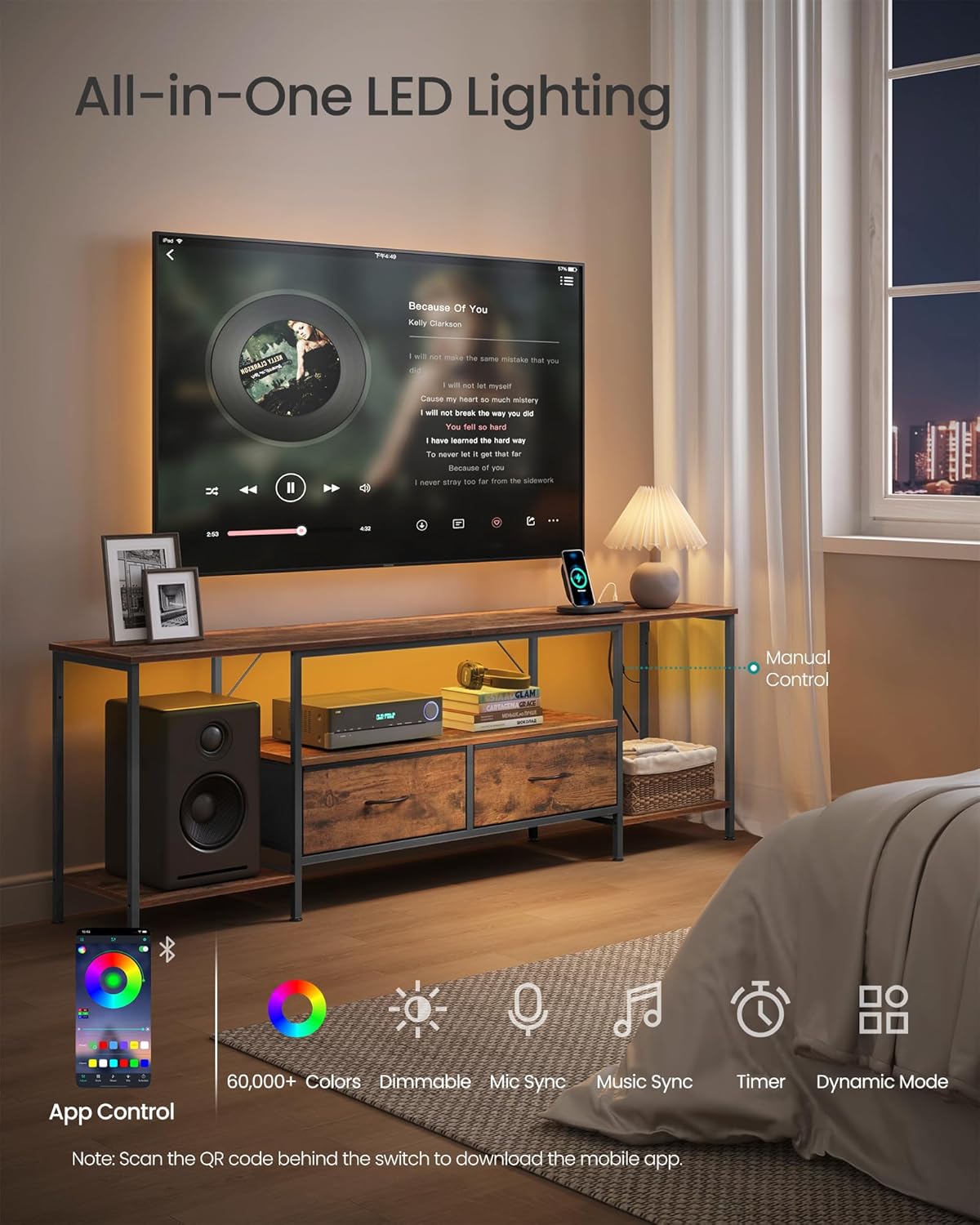
Image: The TV stand with its LED ambient lighting active, demonstrating the various control options available through a mobile application, including color selection, dimming, music sync, and dynamic modes.
5.2 Convenient Power Hub
The built-in power hub provides easy access to charging and power for your electronic devices.
- AC Outlets: Two standard 250V/15A AC outlets are available for powering televisions, media players, game consoles, or other appliances.
- USB-C Port: One 5V/2A USB-C port for charging compatible devices.
- USB-A Port: One 5V/2A USB-A port for charging compatible devices.
- Power Cable: The power hub is connected to a single power cable that plugs into a standard wall outlet. Ensure the wall outlet is properly grounded.

Image: A close-up view of the integrated power hub, showing a smartphone and a portable gaming console charging via the USB-A, USB-C, and AC outlets.
6. Maintenance
Proper care and maintenance will ensure the longevity and appearance of your TV stand.
- Cleaning: Wipe the surfaces with a dry, soft cloth. For stubborn marks, a slightly damp cloth can be used, followed immediately by a dry cloth. Avoid using harsh chemicals, abrasive cleaners, or polishes that may damage the finish.
- Spills: Immediately wipe up any liquid spills to prevent damage to the particleboard and MDF components.
- Drawer Care: The fabric drawers can be spot cleaned with a mild detergent and damp cloth. Allow to air dry completely.
- Regular Checks: Periodically check all screws and connections to ensure they remain tight. Re-tighten if necessary. Verify the anti-tip kit is still securely attached.

Image: A hand wiping water droplets from the rustic brown surface of the TV stand, demonstrating the ease of cleaning and spill management.
7. Troubleshooting
If you encounter any issues with your TV stand, refer to the following common problems and solutions:
| Problem | Possible Cause | Solution |
|---|---|---|
| Stand is wobbly or unstable. | Uneven floor; loose connections; anti-tip kit not installed. | Adjust the leveling feet at the bottom of the stand. Check and tighten all screws. Install the anti-tip kit as per instructions. |
| LED lights are not working. | Power cable unplugged; loose connection to LED strip; faulty LED strip or controller. | Ensure the power cable for the LED lights is securely plugged into a working outlet. Check connections to the LED strip. If issues persist, contact customer support. |
| Power outlets/USB ports not charging. | Power hub unplugged; wall outlet not working; overloaded circuit; faulty power hub. | Verify the main power cable for the hub is plugged into a live wall outlet. Test the wall outlet with another device. Ensure total power draw does not exceed the hub's capacity. If still not working, contact customer support. |
| Drawers do not slide smoothly. | Incorrect assembly; obstruction in drawer slot. | Review assembly steps for drawer installation. Check for any foreign objects or misaligned fabric. |
8. Specifications
| Attribute | Detail |
|---|---|
| Model Number | ULGS421K101S |
| Brand | SONGMICS |
| Color | Rustic Brown |
| Dimensions (D x W x H) | 13.8" x 70.5" x 23.6" (35 cm x 179 cm x 60 cm) |
| Item Weight | 32.8 Pounds (14.9 kg) |
| Material Type | MDF (Medium Density Fiberboard), Particleboard, Steel, Polyester Gabardine |
| Number of Drawers | 2 |
| Power Hub | 2 AC Outlets (250V/15A), 1 USB-C Port (5V/2A), 1 USB-A Port (5V/2A) |
| LED Lights | App and button controlled, 60,000+ colors, adjustable brightness, music/mic sync, timer |
| Maximum TV Size | Up to 80 inches |
| Assembly Required | Yes |
| Included Components | TV Stand, Accessory Kit, Anti-Tip Kit, Instructions |

Image: A diagram illustrating the overall dimensions of the TV stand (70.5" W x 13.8" D x 23.6" H) and the weight capacities for the top surface (88 lbs / 40 kg), shelves (66 lbs / 30 kg each), and drawers (17.6 lbs / 8 kg each).
9. Warranty and Support
SONGMICS products are designed for quality and durability. While specific warranty details may vary by region and retailer, we are committed to providing excellent customer service.
- Returns: This product typically has a 30-day return policy through Amazon. Please refer to your purchase details for specific return eligibility.
- Customer Support: For any questions, missing parts, or issues not covered in this manual, please contact SONGMICS customer support. You can usually find contact information on the product packaging, the retailer's website, or by visiting the official SONGMICS brand store on Amazon.
- Online Resources: Visit the SONGMICS Store on Amazon for additional product information and support.